Tutorial: Jailbreak iPhone 3.1.2 with BlackRa1n RC3

by Sebastien on November 3rd, 2009

Ealier today, GeoHot unveiled BlackRa1n RC3, his latest jailbreak for iPhone OS 3.1.2. BlackRa1n RC3 is very similar to RC1 and RC2. The difference is that RC3 includes BlackSn0w, the unlock for iPhone baseband 05.11.07.

This step by steps guide and tutorial will show you how to jailbreak your iPhone OS 3.1.2 with BlackRa1n RC3. The steps are strictly identical to BlackRa1n RC1 and BlackRa1n RC2 but I figured it might be good to write a tutorial for novices.

This BlackRa1n RC3 iPhone jailbreak tutorial will work on both Mac and PC. If you already jailbroke your iPhone using BlackRa1n RC1 or RC2, there is no need for you to run BlackRa1n again.

How to jailbreak iPhone firmware 3.1.2 with BlackRa1n RC3:

Step 1: Update iTunes to the latest version available and reboot your computer. If your iPhone is not running OS 3.1.2, update your iPhone to firmware 3.1.2 in iTunes.

Step 2: Download BlackRa1n RC3 from our iPhone Downloads page.

Step 3: Plug your iPhone to your computer and make sure iTunes is closed. Run BlackRa1n RC3 and click on “make it ra1n”.
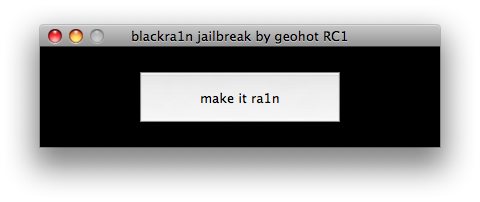
Step 4: Your iPhone will enter recovery mode and you will see the usual recovery image replaced by a picture of GeoHot.

Step 5: BlackRa1n will run on your iPhone and it will reboot when done.

Step 6: A message will show up asking to donate. If your jailbreak is successful, I think it’s the right thing to do to donate $5 or more. It’s a good way to keep GeoHot motivated.

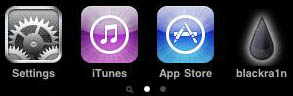
Step 7: After your iPhone has rebooted, you will notice a new BlackRa1n icon on your springboard. Make sure you have an internet connection and launch BlackRa1n.app on your iPhone.
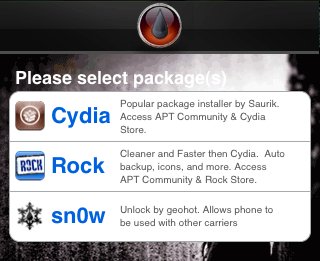
Step 8: You will now have the option to install Cydia, Rock, or both if you choose to, then tap “install”. You will also notice that Icy is gone and it’s been replaced by “sn0w”. Run “sn0w” only if you want to unlock your iPhone.
Step 9: Once the packages are installed, your iPhone will respring and you should see Cydia (and Rock if you chose it) on your springboard.
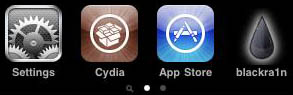
Step 10: Once Cydia and/or Rock are installed on your springboard, you can now uninstall BlackRa1n from your iPhone. Uninstalling BlackRa1n will obviously not remove the jailbreak. It will simply remove the BlackRa1n.app that was used to install the packages. To do so, simply launch the BlackRa1n.app and select “uninstall BlackRa1n”.
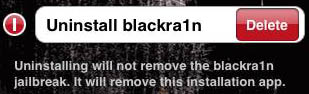
Step 11: After uninstalling BlackRa1n, I suggest you reboot your iPhone.

Done!

The whole process shouldn’t take more than 10 minutes. It definitely is an easy jailbreak.

If you have questions, please feel free to leave a comment below.


467 Responses

  1. Finally a 3.1.2 break and unlock for windows users.

    Is it stable and reliable though?

     
  2. SparrowHawk says: November 3, 2009 at 9:44 am

    You forgot to include blackra1n RC3 to your download list!

    /SparrowHawk

     
  3. Stable enough that it just worked for 4 iPhones and they are all still alive :)

     
  4. Doesn’t work for me. My iphone3gs it’s already jailbroken on 3.1.2. I wanted to unlock it because I’ll go to Europe next week and I want to be able to use prepaid sim cards. The blackra1n doesn’t complete the installation and the the phone never reboots. Any suggestions?

     
  5. Wheres is BlackRa1n RC3? :(

     
  6. I’m still stuck on 3.0.1, This is safe then? Also, do I have to undo my current jailbreak to do the new one?

     
  7. Download from this link: http://blackra1n.com/

     
  8. Anyone know if this works on the 2g iphone?

     
  9. I can see you have included RC3 now ;-D

    /SparrowHawk

     
  10. pls if any1 can help,i have a iphone 3g 16gb and am on 3.0 now,so should i update to 3.1.2 first through itunes and then run blackra1n or do i have to run blackra1n directly,and it will automatically update and jailbreak my iphone to 3.1.2..help will be appreciated.
    thank u .

     
  11. i have a little problem . i make the steps and when i restart the iphone on the screen appears logo with cable iphone and logo iTunes ?
    thank u .

     
  12. Nice post!
    But I have a question. I have officialy unlocked my iPhone but still want to Jailbreak 3.1.2. I can’t use the one from Dev-Team because they did not provide PwnageTool for Windows user yet. Will BlackRa1n RC3 remove my official unlock if I install it?

     
  13. its successfully done but my wi fi is not working at all

    there is some problem

     
  14. In reply to Pranjal:

    From what I understand, if you go to Setting–general–Network and reset the settings it will work again. You might also have to put in their whatever your network settings are.

     
  15. i have tried my level best n i think i did all what u have said.

    but is it working in ur i-phone 3gs?

     
  16. I don’t have a 3g–I have a 2g that I am trying to find out how to upgrade the baseband. I have seen that as a major problem on the blogs and that is what people are recommending to fix it and they state it works right after the reset. Hopefully you can get yours working. Good luck to you.

     
  17. This is the reply I keep seeing on the blogs for those with wifi issues:

    Everyone having wifi issues go to settings – general – reset – reset network settings.
    Then it works again!

     
  18. thanks buddy

    just u need to reset all network settings it will start rocking..

    gr8

     
  19. hello, for me it doesn’t work, i always have the same screen, emergency call, anyone can help me???

     
  20. just done with upgrading and unlockin my iphone 3g to 3.1.2,gr8 tutorial and gr8 work geohot.its sn0wing……..

     
  21. I have a 2g, will this work for it?

     
  22. Really daft question from me here. Do I need an internet connection for this and does it have to be wi-fi?

     
  23. my wifi crashed and i cannot unlock.
    pls help!

     
  24. Thanks, worked perfectly for me!

     
  25. Firts Thanks a lot Geohot for this Release..
    After unlocking baseband with blackra1n my WIFI stop working any one can help? i try to reset network setting its worked but when i resetart my phone my WIFI STOP WORKING again . thanks

     
  26. First Thanks a lot Geo hot for this Release..
    After unlocking base band with blackra1n my WI-FI stop working any one can help? i try to reset network setting its worked but when i restart my phone my WI-FI STOP WORKING again . thanks

     
  27. Great…………solve my problem. I can use my iphone 3GS again.

    Thanks thanks

     
  28. I assume this method for jailbreaking will not work with the newer 3Gs phones that have the new bootrom. Is that correct?
    Thanks very much

     
  29. What about my previously cydia downloaded apps on my iphone?
    Does the backup on itunes along with the aptbackup save my apps/data and then place it back after i jailbreak with RC3?

    thanks

     
  30. I have a 3GS on 3.1.2 with the correct firmware, on Windows 7 64bit, every time I try this, I run the blackra1n jailbreak, click, Make it rain, my phone goes into recovery mode with the plug into itunes icon, the blackra1n jailbreak says ‘running’ and nothing more happens? Anyone?

    AM

     
  31. The jailbreak was the easiest since Ziphone

    but my WiFi has stopped working and i cannot unlock with blacksn0w

    HELP PLEASE ANYBODY

     
  32. Does blackra1n hactivate an iphone?

     
  33. I tried the reset network and my problem was solved!

    Thanks for the advice!

     
  34. I have an iPhone 3GS 32GB with 3.1.2 out of the box. Tried this, and at first it looked like it worked. But whenever the phone is restarted, it goes into Recovery Mode (iTunes logo and USB).

    I retried, and same outcome. I restored to the 3.1.2 firmware from the downloads section, re-did the blackra1n process, and same outcome again. It works, but the phone needs to be restored if it is turned off and then back on!!

    I can’t be going through this each time the battery dies… help me out!!!!

     
  35. In order for the Wifi to work, you would need to do a RESET NETWORK, Under Settings then RESET!!!

    This would 100% work.

     
  36. I just realized he works for Apple, hence the break apart. I just ran BlackRain and the first thing it does is download your phone statistics and presumable collects/emails them.

     
  37. Abdulraheman Patrawala says: November 4, 2009 at 1:19 am

    I have an Apple 3G 8GB i Phone from USA. I tried your RC3 as directed on Windows but it never reboot after some half an hour. When manually rebooted Apple icon appears but there is no blackra1n icon beside App Store. The RC3 application fails miserably. Thank God there is no visible damge to iPhone. All the instructions were minutely followed. Dear GeoHot find some solution, please.

     
  38. Abdulraheman Patrawala

    stop iTunesHelper.exe in taskmanager

     
  39. I confirm what iFarted says in another blog, when resetting network settings does not fix the wifi problem then a “reset all settings” fixed it for me.

     
  40. Abdulraheman Patrawala says: November 4, 2009 at 5:18 am

    Dear Paocer,
    Thanks for your kind advise. I did accordingly but still after step: 5 it automatically stops. After waiting for sometime there is no automatic rebooting. Manual rebooting fails to go for further steps as no icon is seen.
    Some genetic problem with the software.

     
  41. I got this to work on my hackintosh, does not seem to be supported on Windows 7 64bit.

     
  42. Abdulraheman Patrawala

    step 5 should take only a few seconds….

    be sure that itunes is not running and kill the ituneshelper.exe

    check also web re: jailbreaking

    http://thebigboss.org/

     
  43. My iphone goes to recovery mode, what do i do? Please help!!!!!!!!!!! I have been waiting for this software to come out for ages, i need your help guys :’(

     
  44. So.. what about restoring all the stuff from my iPhone backup? Is it safe to restore my phone from the iPhone backup from iTunes at that point? LMK. Thx !

     
  45. I had problems jailbracking my 3G iphone on Vista 64bit computer. The iphone would go to recovery mode. However, I had no problems when try jailbracking the device using a different computer that has XP operating system.

     
  46. Yeah same problem with the WIFI here… stopped working about 8 hours after the hacking… tried resetting network settings but still nothing… trying to redo everything…. Any other thoughts about the WIFI issues?

     
  47. hey,this is for all the guys havin wifi problems after the jailbreak and unlock.
    1st pls try and avoid intallin Rock as i guess it conflicts with Cydia.
    So the solution is just re-run blackra1n to jailbreak ur iphone again,without unstallin or restoring any program.it just returns ur iphone to the original settings with the jailbreak and u dont loose the unlock so u dont need to unlock again.worked for me and i hope should work for all.
    enjoy!!!

     
  48. Abdulraheman Patrawala says: November 4, 2009 at 6:38 pm

    Exact Steps to Jailbreak Your 3.1.2 iPhone or iPod Touch via blackra1n jailbreak by
    geoHot RC1
    There has been a little discrepancy regarding the exact process.. it took a few tries and a little research, but here are the
    exact steps to Jailbreak your 3.1.2 iPhone or iPod touch via blackra1n jailbreak by geoHot RC1
    The following steps Verified and Working on my iPhone 3g with 3.1.2 READ MORE!
    - Update your iPhone/iPod touch via iTunes to the newest firmware (3.1.2) **Note, if you are migrating from 3.0, this
    3.1.2 (including the 3.1 update), this will update your iPhone/iPod touch’s baseline and you will be able to jailBreak, but
    not be able to unlock your phone for a different carrier**
    - Download blackra1n via http://blackra1n.com/
    - Move the downloaded blackra1n.exe to the root of your C:\ drive.
    - Plug-in your iPhone/iPod touch via USB.
    - Turn off your iPhone/iPod touch by holding down the Power Button and then Slide to Power Off.
    - Kill all Apple related services including the following except the AppleMobileDeviceService.exe
    - AppleMobileDeviceHelper.exe ( Read: iTune Helper.exe )
    - iPodService.exe
    - mDNRSResponder.exe
    - Open the blackra1n.exe (that you previously moved to C:\) and click make it ra1n to start the process (you will the the
    button changed to waiting for phone)
    - Hold the Power Button and immediately after, also hold the Home Button.
    - Keep holding both buttons until you see the Apple logo, then release just the Power Button, but continue to hold the
    Home Button.
    - Continue holding the Home Button until you see the GeoHot background image and then you can release the Home
    Button (you will notice that the blackra1n button on your computer changed to running).
    - After about 20-30 seconds, your iPhone will reboot and a new window will pop up saying
    - Your jailbreak is done once the phone reboots.
    If this was the simplest jailbreak ever, please donate to geohot@gmail.com via paypal to support future
    development!!!!
    If you paid anything for this software demand a refund.
    Available free from blackra1n.com, funded solely on after the fact donations.
    - After rebooting, select the blackra1n icon on your springBoard to find your favorite jailBreak installer.
    - Run the installer and enjoy your newly jailBroken iPhone or iPod touch via blackra1n
    Thanks again GeoHot!
    Wickman Studios: Exact Steps to Jailbreak Your 3.1.2 iPhone or iPod Touch via blackra1n jailbreak by geoHot RC1

     
  49. I have a iPhone 2G firmware v3.1.2 and after jailbreak with blackra1n rc3 the WIFI does not work…and even after resetting network setting and resetting all settings….can anyone help me please…

     
  50. pls read my previous post.has the trick to fix the wifi problem.

     
  51. Kenny I didn’t install cydia and neither rock because I cannot connect to any WI-FI.after I run blackra1n RC3 it just reboot and give me the home screen.from there I go directly to Settings-WIFI…..there it keeps searching telling me choose a network but it does not find any network.I tried resetting everything and also running blackra1n again without uninstalling or restoring any application….Thx for the help…

     
  52. Does the blackra1n RC3 work with iPhone 2G?because online I only read about unlocking and jailbreaking iPhone 3G and 3GS with this new version of Blackra1n……

     
  53. Hey i have the balackrain rc3 but everytime i do it the geohot logo doesnt come i have 48 hrs trying to figure what to do if any1 can plz help message me Ag3nt_Gio@gmail.com

     
  54. I’m having a lot of problems with this software. Often everything works and my T-mobile chip gets a signal and I can make calls, but then after I turn off the iPhone and then turn it back on, it goes into restore mode with the iTunes logo and the USB cable. That happens with 3 of my phones. Another phone I was able to get it to be unlocked and it stays unlocked, but it loses connection to the wi-fi every minute or so and shows the letter “E” instead of the wi-fi icon, then it reconnects and works fine for another minute.

     
  55. if u are gettting “emergency call” after jailbreak just Put your iPhone into RecoveryMode
    go to task manager and kill iPod services and iTunes process.
    Run the BlackRa1n..
    get back with the results…

     
  56. Sandeep Gaykhe says: November 4, 2009 at 10:26 pm

    I still cant get rid of the itunes and usb icon after unlocking and restarting the phone, it works fine if i run the blackra1n.exe but when i restart the phone it goes to recovery mode,
    Apple 3gs 3.2.1
    Winxp sp2
    Modem Firmware : 05.11.07
    Itunes 9.0.2.25

    disabled following services b4 running blackra1n.exe
    - AppleMobileDeviceHelper.exe ( Read: iTune Helper.exe )
    - iPodService.exe
    - mDNRSResponder.exe

    please help what should i do to get it working.

     
  57. hi sandeep.

    many people complained this problem “recover mode”, try this solution…

    1. Turn off Phone
    2. Click “make it rain”
    3. Hold Power and Home Button
    4. When apple logo comes up release Power button and continue holding Home.
    5 When Blackra1n background comes up release Home button and a message should pop up saying the jailbreak is complete.
    6. Wait for reboot and your phone will have blackra1n Icon

     
  58. I just plainly think Blackra1n RC3 is buggy as hell. I have low signal bars. When I restore phone back to factory, 5 bars. With RC3 installed. 1-2 bars only. Will wait for the next release ;-)

     
  59. Sandeep Gaykhe says: November 4, 2009 at 11:14 pm

    Hi Haris
    Thanks i did exactly the same for alomost 8-10 times but no success, does it have to do with the Computer OS ? i am on winxp do i need vista for same?

     
  60. hi sandeep

    i think its not the problem of Os. i did jailbreak for iphone 3g 3.1.2 with winxp and another with vista but both were iphone 3g. even i red the same problem from others what u r facing now….any how just google the problem..even i am trying my best to help u….

     
  61. Sandeep Gaykhe says: November 4, 2009 at 11:36 pm

    Thanks a lot Haris, i googled a lot but till now no success. will keep trying, you please send me if you get any update, are you on any chat ?? like gtalk msn or skype?

     
  62. the problem with the steps above is that no matter how long you hold the home button all you ever get is the itunes logo with the usb cable. the blackra1n app stays stuck on “running…”

    at this point i don’t know that anyone has gotten a 3g 8gb off of vista to work except by random retries (if even that). i’ve wasted enough hours for now.

     
  63. hi sandeep.

    can u check what is your blackra1n version??? rc2 or rc3????

     
  64. hi sandeep
    i got another information…..

    iPhone 3GS (updated Bootrom), BlackRa1n only supports a tethered jailbreak. each time you have to use blackra1n to reboot the phone(3gs). so better you play with 3.1.2 custom firmware. search in google for it.

     
  65. Sandeep Gaykhe says: November 5, 2009 at 12:52 am

    Blackra1n RC3 launched on 3rd Nov 2009, can anyone please provide me link to 3.1.2 custome firmware ?

     
  66. Abdulraheman Patrawala says: November 5, 2009 at 3:26 am

    The pertinent point ot note is :

    **Note, if you are migrating from 3.0, this 3.1.2 (including the 3.1 update), this will update your iPhone/iPod touch’s baseline and you will be able to jailBreak, but not be able to unlock your phone for a different carrier** -Wickman Studios, says.

    Dear GeHot, is it true ??? I have the model No. MB702LL but all tutorial suggestions have failed. Is it because of the latest carrier update ? Please update your blackra1n RC 3 regularly by service pack…

    I am awaiting and looking forward for the solution.

     
  67. Hello, thank’s GeoHOT first. I updated 3g like in tutorial, but I can’t see blackra1n icon on my springboard. Tried to enalble restrictions – same no icon :/ who can help me?

     
  68. Rohan Lalwani says: November 5, 2009 at 4:30 am

    i own a iphone 3gs 16 gb officially unlocked out of the box just wanted to know that if i use
    blackra1n RC 3 for jailbreaking my iphone will it be able to work with all sim cards(carriers)
    Plz Help If Possible…

     
  69. Sandeep Gaykhe says: November 5, 2009 at 4:43 am

    i read this post on geohot blog does this make any sense?

    2Fernando: check digits 4 and 5 in your serial number. If they are 41 or greater (I think 41), then you have to use blackra1n each time during reboot. It is some bootrom stuff.
    For example, I have 31.

     
  70. hi sandeep..

    just make a full reastore again with itunes then try.. i had the same problem now i fixed it now….try

     
  71. Sandeep Gaykhe says: November 5, 2009 at 5:49 am

    Hi Haris
    I did the same 8-10 times, are you saying restore using full custom firmware ? please email your chat id on sgaykhe@gmail.com i will buzz u if ur online.

     
  72. Sandeep Gaykhe says: November 5, 2009 at 6:02 am

    Hi Haris
    I did the same 8-10 times, are you saying restore using full custom firmware ? please email your chat id on sgaykhe at gmail dot com i will buzz u if ur online.

     
  73. I am having the same failure to exit recovery mode after restarting my device, a brand new 3GS with latest itunes/firmware and no jailbreak or unlock.

    It would be ridiculous to have to run the blackra1n rc3 after every restart or poweroff- plan to restore to the factory settings until someone makes a more stable program. I have posted for the past 12 hours, used google, checked twitter, facebook, blogs, etc.- nobody seems to have a good solution, so those of us with newer 3GS iphones will have to wait a bit longer for something better and less buggy.

    Worked fine with my older 3G, but this has been an absolute nightmare with the newer 3GS.

     
  74. Hello guys……

    I believe that the WIFI problem>(it does not show/find any wireless networks around, it keeps Cyrcling telling me>choose a network….if i try to manually add a network when i press the Join button it says>cannot scan for networks…) IS caused by blacksn0w(blackra1n RC3)……I did everything that they say on the web and still no WIFI for me….The only thing left for me is to just buy a At&t sim card and see if the WIFI works without jailbreaking>(using blacksn0w>(blackra1n RC3))……..If anyone had this WIFI problem after jailbreaking using blacksn0w and tried it with a AT&T sim card after and now have WIFI let me know please…..My WIFI was working perfectly before upgrading to FW v3.1.2 and jailbreaking……My Iphone is a 2G and with firmware v3.1.2……pls if someone know something out of the ordinary to fix this WIFI problem let me know……

    My thanks go to Geohot because without blacksn0w I wasn’t able to use my iPhone 2G for anything…..now I can play music/videos view photos and even calling with another sim card that isn’t AT&T of course>(I do not know how that happened but my iPhone 2G is unlocked without using WIFI to unlock it the only problem is THE WIFI that is not working at all)I think it is because I have a 2G iPhone that it unlocked without using WIFI to unlock>(I do not know)……

    I repeat If someone know anything to fix this WIFI problem….reply here please…THX

     
  75. Hi Merv
    goto setting-> general –> network and reset network setting,

    your wifi will start working

     
  76. Hi Sandeep

    I tried that solution like more then 20 times and it didn’t fixed it…
    Thx for replying

     
  77. hey guys…i did a 3g unlock and lost my wifii as well….i have done rest network and even reset all settings nothing seems to work….anyone worked this out?

     
  78. So, it looks like more then 90% of the people posting on this thread are all having issues with Blackra1n RC3 as well as blacksn0w RC1.

    These are the same issues most had with BR1 and BR2.

    GEO may be the smartest guy on the planet for all I know, but for whatever reason, his software has many bugs and holes in it. This has been the same theme for every JB/unlock he has done, since his very first one.

    If you know how or if you know somebody who does know how, I highly suggest you ‘break down the code’ of either BR or BS and take a close look at the coding inventory.

    I have just now barely gotten started on this and I have 4 other people working on it as well.

    Major holes (bugs) have already been discovered, yet the we have barely scratched the surface yet.

    This does not bode well, imo.

    One our main goals aside from breaking down the code to see what holes there are, how many and how bad, is to try to ascertain why the software works for some, but not others under 100% identical scenarios (same device, same comp, same os, same instructions followed, same tricks followed and etc..).

    All JB’s and unlocks can be ‘vulnerable’ however, after 3 releases of BR from GEO and now the first BS release, there is a definate pattern within his software being very buggy, with many ‘holes’ in the coding.

    The disturbing thing to me, which I cant help but ask myself over and over (my partners agree) is why are we sitting here breaking down code to try to figure out the bugs or possible fixes, when GEO really should be the one to be doing this. The issues are widespread. It’s not like just a few people are having problems..there are huge amounts of people having rather serious issues.

    I understand GEO made this FREE, but so what? Would you rather have something that is free but does not work or causes many issues or would you rather pay and have something that works properly?

    I think GEO’s attitude is ‘hey, I made it..I made it free…so deal with it yourself’, which is not how things should be done.

    Why put out buggy software that causes so many issues to so many people but the developer is happy because it worked for ‘some’? Why not also take in to account the many people that are bricked or having serious issues?

    It is widely known there are many, many bugs. Why as the developer is he not addressing these issues? Why are people like me and others spending so much time breaking down code to try to figure all of these bugs out?

    I will say that GEO is a very smart individual. Likely smarter then most, including me. Knowing this, I am dismayed he is putting out software that seems to hurt as many as it helps.

    As smart as he is, I believe he is far too young and naive to ‘get things right’. Why not take more time to ‘get it right’? He certainly has the brain power to ‘get it right’, if he really wanted to. Furthermore, although free, it is HIS software and it is causing MANY issues for MANY people and I feel his lack of concern/support is reason enough to avoid his software and wait on a better and more reliable (safe) exploit.

    To be quite honest, we are a bit shocked at what holes we have found so far, which tells us this was very ‘sloppy work’, as we know GEO is far too smart to miss such things.

    Awesome for those it is working for and I do hope it continues to work but a solution must be found for the countless people having serious issues.

    So, the work continues…..

     
  79. Brian, you sound like a whiny bitch loser. Just shut up before you make yourself look worse. Instead of writing a bitchy essay about how buggy it is, go write a jailbreak yourself.

     
  80. I did jealbreak my 3g 3.1.2 w/ blackra1n, after so many time fail to do it.

    how I did :

    update iphone via itunes
    uninstall all itunes in pc
    connect your iphone to pc
    download blackra1n rc3 put file in C/
    run blackra1n as administrator
    and done

    to all of you who have 3g, you should try like I did

    good luck

     
  81. Hi!

    I really hope that someone can help me!!
    Have an iPhone 3G, 8GB, version 3.1.2, modem firmware 05.11.07. After Geohot released Blackra1n RC3, I have tried to unlock this phone. Jailbreak going well, same does the unlock, for a little period. I have full signal, and the operator’s name comes up on screen. Until I take the bus, or travel to another area, then the signal will be gone, and I must go home to reset the phone with sim card, turn off etc … I’ve reset the network settings and all that… Have completed the guide to Blackra1n 5 times but same problem occurs every time! Someone who can help !!!!!!????!!!!!

     
  82. Abdulraheman Patrawala says: November 6, 2009 at 4:59 am

    Eureka !!!

    Please, visit : Forum.gsm.com

    Thanks everyone…

     
  83. Sandeep Gaykhe says: November 6, 2009 at 5:02 am

    @ Abdulraheman Patrawala

    that is not working

     
  84. Blackra1n RC 3 is not working with me. My 3GS – 32G was jailbroked with firmware 3.1. Updated to 3.1.2 and now can’t jailbreak it!
    It stops in step 5. No Geohot picture, nothing. Just a black screen.
    Can anyone help me?

     
  85. Sandeep Gaykhe says: November 6, 2009 at 5:20 am

    Rafael
    whats ur gtalk ?

     
  86. gtalk?

     
  87. Sandeep Gaykhe says: November 6, 2009 at 5:25 am

    do you have any chat id?

     
  88. well, msn rafp @ hormail dot com

     
  89. rafpc, sorry

     
  90. Sandeep Gaykhe says: November 6, 2009 at 5:39 am

    Abdulraheman Patrawala

    Forum.gsm.com this link is not working.

     
  91. I twittered the problem do Geohot. Waiting for reply.

     
  92. So folks, I managed to do the jailbreak!

    I have an iphone 3GS, I updated to 3.1.2 via itunes.

    What happened is that when in step 5, the screen went black and nothing happened.

    What I did: I ran the Blackra1n RC3 normally. When caught on a black screen, I ran the Blackra1n again without turning off or anything the iPhone. Then the image of Geohot appeared and now my Iphone is jailbroken!

    I hope this help you guys!!

     
  93. Sandeep Gaykhe says: November 6, 2009 at 6:47 am

    Rafael,
    try restarting the iphone it will go in recovery mode

     
  94. I didn’ restart the iphone. I ran RC3 and in step 5, where should appear the pic of Geohot, my screen was black and nothing happened. With the iphone in this state, I ran RC3 again. And then the pic appeared and worked was it should work!

     
  95. Sandeep, with you are talking about restarting after the jailbreak, I already tried. No recover mode. Working just fine!
    Turned on, off, plugged in iTunes, tried everything. Working fine =D

     
  96. Sandeep Gaykhe says: November 6, 2009 at 7:29 am

    whats your iphone version.

     
  97. Version 3.1.2 (7D11)
    Modem Firmware 05.11.07
    Evertyhing is working, iTunes connection, wi-fi, e-mail.
    Never used tethering so don’t if it works. I belive yes

     
  98. To COMATOSE :

    Perhaps you should wake up from your comatose state and instead of slinging insults, open your eyes and read.

    Why is this and many other blogs FILLED with people that got bricked using this software as well as previous versions??

    These issues have been identical with all his exploits. You are being quite naive and ignorant if you are unaware that this software causes more issues for people then it actually works for. Furthermore, Should the developer not ensure all bugs have been worked out before release? Knowing the bugs are in there should he not patch them instead of saying ‘it’s free….let the user figure out the problems’? Should the instructions to run the sofware not be more accurate?

    Look around. GEO has his instructions which are quite simple. Yet why do these simple instructions not work for most and why do we have so many people posting “I spent days non stop doing this and that with no luck”? Why are there about 25 different sets of ‘tricks/instructions’ posted by USERS?

    To call this the simplest and easiest jb/unlock ever is a joke. All 3 versions of BR and now the 1st version of BS are the buggiest jb/unlock we have ever seen.

    GEO did very sloppy work. And as usual he only cares about those it worked for and are patting him on his back. He ignores the majority of the people begging him for help saying “I followed your instructions to the letter and my device is now bricked..PLEASE HELP”…Yet where is he to help the many his software harmed? He is there. Tweeting and blogging away, replying to those patting him on his back, but ignoring those who followed his instructions and are now royally screwed.

    Defending him is a joke. The guy has no conscience. Do you see him worrying about all the VERY MANY people that are posting like mad because they now have a bricked device and nothing they do works?

    Did you ever consider to ask yourself why he doesnt care about the many bugs and huge holes in this software that is wreaking havoc on so many people?

    I personally think touching this software is nuts. Hell, dont listen to me. Just look at how many people are now sitting with bricked devices. These people are real. They are not figments of your imagination.

    Furthermore, if you cant do it yourself, splurge $50 – $100 to your local computer guru and have them break down the code and then get that persons opinion of the software. It will be money well spent and likely save many the heartache that so many others are now stuck in.

    People can spend days and weeks if they wish trying all the many different ways people are posting that they need to do to get it to work.

    We have tried almost every method that people posted including the one below and it is the same old story. Hours and hours and hours and it still wont work.

    Listen people, do NOT listen to me. By all means, if you think this software is for you, then use it. If it doesnt work, then spend the next week sitting in front of your computer 24/7 trying all the tricks people are posting to get it to work. Maybe you get lucky and end up with a jB’d and unlocked device. maybe it workd at first, but then days or weeks later you are sitting there wondering why your device is now bricked. Maybe it works perfectly for you.

    However, after seeing the the many bigs and huge holes in this code firsthand, I personally would not touch it.

    And if reading the huge amount of people posting about their bricked device is not good enough for you, then by all means, join ‘their club and become one of them’…but dont come a whining if you end up having issues.

    Try the below method as well as every other set of instructions people have posted. But again, dont come whining about your bricked device if it doesnt work or if you run in to future issues and need help.

    Good luck.

    (the below may work for you, but it may not. ditto with all the ‘instructions’ people are posting to get this easiest JB/unlock ever working properly)

    Lastly, do you keep up with the news? If not, I suggest doing so as there is recent news out that may alter your opinion, however due to your rather profane and insulting post, I’ll leave it up to you to wake up from your comatose state and find the info yourself. Just be ready for a not very pleasant surprise.
    ===================================================

    Exact Steps to Jailbreak Your 3.1.2 iPhone or iPod Touch via blackra1n jailbreak by
    geoHot RC1
    There has been a little discrepancy regarding the exact process.. it took a few tries and a little research, but here are the
    exact steps to Jailbreak your 3.1.2 iPhone or iPod touch via blackra1n jailbreak by geoHot RC1
    The following steps Verified and Working on my iPhone 3g with 3.1.2 READ MORE!
    - Update your iPhone/iPod touch via iTunes to the newest firmware (3.1.2) **Note, if you are migrating from 3.0, this
    3.1.2 (including the 3.1 update), this will update your iPhone/iPod touch’s baseline and you will be able to jailBreak, but
    not be able to unlock your phone for a different carrier**
    - Download blackra1n via http://blackra1n.com/
    - Move the downloaded blackra1n.exe to the root of your C:\ drive.
    - Plug-in your iPhone/iPod touch via USB.
    - Turn off your iPhone/iPod touch by holding down the Power Button and then Slide to Power Off.
    - Kill all Apple related services including the following except the AppleMobileDeviceService.exe
    - AppleMobileDeviceHelper.exe ( Read: iTune Helper.exe )
    - iPodService.exe
    - mDNRSResponder.exe
    - Open the blackra1n.exe (that you previously moved to C:\) and click make it ra1n to start the process (you will the the
    button changed to waiting for phone)
    - Hold the Power Button and immediately after, also hold the Home Button.
    - Keep holding both buttons until you see the Apple logo, then release just the Power Button, but continue to hold the
    Home Button.
    - Continue holding the Home Button until you see the GeoHot background image and then you can release the Home
    Button (you will notice that the blackra1n button on your computer changed to running).
    - After about 20-30 seconds, your iPhone will reboot and a new window will pop up saying
    - Your jailbreak is done once the phone reboots.
    If this was the simplest jailbreak ever, please donate to geohot@gmail.com via paypal to support future
    development!!!!
    If you paid anything for this software demand a refund.
    Available free from blackra1n.com, funded solely on after the fact donations.
    - After rebooting, select the blackra1n icon on your springBoard to find your favorite jailBreak installer.
    - Run the installer and enjoy your newly jailBroken iPhone or iPod touch via blackra1n
    Thanks again GeoHot!
    Wickman Studios: Exact Steps to Jailbreak Your 3.1.2 iPhone or iPod Touch via blackra1n jailbreak by geoHot RC1

     
  99. Whitebreadjas says: November 6, 2009 at 10:50 am

    I’m a complete nube could someone tell me If I jailbreak my out of box 3.1.2 3gs iPhone ( I don’t want to unlock it ) and it doesn’t work as it should do, can I unjailbreak it and will it work as to prior jailbreak any help would be appreiated thankyou

     
  100. I checked out the jailbreak on my iPhone and I deleted the blackrain icon. How do I get Rid of Curia and winterboard also on my main screen?

     
  101. puddletucky says: November 6, 2009 at 8:12 pm

    I have a 3g 8gb iphone on fw 3.1.2, my problem is I run blackrain over’n'over again, and the geohot logo appears BUT i go to my springboard and no blackra1n app!! What the heck. Please help = )
    thanks

     
  102. All went great – thank you! Quick question – if I Unlock it (to be used on a different carrier)- will it still work as it always has (AT&T) or will I loose it’s connectivity to AT&T? I’m planning on selling my 3Gs but not yet. I do want to jailbreak and unlock it first before I sell it but still want to use it a bit longer. Thank you.

     
  103. Someweek42guy says: November 7, 2009 at 8:15 am

    HEY EVERYONE!!
    This is good code, it works cleanly. HOWEVER:

    IF YOU HAVE AN IPHONE 3GS THAT WAS MADE AFTER WEEK 42 IT IS A TETHERED DEVICE AND YOU MAY HAVE SOME ISSUES JAILBREAKING IT:

    1) it may be getting stuck at the waiting for reboot stage, just re-run blackra1n and it will boot it
    2) it WILL get stuck in DFU recovery mode EACH AND EVERY TIME the device is rebooted. you WILL have to re-run blackrain to BOOT your device whenever you shut it down entirely, install software that requires a reboot, etc. this is because apple changed the bootloader and if your device is after week 41 this will happen. I’m sure they’re working on a fix.

    to check your phone’s “week” read your serial number, digit 4 and 5 are your week.

    Solution: If you are week 41+ Iphone 3gs and/or Ipod Touch 3G wait for a fix for the bootloader or deal with having to connect and run blackra1n every time the phone reboots.

     
  104. It does work! says: November 8, 2009 at 3:24 am

    I tried several times – with varying results.

    Remember to shut itunes down (along with iTunes helper – find in Activity Monitor) before starting blackra1n on your computer.
    Also, to insert the non-AT&T sim card before installing blacksn0w on your phone.

    Cheers!

     
  105. hey Someweek42guy
    i have 40 number in my 4th and 5th digit of iphone 3gs 32Gb is

    can you tell me whats wrong with it, it still needs to be blackra1n after reboot, i dont think this series is a thetered series

    some one please let me know.

     
  106. Someweek42guy said:
    HEY EVERYONE!!
    This is good code, it works cleanly
    ============================================

    Actually no. The code is not ‘clean’ and has many, many holes. I highlky suggest people not listen to me or the above person claiming the code is clean.

    Get the TRUE answers yourself. DO NOT RELY on anonymous bloggers (including me!).

    Splurge a few $$’s to either somebody you know or are referred to and have them break down the code and see FIRSTHAND.

    There is a very valid reason the blogs and forums are FILLED with people that had and are continuing to have, issues with all of the BR and BS versions.

    It is NOT related to only 1 type device. The bugs are effecting ALL devices.

    The software IS very buggy with some pretty horrifying holes left in their (distrubing that somebody as smart as GEO could leave such gapping holes in the exploit…and then as usual, ignore all the issues….just because this was made ‘free’ does NOT excuse any of the above!)

    I implore you to not believe a word I say and have the code broken down yourself. You will then know why the blogs are filled with an astonishing number of people that were screwed by BR/BS.

    Attempting to say BR/BS is ‘clean’ is simply ludicrous. There are far more people posting that BR/BS bricked them then there are people who it worked for. This is not a figment of anybodies imagination. Even the ‘experts’ and we all know who they are have stated that BR/BS is quite buggy and GEO, as smart as he is is very ‘sloppy’, ‘as always’.

     
  107. I am waiting on my iPhone 3G from ebay. The firmware version is 3.0 (Build 7A341) and the baseband is 04.26.08.

    I want to jailbreak and unlock it but also have the latest available firmware on it.

    I have seen a guide which will work with the latest 3.1.2 firmware, the 05.11.07 baseband. I want to know if my plan is right. Can somebody confirm please?

    My plan is:

    * Update to latest 3.1.2 firmware via iTunes
    * Jailbreak using Blackra1n
    * Unlock using Blacksn0w

    Am I right here or am I completely wrong? Will the update via iTunes to 3.1.2 change my baseband to 05.11.07?

     
  108. Davo

    do not update to 3.1.2. It will change your baseband to 05.11.07

    Update to 3.1 if you want to

    then jailbreak
    unlock with ultrasnow

     
  109. http://iphonejtag.blogspot.com/2009/11/sn0wday.html

    and

    http://www.iclarified.com/entry/index.php?enid=5886

    suggest that you CAN update to 3.1.2 (change baseband too) and then jailbreak and unlock.

    But you (Paocer) say you can’t?

     
  110. Davo

    i said dont (not you cant)
    wait for a better unlock

    i have 3.1 downgraded baseband (read previous posts)

    used redsnow for jailbreak and ultrasnow for unlock…

    It is up to you, if you want to, i can only suggest

     
  111. its work whith me !!!!!!!!!!!!!!!!!!!!!!!!!!!!!!!!!!!!!!!!!!!!!!!!!!!!!!!!!!!!!!!!!!!!!!!!!!!!!!!!!!!!!

     
  112. I was having the same wifi problem as many others here. When I unlocked the phone, my phone could not connect, or even SEE a single wifi network…Resetting the network settings under Settings > General > Reset > Reset Network Settings, DID work for me. I can connect to wifi networks again =P

     
  113. I want to sell my 3Gs on eBay and already jailbroke it with Ra1n. Now I just need to unlock it. What is suggested – wipe the entire phone using the built-in wipe mode (delete everything basically) and then jailbreak and unlock or J and U first and then wipe. What should I do to prepare the phone for sale (Jailbroken and Unlocked)?

    Thank you,

    John

     
  114. @Sebastian: Thank you!

     
  115. Does anyone know how to downgrade firmware v3.0 to version 2.2 or 2.2.x…..
    My iPhone is 2G….
    Thxx

     
  116. have anyone tried this for restart in recovery mode problem.
    Though this method is very old, but a trial my be worth.

     
  117. 我的手机用黑雨越狱之后,全变成了英文的图标,我要怎么办呢,是重新的去刷机,还是有解决的方法。

     
  118. thanks works great no problems

     
  119. Just did my 3GS 3.2.1 Really was the easiest JailBreak I’ve ever experienced. Quite happily modding my phone. Have no desire to unlock, so can’t speak to that, but from what I’ve done so far, it’s all good. Reboots take forever and a day, don’t know if that’s typical.

     
  120. Mishaal Bakshh says: November 12, 2009 at 10:39 am

    Hello, i am having a hard time jailbreaking with blackra1n. after i follow all the steps above, i still dont see the blackra1n icon on my iphone’s homescreen. what is that i am doing wrong???????

     
  121. Hi Sebastien,

    Can you tell me where can i find the way to jailbreak iphone 3gs 3.1.2 made in 42 week which will not
    only be TETHERED jailbreak.Cos i have tried many ways and i still stuck.

    Thanks.

     
  122. WOW, Finally the one and only who could unlock the iphone in my region lol, Thanks so much!
    I only had hard time with installing the 3.1.2 software through itunes as i have a very week connection, i had to install it using internet download manager as it supports the resume capability.
    Then i had to find where should i place the downloaded packeg in order to transfer it to itunes and instal it later on the phone!
    But finally everything went wonderful!

    Thanks heaps again! It Is Really the fastest EVER ;-)

     
  123. everything is working great but i still cant send picture text messages. anyone know how to fix this??

     
  124. Proven solution if you have problems running the BlackRa1n program, and you get frozen on the iTune connect screen and no geohot image, PLEASE DISABLE YOU ANTI-VIRUS! Also, make sure you end the processes iPodService.exe, iTune.exe and iTuneHelper.exe from your task manager. RIGHT CLICK the blackra1n.exe (Make sure it is in the root of your main hard drive) and go to RUN AS… UNCHECK THE BOX WITH “PROTECT YOUR DATA”. This should enable you to run it. this should run it. You will encounter the itune connect screen but after 5-10 seconds, it goes to geohot. Hope this help everyone with the same problem as me. I tried for hours until I came across this solution. I am using Win XP SP3 iPhone 3G 8G

     
  125. Sandeep Gaykhe says: November 16, 2009 at 4:12 am

    Can anyone tell me where can i find the way to jailbreak iphone 3gs 3.1.2 made in 42 week which will not only be TETHERED jailbreak.Cos i have tried many ways and i still stuck.

     
  126. Sandeep Gaykhe says: November 17, 2009 at 5:40 am

    Hi Sabastien
    I cannot try that as it works for old modem firmware, also i dont have a MAC :(

     
  127. Safe to say that none of these releases are reliable…… ill wait a little longer and see how it goes

     
  128. I jailbroke and unlocked my iPhone 3GS (built after week 41) running 3.1.2 using this method.

    The first time I had the same problem a few people have mentioned. The jailbreak/unlocked work, then after a random reboot I was caught in the “reboot loop” that would just hang until the battery died, then when it had enough charge it would try to boot again and die, etc.

    What I had to do was restore my iPhone. This sucks since I lost my music. Everything else (contacts, texts, etc.) seems to still be there fortunately. Music is not a big deal for me since I didn’t have much on there, though I’m sure this would piss some people off.

    Anyways…

    I just went through it again. After every step I made sure to reboot to see if I could catch what is responsible for the reboot loop. I jailbroke, then rebooted the phone, then I unlocked, then rebooted, then I installed Cydia, rebooted, and so on…

    So far it has been okay. I’m weary that it will happen again. Hopefully a fix comes out for the “reboot loop”

    Thanks, Geohot! It’s not perfect, but it is a great tool that’s for sure.

     
  129. P.S. I didn’t install “Rock” this time, just Cydia. Someone mentioned it can create conflicts (although I didn’t have any Rock apps installed the first time, at least not that I know of)

     
  130. Hey a lot of people were having the problem that when the phone went into recovery mode, while using blackra1n, it would get stuck on the connect to itunes page, i had my sim card inside, when i took it out, it worked instantly. hope this helps.

     
  131. MIAMCUHOSGRACIAS says: November 17, 2009 at 5:22 pm

    HEY HEY HEY
    WORKED A TREAT FOR ME

    I WAS ON 3.1 WITH OLD BASEBAND AND JUST UPDATED TO 3.1.2 VIA ITUNES AND IT LOCKED MY PHONE. THEN JUST DID BLACKRA1N WITH NO PROBELMS. EVEN DOWNLOADED ROCK AND CYDIA

     
  132. I’m at work now so i don’t have my iTunes on my work computer.

    Do i have to install iTunes on my computer to use Blackra1n cos i was thinking i’d like to jailbreak my iPhone right now this instance.

    Help!!! :)

     
  133. @Tek: If you’re already up to date at 3.1.2, no. However, I would recommend you backup your phone first through iTunes though. If you read my earlier comment, I had to restore my backup.

     
  134. Thanks, Patrick!

    I did download a copy of itunes and installed it just in case. Then i launced BlackRa1n and was done in like 10 mins. Im enjoying the best of both worlds now. I also installed the emulators for NES and Sega Genesis on my phone now. Ahhhhh~ the good old memories!!! :)

     
  135. Sandeep Gaykhe says: November 18, 2009 at 7:53 am

    @ Tek
    wat are NES and Sega Genesis , how does they help ???

     
  136. After a successfull jailbrake on a 3GS with from the 42 series after 2 weeks I restored it back to 3.1.2 via iTunes. Since then blackra1n wont jailbrake my iPhone again. It goes through fine with the rebooting and so, I add Cydia, Installous but I can’t add any other “cracked” application which was working fine before.
    Any ideas anybody? Thanks!

     
  137. if u still need to know how to get off the itunes image and blackrain just says running restore your phone to get ready to start again when you connect your phone go into system processes (ctrl+alt+del) and close the ipod services and any itunes related process and take the steps to use blackrain it should go through normally although i cannot download rock

     
  138. well i tried RC3.. worked good for 10 mins … tried installing winterboard then rebooted.. stuck in the loop

    irecovery would run and complete but when it reboots it still shows to connect to Itunes… BS !!!!!!!!!!!!

    Restore time

    Brutal !!

     
  139. FYI

    since it only took 20 mins to restore… i thought id try it again before i upload the 10 gigs of music back into my iphone..

    did RC3 again…… SAME THING… ireceovery didnt help….. now its sitting for restore #2…

    Could it be my Iphone is too new? i got it 2 days ago so maybe i have to wait for a differnt release of blackrain or try a differnt jailbreak

     
  140. I have a Iphone 3Gs 32gigs

    Apple 3gs 3.2.1
    Windows 7
    Modem Firmware : 05.11.07
    Itunes 9.0.2.25

    If it is based off of my serial number I have 42 and I have tried several ways and I removed my sim card and I have the same issues like “Sandeep Gaykhe” and others above it goes into recovery mode after I reboot it. I know I am not doing anything wrong, I guess we will have to wait for an update.

     
  141. i’m having the same problem as Sandeep Gaykhe

    I followed the instructions and managed to jailbreak it, but every time i reboot the iphone it would prompt me to restore the firmware to the manufacture state via Itune. This is really annoying so basically i need to run blackRa1n utility again and follow the same steps.

    Does anyone out there have any solution to this?

    btw my iphone is 3gs, firmware 3.1.2 and itune is running xp.

     
  142. Mike .. looks like were in the same boat… ive looked around and cant find anything …

    Our option is to try a differnt jailbreak app Or wait until a new version comes out of blackrain that addressses VERY new Iphones 3gs

     
  143. First of all, go to i tunes, choose your ipod touch/iphone, on the summary tab uncheck “Open iTunes when this iPod is attached”, then press Ctrl+alt+del, close itunes, and itunes helper
    use black rain, it will unlock iPod/iPhone without making you reinstall all cracked apps. but you have to have ipod/iphone connected to a pc and re-run blackra1n.exe again.

     
  144. i forgot to say, so if your ipod/iphone completely shuts off, you need to reconnect to pc and re-run blackra1n.exe to re-unlock it again(without the re-install of all your music/video’s/apps)

     
  145. figured it out.. need to use blackrain to reboot it successfully after all future reboots.. Kinda annoying but ok for now since i dont plan on rebooting often.

     
  146. Hi.. I have iphone 3gs 3.1.2 jailbreak.. N my device kind of mess up. I wanna restore, but I’m affraid I can’t jailbreak again, cos I had experience before.. I had to restore more than 3 times.. Cos it showed on the screen USB n iTunes for a long time.. More than 20 minutes.. What should I do?

     
  147. Run blackrsin again

     
  148. So, my 3gs is now totally shagged. I’d hoped that by being patient and letting others take the brunt of early testing that blackra1n would have worked.

    Here’s what I’ve done …

    Upped itunes to latest and reboot PC
    Upped my 3gs to 3.1.2
    Ran blackra1n which hung – it jut sat there saying working for over an hour.
    Pulled cable and rebooted phone and still not jail broken.
    Ran blackra1n gain and this time it worked.
    Installed cydia and rock.
    Uninstalled blackra1n

    And now best I get is phone comes up in emergency mode.

    I’ve tried restoring multi times via itunes but all I get is an error saying “itunes cannot read the contents of the iphone” and the phone can be persuaded to go into emergency mode but nothing else.

    I desperately need to get this back – any ideas please folks?

     
  149. Belay that last.

    I’ve rebooted my PC (again), changed my USB port, and re-run the restore (again) and although it said the same “itunes cannot …” and I was preparing to go to bed (possibly to cry) when suddenly it said “activated” and now the restore of my data is being re-applied.

    Bizarre – but I post this addon to possibly help others.

     
  150. can some one plzz explain how can i stop my iphone from going into the recovery mode everytime i restart it….I searched everythign but nothing seemed to help…your help would b greatly appreciated……thank you……

     
  151. We are in the same boat , I believe the only fix for this will be part of a future Jb release

     
  152. Worked flawlessly on my 2G 3.1.2
    Nice Tut!

    :)

     
  153. @Yogi – that is exactly what was happening to me.

    As you can see from my comment right above your last I have now succeded. Here’s what you’ll need to do:

    1. open itunes and allow it to restore to factory – this may not work first time round
    2. restore your config
    3. re-run Blackra1n
    4. Hope it all works this time round.

    It took me 6 attempts “restore to factory” config before my phone suddenly flagged up that it was activating.

     
  154. well, finally. You guys are wonderful. you just made another happy man. Just because of that, I will change my major and become a software engineer. Thanks again and God bless you

     
  155. To BRIAN:

    Thank you. I had believed early on in RC1 that I could find the ‘magic bullet’ to make this program work for me. I was on a JB’d 3G at 3.0 when I first tried. I kind of wish I was still back there. The first step of the install makes you leave that safe realm and then thrusts you into the pits of hell that is the stock software.

    Honestly, the amount of fixes that people have posted is ludicrous. I certainly have taken a lesson from this with my use of free software in general. The sheer amount of things people are suggesting tells you that something is not right. Stop this service or that service, turn your phone off, place it in recovery mode, leave your phone on.

    The best is “I tried this for like 5 days straight and I finally got it working, here’s what I did”. Who sits in front of their computer for 5 days trying different things with a very limited amount of applicable variables and then on the 5th day thinks they are trying something new. You tried it already, it was luck. Stop posting your instructions unless they link to a better JB exploit.

    I’m not going to insult Geo here because I think whether or not the code is buggy, at least it’s there and some people are getting it to work. What I am going to rail against are the ridiculous claims on numerous websites telling of how ‘easy’ this JB is. Are you kidding me? I JB’ed the first time using Dev teams exploit (Ultrasn0w). That was easy, also it worked. I wish these f***ck**s would stop calling this easy and start calling it what it is “a JB exploit that has the potential of working, but has a high potential of screwing over your phone”. Yes it’s a longer headline, but it’s the truth.

    Also Dev team, stop deflecting upset users by posting news about this obviously flawed program on ur site. Just say “JB for windows not ready yet, but we are working”. Yes, people will b!tch and moan, but at least you won’t be tacitly endorsing what I am sure you know to be crapware.

    I gave up on RC1 in hopes that the next would be better. I recently saw that RC3 came out and thought “Sweet, it’s gotta work now. Especially after all the trouble last time”. Had I read your post prior to my attempt I probably would have still tried, but now that it has failed again I am happy to read your words. Realizing that I am not the only person spinning my wheels is somewhat comforting if not a little aggravating. I will take your word about the swiss cheese programing, thanks for the insights.

     
  156. IF YOU HAVE PROBLEMS WITH REBOOTING OR ANYTHING LIKE THAT, MAKE SURE THAT, WHEN YOU DONWLOAD BLACKRA1N DONT RUN IT STRAIGH AWAY! SAVE IT TO LOCAL DISK C, THEN RUN IT. MY PHONE KEPT GOING BACK INTO ITUNES MODE TILL I DISCOVERED THIS ON YOUTUBE :)

     
  157. daveyman – ill give that a try next time i have to reboot.

     
  158. I downloaded blackra1n to my iphone. After reboot i didn’t get wifi signal so uninstalled blackra1n. I have since then rebooted iphone many times and have tried to download blackra1n but it isn’t working. the icon doesn’t show.

    Someone please help

     
  159. deted blackra1n from my iphone before i downloaded snoa nd cidya. why im in not able to redownload blackra1n on my iphone?

     
  160. run the blackrain on your PC again and it should reinstall..

     
  161. i have read posts from top to bottom but cant find a clear answer to my problem.
    i live in the uk and have an U.S. 2g iphone firmware 3.0.1 (7A400)
    MY DEVICE IS JAIL BROKEN AND UNLOCKED CURRENTLY ON o2
    can i update to 3.2 from current firmware and still have a phone i can use in the uk that is unlocked.

    will itunes refuse to activate my american handset it was originally on att in the states

    please help

     
  162. spree i did that but still nothing.

     
  163. it worked on my first try owesome work bro i did donate aswell goooooooodjop

     
  164. Okay, before we go any further with throwing kicks and punches toward geohot…Let’s understand… He obiviously didn’t do it for the bucks…This is to show that no matter what you do there will always be someone who doesn’t appreciate. Give credit to where credit is due. He could have easily put a price on this jb/ and unlock, but didn’t.
    I am also one that’s having problems, but as one who have a very little understanding of technology. I patiently wait and seek fixes for these problems. It’s not easy to do. So, for those that are leaving nasty feedbacks towards GeoHotz..Perhaps he may then consider introducing the fix for these bugs.. Cut the dude some slack!!!!

     
  165. Please help I downloaded blackra1n and it says “The procedure etry point sqlite3_prepare_v2 could not be loaded in the dynamic link libraary SQLite3.dll.”

    Can anyone help I’m not the only person that has had this problem.

     
  166. Abdulraheman Patrawala says: November 28, 2009 at 9:06 pm

    Hell with iTunes. Use froddle for iPhone. It is alternative to iTunes.
    Froddle™ Pod, Free iPod Manager for Windows
    Welcome to the home of Froddle™ Pod, the coolest, COMPLETELY FREE iPod Manager around. Froddle™ Pod is feature rich, easy to use and simple to navigate. It has many of the same features as iTunes and other iPod managers but also includes many extras. Did we also mention that it was FREE? With absolutely no restrictions, that means you don’t have to pay us anything EVER, no paying for Froddle Pod extra features, no time limit restrictions, absolutely no catch, we don’t even ask for donations.

    We have only one goal and that is to provide you with the best iPod manager you’ll ever find for free. We were as sick of iTunes as everyone else, so we set out to create the GREATEST iPod Manager the world has ever seen. When we were done we wanted everyone to enjoy this great product, so we decided to make it completely free!!

    Now for the best part.. Development on Froddle™ Pod is ongoing, so expect to see regular updates and more cool features in the future, all at absolutely no charge! Check out the list of currently supported features below:

    - Copy music and videos directly to your iPod through an intuitive file browser interface

    - Copy music and videos from your iPod to your PC or other storage medium

    - Synchronize your iPod with a folder Backup everything on your iPod to another storage medium (eg. your hard drive)

    - Restore a previous backup Delete media from your iPod Format your iPod (completing erasing it’s contents)

    - Rip audio from a CD to MP3′s ready to be transfered to your iPod

    - Convert wave files to MP3′s ready to be transferred to your iPod

    - Music normalization. Makes audio the same volume to the human ear. No more having to adjust the volume control on your iPod for each individual song.

    - Normalize all audio on your iPod directly Normalize all audio in a specific folder

    - Normalize individual audio files

    - Play audio and video formats supported by the iPod (except quicktime format)

    Many other features are planned and will be released in future versions shortly. You can see what these planned features are on the planned features page.

    Froddle Pod also supports a large range of iPod’s including the new 3G Nano’s and 6G Classics, the full list of supported iPod’s is below:

    - Apple iPod nano: First Generation (1G)

    - Apple iPod nano: Second Generation (2G)

    - Apple iPod nano: Third Generation (3G)

    - Apple iPod nano: Fourth Generation (4G)

    - Apple iPod mini: First Generation (1G)

    - Apple iPod mini: Second Generation (2G)

    - Apple iPod: Third Generation (3G)

    - Apple iPod: Fourth Generation (4G)

    - Apple iPod: Fifth Generation (5G)

    - Apple iPod Classic: Sixth Generation (6G)

    Support for the iPod Touch, iPhone and iPod shuffle is planned for future releases.

    We trust you’ll enjoy using Froddle™ Pod to manage your iPod. Be sure to check the FAQ and Online Help if you need assistance getting started or using Froddle™ Pod. If you’re still having trouble, or just have suggestions for new features, then be sure to stop by the Froddle™ Pod forums.

    Have Fun!

    The Froddle™ Pod team.

     
  167. Kudos to GeoHot for an awseome Jailbreak app for iPhone versions pervious to 3GS! I was surprised at just how easy & quick it was.

    Unfortunately my new iPhone is 1 week old & Blackra1n RC3 shagged it in the bung hole > forced to restore from backup to circumvent dreaded “iTunes Boot Loop”. It also killed my WiFi but managed to fix that before the boot loop went ape shit & I had no alternative but to restore.

    The only reason I shelled out for a new iPhone was so I could free it from the Tyranical Dictatorship that is Apple & install all these funky free apps… so I eagerly await the next RC of Blackra1n.

    C’Mon GH! Impress me with your coding skills & I may even part with some of my cash for your efforts!
    };-)

     
  168. Sorry for double post!

    Hardware Spec:
    iPhone 3GS 32GB
    FirmWare: 3.1.2 (7D11)
    Model: MC133X
    Modem FW/Baseband: 05.11.07

     
  169. how do you uninstall it just incase i’d like to?

     
  170. I’m in India. I have a iPhone 3GS with 3.1 firmware. I bought the iPhone from LA and got it to India, as I had some urgent personal business to attend.

    As per your instructions:

    I installed the Blackra1n RC3 on my iPhone. It installed fine. Then when I opened the app (to install the Cydia and Sn0w), it said “need to check your internet connection”.
    I had connected the iPhone to my laptop, which is connected to the internet. I also configured the WiFi in the iPhone to my WiFi @ home.
    But, as the modem in the iPhone is tightly coupled with the sim in the iPhone (which is ATnT Sim), there was “no service” displayed.

    How do I install the Cydia (Jailbreak) and Sn0w (to unlock) in my iPhone without the iPhone device directly connected to internet ?

    Then I restored the software in the iPhone, which is now firmware 3.1.2.

    I’m STUCK !!!

    Please HELP.

     
  171. GREY “NO WIFI” COMING UP.. I CANT GET MY WIFI TO WORK I TRIED EVERYTHING! I RESETED IT MILLIONS OF TIMES ITS JUST NOT WORKING RIGHT… IT STARTED HAPPENING AFTER I UPGRADED TO 3.1.2 FIRMWARE.. HELP PLEASE!!!

     
  172. will blackra1n only work on 3.1.2
    for the ipod touch

     
  173. FINALLY AN ANSWER!! I purchased my phone Dec 1, 2009. This ra1n method will NOT WORK because the phone has a new BOOT LOADER and therefore it puts your phone into recovery mode for any of the newer iPhone regardless if its 3.1.2. The bootloader is newer and designed to prevent this method from working. You do have a solution…if you restart your phone and get itunes logo with the usb cable just run the make it rain app and it forces your phone to start. However it’s not convenient having to connect your phone to your pc every time you want to restart it. So I guess we are waiting for a jailbreak method that works for the newer phones. Email me for questions or whatever xhalos@hotmail.com

     
  174. I hate indecision, or maybe I don't I don't know says: December 2, 2009 at 7:55 pm

    Okay, the guy in India, is your iPhone connected to 3G and wifi? That Can cause problems with any 3G phone, second try unplugging it from your laptop that usually doesn’t have problems but it doesn’t affect Internet at all. Try that if not I’ll look into
    it more.

     
  175. I mentioned that a couple weeks back just need to Jb if your iPhone is out of battery or has been reset

     
  176. Thanks.
    I got it working. It was a DNS issue. I changed the WiFi settings to static and provided the IP and DNS details. The WiFi got connected and then was able to Install Cydia and Jailbreak my iPhone. Later I unocked my iPhone using Sn0w.

    My iPhone 3GS just works fine with a local service provider. Thanks GEOHOT… :)

     
  177. hi,
    I try to jailbraek my iphone 3g 3.1.2 with blackra1n.
    But i cant it gets te recovery mode and then it doesnt do a think some one can help me?

     
  178. sorry for my english

     
  179. When you reference killing all the itunes processes, do i still do that on a mac? I am unsure how to end processes on a mac other than quiting itunes. If i simply plug in my phone, quit itunes and run the software, will that work? Thank You.
    My phone is a 3GS,3.1.2, no mod.

     
  180. “Rafael said:

    So folks, I managed to do the jailbreak!

    I have an iphone 3GS, I updated to 3.1.2 via itunes.

    What happened is that when in step 5, the screen went black and nothing happened.

    What I did: I ran the Blackra1n RC3 normally. When caught on a black screen, I ran the Blackra1n again without turning off or anything the iPhone. Then the image of Geohot appeared and now my Iphone is jailbroken!

    I hope this help you guys!!”

    THANK YOU very much. After about an hour of searching I found your post. My iPhone is a 3G with 3.1.2 and modem firmware 5.11.07, so your fix apparently works on 3G and 3GS.

     
  181. Hi ALL!

    I’m new to jailbreaking here and hence I would need some points from you? I’d read and do some research on jailbreaking for the latest firmware of 3.1.2 and found out about the BlackRa1n RC3 done by GeoHot could do unlock and jailbreak. However after the jail breaking the iPhone encounter some problem such as unable to run WinterBoard and internet Tethering? Are there such problems?!

    Are there any other problems encounter by you guys who jailbreak your iPhone 3GS 3.1.2 other than those 2 which I’d found out through various forum?

    Is it safe to jailbreak now or would anyone suggest for a “wait” for another version?

     
  182. Sorry I’d forgotten to stat that my iPhone was make purchases 2 days ago in Singapore (SingTel) only.

    Please do let me know the answer to my question which I’d post earlier on and I also notice that many post on the forum that their iPhone need a jailbreak each and every time their iPhone is put to shut down?!

     
  183. please, help me out here!

    well, thanks for bringing my iphone back to live. Bravo!

    after i jailbroke my iphone with the latest itunes 3.1.2 firmware, alot of options are not working:

    installation was incomplete- cydia could not download
    the iphone cannot connect to the internet
    bluetooth is not working
    wi fi not working

    i live in Africa, and my iphone model is MA712LL
    Carrier 5.0
    version 3.1.2 (7D11)
    capacity 8GB

    please, help me. what should i do? thanks alot.

     
  184. Chetan Yadav says: December 7, 2009 at 4:30 am

    this Blackra1n-RC3 worked fine..it functions fine as long as iphone is powered up…once i swtich my iphone off it goes into recovery mode on restarting and i am left with no other option except to restore my firmware through itunes. as a consequence all the thirp party apps are erased.

    can any one help regarding this!!!

     
  185. you can find blackra1n RC3 at http://www.blackra1n.com/ for both windows and Mac

     
  186. I keep reading new posts from people saying the have to restore after a reboot , read people!!! It’s been disgusted multiple times in this post!!! Just run blackrain again no need to restore

     
  187. how come wen i jailbreak it then wen i get an app wen it is respringing it makes me restore my ipod agin i have tried 3 times and thats wat has happened so ive hade to keep restoring my ipod

     
  188. >>I

    I read through the forum and the reason was due to the production date. Those with series no. on the 4th and 5th more than 39 will encounter such problem?

     
  189. hello everyone, i have try this procedure using winvista but my problem is that my carrier won’t work. The whole procedure was succesfully all done but still when i make outgoing calls it prompt sorry even i have a preapid load. Anyway I am using a prepaid sim card from etisalat and not a 3G sim and as what it was instructed from http://thebigboss.org/guides/purplera1n-guide/ I installed snow inorder that my carrier will work. I did but I don’t know what to do next. I inserted the sim but still it keep on saying sorry everytime i send and SMS or make outgoing call. I observed also that everytime I turned on and off the 3G it work for 1 call or 1 SMS but after it tells sorry again. So everytime I make call I turn on and off the 3G but I want my carrier to work by not turning on and off the 3G. I really need help.

     
  190. Hey, does anyone know how to unlock the iphone 3g products 41 weeks and above (really 42nd week and above). Dying to know!..Thanks.

     
  191. everything done..perfectly..but after tha jailbreak bluetooth is not working.its showing as searching..pls help me

     
  192. After using Blackrain and Blacksnow, they did a good job and worked ok until I had to reboot my iphone, now is asking me to connect to itunes and i can not pass fromhere. Any help here, please?

    Thanks

     
  193. I hate indecision, or maybe I don't I don't know says: December 8, 2009 at 11:37 am

    @ NSSCM
    to bypass that remember this is tethered just hook your iPhone or iPod touch back up too your computer and hit “make it ra1n” than just wait, nothing gets deleted all your info and everything stays. That’s all there is to it.

     
  194. I’ve read all posts and still no answers. I have a 2g running 3.1.2 firmware jailbroken on blackra1n 3. Everything else works great, apps wifi, etc. but the phone doesn’t work and keeps saying “no service”. I’ve tried ultrasn0w and it started saying “searching” then goes back to “no service” Does ultrasnow only unlock 3G phones? Is it going to take Pwnage on a Mac to get service or can I do it on a pc?

     
  195. I just jailbroke my 2G iphone and everything except the phone features works. I am using a O2 sim but it still does not work. Also I do not see Blacksn0w in the list of apps in Blackrain RC3. Please help. I have used a mac to jail break my phone.

     
  196. Can’t get it to work. I did a delete instead of a uninstall of blackra1n. Could that be it?

     
  197. I found a solution. I did everything with the 2g 3.1.2 firmware to unlock it but the bootneuter didnt work. SO:

    Plug into computer and do a DFU restore (refer to google on how)

    In itunes w/ phone connected hit SHIFT (KEY ON KEYBOARD) + RESTORE, and select the 3.0 .ispw (FIND it on google somewhere)

    Then run REDSNOW 0.8 for WIN or MAC

    You will need bootloaders also.

    All downloads can be got here: http://www.iphonedownloadblog.com/iphone-downloads/

    Continue as instructed. Make sure you hit CYDIA and UNLOCK, not ICY.

    Once redsnow is done. After reboot. I just put in a AT&T sim card and i got service no problems, works perfectly!!!!!!!!!!

     
  198. @ NSSCM

    With my iphone the same thing happens when I go to reboot! You solved this problem?

    Thank you.

     
  199. I just bought a iphone 3GS 16G this week and i have been trying to jailbreak this iphone and what happens is this:

    I have the updated FW 3.1.2 iphone 3GS, and I ran blackra1n-RC3. It jailbreaks it and no problems. But if i reboot the device again, it is on the “connect to itunes” screen. It doesnt reboot, so i have to restore it again. I tried it alot of times, restoring, rebooting and jailbreaking. Same problem all the time. I am using Windows 7 and I also tried in on windows xp and vista still the same problem.

    Anyone can Help with this Issue. Anyone else having the same issue. ?????

    What do i do so it will restart with our any problems after Jailbreaking.

     
  200. >> Ali

    you’d a iPhone wif the latest boot rom hence you can’t power off your iPhone or it will lose the jailbreak-ing. It happened to all iPhone that was release Oct 2009

     
  201. So is there a jailbreak out for this type of bootrom???? are they atleast working on it????

     
  202. Hi.

    1st I would like to thank u for that great post.
    but i have question, I have just bought iphone 3gs from att without any contract, so before i start jailbreak it, do i have to activate it on att sim card or i should go a head at try to jailbreak it with the need to make couple of phone calls using att sim card?
    thank u.

     
  203. riana santos says: December 11, 2009 at 10:26 am

    please help me with my 16 gb 3gs i jailreak it but once i turned off my phone.. it never gets back with the home screen.. itunes symble and cable.. dream_girl_anne@yahoo.com. message me please

     
  204. Here is my problem I just bought a factory unlocked 32GB 
    3gs and trying to jail break it. 

    when I run blackra1n RC3 it never shows the picture of geohot but says my phone is jailbroken

    then it gets stuck with a blank screen saying wait until reboot which never happens. I end up having to reboot it myself. When it comes back on there is no blackra1n icon 

    It has  3.1.2 and 5.11.07
    thanks for any help

     
  205. >> Ali

    currently there isn’t any fix for this problem, hopefully the dev team will solve this out?

     
  206. >> riana santos

    you have a new boot rom which apply to all iPhone that’s shipped worldwide on Oct 09. you can’t reboot your iPhone once you jailbreak it else you encouter the problem you’re facing now.

     
  207. >> Liquidreign

    it’s not the problem wif jailbreak but rather the new boot rom which put a stop to jailbreak once you had you iPhone reboot. latest boot rom can’t run on WinterBoard. we gonna have to wait for month or maybe years again before someone come out wif a solution? :/

     
  208. Thanks hopefuly dev team will come up with something soon

     
  209. please help… after the jail breakbreak, i just cant open my iphone… my only option is to restor it to factory setting… HELLLLLLLPPPPPPPP

     
  210. jortega456@aol.com says: December 14, 2009 at 8:08 pm

    when i got to blackra1n.com on my iPhone which logo do i click on? Cause i tried both and it said that Safari could not download the file. PLEASE HELP!!! I sacraficed 3.0.1 with tethering for 3.2.1, I really need tethering! thanks

     
  211. How do u uninstall blackra1n from your iPod touch (not just that installation app but blackra1n itself). I am sending my iPod in 2days with my warranty and I can’t let them see that I just jailbroken my iPod. PLEASE HELP!!!!!!!!!!!!!!!! Respond to this ASAP please!!!!

     
  212. >>chiaph

    thank you chiaph for all the help you have provided me. i have been jailbreaking all my friends iphones 2G, 3G, and early 3GS. but its funny i cant do mine.

     
  213. >> Ali

    My 3GS (on 3.1.2 & 5.11.07) also did not reboot, and was stuck on the “connect to iTune” screen. What I did was (leave the iPhone connected), close iTune and Blackra1n programs on the pc and re-run Blackra1n again. That made the iPhone reboot and thus complete the jailbreak.

    >> Others

    My question now is that most of my cracked app that I loaded to my iPod Touch (on 3.0), cannot be loaded into the iPhone. Can anyone help me with this? Do I need to install anything like “Mobileinstallation” before I can load the ipa files?

    Thanks in advance.

     
  214. gez

    install installous in cydia

    open cydia

    goto manage > sources > edit> add source >

    http://cydia.install0us.com/ (NOTE ; 0 is number zero)

    install install0us

    then

    open install0us > goto settings> add home url >

    http://appulo.us/appdb/l

     
  215. Christopher

    do a restore

    download appropriate firmware for your ipod touch

    http://www.iphonedownloadblog.com/iphone-downloads/

    open itunes and connect your ipod touch

    press shift then restore in itunes

    use your firmware that you downloaded (suggest to put in in your desktop)

    open and restore

     
  216. It looks like I need to run “AppSync for OS 3.1″ from Cydia (add source from http://apt.macosmovil.com), before I can sync my apps in iTune to my jailbroken iPhone.

     
  217. im using ipod touch 3g (8gb) model starting with MC.
    My friend’s also the same have alr jailbroken her ipod.

    I’ve tried jailbreaking. however, i get to a full black screen instead of the geohots image. But my blackra1n says jailbreaking is complete.
    What should i do to get to geohots image? I’ve already tried holding down the sleep/wake button and home button but it doesnt help

    Thanks

     
  218. kenny rules. thanks for the post from well over a month ago

    new 3gs owners have no fear if its not rebooting and taking you back to the usb itunes logos
    simply run blackra1n again. instant gratification.

     
  219. Well iv restored my 16g iphone 3gs which iv had for 2 days yes it is the new rom or what ever it is and i run blackra1n click make it ra1n and absolutly nothin other than waiting for device happens its been like that for the last 20 mins……any ideas?

     
  220. i would suggest you to close and restart the jailbreak. and since you have a new 3GS with new ROM you will need to do theatered jailbreak everytime that means you need to run blackra1n everytime you restart your iPhone

     
  221. Tryed that still nothin just waitin for device again iv done everythin all the steps have said about 3-4 times now n the same thing every time

     
  222. Why dont you do a clean restore of the iphone then try it again. See if that works. It did work for me. I also download the Firmware 3.1.2 from apple not from any other site, then try restoring the phone to factory default settings and then run blackra1n. I hope this help.

     
  223. Why I don’t see the snow package? I installed it in iphone 2G from AT&T last night and wnat to unlock it…

     
  224. when i switch the iphone off i loose all the jailbroken stuff ??? but otherwise everthing works good if i dont reboot or switch off can anynore help ???

    Scott

     
  225. >> paocer

    thanks. will try your method and mine this weekend.

    >> scott

    Blackra1n jailbreaking on the new iPhone bootrom is not perfect yet. But all the jailbroken stuffs are not lost, you just need to run Blackra1n again to reboot the iPhone.

     
  226. (WARNING iPod Touch 3G Users!: If you are jailbreaking the iPod Touch 3rd Generation this is a tethered jailbreak so every time you reboot or restart, you will need to run blackra1n agian & re-jailbreak.) many ppl are having this problem… any solutions???

     
  227. Ok. I got it to work eventually. Run the installation of Blackra1n until geohot picture appear on the phone. I think it appeared after 4 attempts. Everything seem to work after that.

     
  228. Hi guys,

    I receive an error when I run Cydia from Blackra1n.

    Error Message:
    ————————————————
    Error Downloading Cydia.
    Error: Error
    Domain=NSURLErrorDomain
    Code=-3006 UserInfo=0x180d10
    “Download decoding failed”
    ———————————————–

    Has anyone seen this? Thanks!

     
  229. Please help, I did exactly what was written and seem to work BUT I do not seen the blackra1n logo step 7 on my Iphone. Please help me :-( ((

     
  230. hi i havw a2g iphone i jailbroke it and i installed cydia but now i cant install any apps from itunes why??????

     
  231. Thanks for these simple instructions. I followed them and I successfully upgraded, jailbreaked and unlocked my iPhone!

     
  232. Need Help bad….just bought 3gs iphone 2 days ago, followed jailbreak procedure to the letter, after geohot pic (wheel turning) screen went black as if no power to phone…cant get any image on screen even while holding power and home…tried to rerun blackrain…nothing, read every post..has anyone heard of this…am I screwed and stuck having to buy a new phone?

     
  233. i got up to the part where it goes into recovery, then i see the geohot picture for about 20 seconds then it reverts back to the regular image, what is going on?

    do i have to try it again?

     
  234. What if it shows it’s done but.. there’s no blackra1n logo in my iPhone? And, I tried it last night it worked I tried to Uninstall it because I worried. And then, Now.. I’m trying it over and over again.. but still.. Nothing happens. I’m really really pissed off with this. Will you help me out?:(

     
  235. @Leilaa
    You mean you think you’ve done a jailbreak but blackra1n isn’t appearing-so therefore u can’t get Cydia etc? Or you got it working then uninstalled it now it won’t reinstall?
    You’re either missing a step or need to reformat your phone and start over (so you can stop worrying about what to do). Don’t get worried, it won’t blow up your phone. Just remeber it takes time to load when you’re doing the jailbreak. I didn’t need to hold “home” and the power button on the top at any stage with the RC3. I didn’t touch anything until it was done.

     
  236. All having roblems unlocking their phones.

    Here is the deal. After much testing I have found that Windows does some funny things. Blackra1n works fine on a Mac platform. If you use windows OS you will have problems with the 16gb 3GS iphones. I have used the same steps on a apple computer and the unlock worked without any problems.

     
  237. I think all of you guys arent seeing the problem here, after reading many of these posts (not all) I see that everyone that is having problems is either running a 3GS phone, or a windows computer.
    Now I have NOT tried this jailbreak bc I wanted to see the feedback blackra1n was getting and it is obviously not good.
    I am not planning on running this jailbreak anymore, but I suggest that you 3GS guys stop trying to jailbreak your phone, and if you are on a PC then go to a buddy’s house and use their Mac.
    If any of you that did get it to work on a 3GS or a PC, then please write something up for those that aren’t getting any luck.

    Im just a kid, but I can clearly see a pattern between your problems. Please do not ask me any questions about the jailbreak bc again I have not tried it, nor will I.

    Good luck
    -Julio

     
  238. @ M Kumar

    How do you set the DNS and IP settings? Do you get them from your router?

     
  239. Okay of you are using a PC male sure it’s fairly updated because my PC did not work but my sisters Dell laptop (last years model) could run it and windows vista (all patches) runs it no problem, So make sure your PC is newish and you have the *****Original***** SQLite.dll and SQLite3.dll in your dynamic link library the one that Windows installs when installed onto your computer,

     
  240. OK, installed AppSync for 3.1 in Cydia, and all my ipa’s can now sync from iTune. Very happy.

    Now I just have to make sure I do not run out of battery or reboot without my Macbook around to run Blackra1n again. And hope they come out with a proper untethered jailbreak soon.

    Good luck to everyone else.

     
  241. I unlocked and jailbroke it but could not get mms and enternet working

     
  242. to to setting, general, reset, reset Netork settings.

     
  243. great post it is so easy and takes only seconds to jailbreak a 3gs !!!!!!!!!!!!!!
    for those having problems first restore your phone then make it rain but not as an administrator and then set your network settings and everything will be fine

     
  244. Hmmm 32BG Iphone 3GS + Model Firmware : 05.11.07 + Model: MC134AB + Version: 3.1.2(7D11)… going to back up all my stuff and go for gold tonight after work… hope this works or im stuck with a shti HTC DIAMOND TOUCH… and wasted my christmas present trying this JAILBREAKING on it … only doing it because i want apps and something different, not to mention MMS around Bahrain …. providers here tell you to do this on a JB phone lol…. so yer.. i wish my self luck :D will post to tonight with progress and how easy it was.. i hope :D
    Jeff.

     
  245. Ok well updated, got out of itunes, hit Make it Rain….. stuck on conenct to itunes pick on the iphone.. using vista32bit + 32BG Iphone 3GS + Model Firmware : 05.11.07 + Model: MC134AB + Version: 3.1.2(7D11).. restoring now and trying again

     
  246. ok.. a doesnt work on vista… even with admin rights ont he program.. works instantaneously on xp…. just when i took it back to my vista pc.. said it was still in recovery mode.. however 8.1 or something was only installed (itunes) on the jailbreaking pc.. with xp on it.. so again restoring and trying but updating the itunes to latest version this time..

    :)

     
  247. i jailbreak and unlock successfully.. but cannot restart phone without connect my phone to my PC.( will boot into restore mode) is this normal?

     
  248. >> blurboy

    yes it’s normal due to the new boot rom

     
  249. This is a very helpful discussion! Thanks for everyone’s contribution.

    I was having the same WiFi issues: not being able to detect any nearby wireless connections and thus couldn’t connect to any. Settings > General > Network Settings > Reset Network Settings did the trick!

    Thanks again!

     
  250. Whenever I try to jailbreak my iphone 3gs 3.1.2 (it came with 3.1.2) it works but if it ever reboots or if I ever turn the phone off it is the original itunes image that the phone needs to be restored. I just run blackrain again and then it works. But do I have to re-run blackrain everytime my phone turns off?

     
  251. It seems I’m having the same problems as liquidreign and jillian: I have not ever seen the geohot image, I’m using a 2G Ipod Touch with model number starting with MB.

     
  252. Chandleezy

    suggest use PwnageToo or quickpwnl to jailbreak your ipod touch 2G

    see

    http://www.iphonedownloadblog.com/2009/01/30/quickpwn-2-2-1-guide-tutorial/

    just use the appropriate firmware from download page (3.1.1 or 2.2.1)

     
  253. does this jailbreak delete everything that’s already on the iphone?

     
  254. Hi! Sebastien, I have jailbroken my Iphone 3gs 16gb with blackra1n and my phone is unlocked and version 3.1.2. Everytime is shut down or restart the phone, it always goes into recovery mode and some applications or games i’ve installed cannot be opened (when I open it, it pops up and goes back to home screen). Can u tell me what’s wrong with it? or should i just repeat the jailbreak again? Thanks

     
  255. When it goes into recovery mode, I have to use blackra1n to get it back to work. but the games and applications are no longer working.

     
  256. When I try step#2 my iPhone 3GS says “Download failed – Safari cannot download this file” am I doing something wrong? I have firmware 3.1.2.

     
  257. What should I do now? what’s about the applications and games that doesn’t work? What will happen if I use iTune to restore it manufacturing default? is it still unlock? or if you could, recommend me some solution to this current situation. Thanks!

     
  258. Hi all,

    Regarding users with iphones made after week 41/new iphones.

    To sucessfuly jailbreak:
    have itunes closed
    open blackra1n (not right after you download it. move it to apps folder or C: drive)
    when the itunes/dock connect screen comes up, close blackra1n completely
    reopen black rain and make it ra1n

    This method of using blackra1n twice hase worked for me.

     
  259. @Sekkou (earlier post)

    ***When the itunes/doc screen comes up for the last time, and stays like that***

     
  260. I have installed the blackrain on my 3Gs. When I open the app and select the installers to download (Rock), the popup with the download progress comes up… but it never makes any progress beyond the first 1/2 cm. Help pelase!

     
  261. HELP PLEASE. I AM QUITE UPSET AT THE MOMENT.

    I did NOT want to unlock the phone. After the Cydia installer was downloaded, the phone started to install the SNOW UNLOCK (and I did NOT have this checked originally when I started the download)… and now my phone does NOT have service. I want this off right away and I am very glad I did not pay the $5 right after the install.

    Email assistance to: tiffthib@ymail.com

    Thank you.

     
  262. Oh my goodness. I am so technologically challenged :(

    The service is back on the phone, *but* instead of the little “G” being next to the signal strength indicator, it now says “E”. What on earth does this mean??? I am so confused, and I wish like heck I hadn’t tried to mess with this thing.

    Happy Christmas to all, and I wish you better luck than this!!!!

    ~tiffany

     
  263. Tiffany,

    Is your 3G on? It’s under Settings >General> Network.

    Good luck

     
  264. Jose,

    I checked the Network as advised, the 3G was switched to “on”. I turned it off, then turned it on again, and my service indicator went away and now says “searching…”, as though the “E” is the only way I can have service because the jailbreak killed the 3G… or something. I really don’t know! If I turn 3G off, then I get the service with the “E” again. If 3G is on, I do not have any service. :( ??

    Also, I have the Cydia and Rock installed on my phone. How can I get rid of one of them? I don’t want both.

    Thanks!!
    tt

     
  265. Further more, I cannot use the ROCK app. I get a message pop up that says:

    “A required component of Rock Your Phone (OpenSSL) still needs to be installed for your Rock Applications to function correctly. Install OpenSSL?
    Cancel Ok ”

    I click OK, and nothing happens. If I try to click on anything from the main Rock screen, nothing happens. The item I click will flicker for a second and then nothing.

    Now I just want this this off of my phone… I’ve lost the ability to use 3G and it doesn’t even work. How can I remove this app??

    :(

     
  266. mate u need to go to blakra1n and install the snow, just click it and your service will work with 3G on.
    happened with me and i was freaking too lol.
    if its not installed, (blakra1n) just connect your phone, close itunes, and do the same thing again, make it rain! ;-)
    go to Cydia (better than rock) go to manage, packages, scroll down untill u see (rock, and rockits extentions) so go to rock, modify, then uninstall.
    the phone will respring and you lost rock now ;-)
    BTW, if you wana keep rock, ad yo wanna install the OpenSSL, make sure to go to Cydia after and check how to change your main password of SSL as you would get a virus through the 3G connection just like happened to me!
    Password will be “alpine” so change it to soething else using “mobile terminal” you can find it in Cydia to install it.
    for any farther help pls lemme know
    ahmad.aoun@gmail.com

     
  267. Please post this in the article!!!

    For those of you with fresh installs of an ipod touch or iphone, you need to download and use an app (even a free one) from the app store before you can jailbreak!!! Otherwise it will not work.

     
  268. I have over 10 apps that I have been using from the iTunes store :(

    Long story short, I have messed with this thing all day. And the 3G is still gone (it has been here since I have had the phone except for today). I have restored it, twice, once from my original saved version and again from factory “new” settings. Still no 3G service.

     
  269. @tathib001
    okay I have 1 easy solution for you, you can go in the rock app Tap the Manage part in the App and uninstall Cydia, and to completely remove the jailbreak put your iPhone into DFU (must be connected to computer) mode hold sleep/wake AND home button for 10 seconds let go of sleep/wake and keep holding home until your computer recognizes it, than restore.

     
  270. There is no instructions after installing Cydia to jailbreak the 3.1.2 iphone. Just simply downloading Cydia to iphone, using Blackra1n RC3 would not jailbreak iphone. please provide more detail instruction on how to install Cydia in detail.

     
  271. Dear tathib0,

    Following is a simple way to restore your Iphone back to its original state and it will resolve your 3G issue along with removing Cydia and Rock applications from your iPhone. You would need to save all of your personal files such as music, photo and movie to your computer before proceeding. This restore process will only save your iPhone setting, passcode and phone contact list.

    1. Download the 3.1.2 firmware from the web to your desktop.

    2. Run iTune on your computer

    3. Plug in your iPhone and wait until iTune detect your iPhone plugged in.

    4. Hold SHIFT key on computer keyboard and click RESTORE button in iTune. A popup window will disply to allow you to select firmware file. Select the firmware 3.2.1 that you just downloaded to your desktop then click open.

    5. Your iPhone is now restored. Wait until the process is completed and the phone is reboot.

    6. Upon completing reboot, your iPhone should be fully operational in its original state and Cycdia and Rock are completely removed.

    Hope this would work for you. Good luck !!!

     
  272. i used it for my old ipod and it worked but its not working for my iphone 2g

     
  273. Meoviet75 ,

    Yes! I restored my phone, and everything is back to the original state. Tonight I shall try once more to process the jailbreak.

    I have hear equally good and bad things about both Cydia and Rock, and in the end it’s a wash between the two. Which do you prefer, and why? Heck, I may install both of them just to be covered :)

    Thanks again for you help, Meoviet75, and the others who left comments!!

    tt

     
  274. the blackra1n icon doesnt show up on my apps… why is this???? i really cant get it to work please help!! :(

     
  275. I jailbroke my ipod touch and iphone 3gs.. and both of the problems i had was that everytime I turned off my phone and ipod, they showed the usb to itunes on there… idk what the problem is..thanks for the help

     
  276. Hi, Please help me by responding to my problem. I’ve jailbroken my Iphone 3gs with Blackra1n, after I reboot, it stuck in Recovery Mode so I use Blackra1n to get it to work, but the games and applications i have installed don’t work (when I clicked on them, they just popped up and went back to Home screen). Please help me to figure out this problem. I don’t want to delete them.

     
  277. Where can I donate?

     
  278. I think I see a pattern here.

    I have a 3gs, 32GB, latest firmware, and the 4 and 5th serial number is 38, so I have one of the early phones before #41 and later. I have a iMac, with the latest iTunes.

    I see that those who are using a PC/Windoze and later versions of the phones (can’t say anything about the ipods) after #41, seem to be having the most problems.

    I did the jailbreak/unlocking with blackra1n and sn0w. I did download Cydia, but not Rock (Rock seems to have issues with blackra1n compatibility).

    My T-Mobile works fine ($100 for 1400 minutes, for a full year). My wifi did not work at first, but I did the reset procedure under: settings…general…reset…reset network settings. My wifi works now. I use Skyp on Wifi for phone calls and when not near a Wifi I use my TMobile.

    I’ve heard that with this software the battery life is shorter, but I’m monitoring that to see what happens.

    If anyone has other input, let’s hear it. I’m not sure if the Develop Team’s software works any better or worse. Thoughts?

     
  279. Please someone help me—-I’m desperate.

    Okay, I downloaded blackra1n to my iphone 2g. I have the latest software. But…once I downloaded it and it rebooted, like alot of my apps are gone. Including: phone, email, safari, contacts, and etc…..It deleted most of the ones that come with the iphone and some that I have downloaded. I synced it with my computer and resynced all apps again, but none of the missing ones have come back…..

    I haven’t seen anyone else with this problem anywhere…

    I know that I could just restart the whole thing to factory settings, but I don’t want to have to do that……

    Please help, anyone?? I want my phone back….*sniff sniff*

     
  280. Hello …
    well I used Blackra1n, I jailbroke my I – Phone and Installed Cydia.
    But when I Rebooted my IPhone the picture with the cable and the iTunes Store sign
    apeared and thats it … then nothing hapens. After that I Re-Formated My IPhone…
    What am I doing wrong?

     
  281. I am facing an issue as below,

    PC : VAIO VGN-Z92JS with Windows 7
    iPhone : 3GS and OS 3.1.2

    Problem :
    After Jailbreak, everytime if rock application require a reboot and/or if I turn iPhone power off and on again, the iPhone will hung up and show the picture of connect USB. I must connect it with my PC and run “Blackra1n.exe” again to reboot it.
    I use Windows Vista to did same thing for my wife’s 3GS abd she never have this kind of problem. is this relate to Windows ?
    Another difference I found is my iPhone purchase later than my wife’s one but she got model with MC134J but mine is MC133J, is this also have some relations ?

    BR
    Kaz

     
  282. is this unlock or jailbreak?

     
  283. It’s Jailbreak only, I did not use unlock since it already easy to hung-up.

    BR
    Kaz

     
  284. Heather:

    What firmware do you have on your phone? Did you update to the latest? Also, are you using a windoze computer or Apple mac?

    Dimi1992:

    What type of iPhone and computer/OS do you have?

     
  285. The Blackra1n RC3 has worked for me first try, thankfully – I’m on a 3G 8gb iTouch (an MC model) and it’s worked fine.

    I too had wifi problems, but just go into:

    General –> Reset –> Reset Network Settings.

    ALSO
    If you have got an iTouch 3G (and I’ve heard the same for iPhone 3G and 3Gs), DO NOT TURN IT OFF, or you will have to repeat the jailbreak process.

    I was a bit ambivalent about using this jailbreak app, though the fact that it’s worked first try is a good sign. I’ll immediately un-JB and re-JB when someone makes a better jailbreak for iPT3, solely because of the boot problem (the one just above); us ipt3-ers and ip3g-ers are gonna wanna see an untethered version, or any sort of version where we can to a full power off and power on without having to redo the JB process.

     
  286. Hi, I am using iPhone 3GS 32GB with the latest update OS3.1.2 and modem 05.11.07, my PC is WIndows 7.
    I use JB only and did not Unlock.
    BR
    Kaz

     
  287. Thanks Sebastien! I’ve been nervous as hell about this, but your tutorial rocked! You gave me a “Get Out of Jail Free” card! Thanks!

     
  288. Thanks Sebastien. You run a great site with excellent tutorials!
    Keep up the good and always current information.

    Love my iPhone 3G running OS 3.1.2, jailbroken and unlocked.

     
  289. i start to sweat my brain out … :( i tried every single jailbreaking method available didn’t work ..
    i have a 3gs 32gb factory unlocked with 3.1.2 firmware and 5.7.11 baseband .. with no luck
    like the others i have the same problem i am stuck with recovery mode every time i turn off my phone, sometimes when i try to connect it to itunes …

    i guess my phone is a new model or something
    i am waiting for a solution i am sure there is an update soon for blackra1n soon — i hope so –

     
  290. #295 – For most iPhone 3GS mobiles after the 39th week of production, you will find that it is a tethered jailbreak which means that it requires Blackra1n and a PC to boot each time. Until there is an untethered version, I wouldn’t even bother.

    This information is also mentioned on Blackra1n.com (Geohot’s blog).

     
  291. blusand and others:

    here’s my earlier post, might help, and as Jake said about the week of production and using a PC.

    I think I see a pattern here.

    I have a 3gs, 32GB, latest firmware, and the 4 and 5th serial number is 38, so I have one of the early phones before #41 and later. I have a iMac, with the latest iTunes.

    I see that those who are using a PC/Windoze and later versions of the phones (can’t say anything about the ipods) after #41, seem to be having the most problems.

    I did the jailbreak/unlocking with blackra1n and sn0w. I did download Cydia, but not Rock (Rock seems to have issues with blackra1n compatibility).

    My T-Mobile works fine ($100 for 1400 minutes, for a full year). My wifi did not work at first, but I did the reset procedure under: settings…general…reset…reset network settings. My wifi works now. I use Skyp on Wifi for phone calls and when not near a Wifi I use my TMobile. I can actually get a WiFi signal at my house from my city. But I use my Skype on my home computer for all phone calls though.

    I’ve heard that with this software the battery life is shorter, but I’m monitoring that to see what happens.

    If anyone has other input, let’s hear it. I’m not sure if the Develop Team’s software works any better or worse. Thoughts?

     
  292. Does anyone have a problem after jail breaking the Iphone 3.1.2 firmware, thats when i load some apps via cydia the machine wants a reboot then goes straight into recovery mode and i have to do a compete restore on the unit everytime. Can someone be able to HELP me. Thank you

     
  293. @Mike C
    As an iPT3 8Gb user with ’46′ as my fourth and fifth character in my Serial Number, I think the ‘rules’ apply differently to either:
    iPT3 users
    OR iPT3/8Gb users
    ^ Apparently a few people managed to get Blackra1n RC2 working on a 64Gb iPT3… can’t be sure though.

    @Chris
    - Nice Name :)
    - It’s possible you’re doing something wrong. Only a few applications would want a full reboot, just so you know. Since you’re on (presumably) an iPT3, it will go into recovery mode every time you reboot your iPT. However, do NOT do a complete restore when this happens, instead: Connect it to your computer, close iTunes and all iTunes processes and run Blackra1n, and you will have your jailbroken iPod with all your apps/music/videos again. That’s what tethered means, which is really annoying.
    I’d still recommend jailbreaking, then using something like PkgBackup to backup all your JB apps when a non-tether jailbreak comes out.

     
  294. The resetting of network settings is apparently not a permanent solution. I have to basically reset my iphone 3gs everyday to make the wifi work! oh man…

     
  295. are there any news for the new un-tethering jailbeak?

     
  296. Hi Mike F. Thank you for your comment. tried this and it seems to work ok. I have a Iphone 3GS with 3.1.2 OS

     
  297. @Shah

    Maybe not for the iPhone. I can assure anyone on an iPT3 will not have the same network problems as you, my wifi has worked all-day everyday for me.

     
  298. Rizmaestro says: January 2, 2010 at 5:19 pm

    Wow this jailbreak worked 100% for me
    and ran so smoothly my
    iPhone is experiencing no problems. Also I’m
    with a 3GS and although people say that you get a tethered jailbreak with it mine rebooted without going on blackra1n to reboot it? How is this possible?!

     
  299. I have run Blackra1n and installed Cydia, and then I uninstalled Blackra1n as the tutorial said, but ifun box still shown that my phone is Jailed. Why?

     
  300. whenever i reboot my itouch it will go into recovery mode and can only be unlocked by running blackra1n again. Did anyone faced this problem too?

     
  301. Rizmaestro says: January 3, 2010 at 3:29 am

    Hmm that’s weird it’s only meant to happen to 3GS iPhones…or at least some of the latest ones because I don’t have to reboot on blackra1n..perhaps latest itouches are tethered now?

     
  302. My original post I said I have a 3GS, serial number below #41, jailbroke and unlock with blackra1n/sn0w.

    No problems loading Tmobile and skype and using them both (skype in wifi zone).

    I did reboot it to see what happens and the result: it still works fine, no problems.

    I do have to reset my Wifi now and then, but that’s no issue. It happens now and then. I went to the airport today, and used its Wifi for internet and making Skype phone calls. Never did touch my T-mobile prepaid minutes (1300 minutes for $100 for a whole year).

     
  303. I jailbroke my iPhone 3gs with Blackra1n and my Wifi stopped working. So I reset my network settings and this seems to have worked.

     
  304. i see jailbreak sucessful message…but iam getting stuck at the emergency call screen…could some please help on this
    my phone is 2G 3.1.2
    system os Windows 7

    P.s I did ran the blackra1n wth compatability mode of windows xp, but no luck

     
  305. Rizmaestro said:
    Wow this jailbreak worked 100% for me
    and ran so smoothly my
    iPhone is experiencing no problems. Also I’m
    with a 3GS and although people say that you get a tethered jailbreak with it mine rebooted without going on blackra1n to reboot it? How is this possible?!

    Same here…wonder why we do not have the issue mentioned????
    3GS 32GB
    5K9470BS3NR
    05.11.07

     
  306. @ Peter Mac

    is your iPhone a exchanged set? the serial number seems so to me. maybe that’s why yours was working fine

     
  307. Hi Chiaph,

    Forgive my ignorance, what’s an exchanged set ?
    I bought it “New” when i was in Hong Kong (they told me it was HK version, already unlocked, uses any carrier (i checked no problem).
    The guy told me i would have to re-run blackrain if i turned off the power..but i tried and it worked fine ?
    Shop keeper was mystified also..but i’m not complaining the phone is working fine in every dept ?

    Just curious to why ?

    Cheers Peter,

     
  308. @ Peter Mac

    No worries. Exchanged set means you have your original set been exchanged due to some working issues, it’s a 1 to 1 exchange. I’d friends who had their iPhone exchange due to some issues and their serials are somehow similar to yours.

    I might be wrong here, but I do notice original iPhone serial number doesn’t seem to start this way?

     
  309. Hi Chiaph,

    Yeah I did some more digging and found that 5K was a valid factory number. I had not seen it before.

    There is a possible reason based on the factory number.

    5K seems to be the Chinese factory that in addition to producing new iPhones also produces refurbished iPhones.

    Refurbished iPhones are a much safer bet currently if you are hunting for an untethered jailbreak. These phones can be constructed from parts of returned phones that test out okay. I would guess that in this case, the main logic board came from a pre-week 40 iPhone but was put in a new case and given a new serial number.

     
  310. Callum White says: January 6, 2010 at 2:38 am

    I have a problem, i have jailbroken with blackra1n and when i reboot it askes me to connect to itunes the it wont do nothing nomore.

    PLEASE HELP!!!!!!!!!

     
  311. Hi all
    I have been having the same wifi issues on the iphone 2g. The issue on the iphone 2g seems to be different from the iphone 3g / 3gs. The reset all network setting will not work nor will resetting the iphone.

    The wifi stopped working after i used blackra1n.
    I have tried resetting all settings, using different jail break solutions, and going back to older operating systems. The wifi is still broken.

    I have read that the issue is caused by corruption in the baseband, through buggy jailbreak solutions. This is not the first time this issue has occurred on the 2g iphone, the original jail break from geohot, ziphone, used to cause this issue sometimes.

    The FIX from what I have read is called swifi, it is made by the iphone dev team. The only thing I cannot work out is how to get it onto the iphone. People use to use iliberty+ to put it on as a payload, but now it seems far more difficult. any ideas of how to put it into a pwnage custom firmware?

     
  312. @ Peter Mac

    Yup yup, I think yours might be refurbished/exchanged set of iPhone. because of all the refurbished iPhone i saw, the serial number are way too similar to yours and they are totally different from the origianl iPhone serial number

     
  313. Dear tathib01,

    Sorry for my late response as I did not check the web for the last several days. Cyndia is more popular than Rock. If you just need to unlock your iPhone then you just use Blackra1n RC3 to unlock it (Third option) without installing neither Cyndia or Rock. Happy New Year !!!

     
  314. It doesnt work for meee… :-(

    I have an Ipod touch 8G(dont know if 2 oe 3 gen…) 3.1.2 , model MC and windows vista.

    Always happens the same
    I restore my ipod then I close itunes and I start blackrain rc3 in administrator made and windows XP mode.
    It starts but then suddenly my Ipod gets stuck with the image of the itunes icon with the cable while the blackrain sais “entering recovery”. And there it ends. I have to restart all again an allways at the same point it gets stuck,…

    What I am doing wrong?

    Please help…

     
  315. I tried this, at first it worked…but since this jailbreak it’s supposed to be tethered (when iphone reboots, you must repeat the whole process).

    When I installed an app. that needed to reboot…boom…my iPhone exploded (?)..

    nah, seriously…it stucked at the connect to itunes logo…and my computer didn’t even recognize it in the usb…

    My solution?

    Let the battery run…and when it tells you to charge the phone…let it rest for some minutes…then connect it until it has enough battery to show the “connect to itunes screen” (if your computer does not recognize it yet, reinstall iTunes) now your pc should recognize your iPhone just use Restore in iTunes and now you can now relax.

     
  316. Hello, I used to wonder how come blackra1n didn’t work with some people as it always worked 100% with me, until I suffered the same problem!!!!
    I have 3 iPhones, a 3G and 2 3GSs, and two iPods 2nd gen and 3G. The blackra1n worked great on all of them untill I got my new 3GS which gets stuck of tether mode everytime I restart it. And I need to run backra1n all over again!! I’ve been reading all the comments here to check if anybody came out with a solution, but nothing till now!! So please if any of u have found a way to solve this pls lemme know just in case I missed something! Thanks a lot and this would be really appretiated. Don’t hasitate to contact me on my mail pls. Ahmad.Aoun@gmail.com
    thanks for ur help :-)

     
  317. i have iphone 3GS with 3.1.2(7d11) modem 05.11.07
    can i jailbreak it with blackrain or not ?

     
  318. It is quite easy. Thanks for the tutorials. Definately adding this blog to favourites

     
  319. hahah I’ve been reading posts for about 3 hours, and have come to a conclusion!
    Jailbroken Iphone 3GS 32GB have tethering issues!
    Well we will see if my new phone has a tetherin issue! if it does its goin up on craigslist…

     
  320. How do u reinstall the blackra1n? I have uninstalled the blackrain, but now I can’t reinstall it. Pls help.

     
  321. any way to re-install the app??? i could not download cydia.. and i tried to remove the app.. but now i want it back so i can try install cydia again.. is there any way please?? desperate need for help!!!!!

     
  322. Emmanuel tamba says: January 14, 2010 at 8:47 pm

    I used blackran1 to unlock the new 3gs while i am waiting for the reboot itone is asking me to restore me phone if i do that I will not have the Blackran icon on my phone. meaning it is not unlock. How do i get around this?

     
  323. With reference to everyones problem with 3GS booting into recovery mode every time it is shut down, the following is posted by GeoHot on his blog:

    If your ipt2/3GS/ipt3 is rebooting into recovery after running blackra1n, this isn’t a bug. It’s a feature. You need to run blackra1n every time to boot it. This ‘feature’, called tethered jailbreak, is enabled by upgrades Apple made to the bootrom and the fact ipt3 uses nand flash.

     
  324. Hi there…

    Just bought my 3gs last week and I came up with the following conclusion.
    Restoring to any other custom firmware or using blackra1n will cause the recovery mode loop.
    iRecovey can help with loop caused by restoring to custom firmware but not blackra1n. I was wondering if something can be done through SSH ??

     
  325. when i reboot my iphone 3g2 and my sisters ipod 2g the itunes connect logo appears help?

     
  326. Hello everyone new to the site. My cousin just turn me onto Blackra1n. Told me to wait till new update comes out for my 3.1.2. iphone. I just bought it 4 months ago. I gald everyone is posting their issues and results. I think I can make it rain on my phone but I still unclear on some things. I want to be prepared when apple drop the new updates. So can some one take the time to post step by step and I mean from the time I download blkrain program to my P.C. to hooking up the usb, but skiping what GeoHot has already explain up above, to how going thru my iphone to disabling the following services b4 running blackra1n.exe
    - AppleMobileDeviceHelper.exe ( Read: iTune Helper.exe )
    - iPodService.exe
    - mDNRSResponder.exe

    also including step by step to insure my wifi works corretly……

    Bottom line a brother just don’t won’t be trying to become a tech at this. If its as easy as everyone say it is and that includes my kuz than their souldn’t be alot of problems as I see in the posts above.

    So if anyone can take the time and assume this is their first time making it rain as “Pac Man Jones said at the strip club”, and go thru the step so their iphone will operate correctly. That would do me some justice bruh……..

    P.S. I have seen the above post, that jumping back and forward is giving me a headache.

    Worst case is nobody will respose with the step by step and I won’t download and make it rain on the iphone which in turn i can’t donated to GeoHot and what I have heard this cat is on point.

     
  327. Gip said:

    Post to this one because I forgot to select “Notify me of followup comments via e-mail ”

    Hello everyone new to the site. My cousin just turn me onto Blackra1n. Told me to wait till new update comes out for my 3.1.2. iphone. I just bought it 4 months ago. I gald everyone is posting their issues and results. I think I can make it rain on my phone but I still unclear on some things. I want to be prepared when apple drop the new updates. So can some one take the time to post step by step and I mean from the time I download blkrain program to my P.C. to hooking up the usb, but skiping what GeoHot has already explain up above, to how going thru my iphone to disabling the following services b4 running blackra1n.exe
    - AppleMobileDeviceHelper.exe ( Read: iTune Helper.exe )
    - iPodService.exe
    - mDNRSResponder.exe

    also including step by step to insure my wifi works corretly……

    Bottom line a brother just don’t won’t be trying to become a tech at this. If its as easy as everyone say it is and that includes my kuz than their souldn’t be alot of problems as I see in the posts above.

    So if anyone can take the time and assume this is their first time making it rain as “Pac Man Jones said at the strip club”, and go thru the step so their iphone will operate correctly. That would do me some justice bruh……..

    P.S. I have seen the above post, that jumping back and forward is giving me a headache.

    Worst case is nobody will respose with the step by step and I won’t download and make it rain on the iphone which in turn i can’t donated to GeoHot and what I have heard this cat is on point.

     
  328. I followed the above install procedure for Mac and iPhone 3G and the phone is unlocked or the T-Mobile card wouldn’t work however there is no Blackra1n program on the phone which I need to install MiFi and Cydia. How do I get the Blackra1n program installed on my phone? Thanks…

     
  329. my blackrain doesnt show the sn0w option.. what do i do?

     
  330. I’m from the states, visiting the UK, and wanted to use my iPhone 3GS with a local vodaphone sim card. Upgraded to 3.1.2 firmware, updated the lastest version of iTunes…Ran the blackra1n exe. When updated, clicked on “snow”. Popped in UK sim card, and works like a charm. There were even texts waiting for me!

    Great job, easy as pie.

     
  331. sorry for sounding like an idiot..but how do i know if my iphone needs to be unlocked?

     
  332. Just wondering if anyone is having Bluetooth problems are jailbreaking.

    I have jailbroken my 3GS for about 2 months now without a problem. That is until today when I tried to enable my bluetooth. I don’t normally use it, but I am thinking of getting a bluetooth headphone soon.

    My problem is, when I switch the bluetooth to “On”, the phone immediately switch back to “Off” by itself. Can anyone tell me what may be wrong? Does rebooting the iphone help? I have not rebooted since I jailbroke.

    Many thanks in advance.

     
  333. tatyana phillips says: January 19, 2010 at 5:10 pm

    I have a problem i downloaded the black ra1n but i accidentally forgot to except of the icons and I dont know how to re-show the blackra1n.

     
  334. I tried to update my iPhone to 3.1.2 today and now it is locked. The blackra1n icon doesn’t show up on my springboard so cannot download Cydia. I tried over and over to rerun blackra1n to no avail. Can someone help me resolve this please.

     
  335. Hi,

    I would like to ask about 3.1.2. I have already installed blackra1n to my iphone. It seemed like there was no problem. After that I have installed Cydia and uninstalled blackra1n. However it is still locked. I should unlock my iphone.

    Now I’m trying to install blackra1n to try unlock again, but when install blackra1n, I does not come up to my springboard. Please help me about this issue.

    How can I install blackra1n again?
    Or how can I delete cydia? cydelete app does not work.
    Please help me.
    Appreciated.

     
  336. hey,

    i have a problem, i used this to unlock my iphone and it works great but it only seems to work with sim cards on contract, i have a pay as you go (t-mobile) sim card, when i put it in the iphone it registers with tmobile and has full service but it will not let me make or recieve calls/texts.

    can the unlocked iphone actualy work with pay as you go sim cards?

    thanks :D

     
  337. Hi Omer,

    You can always do a “Restore” in iTunes to the original iphone state and do everything from the beginning again.

    Cheers, gez

     
  338. Btw, I solved by previous bluetooth problem, rebooting the iphone does do the trick.

    I was hesitant to reboot it with Blackra1n at work (Win XP), while I jailbroke my iphone at home (Mac os). But everything works just fine.

    Hope this is helpful to someone.

    cheers, gez

     
  339. Hi chris lam,

    A locked iphone means you can only use it for one carrier (most likely where you got it from). So, an unlocked iphone means it will work with any sim card that you put in.

    Actually, when you first setup the phone with iTunes, it tells you whether the phone is unlocked. At least it did for me.

    cheers, gez

     
  340. No worky for me, tried four times. After following the steps to the letter, I get the blackra1n face logo, then get the itunes/usb cable icon. Hard reboot does nothing. Each time I plug it in, iTunes launches, tells me I am in recovery mode and asks if I want to restore, If I don’t, it just sits there. If i do, I end up with a brand new phone but no blackra1n. :-(

    3GS, 16GB model, Firmware is 3.1.2 (7D11)

     
  341. I have a 3GS 16GB that the jailbreak worked operfect on. My serial number had 23 in the the 4th and 5th digits. My Iboot version was 359.3. It works so good. It is not tethered either. I can shut my phone down, reboot, let the battery die etc and just boot up normally without having to be tethered to a computer. Check your serial number and iboot version and if it is under 40 in the serial number and has 359.3 not 359.3.2. Greeat job Geohot!!!!!!

     
  342. Hey booger,
    This is what you do.

    1. Connect iphone to computer via usb cable (has to be a Mac).
    2. Turn phone off.
    3. Hold down the home key and sleep button at same time for 10 seconds, after 10 seconds release sleep key and continue holding home key. Once it boots, go to the apple in left upper corner and select about this mac then more info, scroll to usb devices and you will see your iphone and it will say (DFU mode)
    4. Check your iboot version, if it is 359.3 not 359.3.2 then you will have an untethered jailbreak.
    5. If you do not have a mac, make sure you have the serial number and check the 4th and 5th digits. If they are lower then 40, lower the better, then you will be ok.

    As for the problem with not booting.

    Make sure you have your phone off and then connect to usb. Let itunes load, update where necessary, and then close itunes.
    Run blackra1n from you desktop and Make it rain. Wait until it is finshed and reboots.

     
  343. Oh forgot,
    Since my hardware was compatible with an untethered jaiolbreak, I have no issues with wifi, youtube or gps. The phone works so frickin awesome

     
  344. iPhone 3GS 32GB
    Model: MC133B
    Week 51 Manufacture (4th and 5th number in Serial number)
    Firmware Version: 3.1.2 (7D11) (Restored using iTunes)

    Jailbreaked successfully using BlackRa1n RC3

    Download it here and follow the instructions after reading them.

    http://www.iphonedownloadblog.com/2009/11/03/tutorial-jailbreak-iphone-3-1-2-blackra1n/

    Worked out very simply…

    1: Plug the phone into the Mac with the USB cable

    2: Run BlackRa1n RC3 (blackra1n-1.app)

    After Step 4: It will NOT reboot on it’s own…

    All you have to do after clicking ok on the donate message is to wait a little bit when it comes up with done, wait for reboot…

    Quit Blackra1n while leaving phone plugged into USB

    Then open blackra1n AGAIN and click make it ra1n AGAIN

    Thats all…

    That’s what tethered reboot is! Everytime you reboot the phone it has to be with Blackra1n
    Just run it each time…

    Hope that helps the 100s of you out there having problems cobbling the instructions together.

     
  345. Is it necessary to danate 5$?

     
  346. The $5 donation doesn’t seem to be necessary to make it work, guess it’s up to you to decide if something you’ve tried out, like and use is worth the donation for the time and effort people put into it. After all with Apple censoring what apps we can run, it’s handy having a few people helping to stop that original 1984 style advert of Mac coming true with Apple playing the part of Big Brother…

     
  347. WORKED for my iphone 3gs……….YES!!!!!

     
  348. Can i use this to jailbrake my ipod touch 3.1.2 which has already been jailbroken but i took it off?

     
  349. is there anyway to restore my phone and not completely remove the jailbreak mode? I downloaded it to my computer and when i plugged in my phone, it was automatically installed. I want my phone back to normal

     
  350. Hi, Rob or everyone who can help

    I have almost the same model iphone as you mentioned. 3GS 32G, MC133KN, in week 50. version 3.1.2 (7D11). I have Jailbreak with balckra1n RC3, there was no problems in few days, but recently the touch screen randomly freeze sometimes up to 30 seconds, then back to normal. The home button is working when screen is freezing, but you still can not slide the springbord, it will work again after some seconds. Do you have the similar problems? or any suggestions how to solved?

    Thanks,

     
  351. Hi Daniel, one thing springs to mind on the freezing bit… I’ve had a few strange things happening but they tended to be down to some of the downloads, apps, tweaks, system alts. Could be and idea to uninstall the latest ones that have gone on since you’ve spotted the problem. Have had some that don’t like each other as well. It’s a case of test test test I’m afraid.

     
  352. I have restore to the factory version again, and will test for a while to make sure it is not a hardware problem. Will keep update the results.

     
  353. mine keeps saying blackra1n as stopped working any ideas

     
  354. pleeeeaseeee help me … i think i really messed up by doing this whole jail break thing to my phone and im praying to god theres sme way in wich i can remove the entire jail break from my iphone and go back to the way it was beforee….. theres too much stuff going on that i do not know how to work and i jut want my phone bck the way it was before . if you can help me in any way i would appreciate it SO MUCH. thank you

     
  355. I have an iPhone 3GS 32GB with 3.1.2 out of the box. Tried this, and at first it looked like it worked. But whenever the phone is restarted, it goes into Recovery Mode (iTunes logo and USB).

    I retried, and same outcome. I restored to the 3.1.2 firmware from the downloads section, re-did the blackra1n process, and same outcome again. It works, but the phone needs to be restored if it is turned off and then back on
    Thanks for your help

     
  356. Hi I have a 3g phone I tried blackra1n RC3 after booting I got the icon for blackra1n but I try to install cyndya it is saying check your internet I rebooted 3,4 times and reloaded blackra1n but the same please help me
    iphone 3g ver 3.1.2 16gb

     
  357. Peter – you dont need to restore the device each time, all you need to do is connect up to your pc and hit the make it rain button through blackra1n, this will bypass the itunes logo screen

     
  358. I have jailbroken my iPhone 3Gs but everytime I restart it or reset network setting I need to rerun it through the Blackra1n program…which is a major pain in the ass. As if that weren’t enough, I just found out it only works when I run it through the Blackra1n installed on my Macbook Pro, where the iPhone is synced with the iTunes Library! I just had to reset it at work and tried running it though it connected to my Mac Pro and it never restarts, the it goes to the iTunes logo!
    So, I’m stuck all day without a phone!
    Besides this, I’ve also noticed that my phone loses connection to the carrier’s network constantly, so I’m constantly having to try and restore its network settings!

     
  359. I have 2 iphones, both purchased at the same time. I was able to jailbreak the first one, but the second one will not work correctly. In other words the app I am trying to run says it MUST be jailbroke before I can use it. The first phone works great! The jailbreak process seems to go just fine until I look for the Blackra1n icon on the springboard. It never is there. One note… I originally used RC2 to jailbreak both phones. Didn’t know that it didn’t work on the second phone until I got the new app, which is a complete replacement for iTunes, which I HATE! So, I have this second iPhone that has Cydia on it, and Installous. Both work fine. Should I get rid of them and try to jailbreak again? I really don’t know what else to do.

     
  360. Oops… both iPhones are 3G 8gb. Updated!

     
  361. i did everything listed, and did it right. i installed cydia and rock and when i went into cydia to install winterboard, it had me reboot my device. once i did that, it came back into itunes and said that it was in recovery mode and had to be restored.
    great.

     
  362. Devin,

    Have you tried running your iphone through Blackra1n again after it restarted in Recovery mode? That usually works for me… Some iphone models always go back to recovery mode when they are restarted or turned off after they are jailbroken. I don’t know why, but that’s the case with mine too. And just running the Blackra1n program again, bypasses the recovery mode screen and makes it work.

    Good luck!

     
  363. Mohamd AbdulWhab says: January 30, 2010 at 4:51 pm

    Can somebody help me on my problem??
    I have upgraded my iPhone’s OS to 3.1.2 and already JB it also, but the problem is i can’t install the CYDIA becuase of the the error “PLEASE CHECK YOUR INTERNET CONNECTION” appearing ON BLACRA1N…
    would appreciate any help..

    I have already JB my iPhone 3G but when im trying to open Blackra1n, it gives me a “Please Check you internet connection” Error.. Knowing that im fully connected to a wifi spot..
    Do you have any solution to this??

    Regards

     
  364. I think the Blackra1n jailbrake messes up the iphone’s wifi a little bit. This is purely speculation, but since I jailbroke mine, its wifi has been sometimes not working properly: what I mean is, the wifi is on, I’m in a wifi hotspot and it doesn’t find any wifi signal! As a result, I have to reset my wifi settings a few times until it comes back working properly…

    In my case, I have to run the Blackra1n software on my iPhone everytime I restart it, and resetting network preferences, makes it restart. So don’t panic if your iphone restarts with an iTunes logo on it and iTunes says it’s in Recovery Mode once you plug your iPhone. Just run Blackra1n again and try the whole process again.

     
  365. Ahamad Izzard says: January 31, 2010 at 11:31 am

    i just jailbroke my iphone, everything goes fine, thx for the instructions and thx for blackra1n developer too

    wifi works fine

     
  366. yeah, it made me restore it to default settings though. i ran blackra1n again, and it did the same thing. it only does it when i try to install winterboard, so i guess i can have the jailbreak without winterboard, but without that and sbsettings, it makes me not want to jailbreak at all. :(

     
  367. Those of you who have used this jailbreak and receive the error “please check your internet connection”, you MUST put the blackra1n.exe file in the root of your c:/ drive. You can’t just put it on the desktop and run it there in vista (at least not on mine).

     
  368. snow isnt appearing on my blackra1n app, any suggestions

     
  369. I’m getting the black screen problem too, but Rafaels solution doesnt work… any advice?

     
  370. Can anyone help I downloaded the new sofeware on my iphone, i restored it to 3.1.2 again and jailbroke it win blackra1n all is fine and the phone can read all the contacts on my chip but i aint getting any signal, carrier what do i have to do???? I’ve installed sn0w and added blackra1n on cydia but still no luck can someone please help thank you

     
  371. hi
    i too using iphone 3gs 3.1.2 at first try i to unlocked my iphone happy to say better u people download a fresh copy from blackra1n.com

     
  372. the geoshot pic does not come up on the reboot and it just gets stuck on a black screen.

     
  373. So I have realised why it’s not unlocking because I upgraded it’s changed my filmware from 05.11.07 to 05.12.01 and u can’t downgrade, there’s not sofeware to unlock it. If there is a way can someone let me know please thanx

     
  374. Sure u can downgrade!
    1st, download the 3.1.2 from the iPhone downloads on ur desktop.
    2nd, go to iTunes, click on restore while holding the shift bottun.
    3rd, iTunes will ask u to browse and select a file, select the downloaded file, and let it restore.
    Contact me on the email and let me know mate!
    Ahmad.Aoun@gmail.com

    Cheers

     
  375. I just got a refurbished 32 GB 3GS iPhone today and plugged it into the newest iTunes. I’m not sure if I accidently upgraded the carrier settings, but I definately did not upgrade to 3.1.3. I have 3.1 on it now and when I try to update to 3.1.2 by doing a shift-restore like I did on another similar phone last week before I updated iTunes, it verifies the update with apple, but then says that my device isn’t eligible for the requested build. I tried the old methods to unlock a 3.1 OS, but I can only get it jailbroken, ultrasn0w doesn’t seem to be able to unlock it.

     
  376. Damn!
    This doesn’t work for me, first i bought this from that stupid site! I found out it’s free now :S!!! Waste of money damn.

    Ok the problem is I cannot see the icon on my iphone! Which means it didn’t work at all! Please help :(

     
  377. in my first try the icon was there and then i clicked on cydia to install it but it can be downloaded.a note says that connection timed out.what does that mean?and then i tried jailbreaking again my phone this time after i uninstalled blackra1n and then after i followed the steps it rebooted but the icon didnt appear this time.tried it several times but still the icon is missing.please address my problems.thanks

     
  378. i meant the cydia cant be downloaded

     
  379. I am new to this whole iPhone jailbreaking scene. I’ve jailbroken my iPod numerous times, but havent for like a year. I ordered a brand new iPhone 3G S, 32G last week, and it is expected to arrive mid this week. I want to jailbreak it, but I am still a little confused. Will blackra1n work with 3.1.3? Will it work on my new iPhone? Will it be tethered? Will I have to re-jailbreak every time i power off my device? Thanks in advance guys, and sorry for all the n00b questions :)

     
  380. I was able to download blackra1n n everything was working great. About a weel later my itunes asked to upgrade to the latest version, so I did without thinking. After itunes finshed it had deleter blackra1n, cydia, roack, winterboard, and all the apps I had obtained. So, now I am trying to download blackra1n again, but everytime it says “done, wait to reboot” n it get stuck there. What can I do?

     
  381. ok i need help can some one email me i got it jail broken now it wont unlock it downloads snow and it searchs for like 30 seconds and then stops please email me at

    young-blitz@live.com
    thanks

     
  382. Mohamd AbdulWhab says: February 8, 2010 at 2:25 am

    Dear All,

    To all they are unable to install Cydia, Rock and snow in their phones, You have to search for a new proxy to put in your wi fi settings. I have tried it here in UAE and it is work

     
  383. @Kathy
    hey i think u have upgraded to latest iphone sw ver i.e 3.1.3 chat with me on this or mail me sgaykhe@gmail.com i will sort u out.

     
  384. after jailbreaking & rebooting my iphone 3Gs, its going into recovery mode.
    If i connect it to computer and run blackra1n agian, it works.
    iphone is going into recovery mode on every restart.
    Is there a solution available for this?? if yes, please send it to hanu_badri@yahoo.com

    Thanks,
    Hanu

     
  385. Brand New Phone as of 2/7/10. Blackra1n worked fine then after installing cydia, rock, wifi/3G connection turned off. Ran Blackra1n from a friends computer(MAC) nothing happened. Finally figured out WIFI/3G issue. After installing a few apps from Cydia phone rebooted. I get the blackra1n face logo, then get the itunes/usb cable icon. Hard reboot does nothing. Each time I plug it in, iTunes launches, tells me I am in recovery mode and asks if I want to restore,it just sits there with itunes/usb cable icon. I tried using RedSn0w and Blackrain 50 times and it goes through all steps and ends up at itunes/usb cable icon. I tried Restoring to 3.1.2 NOTHING (itunes says device isnt elegible for the requested build.) Help Please.. I have a $300 paper weight.

    3GS, 16GB model, Firmware is 3.1.2 Serial # 88002U ICCID # 89014

    Email me PLEASE
    Artlagasca@yahoo.com

     
  386. Im a rookie at this.. Not sure what firmware or OS i have.. I was trying to restore using iPhone2,1_3.1.2_7D11_Restore ( recently downloaded)

     
  387. Hi ArtLaGasca,

    In your update i saw that you had WIFI issue and you have written you have figued it out.
    Can you please let me know what was the issue & how you fixed it?
    Even i’m facing WIFI issues, its saying its connect, but i’m unable to use internet :(

    Thanks in Advace,
    Hanu

     
  388. my goes in to recovery mode and has a cored pointin to cd and note

     
  389. I figured out wifi problem :)

    Hanu
    sent from my iPhone :)

     
  390. Mastermind1526 says: February 16, 2010 at 4:33 pm

    Black Ra1n all of the world is counting on you to jailbreak the new version 3.1.3!

     
  391. dean lingard says: February 17, 2010 at 11:44 am

    how long does it take for it to reboot mines just a blank screen ……….

     
  392. went through the whole process, but LOST ALL MY MAIN IPHONE APPS…now what??

     
  393. iphone 3gs week 37 old boot room out the box 3.1 firm….. jaibreak and unlock succesfull with brrc1 after black screen hanging ………all you have to do its run black r and if the phone hangs in the blank screen do not disconect the phone……..close black rain and rerun black rain geo hot wallpaper will pop up and the phone will continue to normal reboot……… blac rain icon will be in the dash board …….. if you have new boot room for 3gs users you have to do this every time you turn off the phone… for windows 7 run the program under xp compatibility ……. and kill alll the processe realated to itunes ////apple good luck

     
  394. 3.1.3 firmware baseband 5.12.xx do not update for any reason if you dont have your digital signature for 3.1.1 or 3.1.2 because if you do your not gonna be able to restore to a previous version other than 3.1.3 plus keep in mind that you will lose your unlock

     
  395. This is obnoxious this thread that has been going since NOVEMBER about the 42 week reboot and re-jailbreak issue and there are still NO developments? I should shut my mouth considering for a total of 5 hours I have had my new (refurbished) 3gs 16g vs 3.1.2 week 43 on firmware 5.11.07 from at&t :) but I was upgrading from my jailbroken 3g and was giddy at first for what seemed to be a seamless transition to a jailbroken 3gs, other than not being able to restore my PKGBACKUP that was created with my 3G on the new 3GS. If theres something I have missed or a solution or even an untethered jailbreak option please e-mail me at jerrodbordo@gmail.com, I have alot to download and would rather not jailbreak over and over, I will love you forever :)

     
  396. from what I understand from your post you want to restore a 3g backup into a 3gs 43 week firmware 3.1 baseband 5-11-07 probably new boot room I think you canot restore a backup belonging to a different iphone version…. so if your phone its on 3.1 or 3.1.2 and its still working you should try blavk rain rc 1 for 3.1 0r rc 3 for 3.1.2 so like I said if you dont have your digital signature for the iphone your tring to restore your pretty much stock like me Iam on 3.1 baseband 5-11-07 and iam not plannning to update because i will have to update to 3.1.3 baseband 5-12-xx so you should stay on what ever firmware you have and avoid restore because restore without signature back up on cidia equals to 3.1.3 upgrade so be careful no unlock yet for 3.1.3 with 5-12-xx baseband

     
  397. HI,
    My problem i make unlock to my phone but when switch off and switch on again it lock.
    So there is way to no lock even switch off and on or make restart or reboot.
    Also when make update no problem. I mean to unlock one time and i can make everyting.
    ASAP.

    Give the steps to do if you can with picture.

     
  398. I really dont understand what your tring to say……….you say u unlock its it unlock or jailbreak two different things ………….when you…. do jail break to an iphone 3gs new boot room you have to jailbreak every time you turn it off that its called tethered jailbreak and theres no other way to avoit it i dont know if this applies to your case since you dont mention…..3g….3gs…,,,firmware……baseband …….production week……. but what ever you do dont upgrade to 3.1.3 check on 1 of my previous post and you lll see how I did jailbreak and unlock succesfully with blackrain rc1 and black snow on 3gs old boot room………….good luck and be realy carefull

     
  399. im havin a problem after it reboots it doesnt show da black tear it jus goes back to my regular page plzz help

     
  400. ive been trying to jailbreak my 2g iphone for half an hour now…

    i get to the point where the message about donating money to blackra1n if its successful etc and to wait till it reboots

    my iphone just stays on the blank screen with a dim light.

    how long am i suppose to wait??
    PLEASE HELP

     
  401. Hi Sean,
    As i know blackra1n doesnt reboot automatically if you run only one time, running it again will reboot the iophone or else try rebooting manually & check if it helps.

    - Hanu

     
  402. Boiiiiiiiiiiiiiiiiiiiiiiiiiiiiiiiiiiiiiiiiiiiiiiiiiiiiiiiiiiiiiiiiiiiiiiiiiiiiiiiiiiiiiiiiiiiiiiiiiiiiiiiiiiiiiiiiiiiiiiiiiiiiiiiiiiiiiiiiiiiiiiiiiiiiiiiiiiiiiiiiiiiiiiiiiiiiiiiiii!!!!!!!
    Dis Na Wok fa Mei, Wade Bombaclot Iz dis?

     
  403. FuckMeInMyPussy says: February 24, 2010 at 7:14 pm

    THIS ISNT WORKING…………. SHet man!

     
  404. How do I get the blackra1n app back..I did it a few times but I can’t seem to get it back cos I didn’t install cydia and snow

     
  405. Faizel,
    Restore your settings & run blackra1n again

     
  406. hi everyone, i tried to install blackra1n once and it worked and then i installed cydia, while i was installing it hang-up for a while i waited but the thing didn’t complete the installation, i removed blackr1n, tried to reinstall int again but the icon never appeared again, and i noticed the blackra1n logo image doesn’t stay long like what i saw in the steps on youtube, any idea of whats going on? i also tried the hold the home/power thinggie but didn’t get me anywhere.

     
  407. Go to this link for guides on the proper way to update your iPhone and jailbreak and restore enter dfu mode and more any one with an iPhone should have this site on thier browser bookmarks http://thebigboss.org/guides/ enjoy! :)

    any questions? Email me I’d be happy to help! :)

    faceoff.caster.Troy@gmail.com

     
  408. do you need to take out the sim card?

     
  409. i need help, is anyone on here?

     
  410. im trying to jailbreak my ipod 3g but its not working and all of them say update to 3.1.2 but mines is 3.1.3

     
  411. There is no jailbreak/unlock for 3.1.3 yet

     
  412. its not working on my 3gs 3.1.2 i click make it rain and it says running but never does anything can anyone help its a brand new phone never broken before

     
  413. hi miseroth your problem maybe with the execution of the program you have to runnnit with admministrator privileges and under windows xp compatibility click make it rain and it wiill start working then its gonna say waiting for reboot ……but if it doesnt rebboot ….dont disconnect the phone just close black rain and re run it this time the phone will rebbott it work for me ……..but if you serial number its above week 40 maybe your gonna have a tethered jailbreak meaning you have to rejailbreak every time you turn off the iphone and dont update to 3.1.3 for any reason good luck

     
  414. how do i tell if my serial is above 40? i think this is the case i have to rebreak everytime i turn it off

     
  415. when you restart ipod 2g , 3.1.2 you have to run blackra1n. you have to run blackrain everytime you turn off your ipod

     
  416. I sucessfully installed blackra1n on my 3g bt YouTube and my simcard are not working on my jailbroken phone any suggestions plz help

     
  417. how to download blackra1n icon back into iphone. I erase it alway now i can’t download any game all this without installous from cydia? muy cydia also gone
    Anyone can help?
    email me at gui_sen88@hotmail.com

     
  418. Hi.
    I downloaded and installed Blackra1n no problems. Went to the icon on the phone and tried to instal cydia but kept getting a network error message so i thought i’d try and uninstall blackra1n from the iphone and start again. Now it wont go back on my phone, i have downloaded 3.1.2 firmware and restored the phone using this. This gives me cydia. I tried installing blackra1n again but still no icon on my phone. I tried unlocking the phone usiing ultrasn0w now i have no signal and all of the advice i have seen does not work. Please help.

    I just want to re-instal blackra1n….simple??? well it isn’t ive tried loads of times now

     
  419. the iPhone guy says: March 18, 2010 at 11:38 am

    @spiller put you iPhone in DFU mode and completely wipe it, than use blackRa1n than resync once done use blacra1n and install cydia and/or Rock over WiFi only.
    Need anymore help Email me

    Dakota22789@live.com

     
  420. Picture of Geohot wont show up :(

     
  421. Hi i want to know if can i turn off my iPhone? Will it turn on normaly? Or i need to connect with a computer to skip the recover mode?
    Tks
    alex

     
  422. i downloaded blackra1n and made it run
    but accidently, it got uninstalled from my itouch and cydia was not installed can someone please tell me how to get blackra1n app. back on my ipod ..
    plss help

     
  423. Thank you so so much Sebastien for a really good tutorial.

    Worked perfectly with no problems at all – I’m so delighted!!!

    Since moving away from the UK a year ago my iPhone had just become a glorified iPod Touch. Now it’s an iPhone again – hurrah!!

    I think everybody will understand how overflowing with utter joy I am tonight!!

    Thanks also to GeoHot for making it all possible.

    You guys ROCK ! xx

     
  424. Hello m8 , I unlocked my iphone 3gs 3.1.2 and after unlocking it i removed the blackra1n app from the iphone and i didnt download cidya on it. How can i get the blackra1n app back ??

     
  425. @ibbe
    I’m sorry to tell u mate that u need to repeat the whole proccess again and just like u did.
    Now for the guys that are trying to downgrade and are not getting network:
    you need to do the proccess TWICE, after downgrading using redsn0w, the phone wil work with no network, just repeat it again by clicking on restore + shift. When done, the phone will ask u to connect to ituens, run blackra1n now. And Its done. Don’t forget, twice as that’s the only way it worked with me.
    Goodluck, and I u need anythin email me on Ahmad.Aoun@gmail.com

     
  426. Hi

    I have jailbroken an iphone 16gb 3GS wiith blackrain, but every time I reboot the phone the itunes icon comes up and it gets stuck in there until you re-run blackrain, any ideas?
    thanks

     
  427. i have iphone 2g. i used blackra1n. now my phone can only do emergancy calls. wtf????? please help!!!!!!!!!!!!!!!!!!!! i restored with latest itunes. i have a mac and pc. bolth wont work. id like it to work on my mac as easy as it did for everyone els. pleaase im getting frustrated.

     
  428. i have a t-mobile sim. ive followed many instructions. please help. i miss my phone already.

     
  429. Hcolemanx3 says: March 28, 2010 at 8:30 pm

    When I am trying to jailbreak my ipod, the picture of GeoHot doesn’t show up when it goes into recovery mode like it says it should..
    The popup still comes up and asks to donate but my ipod screen is just black, no reboot happens.
    Help Please :)

     
  430. I downloaded blackra1n and did everything that your supposed to do and I got the message enjoy your jailbroken iPod but the picture of geohot never showed and my iPod wasn’t jailbroken. So what happened, please help I really want to jailbreak my iPod.

     
  431. Kavanjit Hayre says: April 10, 2010 at 11:15 am

    Hi,
    Done all the process step by step, my Iphone reads my sim card but it doesn’t allow me to make any calls and plus i cannot get any 3g services either… Please help me

    Thanks

     
  432. my wifi does not work anymore. i have iphone 3gs

     
  433. i did jb using blackrain, but it doesnt read my tmobile sim? what am i missing? i also did the redsnow jb..still no tmobile network…i turned off 3g…still no network.. help pls. thanks

     
  434. I took my iPhone to a place to be jailbroken and they tried using this same exact blackra1n program but it wouldn’t work. My phone is 3.1.2 version, can you tell me how that can be and if there is any alternative to jailbreaking?

     
  435. my 3.1.3 version is lock with a telestra aus an?d i can only use it for a 1 company so how do i get it or make it use multi simcards or network

     
  436. every time i jailbreaked it show the itune sign like connect to itune

     
  437. Does anyone know how to get the youtube app working. I’ve read that u hav to contact vodafone to get the content unblocked but to do that u have to restart the iphone which will cause it to go to recovery mode. anyone know a way around this.

    Thanks

     
  438. Garaadka, I think I know your problem, that happened to me as well, what I did was to connect it to the computer and then I downloaded Blackra1n, this Jalibrakes your Iphone, what you have to keep in mind is that you cannot download stuff from itunes, if you do, the iphone will get blocked, i suggest wenever your iphone battery goes to 20%, charge it because if you turn iphone off you have to install Blackra1n again.

     
  439. ok i have blackra1n on my phone…everything runs fine but i wont let my phone features work (text, calls, etc.) in the settings it doesn’t say that i have a cellular network….what do i need to do?

     
  440. Hi guys,
    here is a fix for the wifi problem:
    1) disable wifi on your iphone.
    2) turn off your iphone.
    3) connect your phone to your pc/laptop, running windows xp or vista sp1 (not windows 7!!)
    4) run blackra1n
    5) after phone boots up, it will work.

     
  441. My 3g iPhone is broken with lines after blackrained. Pls help

     
  442. Does anyone know how to get the youtube app working. I’ve read that u hav to contact vodafone to get the content unblocked but to do that u have to restart the iphone which will cause it to go to recovery mode. anyone know a way around this.

    Thanks

     
  443. contact me on my gtalk sgaykhe@gmail.com

     
  444. RE: Abdulraheman Patrawala

    I followed your steps, now my iphone doesnt even turn on,

    Any help????

    email me shuai025@yahoo.com

     
  445. after jail breaking the iphone 3G S with blackra1n the blackra1n icon isnt coming in my iphone version 3.1.2……. so what will i do now plzzzzzzzzzzzzzzzzzzzzzzzz telllll me plzzzzzzzzzzzzz……..plzzzzzzzzzzzzzz……… my email is: rahber_sadique@yahoo.com

     
  446. how come i dont get the blackra1n application on my iphone… so i cant download the cydia thingg… anyone helpp

     
  447. QUESTION:

    When I click “make it ra1n”, my iphone reboots and iTunes opens up automatically and prompts me to Restore and Update my iPhone. And I do wait till GeoHot’s picture to come on my iPhone but it doesn’t. I think it’s just restoring my phone instead of jailbreaking it. I did the update and everything but eventually it just restores my iPhone back to it’s factory settings.

    I am using 3.1.3, Latest version of iTunes, Blackra1n RC3, and iPhone 3G S.

    Please helllpp? I have already tried to jailbreak it like twice with no result at all.
    Note- I jailbroke my iPod Touch a year and half ago using blackra1n with no problem at all, smooth as breeze but somehow it’s not as easy now.

    Any help or tips will be appreciated.

     
  448. Aamirmaq says: May 30, 2010 at 6:34 am

    Mine is 3gs 3.1.2 5.11.07 and I lost service, wifi, IMEI no etc three days back. I used reset option and now my iphone doesnot come out of apple logo. When tried to restore to 3.1.2, it says you are not eligible

     
  449. How do I check my OS version?

     
  450. Hello, i have the iphone 3g 3.1.2 and i can’t make it connect to my wifi. i want to send it back to apple to fix this problem. How can i uninstall the blackrain so i won’t lose the guarantee?

     
  451. hi…..i tried using this software…..but i can not download the balck rain

     
  452. Chan Bunhak says: June 10, 2010 at 2:47 am

    i’m waitting to jailbreak my ipod touch 3rd genration os 3.1.3 for long time. i don’t know when blackra1n release it for us. if someone know please tell me. my mail is bunhak_chan@yahoo.com. thank you in advance.

     
  453. Forget this whole shit… ALL my iphone data and pictures wipe out after i did a restore to solve the recovery loop thingy…

    juz use SPIRIT… it takes just 5 Seconds to complete the jailbreak.

     
  454. chris owen says: June 26, 2010 at 1:21 pm

    i run blackra1n , it went through all the necessary processes and shows that it has jailbreaked, but i can’t find the Blackra1n icon on my screen, i have tried all Blackra1n RC1, Blackra1n RC2 and Blackra1n RC 3 but still can’t find the icon…please help…..

    Im using Ipod Touch 3.1.2 firmware

     
  455. how to unlock without Internet connectin?

     
  456. Westchaser says: July 26, 2010 at 8:27 pm

    July 2010: I used iTunes to backup my 3G iPhone. Then, I downgraded by 3G from 3.1.3 to 3.1.2 and ran into issues with iTunes. It ran for a while without issue but ended with an error each time. Upon rebooting, the iPhone showed the USB cable / iTunes icon and nothing more. I was finally able to get 3.1.2 installed. Once there, I noticed all of my music and non-standard apps were DELETED. Fortunately, Notes, Photos, Recordings, Contacts were unaffected. I tried doing a restore-from-backup in iTunes and referenced the very first backup I did. This did not restore my music or apps. I proceeded with the jailbreak using BlackRa1n and it finally worked.

    By the way, on Windows 7 (and Vista), the iTunes backups are here:
    C:\Users\*YOUR-USER-PROFILE*\AppData\Roaming\Apple Computer\MobileSync\Backup

    I am glad to be jailbroken but I am very upset over losing my music and apps.

     
  457. Westchaser says: July 26, 2010 at 8:31 pm

    Miss M: You have to be on 3.1.2 iOS .. not 3.1.3

    Brad: Settings > General > About > Version

     
  458. my iphone once jailbreak-ed before but after upgrading to 3.1.3 firmware my iphone got simlock-ed. I have to send it to Apple centre to unlock it. but now it has been fixed & not jailbreak. after gone thru the steps, i only managed to see geohot pic (^_^) but failed to reboot after that *i assume it automatically* (x_x)..please2 help me…

     
  459. Stingerxxx says: August 2, 2010 at 2:25 pm

    How do i update to newer firmware after its bee jailbroke. I have a Jailbroken Iphone 3g at 3.1.2 now would like to update to 4.0.. Can’t seem to find a good guide for this. Any help?

     
  460. i have an iphone 3gs 3.1.2 firmware 5.11.07. i tried to jailbreak suign blackra1n RC3 . i even see the picture of geohot on my iphone screen but suddenlly after that it crashes. wts the problem.


Your Comments

Leave a Reply


Submit Comment