How to Transfer Music From iPhone to Computer

by Sebastien on October 22nd, 2009

Lately, I have been working on getting my iPhone ready for our long trip beginning in about a week. I started a few weeks ago by moving my contacts and calendars to the cloud with Google Sync. The next step was to move some of my music from my computer to my netbook.

I could just sync my iPhone before leaving and load it up with music but if something wrong happened (ie if I had to restore), I would lose all my music, which is why I think it is wise to move the music I want to my netbook.

There are many iPhone to PC softwares out there. My favorite is Lenogo (for Mac and PC). I use it on my everyday computer to copy music from iPhone to computer. Tansee is another solution but I like the UI of Lenogo better.

All these softwares cost money though and I didn’t want to have to buy another license for my netbook so I had to go the good old way about transferring my music to my computer.
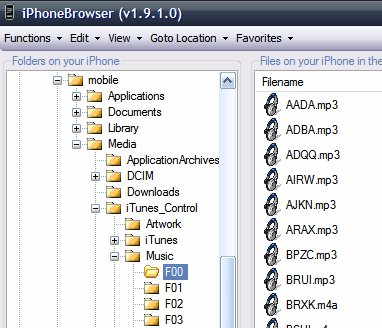
You can manually copy your music to your computer but it’s not as straightforward as using Lenogo and it will require you either SSH into your iPhone or use a free tool such as iPhoneBrowser.

From the computer where you want to move your music to, navigate to private/var/mobile/Media/iTunes_Control/Music and you should see a bunch of files name F00, F01, F02, etc…

All your music and movies are located in these folders. If you open F00 for example, you will see some mp3 files with names that don’t make any sense (see image above). It’s fine though.

Now move the “Music” folder to your computer. Depending on the amount of music you have in there, it could take a while. Moving 20 GB of music took me hours… Painful!

Once you’ve backed up your music to your computer, simply open iTunes and drag/drop the folders into there. iTunes will automatically recognize the files’ information such as titles, artists, etc…

There is a few downsides to this method though:

  • it doesn’t save playlists: if your songs were sorted into playlists, you will still copy the songs but they will be attributed to no playlist
  • it doesn’t transfer ratings
  • it doesn’t transfer play count

In my case, these were minor downsides and I can deal with it but it might be an issue for others.


17 Responses

  1. I love iPhone but it’s simple stuff like this – which should be as easy as plugging in the phone and dragging stuff to a folder – that makes me hate this thing some times.

     
  2. I completely agree with you. All these little details make a huge difference in the end.

     
  3. Not only does iPhoneBrowswer give you access to your music but your entire root partition. How rad is that?

     
  4. Sebastien,

    Does iPhoneBrowser require you to have iTunes loaded on your machine? I ask because I can’t load ITunes on my work laptop and I would like to have a way to transfer to my iPhone.

    I’m thinking of loading up USB Drive from apt.dmytro.me repo so I can mount as a USB drive without any additional software. Played with that at all?

    Great blog! Keep up the good work bro.

     
  5. Hey Tom,

    Thanks for the comment :)

    iPhoneBrowser doesn’t need iTunes. As I explain in the article, it is fairly easy to copy the music from your iPhone to your computer, but I don’t think you can go the other way around (computer to iPhone). If you want to do that, I think you’ll need Lenogo (mentioned in the article).

    Sebastien

     
  6. Another program I just discovered (haven’t tried it yet) is i-FunBox. Has anyone tried that program?

    http://www.i-funbox.com/

     
  7. I-funbox is the fastest for transferring files to and from the iPhone. Try it.

     
  8. > I could just sync my iPhone before leaving and load it up with music but if something wrong happened (ie if I had to restore), I would lose all my music, which is why I think it is wise to move the music I want to my netbook.

    Can you clarify the above? Why would you loose your music if you have to restore when it is there on your netbook?

     
  9. Irha,

    Because at that point, the music wasn’t on my netbook yet. The music was on my iPhone and on my everyday computer. I had to move it to the netbook to in case something bad happens.

    Sebastien

     
  10. Hey , I use double twist , I find it works well , any one else ?

     
  11. For those of you on a Mac, iFuntastic will do the job too. :)

     
  12. Hey Sebastien,

    Thanks for writing such informative articles about the iPhone. I have bought one 2 weeks ago and am just exploring it and your articles are really helping me out. Keep writing.

    Varun

     
  13. Thanks, did not knew about lenogo. Will Give it a try.

     
  14. just downloaded and installed and program will not work, I am presently running Vista.

     
  15. thanks

     
  16. it doesnt let me copy the music files to my computer…how do you do that?

     
  17. I am using Windows7 and cannot get Lenogo to work. Not impressed with their dead link “support page” either. Hoping Paypal can get my money back.


Your Comments

Leave a Reply


Submit Comment