Jailbreak iPhone 3G or iPhone 3GS 3.1.2 with PwnageTool

by Sebastien on October 13th, 2009

This step-by-step guide and tutorial will show you how to jailbreak your iPhone 3G or 3GS OS 3.1.2 using PwnageTool 3.1.4 for Mac OS X. PwnageTool is a Mac and Mac only tool. There is no equivalent for Windows and no one knows yet when such a tool for Windows will be released.

If you updated your iPhone via iTunes to 3.1.2 or if you bought your iPhone with 3.1.2 pre-installed, you will be able to jailbreak it, however, you will not be able to unlock it. On the other hand. if you are still on 3.0 or if you have updated to 3.1 using PwnageTool, you preserved your baseband and you will be able to unlock using UltraSn0w.

This tutorial is written for both the iPhone 3G and 3GS. The steps are identical. The only thing that changes is the file you have to download in order to create your custom IPSW.

How to jailbreak iPhone 3G/3GS 3.1.2:

Step 1: Make sure you have downloaded and installed the latest version of iTunes.

Step 2: Create a folder called “jailbreak” on your desktop. Download and save the following files to this “jailbreak” folder (all these files can be downloaded here):

  • PwnageTool 3.1.4 for Mac OS X
  • If your iPhone is a 3GS: 3.1.2 for iPhone 3GS (iPhone2,1_3.1.2_7D11_Restore.ipsw)
  • If your iPhone is a 3G: firmware 3.1.2 for iPhone 3G (iPhone1,2_3.1.2_7D11_Restore.ipsw)

Note that I highly suggest downloading these files with FireFox as Safari usually creates issues.

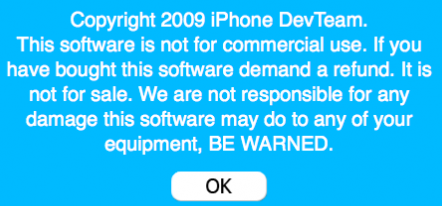
Step 3: Launch PwnageTool. It should give you a warning message. Click OK.
Step 4: Select “Expert Mode”.
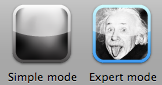
expert mode

Step 5: Select your device then click the blue arrow to continue.
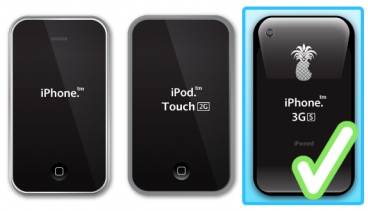
select device

Step 6: If PwnageTool doesn’t automatically find the correct IPSW file, click “Browse for IPSW” and locate it (it should be in your “jailbreak folder”).
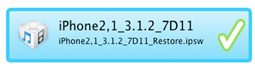
firmware

Click the blue arrow to continue.

Step 7: You will now have several options. Choose “General” and click the blue arrow to continue.
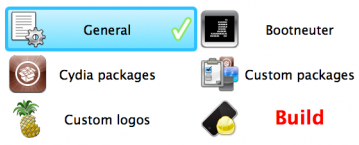
options

Step 8: Under “General Settings”, you have the option to activate the phone or not. This is a very important step and I’m pretty sure that we’re going to have a bunch of comments related to this setting, so please read carefully.

If you have a contract with an official carrier (such as AT&T in the US, or Orange in France, etc…), do not activate.

If you do not have a contract with an official carrier (ie. you want to unlock for another carrier), you have to activate. Then you will have to install UltraSn0w from Cydia in order to fully unlock the phone.

You will know you didn’t choose the right option if you don’t have signal after jailbreaking.
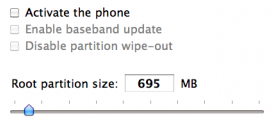
general settings

You don’t have to, but I suggest increasing the root partition size to somewhere around 700MB, just to be on the safe side. When you’re done, click the blue arrow to continue.

Step 9: You are now taken to the “Bootneuter settings”. All of them should be greyed out. Click the blue arrow to continue.
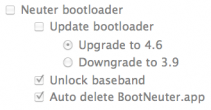
bootneuter

Step 10: You are now taken to the “Cydia settings”. From here, you may download packages so you don’t have to manually do it later. For example, you may download WinterBoard, which would be installed during the pwnage process. Let’s keep things simple and skip this step which is not necessary. Click the blue arrow to continue.
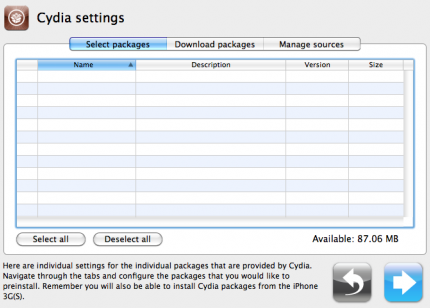
cydia settings

Step 10: You are now taken to the “Custom packages settings”. I highly suggest only selecting Cydia as Icy can be very buggy sometimes. Click the blue arrow to continue.
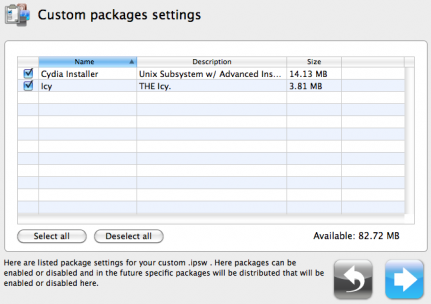
custom settings

Step 11: You are now taken to the”Custom logos settings”. You can choose to add the default logos (see below) or you can add your own logos. If you choose to add your own, make sure the images are not larger than 320 x 480. I personally don’t like these custom logos so I uncheck them all and keep my stock logos. Click the blue arrow to continue.
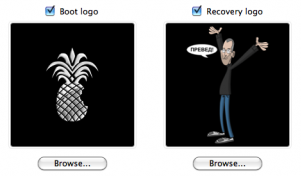
custom logos

Step 12: We’re almost done! You now have to build the custom IPSW. Click “Build” and click the blue arrow to continue.
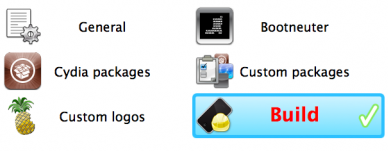
build

Step 13: Save your custom IPSW to the “jailbreak” folder we created in step 2.
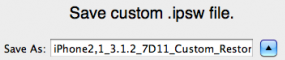
save

Step 14: PwnageTool will now start building your custom IPSW. Be patient… It can take up to 15 minutes.

building ipsw

Step 15: PwnageTool will ask you if your iPhone has been pwned before. If you’re not sure, just click NO.
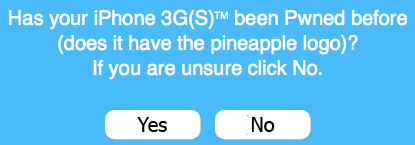
pwned

Step 16: If your iPhone was previously jailbroken, you can skip to step 19. If your iPhone wasn’t already jailbroken, follow the following directions.

If your iPhone isn’t plugged to your computer yet, plug it. Don’t open iTunes. If iTunes launches automatically, close it. PwnageTool will now deliver the payload.
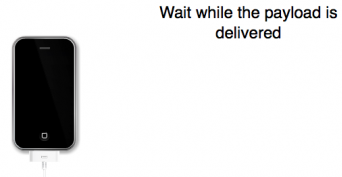
payload

Step 17: After successfully delivering the payload, PwnageTool will put your iPhone in recovery mode and you should get the following message. Click OK.
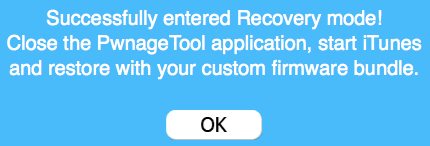
recovery

Step 18: iTunes should pop up saying it has detected an iPhone in recovery mode and that you must restore. Click OK.
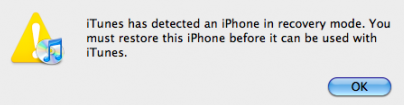
itunes recovery

Step 19: We are going to restore your iPhone using the custom IPSW you built. In iTunes, hold the “Alt/Option” key and click “Restore” at the same time. DO NOT click “Restore” without holding the “Alt/Option” key! A dialog box will pop up and you’ll be able to choose the custom IPSW file you created that was saved to your “jailbreak” folder.

restore

Step 20: Navigate to the “jailbreak” folder and select the custom IPSW we created:

  • iPhone2,1_3.1.2_7D11_Custom_Restore.ipsw for iPhone 3GS, or
  • iPhone1,2_3.1.2_7D11_Custom_Restore.ipsw for iPhone 3G

Step 21: iTunes will now restore your iPhone using the custom firmware which could take a while, so relax. When done, your iPhone will reboot and you will now have a jailbroken iPhone.

You may now unlock your iPhone. For more information about unlocking your iPhone, please read our iPhone 3.1.2 unlock page.

If you have any question, please leave a comment below.


261 Responses

  1. Hi, great guide, mine worked, but i restored mine in windows after creating the custom ipsw with pwnage tool on mac, but i get no signal which is strange, i put it in flight mode then came out of it and it said “invaild sim” what’s that mean? also i have mac osx 10.5.5 installed on my acer laptop, what would be the “option” key if i were to restore using mac? or you cant? or buy a usb apple keyboard?

     
  2. GarethDPhillips says: October 13, 2009 at 10:24 am

    So does this automatically strip out the new baseband from the custom firmware it creates, or is there an option to ask it to do this?

    Or another way of asking this, will this only ever create an IPSW with an unlockable baseband, or is there an option to also create a package with the latest (none unlockable) baseband ?

     
  3. I jailbroke today using PwnageTool, but now I have no cell phone service!

    I upgraded my carrier service through iTunes yesterday, but waited to update to 3.1.2

    has anyone else experienced a loss of service after 3.1.2 jailbreak?? is this due to the carrier update? is there a way to revert back??

    I am on AT&T and have never unlocked my phone.

    Can anyone help?! pleaseee

     
  4. yeah, i’ve done this twice now and both times i clicked activated but still not cell service. im from the uk so i had to use the “activator” i hope you didnt do that as your already on ATT? i’ve restarted my phone 2 times n still nothing,,,,maybe if i wait a little longer…

     
  5. GarethDPhillips says: October 13, 2009 at 11:33 am

    Mmmm this doesnt sound good!

    You havent somehow updated your basebands have you?

    If you are in the UK you can activate yourself (even if you dont intend to use an O2 sim) as long as you have a free o2 pay and go sim. Much better than “hacktivation” as that gives you problems with push notifications etc I think?

     
  6. If you activated during the process, that means you want to unlock your iPhone. If you want to unlock your iPhone, you have to install UltraSn0w from Cydia

     
  7. GarethDPhillips says: October 13, 2009 at 11:38 am

    That makes sense Sebasien, thanks. If you choose activate it will alway require unlocking afterwards.

    Can you tell me please, will this tool (reglardless of what options are selected) always make an IPSW to restore from with an unlockable baseband, or is there a way I could do something wrong and have it build a file with the new baseband? Reason I ask is there is no way to verify until the job is done, and then there is no going back !

     
  8. yeah its really strange, now both sims dont work, but the o2 sim activated before i used another custom 3.1.2, i followed the instructions clearly and no service, dunno what to do next..but still my t-mobile-uk sim still doesn’t work….any advice?

     
  9. got no signal from both sims so can’t open cydia or i would of done that already…also not let me connect to my wi-fi either :(

     
  10. GarethDPhillips says: October 13, 2009 at 11:41 am

    still no carrier name bug? Does anybody know how to apply a cusom carrier logo (graphic) on 3.1 or 3.1.2 ?

     
  11. @GarethDPhillips There is no way you can update your baseband if you use PwnageTool. Use MakeItMine from Cydia to add your own carrier text (no logo)

     
  12. yeah i think, you have to do it with pwnage tool on mac and at bootlooder menu add your own…? never done it personally but i think you got there, before you click “build” nope carrier what so ever, i might have to go back to my own customer 3.1.2 as that let me use my o2 payg sim…

     
  13. GarethDPhillips says: October 13, 2009 at 11:50 am

    @Sebastien, ok thanks that is reassuring.

    I guessed I would use “makeitmine”. Do you not know of a way to apply a graphic instead of just text? I currently use an IPCC file that does this, but apparently this wont work with 3.1.2

     
  14. Install winterboard and look for carrier logo images in Cydia

     
  15. GarethDPhillips says: October 13, 2009 at 11:52 am

    @Sebastien thanks again! Am I restricted to images that exist in Cydia, or can I use my own?

    I wonder why they didnt fix this (small I assume) bug this release? Doesnt make sense.

     
  16. Manoftheyear says: October 13, 2009 at 12:10 pm

    Does it even work, if you have a pre-installed FW 3.1 on the 3GS?
    That’s my case.
    Version: 3.1 (7C144)
    Modem-Firmware: 05.11.07

     
  17. I believe the second paragraph answers your question… Will jailbreak but not unlock. You can’t unlock 05.11.07 yet

     
  18. in app purchase problem!!after jialbreak to 3.1.2!!Any 1 can help?? Please…………..

     
  19. Hey thanks for the tutorial and responding to some of the questions the commenters before me had!

    It helped me figure out that there are several ways that the custom firmware can be made… (activated or non-activated, etc…)

    If you search hard enough on google… you can find the custom firmware without doing all of the above steps… for all the windows users out there…

     
  20. yeah done it all again and still get no signal, restored using windows this time, phone works perfectly just no signal plus it doesnt let me load cydia through my wifi, any other work arounds?

     
  21. Same problem here activated just fine on ATT but get no signal after I update the device .

     
  22. @BioTech what do you mean? Did you check the “activate” checkbox or not?

     
  23. Yes, had it checked by default, All i changed was removed icy and the custom logos. Then restored with the image it creates. After the restore i lost all conenction to the outside world except wifi. Hope this helps.

     
  24. Well, sorry to be sarcastic, but yes, it helps understand you didn’t pay attention to Step 8…

     
  25. Yes your right my fault, should have read more carefully. Sorry for the confusion. Trying again.

     
  26. I installed all the above and when it is in the process of restoring, it tells me that an error occured. Has anyone experienced this?

    Please help:(

     
  27. GarethDPhillips says: October 13, 2009 at 2:41 pm

    would anybody be kind enough to post a custom firmware somewhere (created by the new Pwnage tool) as I dont have access to a mac to make one.

    I need a 3G 3.1.2 IPSW, 1GB partition, stock logos NOT activated, (obvioulsy basedband not updated)

    An help really appreciated.

     
  28. Are you guys sure this works?

     
  29. Hi Sebastien,

    Thank you for your hard work getting this software together.
    I followed the steps you outlined. However, the iPhone 3G is not jailbroken anymore. It was previously jailbroken but not unlocked.
    I don’t know if I did the wrong thing or what. Am I now the not-so-proud possessor of a “brick”?

    Thanks again,

    John

     
  30. This fixed my “stuck in plug in itunes screen” problem

    Jail broken
    iPhone 3G 3.1.2

    Use these instructions and just leave it alone for approx 1 min

    Reboot your phone.
    Leave it on.
    Run blackra1n.exe.
    Plug your phone in.
    Make sure itunes isn’t open.
    Click on “Make it Rain”.

    That should put the blackra1n icon on your phone. From there, you can install cydia.

     
  31. hey i dwnl the firmware and when i go to open redsnow it brings the browse windo up and i select the second 3.1.2 and its saying that it can not find myipsw

     
  32. I have different problem. I got my phone jailbroken successfully with the instruction. Have signals, but the AT&T logo has disappeared…

     
  33. Yes, it is a know issue. Just download MakeItMine from Cydia and you can say whatever you want instead of your carrier name

     
  34. Thank you so much. Besides the logo thing everything works great!!!

     
  35. coud you please send me an email iabout what i should do i appreciate it

     
  36. UGH THIS NEVER WORKS FOR ME. everything is okay until i try to install the custom firmware. then a little msg pops up on itunes and says “cannot be restored error (1402)” or something.

    ive been trying to jailbreak my iphone for HOURS. i’ve used every method possible and it just DOESNT work.

     
  37. iAppledude13 says: October 13, 2009 at 9:13 pm

    Ok so on one of the first steps where u select the device u wanna jailbreak I say iPhone, iPod touch, and iPhone 3gs is the iPhone selection for the iPhone 3g?

     
  38. Mike Barnes says: October 13, 2009 at 9:24 pm

    After I finished everything itunes wants to restore from my last back up. Should I do this? Right now my phone works, but I don’t have anything on it. Thanks!

     
  39. i’ve downloaded pwnage tool 3.1.4, and other nescessary files for my iphone 3g, 3.1.2 firmware. i succesfully completed the tutorial on jailbreaking my 3g, but when i go to put in my t-mobile simcard, it say the card is invalid. can anyone help me out with this?

     
  40. Hey guys well i tried using this and i cant connect to any carrier, as i have read its due to that i have a 05.11.07 modem firmware. is tat why?

     
  41. I did all the steps and once everything waas done i shut down my iphone started it back up and cydia app isnt on there… anyone help?

     
  42. was it a problem that i installed cydia and icy on the step by step process?

     
  43. #37 – select iphone 3gs for iphone 3g

    #38 – yes if you want to have your data restored to your phone

    #39 – you need to install ultrasn0w to unlock your phone. If your baseband is upgraded to 05.11.07, you’re out of luck.

    #40 – yes, you’re out of luck until a new unlock is released. when? I don’t know.

     
  44. hey at the very beginning it when i have to choose the firmware it says Wrong Bundle Firmware Selected in a red box….
    i have an iphone 3G with 3.1.2 latest officiel upgrade and downloaded the iPhone1,2_3.1.2_7D11.ispw

    so i am a little confused could you be give me a hand with this.

     
  45. I am new to jailbreaking and will follow the instructions. If something does go wrong, I can just restore my phone to factory settings right?

     
  46. GarethDPhillips says: October 14, 2009 at 1:00 pm

    @Sebastien can you offer any help here? I am getting the same problem as Sean (well my mate is as he is the one with a MAC who is trying to create a firmware for me)

    I retrieved the file called iPhone1,2_3.1.2_7D11.ispw from my itunes downloads folder so this is definitley the correct IPSW for my 8GB 3G, however we are getting the same error, wrong bundle selected. HOw? What am I overlooking please?

     
  47. @Sebastien, I followed procedure and worked like a charm. Downloaded MakeItmine and got the carrier working as well. The only problem I am having is installing AppSync. It seems I can not install from Cydia Hackulo.us into the phone. Do you know anything about this?? thanks and good work.

     
  48. @Sebastien, I got it done. Everything is working fine. thanks!!

     
  49. I’m having the same problem as GarethDPhillips and Sean. I’ve tried the latest Pwnage tool (3.1.4) on the file “iPhone1,2_3.1.2_7D11_Restore.ipsw”. I tried downloading the ipswfrom Apple and an online source. In both cases, I get an error saying “Wrong Firmware Bundle Selected”
    What happened? Did Apple release a new iPhone1,2_3.1.2_7D11_Restore.ipsw with the exact same filename but different checksum so Pwnage won’t work with it?

     
  50. I have a question about step 8. I didn’t know about this guide before I ran PwnageTool, and so even though I have a contract with AT&T, I chose to activate in that step. And, as is described in the guide, I now have “no service”.

    What is the best fix? Can I re-run PwnageTool and then restore with the new custom ispw, or should I just go ahead and run UltraSnow? Will either of those solutions work? Both?

    Thanks.

     
  51. Garethdphillips says: October 15, 2009 at 2:45 pm

    You can do either. You are best to restore with an inactivated Ipsw if you have the corecct SIM for the phone as most people don’t make it clear that the “hacktivated” phones that aren’t activated via iTunes have problems with pushed notifications to apps in that they don’t work.

     
  52. Hi,

    someone mentioned here that he activated regullary and then unlocked it with ultrasn0w and used it with another card. Will that work? Baseband will still stay on 4.26?

    Thanks in advance,
    Vladimir.

     
  53. Thanks, Garethdphillips. I’ll just re-run PwnageTool then, unselecting activate.

     
  54. I have a jailbroken iPhone 3GS running fw 3.0.1. I jailbroken it with the 3.0 redsnow jailbreak.
    Can I just keep it jailbroken and run pwnagetool and that will upgrade me to 3.1.2 or do I have to update using itunes to 3.1.2 and then run pwnagetool?
    Because it doesn’t make sense, because on Dev-Team’s Blog it says:

    “If you’re already jailbroken (by whatever means), you don’t need to mess around with DFU mode at all. Just create (or get from a friend) your custom IPSW and Option-Restore (Shift-Restore on Windows) to it via iTunes. Don’t enter DFU mode at all. Please make sure you are restoring to the custom IPSW, not the stock one from Apple! For best results, use the latest iTunes (9.0.1) — which includes a nice new application organizer.”

    and since you couldn’t jailbreak 3.1.2 until now, unless you used blackra1n..
    thanks in advance for the help.

     
  55. I have a friend who has a 3GS wtih 3.1 pre-installed. He has upgraded to 3.1.2 but is somehow having troubles with blackra1n. I used an pwnage tool created 3.1.2 to restore my phone in windows but it was easy as it was already jailbroken.

    However, his iphone is not already jailbroken, can he put it in DFU mode and restore to 3.1.2 custom ipsw ? will that work ?

    thnx

     
  56. kyogirlbubbles says: October 16, 2009 at 4:17 am

    i accidently upgraded on my iphone 3g and it wiped out cydia and every thing so i restored my phone i was wonding how i can jail break it again coz the old method doesnt work any more

     
  57. Great program. Worked perfect first try. Thanks everyone who helped make it possible.

     
  58. this is really cool! it works for me!

     
  59. Hi, this is my first time unlock the iphone, when i run pwnage tools after select iphone 3gs, its taking very long time to choose the ipsw, is it hang or what ?

    Any advice ?

     
  60. @ Iphone:
    What Firmware were you on when you jailbroke?

     
  61. Sebastien said we can’t unlock iphone with Firmware 5.11.07 yet. I have this firmware, tried it 3 times, still didn’t work. I think jailbreak worked because I now have Cydia; however, I can’t sync any applications that worked with OS 3.0 iphone.
    Thanks

     
  62. Does anyone know an alternative software for isim application? I need to copy my contacts all to my SIM card but need a software to do so…

    Any suggestions anyone?

    Thanks

     
  63. @ #47, 49 and others. There are multiple “official” ISPWs, depending on which iPhone you have:

    For iPhone 2G: “iPhone1,1_3.1.2_7D11_Custom_Restore”
    For iPhone 3G: “iPhone1,2_3.1.2_7D11_Custom_Restore”
    For iPhone 3GS: “iPhone2,1_3.1.2_7D11_Custom_Restore”

    HTH

     
  64. SaintJohn, We’re aware of that. I have the correct firmware for my phone. That is not the issue. It is that Pwnage Tool doesn’t like the image. I’ve tried the official one from Apple as well as several found on websites. None of the “iPhone1,2_3.1.2_7D11_Restore.ipsw” work with Pwnage Tool 3.1.4

     
  65. I keep getting Error 1604! Help!

     
  66. I have an iphone 3G 8GB with 3.1.2 and then i select the iPhone1,2_3.1.2_7D11_Custom_Restore it says is the wrong package
    whats going on???
    ???
    help??

     
  67. hello there,

    first, nice tutorial. i have a 3GS 3.1 pre-installed iphone. in one of your article, it said that iphone 3GS with pre-installed 3.1 cannot be jailbroken. so does this mean if i upgrade the fw to 3.1.2 using iTunes, i will be able to jailbroken it using this article?

    secondly, will i be able to unlock my phone if i follow step 8 by checking the activate option?or it still won’t work since the phone is 3GS 3.1 ofw?

    thanks.

     
  68. I downloaded pwnagetool 3.1.4 and firmware 3.1.2. I opened pwnagetool and selected the iphone since I have a 3G and it couldn’t find a firmware bundle. I selected the iphone 3GS and it found the firmware bundle, but for the 3 GS. Should I continue through the process for the 3GS even though I have a iphone 3G?

     
  69. To followup on my previous comment, My modem firmware is 05.11.07 and the version 3.1.2 (7D11)

     
  70. i did try it to but with out luck !!!! i went throuth all the steps but after jailbroke the phone is no signal

     
  71. The reason Pwnage tool hangs when looking for ipsw file is that it from Pwnage tool 3.1 onwards it only seems to work on intel chips (Mac) not PPC chips. I suggest that everyone having problems should create a custom 3.1 ipsw file via Pwnage 3.1 following the particular instructions regarding make an model of iPhone to jailbreak, see iclarified.com for instructions. Use DFU mode to restore the custom ipsw.

    Anyone who wants unlock who has baseband version higher than 04.26.08 cannot unlock so do a google search on Fuzzyband which can be installed via Cydia, this will downgrade the baseband to version 04.26.08 which can be unlocked by installing Ultrasnow via Cydia, Fuzzyband requires the 05.08 bootloader but Fuzzyband works that all out for you, if it cant find 05.08 it cant downgrade an this iPhone cannot unlock. This can only be done on firmware 3.1 nothing higher.

    Then you will need to create another Custom 3.1.2 ipsw file using Pwnage tool 3.1.4, again it will only work with intel chips not PPC (Mac) once custom ipsw has been created you only need to restore in restore mode, not DFU, you can then restore to your iPhones backup file in iTunes, to upgrade to the latest firmware Jailbroken, if you succeed with Fuzzyband an downgrade the baseband to 04.26.08 Pwnage will not update the baseband so you can apply Ultrasnow via Cydia an you will be unlocked an Jailbroken.

     
  72. hey all, this has probably been answered a thousand times and probably in this thread but i just cant find the answer im looking for.

    i have an iphone 3g 16gb
    it is updated to 3.1.2, (believe it was originaly 3.1)
    it is locked to vodafone and when i put a telstra sim it had no coverage so i believe it is locked to vodafone.

    model: MC132X
    modem firmware 05.11.07

    I Would like to unlock and jailbreak this phone and can’t seem to do either.

    i am running a pc.

    is there someway i can go back to firmware 3.1 and unlock and jailbreak that way? any help would be appreciated.

     
  73. I’ve been trying to re-jailbreak my phone for over a week now, but keep getting “Wrong firmware bundle selected”. I accidentally updated from iTunes before the latest Pwnage Tool came out.

    I’m running iPhone 3g 3.1.2 updated from iTunes, and unfortunately updated broadband. I am NOT looking for an UNLOCK – only a jailbreak.

    I tried Blackra1n and Pwnage 3.1.4 and am using firmware: iPhone1,2_3.1.2_7D11_Restore.ipsw as instructed.

    I have iTunes 9.1 installed and updated…

    What am I doing wrong? I’ve tried different firmwares, and followed every suggestion, but it won’t work. I’ve also tried it on two separate Mac’s – currently on a new and updated MacBook running OS 10.5.8

    I’d appreciate any help! Many thanks. Again – no unlock needed, only a jailbreak.

     
  74. I’m having the same problem as Kevin where it says “wrong firmware bundle selected”, and I’ve tried the iPhone1,2_3.1.2_7D11_Restore.ipsw firmware and several other firmwares at this point, and cannot get past this step. I’ve jailbroken my phone several times in the past and have never had this problem before. I’m also running a 3G iPhone 3.1.2, with Pwnage 3.1.4

    Any help you can provide for us would be greatly appreciated!

     
  75. Jesse, are you clicking on the iPhone icon/image on the right hand side of the page? It is a bit confusing that is says 3G(s) but is means it is meant for the 3G and the 3Gs. The “iPhone” image on the left hand side is for the original EDGE iPhone.

     
  76. I get stuck at Step 6. I have an iPhone 3G and whenever I select the ipsw file, iPhone1,2_3.1.2_7D11_Restore.ipsw, it says ‘wrong firmware bundle selected.’ Help please?

     
  77. And I am clicking the iPhone on the far right …

     
  78. I have an iPhone 3gs with all the iTunes updates that have come out. I’m with AT&T and I just want to make sure that no matter what happens when I try to jail break it that I can always restore it back to the factory settings if the jail break doesn’t take for some reason. If some one could reasure me that would be great.

     
  79. Clicked on the 3G(S) option to the right and it worked…sometimes the answer is too simple for me to even try, haha. Thanks for the clarification Catapult!

     
  80. So, I had followed the instructions above and followed every procedure. When I pressed ALT/ OPTION on my macbook, I saw a Pineapple logo. 3 seconds later it disappeared and went to a apple logo. I am wondering what I did wrong…I bought my iphone just yesterday and it’s a 3G 3.1.2 updated from itunes.

     
  81. I am having the same problem as so many others above – upgraded officially to 3.1.2 via itunes. Now looking to jb. Blackra1n doesn’t have any affect and I get “wrong firmware” message when using pwnage tool. I have definitely have the right firmware, and I selected the right type of iphone on the first page….

    Does anyone have any ideas to help all of us unlucky ones?! Thanks.

     
  82. Nick:
    With Blackr1n, make absolutely sure iTunes is quit AND won’t launch when the phone resets in to restore mode. If iTunes intercepts the restore boot mode, it won’t work. I ran in to this problem. I actually moved iTunes to the trash temporarily.
    As for the “wong firmware” message in Pwnage; I ran in to that too, make sure you click on the very right hand iPhone if you have the 3G or the 3Gs. The one on the left is for the EDGE iPhone only. Many people get confused by the Directions for 3G on other sites that show the check over the image on the left. This is not the one you click for 3G.

     
  83. @Catapult

    Great thank you for the info. I was selecting the lefthand iphone. I will try using the extreme right hand one and report back. It is pretty confusingly labelled, because the extreme right only say “3GS”, no mention of standard 3G!

     
  84. hello,
    i have the same problem – iphone 3g, 3.1.2, and always ‘wrong firmware’
    please help me, i use PwnageTool 3.1 f and 3.1.4 for mac – and nothing… :( ((

     
  85. I have an officially unlocked iphone 3GS on 3.1.2 firmware from Australia. I do not have any contract with any mobile companys here. I want to jailbreak it…Do I click on activate or now?

    Thanks in advance.

     
  86. I D/L’d The Current Firmware 4 My IPhone 3G and Put It In The Jailbreak Folder And When I Browse 4 The IPSW And Click 2 Open It, It Says Wrong Firmware Bundle Selected? WTH Is This? And How DO I Jailbreak This POS?

     
  87. Did Some Reading And Saw Catapult’s Post, Thanx Man!

     
  88. Now When This PwnAge Tool Builds THe Custom ISPW It Fails? WTH Is This? And How DO I Fix? This Is Getting 2 B A Pain N The Ass, and I Miss The Old QuickPwn 4 Windows That Actually Worked… Makers Of This Program Rushed Way 2 Fast…

     
  89. I am having trouble getting signal. I have updated for the first time using pwnage tool 3.1.4 and used ipsw listed for Iphone 3gs. I don’t know whats wrong! I lost all apps from apple store on iphone. when trying to redownload it says that my password is incorrect. I am currently using my friends mac to Jailbreak. I have windows at home. I do currently have AT&T and don’t need an unlock but did choose the option to activate when using Pwnage tool. Can anyone please help me out? I have no Idea what i have done and I am a Noob as I have never Jailbroken before. I had os 3.1.2 downloaded via itunes.

     
  90. As far as I can tell I followed the jailbreak instructions to the letter. I have always used AT&T and want to continue doing so (at least for now). I turned off activication in PwnageTool. It all went well – except – I am “awaiting activation” for several hours and of course, I don’t have a signal. Everything else worked as advertised. What did I do wrong (Did I do anything wrong)? How do I move forward e.g. what are the next steps I should take to make the iPhone usable as a phone again?

    This is not my first time jailbreaking the phone (previous OS releases). Before taking any action I was at 2.2 (jailbroken) on the phone. I did accept a carrier update before starting the jailbreak process (was that a mistake?). I’d really really appreciate a response that says, “Do the following …”

     
  91. Hello
    I updated my iphone to 3.1.2 using itunes then I jailbroke it using the latest pwnage tool for mac. I have tried both activated and non activated custom firmwares for my iphone 3g but the phone just won’t work. With the activated firmware the phone would go upto the home screen with cydia in it but it doesn’t get any carrier signals (i’m with at&t and also have the data package required for the activation with itunes) and after sometime it says no service and with the non activated custom firmware itunes just won’t activate the phone as it says the simcard in the phone isn’t carrier supported simcard etc, however I’m using an at&t simcard and I even had it replaced with a new one but still no luck. Could it be the new itunes and the firmware through which apple are trying to stop the jailbreaking or am I doing something wrong. It seems like my phone is been bricked and this is the second phone which is behaving like this as I exchanged the old one at the apple store. Anyone can help? I would really appreciate that plus I don’t wanna go back to apple store again to replace the phone.

     
  92. RichardDribbles says: October 25, 2009 at 9:18 am

    Hi All. Great post. Ran into some problems.

    I have a factory unlocked iPhone from Hong Kong (MB496ZP), so if I understood the post correctly, all I need do is jailbreak.

    I am on firmware 3.1.2. I created a custom ipsw using PwnageTool 3.1.4 for Mac OS X. I made sure the “activate” option was checked since I’m not with an official carrier (I’m with China Mobile, and the phone is factory unlocked). I restored to this custom ipsw just fine and reloaded my previous settings, but I don’t get any service at all.

    All the apps work, and I can acces wifi, but no calls. Do you think the modem firmware 05.11.07 is causing this problem? Is there a next step I need to do using cydia?

    I tried restoring back to factory defaults so I can at least use my phone, but itunes tells me to go see my local apple retailer :/ Any help with this is much appreciated.

     
  93. @RichardDribbles I am having exactly the same problem as you. I’ve been rrading various sites but haven’t figured it out yet. I hope someone can help us :(

     
  94. I’ve read all the posts here and many other places about the “wrong firmware bundle selected” and STILL don’t have a solution. I have a 2G iPhone. I have downloaded the original Apple 3.1.2 firmware for it from MANY different places. I have downloaded Pwnage 3.1.4 from MANY different links. In Pwnage I click the 2G iPhone image to the far left. EVERY SINGLE TIME AND WITH EVERY IMAGE I ALWAYS GET the “wrong firmware bundle selected”. I’m burnt out on this and the Dev-Team site has absolutely no mention of this obviously very persistent problem. Can anyone out there help with this. YES, I have the correct firmware and YES I’m clicking the correct phone image in Pwnage 3.1.4 (in fact I tried them all just for kicks!).

     
  95. wizeson, just for kicks, why don’t you tell us the file name of the firmware you downloaded? Also, I know what you mean by ’2G iPhone’ but just to leave no room for miscommunication, you do me the 1st generation iPhone (silver/EDGE), correct?

     
  96. All the people having problems, make sure you have a Mac with intel chips not Mac with PPC chips – I have both systems, after running tests, I have run into many of the problems people are talking about here on the PPC but not on the Intel Mac.

     
  97. New_iPhone3GS says: October 27, 2009 at 11:41 am

    Hello everyone!

    I’m about to jailbreak my new 3Gs with 3.1.2 preinstalled. Will these jailbreaking tutorial work without a simcard? No? Yes? Thanks!

    Kind regards,

    Nat

     
  98. I’ve tried to install is twice. It does work, but when I do the re-sync of all the apps it crashes and its now stuck on the pineapple… I can re-install with the official, but i really want to jailbreak.

     
  99. @RichardDribbles

    hi there i have exactly the same Iphone also bought from hong kong and i also use it with China Mobile sim card. I have jailbroken it but when i clicked activate it did jailbreak it. so i dont know why it isnt working for you.

    to restore it you have to do the following. when i first went to buy the iphone i put my sim in and connected it up to Itunes, it gave me the same error what you have to do it change the sim card to another sim from another country. One for example of your home country then simply, with the sim card from your home country in it, connect it to itunes again and it should work. for example i took my china mobile card out and placed my swiss one in, connected it up to itunes restored it. then once it was restored changed the sim again to the china mobile one and it works fine…..

    hope this helps…….

    i think there must be something up with the china mobile sim cards and iphones.

     
  100. RichardDribbles & Dave,

    if you have officially factroy unlocked, then you shouldn’t check “activate my phone”, i.e. it has to be unticked. Because your device already unlocked.
    This is the same situation as mine, and its working well but still with OS 3.1.

    Now I want to upgrade to OS 3.1.2, so my qeustion is should I go through DFU mode or no need?
    While I was reading the blog here and there, I noticed that I don’t have to plug and connect my phone while Pwenag tool is creating a custome isp. file for iphone 3G 3.1.2, is that true?
    If yes, should I update my iphone with the custome isp or official Apply file to 3.1.2?
    Note: 1) I have factory unlocked iphone 3G with OS 3.1 (yet). 2) Jailbroken on OS 3.1 and no issues

    Thanks,
    Poa

     
  101. i seem to have similar problem as RichardDribbles except that my iPhone 3G was not factory unlocked and was legitimately activated by the carrier (3 Hutchinson at Macau). i followed the guide and upgraded from 2.2.1 (previously jailbroken with QuickPwn) to 3.1.2.

    the thing is that i used a sim pin. when i was done jailbreaking and iTunes was all happy and sh*t telling me the iphone was successfully unlocked (almost verbatim), the a “window” in my iphone screen poped and asked me to input my pin. the funny thing was that it kept on asking me for the pin even though i keyed it in numerously. finally i gave up and put in my other sim card from the same carrier (which has the sim pin lock disabled) to test it out. this time the iphone did not ask me for a pin but still no signal, and it was responding really slowly as if there was another program running in the background.

    i went to setting and had a look, where i found the “Carrier” tab kept on appearing and disappearing. once i caught and and enter the “Carrier” where it started loading for a few seconds, then another window came up saying “Unable to load network list”.

    for a time, i suspected that the OS skip (from 2.2.1 to 3.1.2 instead of from 2.2.1 to 3.0 to 3.1.2) was causing the problem. i did downgrade to 3.0 from 3.1.2, but the same problem emerged, jailbreaking “successful” but no signal.

    i even checked that whether i had mistakenly upgraded the baseband with Fuzzyband, but found out that it stayed at 2-02.20.03 (i wonder if that is the culprit).

    after a few days searching the net for solutions, i finally called the carrier who claimed that their service was running fine and asked me to bring the phone to their service department for a checkup (which i wouldn’t do with a jailbroken phone).

    so the questions are:

    should i downgrade to 2.2.1 (i know it’s possible but the Dev Team had warned against it) to get back signal?

    should i install/upgrade/downgrade to a clean OS (i wonder if this can be done without changing the baseband) so that the guys down at the carrier service department can have a look at the problem?

    should i restore the iphone through iTunes without the custom ipsw file and wait for another version of pwnage tool that can jailbreak with the higher version baseband?

    thx in advance for any suggestions/thoughts/ideas/whatever

     
  102. got the solution to my problem on getting no signal after having jailbroken my iPhone 3G from 2.2.1 to 3.1.2 with pwnage tool 3.1.4. all i did was to upgrade my baseband from 2.30.02 to 4.26.08 with Fuzzyband.

    i read somewhere since baseband manages all the antenna activities, and since my baseband version was still kept at 2.XX.XX, so i suspected that was reason why i couldn’t get my phone to “talk” to the carrier.

    anyway, now all i need to do is to get Carrier Logo Fixer to fix my carrier name not showing at the the top left corner of the screen.

     
  103. Carrier logo fixer – use Make It Mine, install from Cydia.

     
  104. ok- i tried all this, it went all the way until the installation of the firmware was completed but it could not reboot and was stuck in recovery mode. dead end here

     
  105. soaddictive says: November 1, 2009 at 8:56 pm

    i have successfuly unlocked my phone but all my pictures/contacts etc have been erased. Also, itunes is asking me if i should restore phone from backup or set up as new phone. What should I do? Is there anyway to restore my sms/pictures/contacts without relocking my phone?

     
  106. Hi there

    I followed the process step by step, but at the last step itunes gave me “1600″ error and the phone is completely dead. Can’t even do a hard reset and it’s not recognised by itunes any more. It’s 3GS factory unlocked.

    Any advice will be appreciated.

     
  107. Going to take the plunge, but I have 2 quick questions.

    1) Once jailbroken, do I still sync the device (using iTunes) and use iTunes as normal?
    2) If I decide to go back to “stock” is that easily done just by restoring using the official apple firmware?

    Thanks in advance.

     
  108. Could anyone tell me if it’s now possible to UNLOCK an iphone 3G version 3.1.2 Baseband 05.11.07 ?????????
    Thank you!

     
  109. New_iPhone3GS says: November 3, 2009 at 9:27 am

    To all and specially to Zaza-ip,

    GeoHot the developer of Blackra1n, just released BlackRa1n RC3 (BlackSn0w). It will jailbreak and will ** UNLOCK ** (yes, that’s unlock) 3G and 3GS 3.1.2 with 5.11.07 baseband. And what’s best, it’s for free. Go thank him. If you’re generous enough, it would be very nice of you to donate even a small amount to him as a sign of appreciation to all his hard work.

    Free your iPhone –> http://blackra1n.com/

    Words from him: “… Get the truth out, that all iPhone unlocks and jailbreaks are free, and if you are buying something, you aren’t getting anything a simple google search couldn’t get you, and are probably funding someones crack habit. … and tell the iPhone owning world all they need is at blackra1n.com”

    Now get moving.

     
  110. New_iPhone3GS says: November 3, 2009 at 9:29 am

    To all and specially to Zaza-ip,

    GeoHot the developer of Blackra1n, just released BlackRa1n RC3 (BlackSn0w). It will jailbreak and will ** UNLOCK ** (yes, that’s unlock) 3G and 3GS 3.1.2 with 5.11.07 baseband. And what’s best, it’s for free. Go thank him. If you’re generous enough, it would be very nice of you to donate even a small amount to him as a sign of appreciation to all his hard work.

    Free your iPhone (remove spaces) –> http : // blackra1n . com

    Words from him: “… Get the truth out, that all iPhone unlocks and jailbreaks are free, and if you are buying something, you aren’t getting anything a simple google search couldn’t get you, and are probably funding someones crack habit. … and tell the iPhone owning world all they need is at blackra1n.com”

    Now get moving.

     
  111. Hi,is dere anyone can help me to fix my iphone 3Gs?
    Currently , i using AT&T. i try to jailbreak with blackrain . But is doesn’t work , after awhile..i try to download quickpwn 3.1.4 to jailbreak & unlock the iphone. I have step by step to following the formula . But is still can’t work. at the moment , i have stuck into Restore mode right now. Please , anyone help me ~

     
  112. I got up to Step 12, where I am supposed to build the .ipsw. However, whenever I try, I get a red error saying :You do not have enough free space.” Any ideas? Thanks!

     
  113. bahblacksheep says: November 4, 2009 at 6:51 pm

    I got error 1604 on step 21 is there a solution for this? I see no one has even addressed all the other questions on the same issue.

     
  114. My phone was jailbroken with 3.1. then I restored the phone so I could get pic text. Just succesfully jailbroke with 3.1.2 and unlocked with ultrasnow and now i have no service which I have through att. please help! not sure what I did wrong.

     
  115. why dosent my keyboard theme work when i activate it via winterboard.. my keyboard stays the same no matter what them i put it on ? how do i fix this……email Nunzhockey@yahoo.com

     
  116. i have a week old 3gs with 3.1.2 and 7d11 that is factory unlocked. i follow all the steps untill the phone should restart to be jailbroken but instead never boots up, so i have to restore and update from itunes. i repeated this tutorial several times but no luck.

     
  117. Andre Powell says: November 6, 2009 at 11:20 am

    I followed the jailbreak instructions and I now have Cydia as an icon on my phone.
    However, the programs that I install from within Cydia such as SBSettings and Winterboarder etc. do not register as either icons on the phone or adjustable fields whithin Settings.

    I don’t think I have a fully jailbroken phone???

    I do have cell phone service.

     
  118. plz let me know how i can update my jailbroken iphone 3g (3.0 version) to the official 3.1.2 version?? will it work if i jus updated it with itunes ???
    plzz reply !!

    thanks

     
  119. plz let me know how i can update my jailbroken iphone 3g (3.0 version) to the official 3.1.2 version?? will it work if i jus updated it with itunes ??? plzz reply !!
thanks

     
  120. Hi. I use PC, i don’t have “Alt/Option” key, what should I press, just alt?

     
  121. I downloaded the two files and put them in the jailbreak file folder well when I try to open up the Pwnage file it wont open it just says open, save, cancel and I click open and it wont open.. HAs this happened to anyone else and what can I do?

     
  122. i have followed all the instructions and after the reload the phone reboots and never comes on again.

    is there a way to fix this?

     
  123. Hey i was just wondering after doing all this and restoring it and so on, what happens to all your text messages. do they all get erased or do they just stay as they are and the software only gets broken in to..sortta speak

    I’m planning on doing all this tomorrow and before i do it i’d like to know what happens.
    Thanks for your help!

     
  124. Hi,

    I have tried again and I am still having the same issue.

    I end up having to do a normal restore from Apple to get my phone to turn on again.

    Any ideas on why this is happening? I am using a 3GS with 3.1.2.

    I have previously successfully jailbroken my 3G so I know how to use the process.

    Any ideas or help much appreciated.

    Thanks

     
  125. There are some very basic questions not addressed in the steps above.

    1) Should I update to 3.1.2 through iTunes before jailbreaking, or just download the 3.1.2 .ipsw, use it to build a custom restore

    2) Should I update the carrier settings, as iTunes says I should?

    3) How do I make sure I still have my…
    3a) App Store apps?
    3b) data for App Store apps?
    3c) Cydia apps?
    3d) data for Cydia apps?
    3e) other stuff that I’ve stored on the local filesystem?

     
  126. Steve,

    Here are answers to your questions:

    1) download the 3.1.2 .ipsw, use it to build a custom restore

    2) Yes you may, or wait till the process is over. doesn’t matter

    3) You will lose everything. Apps from app store will resync with iTunes. You will have to manually download apps from cydia again. All data will be lost.

     
  127. OK, I got my app-store apps back (remember to “Transfer Purchases” before you upgrade!). And in fact they don’t seem to have lost any data. (Which is good: AppBackup was supposed to prevent losing data this way, but AppBackup doesn’t work on 3.1.x.)

    I got my Cydia apps back by using AptBackup (not to be confused with AppBackup, above):
    1) before you upgrade, tell AptBackup to “backup”
    2) after you upgrade, download AptBackup from Cydia again before downloading anything else
    3) tell AptBackup to “restore”
    It will take a few minutes, but will re-install exactly the same Cydia apps you had before.

     
  128. Hi, this may sound like a weird question but I purchased a factory unlocked 3gs on ebay (waiting for it to be delivered) and i’m wondering if I update it to 3.1.2 can I jailbreak it too? I’m confused because everything on the internet deals with locked iphones.

     
  129. I followed all the steps exactly, but Pwnagetool gets stuck at the screen when it says its trying to enter DFU mode to get the phone into recovery mode, i have the phone connected via usb and turned off. Nothing seems to happen.

     
  130. I’ve just followed the steps above and after restoring with the custom firmware my iphone is not switching on no matter what i do. when I plugged into a mac its says its in restore mode and when trying to restore i can an error.

    I have a 3GS

    TIA

    Mubs

     
  131. i have the same problem as mubs, i have also asked about it earlier, so pls help

     
  132. Hi Pat,

    I sorted my iphone out buy restoring it with the restore and update button in ITunes. After doing some research I have found out that this process will not work with the latest 3GS with the new iboot version. So currently the only option we have is to use the thethered version from geohot which means each time we restart the phone it needs to be plugged in to a computer. Hopefully they’ll bring something out soon!!

     
  133. um… so PwnageTool 3.1.4 is only for Mac?? am i right?? or it works on MS 2?

     
  134. I read everything many times, as well as the comments, just want to confirm to be sure before I try this:

    I updated my OS to 3.1.2 via iTunes. I NEVER Pwned my iPhone3GS before so if i read this right, jailbreaking will still work, yes?

    I do not need my phone unlocked, as since I am in Hong Kong and with a contract through 3 (the official carrier here) and all HK iPhones come unlocked out of the box, I would need to select the option that I do NOT need to activate the phone

    Basically, if I follow the above directions exactly and NOT activate the phone I should be fine, correct? Would someone please confirm this for me

    Thanks!

     
  135. Hey,

    Thanks for the great tutorial. After a few tries I got it to work, but now I’m wondering about “restoring from a backup” or “setting up as a new phone”. I’d love to be able to set my phone up with my contacts and applications as it was before it was jailbroken, but I’m afraid if I click on “restore from backup” it will remove the hack. Any information would be appreciated.

    Thanks,

    Matt

     
  136. Matt,

    “Restore from backup” will NOT remove the hack. “Set up as a new iPhone”, AFAIK, will forget everything the phone knows, including its own phone number. I don’t think you want to do that.

    I’ve never been clear on exactly what is included in an iTunes “backup” and “restore”, nor what is allegedly preserved over an OS upgrade. On several occasions I’ve done an OS upgrade and lost all my apps (Cydia and AppStore alike), but when I re-installed them I found that they “remembered” what I had been doing before the upgrade — that is, their data were intact. Can somebody explain clearly what a “backup” covers?

     
  137. I tried this on my 3GS and when itunes finished restoring, the phone booted up in dfu mode.
    3.1.2 factory.

     
  138. hello,
    i went through all the process but at the end of the process i got this message from i tunes (The iPhone “iPhone) could not be restored. An unknown error occured (1604).)
    my i phone is unlocked, 3GS, 32 gb.
    what is the reason for that.
    i already came back to the original firmware it works again.

     
  139. Hi,
    Some body can help me pls. I try to open the “PwnageTool_3.1.4″ file in the windows XP but it never open. How can i open this program on XP? or where i can find the same XP program?>

     
  140. Hi All

    Just an FYI

    Just Jail broke my 32 GB 3gs on 3.1.2 (from itunes) with new base band.

    I kept running into 160X error and found expanding root partition to 1024 MB did the trick. This may solve other issues

    Thanks for the howto.

     
  141. i am using windows 7 trying to jailbreak iphone 3gs 3.1.2 when i download firmware from downloads page i am using winrar to extract, it doesnt extract properly it extracts into about 30 files instead of 1 or 2 as its suppose to what am i doing wrong?

     
  142. hey thanks so much!! thanks to yr great tutorial i got through it the first time with no problems. i just have a few questions whenever i connect my iphone to itunes it asks me to update the carrier settings. my phones is a 3gs i used itunes 9 (its the newest version) and i have 3.1.2 on my iphone. i didnt update because i afraid it will mess things up. just curious if i could. i read somewhere i shouldnt take any updates directly from apple so thats what im gona do until i hear different or get a response. the other question Matt up above asked, if i can actually backup my phhone i believe its post #135.

    Thanks again,
    Scott

     
  143. My 3GS also boots up in DFU after the custom restore. Anyone figured out a fix yet? It goes all the way through the process of loading the new, custom IPSW, but once it reboots and gives the message that the phone is resetting, the phone comes back with a blank screen, and iTunes yet again recognizes an iPhone in recovery mode (which I take to really be DFU).
    I’ve tried this 7 times, and I still get the same result. I tried using iRecovery, but this didn’t work because it said I had no iPhone attached. I’m at my wit’s end.

     
  144. Thanks a lot! This accualy work, did it on 3 iphones, no problems. JUST FOLLOW THE STEPS!!!

     
  145. Does the iPhone encounter the power off problem like the blackra1n does?

     
  146. does it work on 5.11.07?

     
  147. just hope then ppl can quickly break the jail break with 05.11.07 modem

     
  148. no matter what you can always restore right?

     
  149. ya, i also try jailbreak ..but screen go blank…and hang..just restore can le

     
  150. Hi,

    Thank you very much for the tutorial. It is definitely the best one I have found so far but unfortunately, I am not able to successfully jailbreak my phone. My problem pretty much mimics Sammy’s problems i.e I get all the way through the process but the phone always comes back with blank screen. He attributes that to DFU and because I am such a novice I don’t even know what that is. I did see that someone tried expanding the root partition to 1024 MB. I am going to go ahead and try that because what the heck. I’ve done this six times already so really, what’s one more but if anyone has any additional tips, I’d really be grateful.

    Adrienne

     
  151. every time i get all the way through it but when i try and to the final restore prosses i get a pop up window on itunes that says unknown error occoured. i have an iphone with 3.1.2. is that why?

    and whats the difference between jailbreaking it and unlocking it?

     
  152. ive just jailbreaked my iphone but the thing is all it does afterwards is a picture connecting to itunes plus its loacked i really cant do anything.. can u guys help me out? i dunno wat to do next.. = (

     
  153. doesn’t work for the latest iphone with 3.1.2 firmware and 05.11.07.. always get error and phone wont start up after reboot

     
  154. teddyoctober says: December 22, 2009 at 8:54 am

    Well, after numerous attempts, following these instructions step by step, I cannot get this to work.

    I have no issues with creating the custom.ipsw file, however, upon restoring with iTunes, it goes through the entire process and then upon reboot, informs me that iTunes has detected an iPhone in restore mode. If I try to restore the custom ipsw file again, it gives me an error (1600), and then I have to restore to factory again.

    I’ve tried numerous different approaches, creating numerous ipsw files, and can’t get it to work, so I think I’ll have to keep the new iPhone stock for now.

    Another note, this was done without trying to unlock the phone, and then trying to unlock it again. The phone is on an authorized carrier (Bell), so not sure where the issue is coming from.

    Any thoughts?

     
  155. Hey guys can someone plz help am new to iphone i have created the ipsw file on mac with the help of my frnd coz he is a mac user but i am a windows user i have copied tht ipsw file from his mac to my pc n trying to restore tht custom ipsw file wiv itunes but its not working its stuck on the message tht iphone is restoring n after tht there is an error n also u cant use iphone coz it stays in recovery mode wiv itune logo on iphone untill or unless u put the normal firmware again plz require an asap help ….

    And my phone is unlocked so i dnt need to unlock my phone the only reason why am jailbreaking is coz i want cydia to install applications n stuff plz help..

     
  156. it wont JB my new 3gs, ive tried several million times over past few days to no avail. i dont think it likes 3.1.2 =[

     
  157. 3GS with 3.1.2 brand new.

    Well first tried Pwnage 3.1.4, but could not get the program to find the .iswp or let me browse for one. Just locked up and I had to force quit.

    Then tried Blackra1n, and Blacksn0w which worked great. Had tethering setup and was gonna start customizing. But every time I restart the phone, I had to plug it in and re run Blackra1n to get out of the restore screen.

    Fix the bugs and make the programs work and I will be back.

    Everyone I work with has the same message tone… I was hoping I could get my changed to something I liked. soon i guess if it ever gets fixed.

     
  158. How do I unjail break it? Like how do I restore my phone to the unjailbroken one? Also can I ever save my texts frm when it was jailbroken if I unjailbreak it?

     
  159. hi guys just wondering…. im from singapore, and all three service providers there sell fully unlocked phones (eg: if i purchase from 1 carrier i can still use the sim from another carrier) so just enquiring if i should click the activate option on or off ?
    Thanks
    Have a Merry Christmas :)

     
  160. Hi,

    I received a brand new iPhone for Christmas. Unfortunatly, your procedure don’t work on my iPhone. The iPhone was buy from Tellus Mobility in Canada. Could you let me know what going on and how can I unlock and jailbroken it?

    I don’t have any contract with the provider and I have the SIM of this company (Tellus.) BTW, the iPhone is locked and up to date with the later firmware 3.1.2 from iTunes.
    I follow exactly and step by step the jailbreak procedure and when the iPhone reboot (after I pushed the custom Firmware with pwnageTool 3.1.4 ), the screen of the iPhone remains black (no image) and the iTunes says again it founed the iPhone in recovery mode and the only way to use it, is to restore it?.

    Any Solutions?

     
  161. Hi, I’ve done all the steps in expert mode, but when i try to restore to my custom IPSW, i get restore error 1600, 1604, and 2001 (i’ve done it three times, three different errors). Please, anyhting that will help would be great.

     
  162. Hi Jimmy,

    I tried pwnagetool and Blackra1n and I’m not able to unlock it and jailbreak it. I think Apple update something into is latest firmware and iTunes.

    I follow all the procedure multiple times and With pwnagetool I got the same error of you1604 , and with Blackra1n the iTunes only wan’t to restore it.

    I hope they developpers guys will be able soon to find the way how crack it!

    From Montreal!

     
  163. Hi, so I just did all this but Cydia doesn’t show up anywhere on my phone. Where should it be and if it really isn’t there how can I get it there? :S

     
  164. Hey, I did it! Finally! I used blackrain. While the iPhone is in recovery mode, hook it up to the CPU, open blackrain, click make it rain, and just wait, the iPhone should reboot and show up in iTunes, blackrain be there on the iphone. Maybe you did this already, but after 3hours this finally worked.

     
  165. Open blackrain on iPhone. Install cydia, then uninstall blackrain

     
  166. a question about step 8:

    the tutorial (which is great!) says:

    “If you have a contract with an official carrier (such as AT&T in the US, or Orange in France, etc…), do not activate.

    If you do not have a contract with an official carrier (ie. you want to unlock for another carrier), you have to activate. Then you will have to install UltraSn0w from Cydia in order to fully unlock the phone.”

    —–

    I have a “monthly contract” with Orange UK which just got the iPhone. A “monthly contract” means I can cancel at the end of each month. However, Orange does not offer the iPhone on the sort of contract that I have.

    i want to buy an iPhone in the US and jailbreak then unlock as per the tutorial so it will work with Orange UK.

    since (a) Orange UK is a new provider and does not offer iPhones on the “monthly contract” and (b) the phone will be bought in the USA and would not have been activated before, should I activate in step 8 or not?

    thanks for your blog and your tutorial!

    regards,

    birksworks

     
  167. Hi help me fix cydia plees

     
  168. I did the install and everything worked fine. I was trying to download an app from cydia and my iphone 3gs was restarting and is now frozen on the pineapple logo. My phone is not recognized by itunes when I plug in the USB and I cannot get past the pineapple logo. Does anyone have a solution for this problem? Is there a way I can just restore my iphone to factory settings? I just want to be able to use my phone. Any help is greatly appreciated

     
  169. I jailbroke my iPhone 3G, also I helped my friend out with his iPhone 3G (he has Windows, so he had to use my Mac). I used this beautiful guide. It worked awesome on both. I tried helping my brother-in-law out & it said it installed everything, but after he hooked it up to his computer, it wasn’t jailbroken. I went and upgraded to iPhone 3G S, and I was super excited to jailbreak it, and it just won’t do it. I went through the step-by-step guide like the 3 previous times, but I keep getting stuck on the “Connect Device to USB” screen that pops up when getting to step 16. I don’t have iTunes running & I have followed everything perfectly. It just doesn’t recognize that it is plugged in. I have it plugged in & it still tells me that I need to plug it in. I’ve tried restarting everything, and I am not sure what to do.. I realllllly miss the awesome features of the jailbreak! HELP?! Please?

     
  170. try using blackrain. it’s extremely simple. download Blackra1n RC3, follow the directions you find

     
  171. Thanks Jimmy.. I’ll try that :-D

     
  172. will this jailbreak work with newer iPhone 3gs? the ones being produced after the 4-th week or whatever..ive heard there are problems with those..is that true?

     
  173. I used the Pwntool and now my iphone can not start at all. Help please

     
  174. i cannot get past the step where u brose it says firmware not found

     
  175. Will the author of this post reply these requests please. It really doesn’t work for some of us; i’m an advanced computer user and this procedure didn’t work. My iphone is a day old, so i’m assuming we’d be expecting an update from you guys soon. Thanks.

     
    • @Jay Dee Sorry but I don’t reply to the “jailbreak” or “unlock” comments. There are literally hundreds of them coming every day and I don’t have time for that. I rely on the community to help.

       
  176. Oh well, that’s fine and all. But several of the questions and issues here are basically the same; most ppl who recently got the new iphone 3GS are not able to get the jailbreak to work which suggests to me that the problem has a common source and all i’m saying is it will be nice if you guys could do some research and find out if apple has yet again made changes to the device. In the absence of your assistance on the issue, i guess it will be a case of “To each his own”.

     
  177. Katryne Cali says: December 29, 2009 at 10:33 pm

    I installed and it only works when I turn off the 3G.
    Also the wireless is not working. It wont find any network while my other iphone from AT&T does!
    Can you help me please?

     
  178. Nick Stephan says: December 29, 2009 at 11:46 pm

    I created the custom firmware and then restored in itunes on my mac, but after its done and says “wait your your iphone to reboot” or whatever, it just goes back into recovery mode on itunes……whats happening?? what do i do??

     
  179. Nick Stephan says: December 30, 2009 at 12:14 am

    Jimmy you deserve a medal haha thanks worked great! I dont have MMS though with tmobile…..know how to fix that?!

     
  180. Nick Stephan says: December 30, 2009 at 12:23 am

    wait i rebooted my iphone and it lost the jailbreak…..

     
  181. i get stuck at the pinapple everytime and have to restore my phone ( 3gs)
    question: do all the applications have to be reinstalled also as part of this process?

     
  182. CONGRATULATIONS
    Great that your iphones are unlocked.
    I have only two question here:

    After jailbreaking as mentioned on the various websites. WILL I BE ABLE TO ADD repo666.ultrasn0w.com to download ultrasn0w from Cydia? ( I know the method of adding repo into Cydia)

    But I am in Zambia and I am getting my 3GS next week from O2 UK. I have some successful experience in Jailbreaking and unlocking about 4-5 iPhone 2G earlier. But since I am not using AT&T or any other authorized network to activate, Iam wondering how the iPhone 3GS will connect to internet after jailbreaking for downloading ultrasn0w to unlock?

    1) Is there any way to download ultrasn0w on to my Mac and then update to the iPhone 3GS to unlock?

    2) While Jailbreaking and unlocking which sim card should be in the iPhone?

    PLEASE HELP AND ADVICE.

    Thanks a ton in advance.

    Subi

     
  183. Hi, it does not work with new iPhones…..Stuck on “Preparing iPhone for restore….”

     
  184. Just successfully jailbroke my iPhone. Followed instructions to the last word, and it worked like a charm. Thanks Sebastian!

     
  185. I just just bought my iphone 3gs 4 days ago. My iphone is open. so i dont need to unlock it. But i need to jailbreak it. I follow every step as described carefully and every time after i finished restoring the custom firmware, it says wait for your iphone to reboot but after it just goes back into recovery mode on itunes. same problem with nick. Seems it fails to boot and seems itunes detect the modified firmware we have created thru the pwnage. any body please help???

     
  186. THANKS! This worked perfectly on my new 3GS and thanks to Cydia and Winterboard, I’ve overhauled all of the default graphics/sounds. Great tutorial!

     
  187. Nick Stephan says: January 2, 2010 at 9:44 pm

    abak, just jailbreak through blackrain then install cydia through blackrain and then delete blackrain. This will jailbreak but if you reboot your phone youll have to plug your phone in and run blackrain again. It only takes like 30 seconds but it works and i dont really reboot my phone often anyways. So thats the only way i could find.

     
  188. I tried black rain also nick…same as u that i dont really boot my phone so often also. But i have the same problem when it want to boot. go to blank screen and then i tunes show up and say that my phone need to be restored and i cant used it until i restored. i used macbook pro and itunes 9.02. any other way nick? please help. thx lot

     
  189. Abak, like Nick said, when the black screen with itunes and white cable show up after you reboot, just “make it rain” again (i.e. run blackrain again) and it’ll restart your phone for you, this time without the black screen. You’d have to run blackrain every time you reboot the phone, i believe. I almost never reboot mine so it’s not a problem for me. Moreover, it takes less than 30 secs anyway.

     
  190. Nick Stephan says: January 3, 2010 at 6:11 pm

    im not sure. im using a macbook and itunes 9.0.2 and i run blackrain and itunes recognizes it and it runs normal but when i boot it off and try and boot it back up it says its in recovery mode….then i rerun blackrain and its fine. i dont know another way….

     
  191. Hey… is it okay if I use my friend’s custom firmware which he built using same version iphone as mine? and if I use it what do I do

     
  192. instructions are bogus.Did not select activate because i am a atat carrier and i still have zero service on my phone.Phone a jailbroke but no service.

     
  193. Gonzo: I don’t know what you did, but it work perfect for me!

    Sebastien: Tutorial and instructions was perfect. I never wanted to Jailbreak my phone, but after purchasing Slingbox and the Slingbox mobile player, now I can watch TV wherever I get 3G service and don’t have to be tied down to the wifi. Many Thanks!!!!

     
  194. Hi!
    I had important information on my iPhon.
    My iPhon already included a electronic thin film and by this thin film its phone worked not very good. When I installed new version 3.0 all of my information disappeared. Now I have the following question:
    Is it possible that I find that information? If yes, How?
    Thank you very much for your time and your help.

     
  195. Sebastien,

    Thanks. This works great.

     
  196. ATTN IPHONE 3GS OWNERS:

    I have experience jailbreaking several different iPhones. This tutorial only works for 3G and earlier models. It WILL NOT jailbreak a 3GS (unless yours was one of the first 3GS phones made… not likely). You can jailbreak with blackra1n, but will have to connect to a computer EVERY time you reboot the phone. The reason for all of this is a change made by Apple to the iBoot file on the iPhone. All newer 3GS phones have this new iBoot, no way to change it, and no one has figured out how to crack it yet.

    I guess we all have to standby for a while.

     
  197. @Bryan
    Thanks for taking the time to write that comment, I randomly decided to try and Jailbreak mine today, but will now hold off after reading your note.
    Thanks!

     
  198. I have followed all the steps and everything went fine until the end when I was doing the custom restore… My phone won’t boot back up unless i restore it to its original factory settings… ANY ADVICE?

     
  199. It didnt work for me either. I followed it step by step and when it came to the rebooting part, it just stayed off. Couldnt be turned on or anything, basically dead weight.

    Tried opt+restore with the “custom recov” file again, and it just showed a 1600 error all three times.

    On a positive note, i was able to recover it back to its “virgin” self with a regular restore. At least i could still use the phone.. Thank God..

     
  200. If u took d pain to scroll all d way to d bottom to leave your comment about how it didn’t work after 200 other comments, maybe u should consider reading those other comments first. I’m assuming of course that u noticed d date this article was written and u’re not d first to read it or encounter dat prob so just maybe someone already proferred a solution. So read d comments and write something different; stop asking questions dat have been answered or raising issues dat have been attended to.

     
  201. my jailbreak didnt work on my 3gs 3.1.2 it came up with an error on itunes with error 1600… any fixes plz email me

     
  202. didnt work on my 3Gs, follow the tutorial…. came out with error 1604… what should i do?

     
  203. I bought a brand new 3G 3.1.2 (7D11) mid Dec. 09 from apple store with AT&T service contract. I would like to JB it but need to know, if I follow instructions, will PwnageTool work for me and should/will I be able to continue using AT&T service after JBing.

    Many many thanks to anyone who can assure me either way.

     
  204. This definitely works. all those on Vodafone india shd uncheck the activate option.

    Tks sebastien

     
  205. Followed the directions (using simple mode instead of expert) on a previously pwanged 3g with 3.0 with no problems. Then followed directions to unlock with ultrasn0w and again no problems.

    Thanks very much!

     
  206. This is an amazing good an clear tutorial. Wow! And thanks.

    To those who got an error when iTunes tried to restore your phone (eg. in step 21 of this guide) I experienced this too. My problem was that I still had the PwnageTool software running. After I closed down Pwnage iTunes was able to do the restore error-free.

     
  207. Great post and should work OK for most everyone without the firmware 3.1.2 pre-installed. From some of your comments I wonder if that’s the case here. Just to be sure, I attempted your instructions on my Iphone with 3.1.2 pre-installed from Apple and it did NOT work. From what I understand pwnage tool can only restore the 3.1.2 firmware back to it’s older counterpart, but 3.1.2 pre-installed has no counterpart and therefore this will not work.

    Just wanted to give a heads up also that Apple has also came out with a new update today as well.

    If you followed these instructions correctly and you have 3.1.2 already pre-installed restore is easy.

     
  208. -JunkyFungus or anyone,

    my 3G did come with the 3.1.2 (7D11) firmware pre-installed, however it was a “replacement” phone which I got after warranting a defective one. I’ve heard the phones Apple exchanges for warrantied ones are sometimes used but refurbished. If that’s the case, would there be any chance my current phone could have that counterpart you referred to? Sorry if I’m repeating what you already posted but want to make sure if I were to attempt this JB, that I don’t end up with a “brick”. Maybe a better question would be, is there another method to JB pre-installed 3.1.2 phones?

    Again, many thanks.

     
  209. @kidphysik As I mentioned above your comment if you do a complete backup and sync to iTunes before you attempt the jailbreak you should be able to restore just fine. :-)

    @anyone else that cares
    I want to also apologize for the erroneous comment yesterday that Apple has come up with a new update: it was a carrier update and not an Apple update.

    Here’s what happened when I attempted to jailbreak my iPhone 3G(s) with 3.1.2 pre-installed by Apple: The first time it seemed like it worked A-OK and everything went through great. After I restored using the Alt/Option / Restore feature the iPhone rebooted and came on no issues. While still plugged in to my Mac iTunes said I now needed to create an account as it had found a “new” iPhone, or I could indeed thus restore it again. I knew if I restored it again it would thus restore it to the original 3.1.2 and that would supersede the jailbreak. Having a PC with iTunes I brought the iPhone over and created a new account with it and discovered the dreaded “error 1600″! PAPER WEIGHT, Oh No;-), nah not if you followed directions.

    A suggestion: DO NOT send Apple feedback on the error if you do get it and have Apple Care. DOH!

    OK so after error 1600, I simply brought it back to the mac and chose restore. After some rigmarole of jumping through hoops I successfully restored.

    2nd and third attempts were all variations of the first as mentioned above, all met with some error starting with 16. Blasted Apple and here I thought upgrading from my 2g iPhone aluminum casing was going to be succulent, but instead I am left with a factory set iPhone from Apple that I adore, but can’t get no nooky from.

    I really do hope someone comes up with a legit jailbreak (an oxymoron at its best) that does not simply rely on reverting firmware back, when no additional firmware is available, except what came with the phone. Until I humbly bow down and accept my iPhone as it is.

     
  210. Just use blackra1n already. I have the brand new 3GS that comes with 3.1.2 preinstalled, and it took less than 30secs to jailbreak using blackra1n. I don’t see why people still leave comments over and over again even after solutions after solutions have been recommended.

     
  211. Hey I just tried to jailbreak my 3gs and for some reason everything was going great until I was on last step I pressed the alt key and downloaded the new firmware and from there i saw the one logo of the pineapple after that it just went blank when it was almost done with the loading bar what do I do???

     
  212. And when I tried to do the whole process again it’s won’t let me download the firmware to the phone it gives me an error code of 1600

     
  213. Can’t find the (iPhone2,1_3.1.2_7D11_Restore.ipsw) file in the link provided.

    It only had the PwnageTool 3.1.4 for Mac OS X file for download.

    Where can I get this first file????

     
  214. If I purchase an iPhone 3Gs (3.1.2 preinstalled) with no att commitment, would I be able to jailbreak/unlock it and use my SIM card from my current phone (my current service provider is att, but I don’t want to pay the extra for the iPhone plans)?
    Got a little confused because in the beginning of this article it says that a purchased iphone with 3.1.2 can’t be unlocked using ultrasn0w, yet another article on this site states otherwise.

    Thanks!

     
  215. @Jay :) I was only demonstrating this method with pwnage which does not work with 3.1.2 pre-installed however many attempts I made.

    Every-time I used pwnage to attempt a jailbreak, just to check it out, I had multiple errors and countless hours restoring my iPhone, but I was able to restore! I have not spoken of my blackra1n experience since the OP is only giving instructions in this post of how to use PwnageTool. I’ve heard and read that PwnageTool only reverts Firmware and it makes sense why it wouldn’t work if this in fact is the case. My experiences tells me it is since I was unsuccessful at jailbreaking with using it on a 3.1.2 pre-installed. (Don’t know, check your model number, seek and ye shall find;) ).

    In the regards of using blackra1n: It works in less than thirty seconds:)

     
  216. @ JunkyFungus, yeah i wrote that because your last paragraph had mentioned “… someone come up with a legit jailbreak…” which i think blackra1n is. I had the same problems you had using the method in this article (i tried so many times that i thought i might end up damaging the phone) and then came the “blackra1n enlightenment”. lol.

    I’m glad it worked for you. The iphone experience is truly exceptional after jailbreaking. Have fun!

     
  217. @ Zoomrix, i don’t know how you can get the iphone from att and skip adding the mandatory data plan (for $30, i think) especially as you’re a current att customer. It says so explicitly on their website, no iphone without the special data plan. And even if u did, they also say they reserve the right to automatically add the data plan when they find out you are using an iphone on their network, so i don’t really see you winning this one. Also, if u’re on att, why try to unlock for another network? It’s already built for att so unlocking it and then putting att sim card in it will make no difference, i think. But it’s worth the trial, so give it a shot, if u will. I haven’t unlocked an iphone ever because i’m on att but i think ultrasn0w might work; u just need to check the original developers website and find out the latest version.

     
  218. oneofmanymonkeys says: January 17, 2010 at 3:49 pm

    AT&T SERVICE ISSUE FIXED FOR ME…the first time around, i followed the directions perfectly (i think) but I couldn’t call or text after the jailbreak. My AT&T service had vanished. I went through the process again, made sure I unchecked “activate the phone”, and when it was all done i made sure NOT TO restore the phone from the previous saved version, but added it to itunes as a new phone instead (I’m not using the proper terminology here, but I think it captures the gist of it). Service was back immediately. Only problem was the language was now… I don’t know, Dutch or something. But I had this problem when I first got the phone as well. Obviously, I changed this setting in the Settings section and all was well. Hope this helps somebody…

     
  219. Ahmed El Tonsi says: January 19, 2010 at 2:49 am

    How do we press option on mac?

     
  220. Ahmed El Tonsi says: January 19, 2010 at 2:50 am

    please someone answer if he/she nows!!!

     
  221. @Ahmed El Tonsi It’s the Alt button between the ctrl and the Apple key, well at least it is for me on my macbook pro. Bottom row left hand side. Hope that helps:)

     
  222. Jailbreaking does work,yes,but……
    If you have a new 3Gs chances are it has the new software on the rom chip at boot.This means that it would be in fact a “tethered jailbreak” only.

     
  223. Going through the process and I have the option to “Enable baseband update,” which doesn’t seem to be explained in the tutorial. I’m not familiar with this terminology – can anyone translate that for me and tell me if it’s something I need/want to do? I have a 3G (not 3GS) with AT&T.

    Thanks, thanks.

     
  224. Joanna Ruiz says: January 26, 2010 at 6:10 pm

    hi there i really want to jailbreak my phone but im scared that i will loose service or my phone wont work anymore… can any1 help??

    is there a way to jailbreak with no consequences??

     
  225. @Joanna.
    Sorry to tell you, but there will “Always” be risks with jailbreaking! But it is worth it! Most of the time all you have to do is restore it and everything is back to normal.

     
  226. Hello Everyone,
    I currently have the jailbroken 3.0.1 version 3GS, is it worth it to update to 3.1.2?
    Do i run any additional risks? Sorry I’m kinda new to all this jailbreaking business, should I also follow the above steps?

     
  227. fuk that ho u all ga y as heooo

     
  228. phantomgreen says: January 28, 2010 at 7:55 pm

    Just figured this out in case anyone else comes across it…

    If PwnageTool hangs looking for the ipsw (forever-ish), unmount your external hard drive . Time Machine drive not included and may only apply to NTFS volumes(?).

     
  229. i have successfully jailbreak my phone foloowing ur steps but i am not able to unlock my iphone coz i am able to add in the source for ultrasnow, i used this repo (repo666.ultrasn0w.com)

     
  230. I go through all the steps and then when itunes restores my phone with the custom firmware, it won’t reboot. The computer will still recognize my phone as on…but the screen is completely blank and will stay that way until I restore with factory defaults…I’ve tried jailbreaking it about 7 times…any suggestions?

     
  231. I’m having the black screen problem too! I’m trying to restore back to normal settings now, and will try blackra1n…this one does NOT work on the new 3gs ! Don’t waste your time!

     
  232. IF YOU ARE STUCK ON THE BLACK SCREEN:

    Well, I was able to restore back to factory settings after being stuck on the black screen! Whew!
    All you have to do is just restore in itunes and then it will let you restore from your backup and everything goes back to normal!

     
  233. I have a factory unlocked iphone 3GS running on firmware 3.1.2 with 05.11.07 baseband. Is it OK to make a jailbreak?

     
  234. is it possible to un-jailbreak my iphone 3gs? also are there any risks i should worry about?

     
  235. everytime i get to the step where you plug in the phone to deliver the payload.. it keeps saying connect the phone and i keep plugging it in but nothing happens

     
  236. Carrier: AT&T (GSM based), T-Mobile
    Technology: 3G EURO Standard, Quad Band 850/900/1800/1900

    Buy 2Units And Get 1 Unit FREE

    Apple iPhone 3G S 32GB Unlocked
    Apple Earphones with Remote and Mic
    Dock Connector to USB Cable
    USB Power Adapter
    Documentation
    Price : $320USD

    For More Information, Inquiry & Order Placement, Contact us as below :

    Email: techmob213@gmail.com
    MSN IM: techmob213
    Tel: +20148404558

     
  237. I can build my IPSW just fine, but when it tells me to connect to USB and I do it never recognized it. What am I doing wrong?

     
  238. Hi Sebastien,

    Nice tutorial, with a lot of details, thanks.
    I have a small question regarding jailbraking on an iphone 3GS:
    I previously jailbroken a few iphones using pwnage tool and blackra1n, now, i have this iphone which is a 3GS and it’s officially unlocked (so I don’t need any chance for unlocking it)
    I need to know whether or not the 3GS (new bootrom) can be jailbroken without any issues? when I say issues I’m talking about “tethered jailbreak”, because I don’t want to restore the firmware every time the phone is shutdown.

    Thanks in advance for your help,
    Alex

     
  239. I would like to know if it is possible to jailbreak Iphone 3.1.2 now that Apple updated the firmware to 3.1.3 with this tool?

     
  240. umm.. so when i plugged my phone in for step 16, it wont go past that.
    it still says “connect phone”..
    but its connected, and charging. so obviously its not my cords or anything?
    :/ help?!

     
  241. Hi, I´ve having problems with Pwnage won´t find my Iphone during the process even though it´s connected…what can I do?

     
  242. In case any of you were as stubborn as I was, here is something else that doesn’t work for you iPhone 3GS week 40 or later owners. (Once again, the last two of the first five digits of your serial number will tell you your manufacture week. If your week is a larger number than 40 [mine is 44] there is no untethered jailbreak for you.)

    With the release of PwnageTool 3.1.5 (http://tinyurl.com/y8ffrjk) and Cydia’s new ECID SHSH backup feature (http://tinyurl.com/ylf85q9), I thought I was finally going to get an untethered jailbreak on my iPhone 3GS and bid a fond adiue to GeoHot’s smiling mug. Since I had stored my ECID SHSH with Cydia while running iPhone firmware 3.1.2, it was a simple matter to tell my /etc/hosts file to look to Cydia when verifying the restore with Apple. (see above link)

    I restored to 3.1.2 with no trouble at all, and this was very reassuring. Before modifying my /etc/hosts file, I kept getting an error message that “This iPhone cannot be restored” and that was understandably a little panic-inducing.

    I thought to myself, “hmm, if iTunes is being fooled when it comes to restoring to the standard firmware, wouldn’t it also be fooled when restoring to CUSTOM firmware?” and the jailbreaking lightbulb went off in my head once again. I d/led the new PwnageTool 3.1.5 with high hopes for redirecting iTunes’s request for verification and getting that sweet sweet umbilical-free jailbreak.

    Well, no dice. I just wanted to let you would-be cord-cutters know that, even with your /etc/hosts filed modified to look to saurik for verification instead of the iPhone Software Update Server, you will still end up with iTunes telling you it has recognized an iPhone in recovery mode.

    To reiterate, this is a problem with iPhone 3GS models manufactured after week 40. Anything else (or any iPhone with an earlier manufacture date) should be able to burst through the placenta and run screaming down the halls with no problem.

     
  243. Same deal…. doesnt find iphone to deliver payload..

     
  244. It wont deliver the payload??
    help

     
  245. I have a 3gs running 3.1.3 and i followed all your steps but it wont find my iphone when it says connect device. and it just keeps looking endlessly ive tried turning it on and off and all that.

     
  246. I have a 3gs running 3.1.3 and i followed all your steps but it wont find my iphone when it says connect device. and it just keeps looking endlessly ive tried turning it on and off and all that. it gives me no prompts or anything just the little loading circle that keeps spinning..

    whats wrong?

     
  247. Hey i am having the same problems connecting as everyone else.. what should i do?

     
  248. I’m still in the process of jailbreaking my 3gs version 3.1.3 but need to know if anyone would happen to know why every time I finish step 8 that it asks me to connect device to USB, and I do…..but nothing happens! What am I doing wrong? Please help.

     
  249. Oops, I meant to say when i finish step 15

     
  250. My iphone 3G is factory Unlocked. will it still be unlocked when I jailbreak it?
    I heard it from somewhere that I cannot have my sim in when jailbreaking it. is it true?

     
  251. I need your help
    my 32 g 3gs was gailborken using blackra1n.exe everything was ok (firmware is 3.1.2)
    the only thing was not correct is i have to uses blackra1n.exe every time cause it awlays comes in recovery mood loop

    I used your guide in mac with pwnagetool 3,1.4 and after buliding the custom file from 3.1.2 file i used itune to restore using this custom file i did answer no when it ask if was pawned or jailed braknem i need ur help cause i end up with a phone only black screen i only can put it in dfu mood and nothing else
    walkedthemile@gamil.com
    plz help

     
  252. Vaultergrl says: March 27, 2010 at 7:37 pm

    Perhaps this is an odd question: After jailbreaking my 3gs (3.1.2) on a Windows and eventually running into some issues (Pineapple logo freeze and 1600 error among others) – can I try to use PwnageTool 3.1.4 and Blacksn0w on a friend’s Mac and then try to restore again on my PC using Blackra1n/other? I want to also know in the hopes that the quirks are gone. Thanks!

     
  253. Hey guys i follow everything to the word but when it pops up with connect iphone it never ever finds the iphone… any ideas? i am on a mac with a 3gs

     
  254. I have a 3gs with 3.1.2 firmware. I followed all the steps to the letter, tried restoring with custom ispw but when it finally finished, itunes said phone is still in recovery mode. phone looked like it was off and the only thing i could do was restore factory settings and install 3.1.3 firmware. Did I do something wrong??

     
  255. I have 32GB iPhone 3GS, Version 3.1.2 (7D11), Modem Firmware 05.11.07

    I have successfully unlocked my iPhone 3 months before and it was working perfectly.

    Last week for some reason I was asked to reboot the device as I had already done many times previously I did reboot.

    Now whenever I turn it on, the screen gets stuck at “Connect to iTunes with USB cable”

    And when I run blackra1n it goes well until it says jailbreak successfully done, wait for reboot. And I am not seeing anything after that just only geoface and it says “done, wait for reboot”

    After a while it restarts and again same process and message comes, “jailbreak successfully done” and then “done, wait for reboot” and same geoface appears but after a couple of minutes apple logo appears and back to restore mode (iTunes USB cable) then again geohot face appears and then again few minutes later apple logo appears and back to restore mode (iTunes USB cable). And so on … every time

    I tried like 15 times but no result, What should I do? Any suggestions?

    Thanks in Advance :)

     
  256. Hi, I have exactly the same iPhone specifications as Ankur, and had the same problem after doing a reset network settings as iPhone became “unstable” (short loss of wifi).
    So I kept it blocked over a week, and then followed kaubut0 tuto how to downgrade 3.1.3. to 3.1.2. (but wasn’t in 3.1.3.): strangely it worked, restatrted and I noticed I had saved my ECID on Saurik’s files, (which I didn’t remember having done so…).
    Now I still have a problem, leaving in Thailand, True is the official carrier, I have a True simcard but didn’t buy the phone by their service, I have full signal, wi-fi etc….
    I can send textos (sms), I can receive calls, but I cannot pass any call !?!?!?
    Been trying for 3 days, but still cannot make a call, wonder what’s wrong….
    Beside this, after having successfully installed Cydia and install0us, I’m experiencing download issues in install0us, loose the connection for unknown reason, but the wi-fi signal is very good and the icon doesn’t disappear…
    Any help would be very welcome…
    Many thanks

     
  257. hi
    whenever i chose the ipsw file it says that its a wrong firmware… what can i do?? i downloaded another one but its not working too

    PLZ HELP

     
  258. Hi, I just followed all instructions….when iphone rebooted, theres no cydia etc? its just a rebooted iphone? any help please?

     
  259. Obviously says: June 2, 2010 at 11:34 am

    260 posts, all bad and you idiots are still trying this method? Take this site down. IT DOESN’T WORK! Geez!

     
  260. Fukin wankaz!!!


Your Comments

Leave a Reply


Submit Comment