Posted in Cracks & Hacks, How To & Tutorials, iPhone News, iPhone Talk and tagged with , , ,

Jailbreak Your iPhone With BlackRa1n Tutorial

Written on October 11, 2009 by Sebastien 700 Comments

This step-by-step guide/tutorial will show you how to jailbreak your iPhone using BlackRa1n, the latest jailbreak tool by GeoHot. This BlackRa1n tutorial is for Windows and Mac. Note that this tutorial was written for a PC but the steps are identical for Mac.

Before we get started, I highly suggest you read this post I wrote earlier today. There are a few requirements and restrictions about BlackRa1n and it is very important you read and understand them all.

BlackRa1n will not unlock your iPhone. Also you should not update to 3.1.2 if you want to be able to unlock. If that’s your case, you will have to wait for the Dev Team to update PwnageTool.

This tutorial was written for an iPhone 3GS but the process is exactly the same for all iPhones and all iPod Touch.

UPDATE: BlackRa1n RC2 is out! Check out this tutorial for a step by step guide on how to jailbreak your iPhone or iPod Touch with BlackRa1n RC2.

How to Jailbreak Your iPhone Using BlackRain:

Step 1: Update iTunes to the latest version available and reboot your computer.

Step 2: Download BlackRa1n from our iPhone downloads page and install it, then reboot your PC (note that rebooting is not necessary but I always do this as a precaution).

Step 3: Plug your iPhone to your computer and launch BlackRa1n. Click on “make it ra1n”.

make it ra1n

Step 4: Your iPhone will now enter recovery mode. The regular recovery mode image on your iPhone will be replaced by a picture of GeoHot.

entering recovery

Step 5: BlackRa1n will run on your iPhone and then it will reboot.

done

A pop up will show up asking you to donate. If you successfully jailbreak your iPhone, I suggest you send $5 or $10 to GeoHot.

Step 6: Once your iPhone reboots, you will notice a new icon on your springboard. This is BlackRa1n. Now make sure you have internet connection and launch BlackRa1n on your iPhone.
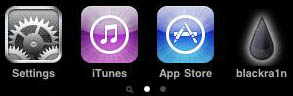
blackra1n installed

Step 7: Choose what installer applications you want to install on your iPhone and then tap “Install”. I suggest only installing Cydia but you may install them all if you want to.
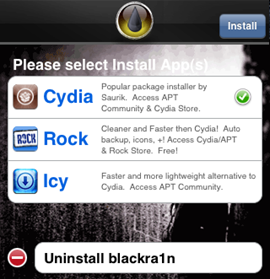
blackra1n app

BlackRa1n will download and install the selected applications.

Step 8: Once done installing, your iPhone will respring and you should see your installer app on your springboard.
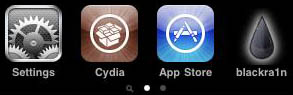
blackra1n cydia installed

Step 9: Once your installer app (Cydia in our case) is installed. You can safely uninstall BlackRa1n by launching the app and selecting “uninstall balckra1n”.
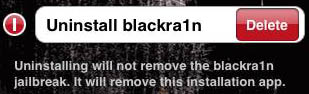
uninstall blackra1n

Step 10: Reboot your iPhone. You’re done!

If you have any question, please leave a comment below…

Liked this article? Please subscribe to the RSS feed, or follow me on Twitter and Facebook.


Related Entries

» Jailbreak iPhone 3.1.2
» BlackRa1n 2 Coming Out
» BlackRa1n RC2 is Out
» Weekly Wrapup: BlackRa1n, Jailbreak, and More…
» BlackRa1n for Mac is Now Available

700 Comments »

  • Superstar lady said:

    im currently on 3.0.1 n my phone is unlocked when i run blackrain n do the steps im finished right? or do i have to unlock the phone too again?

  • Jesse said:

    No your Unlock is gone it´s just a Jailbreak tool not a Unlock tool.

  • Cayman (Attila) said:

    Sebastien, thanks for the tutorial, im a jailbreaker now! :)
    But there is one thing, blackrain doesnt need to be installed. Its running without install. :)

  • informer said:

    I am currently at 3.1 version and not unlock yet, how long i have to wait for the unlock version come out. any one have any idea..please let me know. thanx

  • Angela said:

    it worked!! thanks sebastien and geohot!! <33333

  • Steve H said:

    I’m currently running 3.1.2 (locked). Will the Jailbreak still work without the phone being unlocked. and on 3.1.2? Thanks Seb.

  • AJ said:

    after much screwing around with this, and feeling like the process was working but never got a blackra1n app in springboard…I got it to work woth the following criteria:
    fresh restore of 3.1.2 (again)
    run blackra1n before updating carrier settings AND before restoring iphone profile from backup

    run blackra1n as administrator and in xp comp mode

  • DrChip said:

    Just finished and ran in to some small problems. It work and works well!!!! Awesome! I did 1g, 3g and 3gs all at once. Blackra1n doesn’t work on windows 64 bit very well. I tried! It works on 32 XP, Vista 32 and Windows 7 32 fine!

    1. upgrade to 3.1.2 firmware in iTunes..
    2. Plug in your device to your pc. ( ipod touch 1g,2g,3g,iphone,3g,3gs…)
    3. Go to http://www.blackra1n.com and download the blackra1n application. Click on the little windows icon below the website.
    3. Start blackra1n.exe on your pc ***1
    4. Click on “Make it RA1N”
    5. Wait for it to reboot automatically
    6. You will see GeoHot’s face right away ***2
    7. Open blackra1n app on your device and choose Cydia OR icy OR Rock
    8. Done

    ***1 on windows 7:
    copy blackra1n.exe to c:\
    run blackra1n as administrator

    ***2 Cable with iTunes on phone (if it takes longer than 30 seconds)
    You need to close blackra1n
    Hold down the power and home bottom until it shuts off.
    Press the power button and boot your phone again
    Start at #3 again

    Note: The jailbreaking part only takes 10 seconds. If it’s taking longer than its stuck.

  • mike said:

    I went and updated everything i needed to, and the hack still iznt working, when it goes into DFU mode it is the same old screen i usually get, not the screen from the website, and all it says iz that itz running . can someone help me?

  • John said:

    Wow, that was easy. Cydia was installed in 5 minutes.
    GJ. Now it’s time to put this to the test.

  • Mr. BBB said:

    Hello, thanks for all the info

    I have à problem, i have jailbreaked my iPhone 3gs 3.1.2 Whit blackra1n. Everything worked fine and i installed cydia, rock and icy. But when i try to install winterboard it installed it but nothing change on My iPhone?! I have also tried the 5 icon desk but it dosent work. This is My first jailbreak so i dont know if iam doing something wrong………..

    Thanks in advance

  • David said:

    I jailbroke my device using this method, but I accidentally deleated blackra1n before I installed cydia. How can I get cydia? Do I have to rejailbreak?

  • erik said:

    how long do this usualy takes to finish

  • teak said:

    i bought my iphone that come with o.s 3.1 it pre-install 3.1 ,does blackra1n can jailbreak it?

  • RA said:

    I use my Mac to synch with my 3Gs Iphone. I also have a PC that I can use for blackra1n. Is it possible for me to jailbreak with blackra1n on my PC and then synch it back up with the iTunes on my Mac and still preserve all my apps, music, etc? Would the process be much more involved? I am still currently at 3.01 on my phone and it is already jailbroken currently, but I did not do it myself. I know, this is a seriously newbie question.

  • erik said:

    mine takes the same amount of time every time

  • JAY said:

    hi i bought an iphone 3sg about 2 weeks ago with 3.1 pre-installed basband 05.11,07 and locked on the o2 5.0 carrier/network which i use as my carrier so i dont need to unlock. if i jailbreak it will i loose that?? im new to jailbreaking so if some one could help it would be well appreciated.

  • JAY said:

    in case your wondering about the o2 carrier its because im from ireland thanks again

  • osting said:

    @RA – same situation as you – found anything on your question?

  • BBYM said:

    @RA, osting:
    yES you can jailbreak on a pc and go back and sync with ur mac!

  • BadNews said:

    How long should it take for blackra1n to finish running? Mine has been “running..” for a little more then 5 mins now…

  • BBYM said:

    If it doesn’t work close the app and unplug. Restart and try again. That was it when purplera1n had tha same issue for me…

  • Duke of Prunes said:

    I’m running windows XP 32 bit and I can’t get this to work properly. I plug in my iPhone(3GS – brand new), update it to the newest version on iTunes, close iTunes and run the blackra1n application. iPhone restarts but first shows me the cable->itunes screen then black for a loong, long time. Trying it for the 5th time now but it’s not working.

    Haven’t seen GeoHack’s face on my iphone yet. When I restart there’s no blackra1n app…

    Any ideas how I could get it to work?

  • Brad said:

    I just jailbroke my iphone, and cydia was ‘reorganizing’ and my iphone automatically locked. I tried to open Cydia and it does not open, it shows up for about 2 seconds and goes back off,what should i do?

  • Duke of Prunes said:

    Oh yeah, I get the dialog saying the procedure was successful if that makes a difference

  • Duke of Prunes said:

    Basically, the reboot never happens… I have to turn it back on myself, and when I do nothing has changed.

  • BadNews said:

    Restarted several times and still not moving from “running…” This is my first jail brake is there anything else i should try?

  • BadNews said:

    Aj— I noticed your post said you did it before the carrier update. I’ve already updated mine is there anyway to downgrade it so that i can jailbrake?

  • pierre said:

    I have a 3gs 3.1.2 i am trying to use blackra1n but it freezes at the recovery mode screen

  • Danny:P said:

    Does this work with iPod Touch (firmware 3.1.1)?

  • Champion said:

    my phone keeps getting stuck at the itunes logo part, right after the dfu mode. how do i fix this?

  • DestriStar said:

    I tried blackea1n literally 12 times. Each time, iTunes would pop up. I too, had updated carrier settings and thought this was the problem. Finally, my husband tried. He left iTunes up when it came up & it worked.
    Hope that helps someone!

  • LIL DAVID said:

    GREAT…THIS IS THE BEST SOFTWARE THAT I EVER USED 2 JAIL BREAK MY IPHONE BUT I ACCIDENTLY JAILBROKE MY 3.1.0 SOFTWARE AND IT STILL WORKED THANKS GEOHOT

  • DestriStar said:

    Sorry, I meant to say that when iTunes would open for me, I would close it.

  • Jimmy said:

    Im trying to jailbreak my phone but its getting stuck on the recovery mode image. I click “make it rain” and it just stays in the recovery mode. It doesnt show the geohot pic. someone help pls

  • Champion said:

    i think everyone who keeps getting stuck in recovery mode needs a patch… its sumthing to do with properties but idk where or how to fix this problem. someone help plz, i need this jailbreak!

  • Cayman (Attila) said:

    Jimmy: Which operation system do u have? I have windows 7, than i set the blackrain to xp mode, than i run it as an admin, and it worked for me perfectly. But first i updated itunes, than i restared my computer.

  • CT said:

    No problems in Windows 7 64 bit without bothering with XP compat mode. Just ran as administrator after updating my phone to 3.1.2 OS and firmware (didn’t apply carrier updates before jailbreak). Awesome!

  • straegle said:

    im also having problems with winterboard not working.

    just for aheads up appsync for 3.0 in cydia works for 3.1.2 jailbreak

  • Jimmy said:

    i have tried it on my laptop running windows vista..and my desktop running windows XP..still no luck. I’ve been reading that iphone 3g isnt working to well with the blackra1n. maybe that is the reason it wont work?

  • dennis said:

    im stuck in the recovery mode all i get is the usb cable connect to itunes no geohot pic

  • BEN said:

    Same prob as some others, staying in DFU mode and nothing more? someone help??

  • Lars said:

    I cant open cydia. It says: Reorganizing, will close when done. Then it closes! Im not a pro soooooo be nice!

  • Jezza said:

    Would this work if I use bootcamp on my mac??

  • Jimmy said:

    i think ill just wait for dev team to release pwnage tool..not workin for me…tried it about 20 times with no luck. Never see the geohot pic

  • isabell2009 said:

    Hi,

    i cant reboot iPhone after running blackra1n. Have done everything like in description. Waht am i doing wrong? Please help me!

    Ty,
    isabella

  • BadNews said:

    My persistence finally paid off! my iphone is jailbroken now thanks blackra1n :)

    What i ended up doing differently was I started blackra1n before I plug my iphone in…. It literally took only a few seconds after that.

  • Guy said:

    If anyone is having problems try to do the jail break with your computer in SAFE MODE.
    Ive done numerous jail breaks and having the computer in safe mode fixes the problems I usually have. I am running Vista home premium 32 bit

  • Cayman (Attila) said:

    Isabell: Blackrain will restart your phone, be patient, for me within 1 minute, blackrain restarted my iphone :)
    Lars: did u try restart your phone after installed cydia? it worked for me, i had the same result like u.

    Maybe yes, i mean it wont work very well on 3G, maybe that your problems. I tink u should wait somebody who smart about this :)

  • guille said:

    if i jailbreak my ipod with this program do i lose all my music and info?
    thx

  • Moe said:

    can I jailbreak my iphone on any computer or do I have to use the one its formatted with?

  • Cayman (Attila) said:

    Guille: u can jailbreak just if u have ipod touch, and no u won’t! :)

  • guille said:

    @Cayman (Attila) thx for answering so fast :D

  • Cayman (Attila) said:

    Moe: im not sure, but i think u can do it on any pc, cause u dont have to use itunes in the jailbreaking process. But i am not sure, so i suggest wait until u get home and do it with your own pc that synchronized with ur iphone :)

  • rejrejid said:

    have itouch 3g 32gigs … blackra1n installs fine and works but need to plug in to computer everytime itouch restarts. i’m i doing something wrong?

  • CFI said:

    WOW!!! Geohot easily gets my 100$ donation. Thanks geohot

  • Beau said:

    Okay, ive tryed 50 times or so to do this on two different computers and i still get the “plug into itunes” thingy. I’ve jailbroken my phone many times before this and i know what im doing but now, I’m offically done with this.

  • Fer said:

    Will I lose my unlock on iPhone 2g if I update to 3.1.2?

  • Jordan said:

    Same problem as everyone else. I get the usb to itunes logo and then I have to reboot phone just to be back at square one. I have the 3g 8gig on 3.1.2 and tried before and after carrier updates. Even tried as admin.

  • Jimbob said:

    Hello, I have a new 32Gb 3GS with 3.1 installed. It came factory unlocked. Will Blackra1n jailbreak my phone without locking it? Will I still be able to sync with itunes afterwards?

    Thanks

  • Luis said:

    it says running… how long should it be stucl on this

  • Annalee Cruz said:

    I have the same problem with winterboard after installing it. I played around with it and find out that Icy is causing the crash of winterboard. DO NOT install Icy from blackra1n but rather install it from cydia. That should work after that.

  • Jesse Crane said:

    I have tried it several times and it never gets pas the screen with the itunes and cable. I have a 2nd gen Ipod Touch running 3.1.2. I have tried several suggestions including reboots, redownloads, switching USB port, and using taskmanager to stop any ipod software. It still won’t work.

    Do you have any idea why? what should I do?

  • Annalee Cruz said:

    For Jimbob:

    If you bought our Iphone factory unlock as you said then it will never be lock to any carrier. You are safe to jailbreak it and have fun with the things you will discover after jailbreaking. Its worth it.

  • Dark_Knight said:

    NOTE: DO NOT INSTALL ICY from blackra1n. There are some compatibility issues like cydia and apps are crashing. Install ICY FROM CYDIA.

  • Seamus said:

    Ugh. same problem keep getting iTunes connect thing is there any workaround?

  • rHYS said:

    to all those with the stuck on running problem i fixed it by keeping my phone locked then opening blackra1n.

  • Seamus said:

    well i feel dumb i just fixed it by restarting my computer!

  • E88 said:

    I had the same problems with 3g getting stuck. Tried 5 times with no luck.

    I switched usb cable from one slot to another, and re-ran Blackra1n. It worked on next try!

    Hope this works for anyone else having these problems.

  • Jimbob said:

    Thx Annalee Cruz!!

  • Cayman (Attila) said:

    Im trying the jailbreak for 3-4 ours continuosly, and i can confirm the problems with icy, i dont know what the problem with it, but some thing didnt work well, then i uninstalled icy, and even the cydia is faster. I dont understand, these are just my results :)

  • Jesse Crane said:

    I tried the USB switch already, I’m gonna try the SAFE MODE after this restore is done.

  • ben said:

    does it work out of the box

  • MARTINEZ said:

    I Restored My Phone, Updateded To 3.1.2, Then Ran Blackra!n, I Clicked On Make It Rain and It Boots Until The Itunes Logo and The USB picture Comes Up And It Gets Stuck…ANY HELP PLEASE????????!!!!!

  • eviltim said:

    I have the same problem .. 3g 16mb running V3.1.2.. I start BlackRa1n and it says blah blah.. then running and thats as far as it goes.. I have tried every suggestion in here plus a few of my own.. no luck..

    Cmon someone has to know the fix..

  • W7User said:

    Somehow iPhone Browser recognizies the ipod but says its not Jaailbroken….. Any Ideas ?

  • Kyle said:

    i have a jailbroken 3gs on 3.0. are you supposed to update to 3.1.2 in itunes before running this?

  • D13 said:

    Its not working for me. It keeps making me restore my iPhone. Can someone help???

  • Cayman (Attila) said:

    Kyle: the blackrain can jailbreak 3.1.2 but 3.0 its better for this time, i think. If stay on 3.0 there is always be a chance to unlock, but if u upgrade there is no unlock, and maybe will never be able to unlock in the future, i mean in the near future! :) So i think u should not update, but the choice is yours :)

  • Dark_Knight said:

    For Kyle:

    Im not quite sure but as far as I know DevTeam released a JB for 3.0 and blackra1n is for 3.1(2). Just my opinion.

  • Luis said:

    i’m stuck at running… any1 figure out hot to get pass this im running windows xp

  • Kyle said:

    well i don’t care about unlock, i just want to be on the latest OS.

  • Dark_Knight said:

    For Kyle:

    Then feel free to upgrade then jailbreak with blackra1n.

  • Cayman (Attila) said:

    I was reading the geohost blog, and in the comments they are trying to find out how to solve the problems with 3g stuck in dfu mode. So here’s some tips of the last 100 comments (there is 838 comments right now, i cant readm them all sorry :)

    Try to ctrl alt del and stop all apple programs are running, mostly look out for Itunes to do not run! It worked for some poeple.
    The second that i think maybe the problem. Anti-virus program. Again, crtl alt del and close them all! It worked for some people again.

    So, still official solve for the problem :)

    The blog is here, the last article’s comments that u should take a look at! Somebody will know the answer :)
    http://iphonejtag.blogspot.com/

  • Cayman (Attila) said:

    I was reading the geohost blog, and in the comments they are trying to find out how to solve the problems with 3g stuck in dfu mode. So here’s some tips of the last 100 comments (there is 838 comments right now, i cant readm them all sorry :)

    Try to ctrl alt del and stop all apple programs are running, mostly look out for Itunes to do not run! It worked for some poeple.
    The second that i think maybe the problem. Anti-virus program. Again, crtl alt del and close them all! It worked for some people again.

    So, still official solve for the problem :)

    The blog is here, the last article’s comments that u should take a look at! Somebody will know the answer :)
    iphonejtag.blogspot.com

  • jay said:

    thank u nOx for that peace of info worked great however i have installed winterborad and a few themes the themes will show up i winerborad but will not display. anybody know how resolve this….

  • Doctajoyce said:

    Evening everyone,
    I jailbroke my eight gig 3g succesfully but when I try to run any app store program it starts and closes immediately any suggestions?

  • young blood priest said:

    open black ra1n first than connect your iphone

  • Dark_Knight said:

    For Jay:

    Is this the first you are going to use Winterboard?

  • eviltim said:

    young blood priest said:

    open black ra1n first than connect your iphone

    —————————————-

    yea.. that didnt work

  • bsbrady said:

    I currently have a 3G jailbroken at 3.0.1. I use PDAnet to tether. If I jailbreak 3.1.2 will I still be able to tether?

  • bajanfari said:

    i tried and tried ….FINALLY I PUT MY SIM CARD AN BOOOM IT WORK MAKE SURE U HAVE YOUR SIM IN THE PHONE …HOPE THIS HELPS …..BECAUSE U GUYS HELP ME

  • ankelly said:

    I was stuck at “running” also. I read a lot of these posts too. What I did that worked for me was to start blackra1n and when it said waiting for iphone, then I plugged in my phone. Then it worked fine. No problems at all, worked in seconds after that.

  • Whateveryouwant said:

    Whatever else blackra1n is, it certainly is not ready for primetime. A jailbreak solution should be nothing if not reliable. It should fire every time you pull the trigger and this ain’t it. Disappointing.

  • Colten said:

    Does anyone know if there is a way to replace the AT&T logo at the top of the screen to say anything or change it to something cool?? I can’t seem to find anything about it, thanks!!

  • jay said:

    hi dark night i have installed – reinstalled unstalled restarted and still not working.

  • D13 said:

    Do i have to restore?

  • Dark_Knight said:

    To BsBrady:

    Yes! As a matter of fact I’m using my PDAnet as I type this.

  • Kyle said:

    everything is working fine for me. only bad thing is that i have to search through cydia again to get my phone looking like it used to.

  • Dark_Knight said:

    To Jay:

    I bet you did those steps to solve the problem. What I’m asking you is if this is the first time you are going to use Winterboard and tell me what did you installed after jailbreaking it. Did you installed ICY from blackra1n?

  • Himantha said:

    Hi
    I read that sme ppl who did this had problems like crashing apps and phone gettin stuck wen rebooting if this happens to me can I just restore the phone official firmware using iTunes and will I loose ny data like contact and installed apps

    thank you
    hima

  • jay said:

    yeah i did install icy should i not have done?

  • Dark_Knight said:

    To Jay:

    When you say nothing is happening after you installed Winterboard, does it crash or did you choose the theme you wanted? Because if you choose the theme and winterboard didnt applied the theme then it has something to do with ICY. I have the same problem as yours until I find out that ICY is causing the problem. I removed Icy and my winterboard worked perfectly. Its been a known issue since the release of Iphone 3.0 that
    Cydia and Icy when installed together during the jailbreak process causes a lot of issues like cydia is not working to app crashes. If you want to install Icy, I suggest you do it from Cydia. Hope that helps.

  • WHITE27 said:

    I could not run blackra1n on vista (tried on 32bit and 64 bit) with iTunes 9.0.1.8
    after few hours I have found solution
    How to run it on vista with iTunes 9.0.1.8

    1. Close iTunes
    2. Open “task manager” press (ctr+alt+del) then select “Start Task Manager”
    3. click on “Processes” tab
    4. Find “iTunesHelper”
    5. Right click on it
    6. “End Process”
    7. right click on “blackra1n” > “Run as administrator”

    Hope that helps.

  • eviltim said:

    yep that doesnt work either

  • Annalee Cruz said:

    Apparently, a lot of people are having problem with blackra1n. When I run it the first time I didn’t encounter the mentioned problems except my trouble with Icy.

  • Matt said:

    I would like to share how i got this to work. I tried about 10 times to make blackra1n work and it got stuck in the normal iphone DFU mode.
    -Make sure you restart your computer after you install Blackra1n.
    -After that make sure itunes is closed. I am running 64 bit vista os. I went into task manager and ended all of the processes that apple uses. The thing that made it work was when i clicked on services (in the task manager) i restarted the “apple mobile device”
    -then i clicked “make it ra1n” and it works. Hope that helps

  • Beau said:

    FOR ALL iPhone 3g Users

    DO NOT JAILBREAK RIGHT NOW!!! Your phone will go into the “Connect to iTunes Recovery Mode” and you will have to restore your iphone.

    Steps that i’ve tryed that do not work:

    ————————————————————————————–
    1. Close iTunes
    2. Open “task manager” press (ctr+alt+del) then select “Start Task Manager”
    3. click on “Processes” tab
    4. Find “iTunesHelper”
    5. Right click on it
    6. “End Process”
    7. right click on “blackra1n” > “Run as administrator”
    ————————————————————————————–
    Take internet connection off of computer when jailbreak
    ————————————————————————————–
    Try on a different computer
    ————————————————————————————–
    1. Take your sim card out of the phone before you jailbreak
    2. Jailbreak
    3. Reenter sim
    ————————————————————————————–
    1.Download latest iPhone OS firmware
    2. Download BlackRa1n
    3. Restart Computer
    4. Jailbreak
    ————————————————————————————–

    For iPhone 3G users that is what i’ve tryed. Ive always just let it sit on the iTunes restore screen for an hour and nothing happened. One thing i did not try yet which im not going to till i have offical word that it works, or something works, is when BlackRa1n says waiting for iPhone, then plug it in. Apparently on another blog that has worked but i will not try it till someone confirms it.

    Hope this comment helps 3G users and their frustration!!

  • DrChip said:

    http://cydiaupdates.wordpress.com/2009/10/11/blackra1n-stuck-at-the-running-screen-heres-the-fix/

    If youre stuck at the recover mode use the link above. It explains about needing service pack 3 when in XP mode. (The needed mode to make the jailbreak work.)

  • Matt said:

    Sorry i want to add to my comment. Mine was #107. I am running a iphone 3g and it worked

  • Joana said:

    Hi I’m having trouble jailbreaking my iPhone 3g I can’t get passed the waiting on iPhone don’t understand why if iTunes is detecting my iPhone and I also see it under computer can anyone please help me

  • Dark_Knight said:

    <—- Silly Face, I'm not mad though.

    To Colten:

    Does anyone know if there is a way to replace the AT&T logo at the top of the screen to say anything or change it to something cool?? I can’t seem to find anything about it, thanks!!

    The app that you are looking for is called Make It Mine… when you search it for Cydia, type it without spaces.

  • eviltim said:

    Matt said:

    I would like to share how i got this to work. I tried about 10 times to make blackra1n work and it got stuck in the normal iphone DFU mode.
    -Make sure you restart your computer after you install Blackra1n.
    -After that make sure itunes is closed. I am running 64 bit vista os. I went into task manager and ended all of the processes that apple uses. The thing that made it work was when i clicked on services (in the task manager) i restarted the “apple mobile device”
    -then i clicked “make it ra1n” and it works. Hope that helps

    ————————————-

    NOW THIS WORKED!!

  • Dark_Knight said:

    To Colten:

    The app you are looking for is Make it Mine. When you search for it at Cydia, type it without spaces.

  • Ody said:

    okeydokey, so havent jailbroken in a while, and saw there was this new blackra1n jailbreak, i figured ok sounds cool. well, i download it install it, and i go to download Winterboard, my ipod shuts off, when i turn it on the apple logo appears for like 10 seconds, then it resets. Ive tried connecting it to itunes, and nothing. anyone know what to do?

  • dennis said:

    it worked after i used the task manager to end “iphonehelper”…
    can anyone confirm which applications from cydia work?

  • Ody said:

    okay, nvm i got it into DFU mode. =} whew

  • Gary said:

    Like others have reported, my iPhone 3G 3.1.2 got stuck on the “running” step with the USB/iTunes connect screen on the iPhone.

    I tried the settings suggested above including turning on Airplane mode and restarting but to no avail. I repeated the process 2 or 3 times with no luck.

    As a last resort, I tried launching the Blackra1n app BEFORE plugging in the iPhone. It worked like a charm! Thanks geohot!

    My configuration is as follows:

    Windows Vista Home Premium 64 bit.
    iPhone 3G 3.1.2 8gb

  • kevin said:

    I’m running the 3g with xp on a laptop. I tried almost everything and had no success. I switched all the usb Ports all of the ctrl alt delete processes and nothing worked. I then put my computer in safe mode then restarted it. I recommend just RESTARTING THE LAPTOP THEN END THE ITUNESHELPER.EXE PROCCES THEN START BLACKRA1N. then it worked for me. I hope this helps.

    Penn State Rugby Football

  • eviltim said:

    The following worked on my 3G 16mb after all of the other things did not.. This worked first try, I even restored it back and did it again just to verify it wasn’t a fluke.

    Iphone 3G 16MB

    OS 3.1.2

    1. Make sure you restart your computer and your Iphone is connected.
    2. After that make sure itunes is closed.
    3. Press CTRL-ALT-DEL and select task manager.
    4. Select processes and find the Iphone Helper process and stop it.
    5. Select services and find the “apple mobile device” process and restart it
    6. Click “make it ra1n” and it works. Hope that helps

  • Dylan said:

    as soon as i click “let it rain” it starts but on my phones screen it just has the usb cable and the itunes sign and stays there. what did i do wrong?

  • Knighthawk said:

    Worked perfectly the first time on my iphone 3G running 3.1.2. I ran it from a windows vista laptop from a folder on the desktop. Changed no settings just double clicked it. It restarted my Iphone then the picture came up on the phone and ITunes loaded on the PC. The small busy circle appeared on the phone and about 1 minute later it was done. Thanks so much

  • Jeff Miller said:

    iPod Touch 2G ***Now jailbroken 3.1.2***. Thank you Sebastion, this worked perfectly for me on the first run, it took less than 2 min to jailbreak and I didn’t lose any of my apps or anything.

  • msmug said:

    i tried all the steps listed above.
    first time i ran ‘make it rain’ it looked like it was working. i got to the screen where it said that after it restarted, it’d be complete and to donate if i wished. it got stuck on the “done, wait for reboot” screen. i waited 30 mins and nothing happened. so i tried to restart the phone and nothing happens anymore. the apple logo appears, then disappears. i can’t start the phone. itunes wont recognize the phone as a device. HELP?!

  • msmug said:

    oh. so after that, i tried again. i stopped the ituneshelper process and restarted the ‘apple mobile device’ process. i tried to ‘make it ra1n’ again and it’s stuck on ‘waiting for phone’ and theres nothing happening on the phone :(

  • gpzal said:

    iphone 3g 3.1OS running windows 7 64 bit works.

    it did not work no matter what I tried with 3.1.2

    thanks.

  • Knighthawk said:

    Never at any point did the itunes icon and cable appear on my phone when it worked

  • CalCadi said:

    thank you so much, worked perfectly, i upgraded my iphone 3gs first, then ran program to make it rain(lol) then updated my carrier files, then installed cydia only, installed package backup, and did a restore i have all my programs bacc in under 20 mins, this was the easiest jailbreak i have ever done, i have been jailbreaking my iphone since first generation, and hands down this program was the easiest to use thanks again, i donated 5 bucs

  • Samsiteone said:

    Not working on iPhone 3G. 3GS and iPods are fine as I heard. YouTube and online forums will confirm what I say.

  • Infamous said:

    Yes Finally Worked For Me
    Basically Just Keep Trying
    I Tried About 5 Times Until I Got It

    What I Did Different Was Opened Blackra1n while it was syncing with iTunes

  • Infamous said:

    Btw I Have An iPhone 3g 16g

  • thrill5one6 said:

    I thought mine was getting stuck in recovery mode and said to connect to itunes. I then found some other directions that says to close out itunes and black ra1n when it is stuck in recovery mode and this method worked for my 3GS 3.1.2

    1. Make sure you have newest verison of iTunes
    2. Upgrade using iTunes
    3. Download blackra1n from blackra1n.com
    4. (after done upgrading) Close iTunes
    5. Run blackra1n and click make it ra1n
    6. When in recovery mode close iTunes again and blackra1n
    7. Open blackra1n again and click make it ra1n again
    8. After reboot go into blackra1n on spring board (never restore from backup in itunes)
    9. Install Cydia (make sure you have internet)
    10. Open Cydia after it closes and confirms it works then do 11
    11. Delete blackra1n on springboard (open it and tap uninstall)

  • Os said:

    I followed every single advise and nothing works… it keep telling me that is done but I have to reboot phone myself… antivirus is off, firewall off, all apple applications running have been disable (except AppleMobileDeviseService.exe becuase without it, blackra1n.exe will not detect iPhone… any other ideas???

  • Cayman (Attila) said:

    Os: use other method, pwntool or something :)

  • the beav said:

    Man thats the maddest one yet. thanks geo ill send you some cash.

    all you other cheap bitches send a donation too

  • Anthony said:

    Connect to itunes fix….

    all i did was first have black rain open without the iphone connected and iphone off.. then i just click make it rain and turn on iphone worked pretty quick….

    tried this after 1 hour of trying and finally broke yayyyy

    iphone 3g

  • BKW said:

    So I just Downloaded blackra1n for my Ipod 3g 8gig and I got 3.1.2 on Win 7 do I need PwnageTool or no i can go head and run as admin

  • msmug said:

    here’s a dumb question. was i supposed to update my iphone to 3.1.2 before running blackra1n to jb?
    cuz i didnt. and i wonder if that’s why i’m running into probs.
    if so, does anyone know how to fix that?

  • Ragflan said:

    Just a quick question.

    1.) The jailbreak worked and I installed Cydia as well…
    2.) I tried installing Backgrounder and it when I pressed Reload Springboard, it just hung there.
    3.) Tried pressing the power off button. Nothing. Menu button – nothing.

    So, do I just wait for it to drain its battery and restart? or shall I run the blackrain hack again? Thank you for any help…

  • Ragflan said:

    I’m using an iPod Touch 2G by the way…

  • Eric said:

    is it able to jailbreak iPhone 3G with BB 05.11.07? help help!!

  • Eric said:

    i’m stuck here, my iPhone hung from time to time?!!

  • Andrew said:

    I have the same problem with winterboard not working properly. I installed Icy, Cydia, and RockApp all through the blackra1n jailbreak….

    How do I go about uninstalling Icy to resolve this problem?

  • Bert said:

    I have also tried everything with no success (Win7).

  • Eric said:

    may it doesn’t support BB 05.11.07?

  • Ste said:

    Just tried with 3G 3.1.2 on o2 on both XP and Vista PC.
    Both stay on iTunes plugin screen for ages with nothing happening :(

  • atrodysimgerai said:

    STE: connect iphone>enter restore mode>run blackea1n>thats it :)

  • ZefleR said:

    Anyone with the USB to iTunes screen hanging. Kill the msdnresponder process in task manager then try it

  • Abhishek Jain said:

    My iphone 3gs 32 gig is stuck on activation screen..evn aftr jaibrkin d same with black ra1n…

  • nikki said:

    it doesn’t work on my 3GS. Am i doing something wrong? Theres no blackra1n icon after the reboot.

  • CraZ said:

    OK .. I have an iPod Touch, I upgraded the firmware, ran blackra1n.exe, worked like a charm.
    My problem is ..
    When I turn off the iPod after successful install and reboot, the iPod reboots in DFU mode .. then I have to run blackra1n.exe again to get into the iPod.
    Any thoughts?

  • gogocons said:

    For those having problems, this is your post.

    First, my iPhone 3GS was bought only a week ago, it was OTB 3.1. I upgraded it to 3.1.2 last night not really knowing if I should or not for this jailbreak. It also has the updated baseband being OTB so yes this jailbreak works with it for those who don’t know.

    After many hours with no luck I finally decided to start reading up on what other people’s solutions were and I finally used this solution which worked on my first try.

    1) Reboot Windows (Vista Ultimate 32 bit)

    2) Plug in iPhone (different USB port then I’ve been using)

    3) “make it ra1n”

    4) Close iTunes

    5) Stuck in DFU

    6) “make it ra1n” again

    7) This time the picture popped up and I’m now happily jailbroken!

    I hope this will help someone at least.

  • gagir said:

    Works well for me, 3GS 16G, FW 3.1.2

    BUT!

    I cannot make the cell phone service work, it is a legit account for witch I have a contract so I do not care about unlocking.

    Is there something to do over blackra1n?
    The modem firmware is now 05.11.07

  • marvinmadman said:

    I had many problems when trying to JB both my 3G iphones. The first one was easy (about 2hrs), Last one about 3hrs. I think what works is that you have to reinstall the 3.1.2 firmware without restoring your backup settings or installing the next ATT carriers update. Those have to be installed after Blackra1n. 1. open Blackra1n. 2. plug in your phone and get it on the HOME screen. 3. open iTunes and wait about 1 minute to allow recognition of your iphone. 4. unplug your iphone. Leave itunes open. 4. click Make it Ra1n. 6. plug in your iPhone. Should work after that as it worked for me. But I think the most important step is not installing the ATT carrier update.

  • gagir said:

    Thanks marvinmadman,

    I did not do such update, as I know of. I am in Canada and using Rogers.

    My first jailbreak was with ultrasn0w to make it work, but now it is not supported.

    I installed 3.1.2 following the above instructions.

    Only problem was I installed Icy and Cydia at the same time, so I had to restore and re blacksn0w my phone.

    I reinstalled my apps using Rock restore.

  • Eric said:

    i try but i’m still stuck at the window?!

  • Ron said:

    It says “Runnung” but theres no custom image just the usual usb cable w/an arrow pointing up to the itunes cd icon. been like this for 5min an nothing happening

  • Ron said:

    btw i am still running 3.1 and not 3.1.2 – am i suposed to upgrade to 3.1.2 first? i thought i saw not to upgrade it to 3.1.2 before using blackra1n?

  • John said:

    Sure wish I’d read this before I started. Now I’m stuck at a black screen. Reboot and it appears I’m NOT jailbroken. Can’t seem to get anywhere. As far as I can see, it simply does not work. I’ll keep trying (what choice to do I have?) but I’m pretty disgusted.

    My advice to anyone reading this is to continue waiting for a decent jailbreak solution. This certainly isn’t for me.

  • JAY said:

    Dark_Knight

    Did what u said and it work! thanks so much love the jailbreak just wish there was more options and apps to customize your iphone like in the 1.1.4 change the interface colour and all…aw well….

  • Abdullah said:

    INFO: welcome to blackra1n for windows
    INFO: loaded dll at C:\Program Files\Common Files\Apple\Mobile Device Support\bin\iTunesMobileDevice.dll
    INFO: button clicked
    INFO: internal device callback called
    INFO: callbacks registered
    INFO: sent enter recovery command

    It freezez at running

  • JAY said:

    hope this will help….

    after i updated itunes and my iphone firmware i restarted my laptop.
    then i terminated bonjour, firewalls and all anti virius.
    put blackra1n program in the c drive.
    make sure itunes is closed.
    run blackra1n as an administer then when its say waiting on phone connect your phone… thats how it worked for me….

    i have a vista 32 bit laptop and i did not change it to the xp compatibility. 3.1.2 iphone 3gs and it worked for me.

    hope this helps sorry i cant help anymore…

  • JAY said:

    sorry forgot to add i also had all the same probs freezing, stuck in recovery and everything before i done what i said above, done all the above and it worked. i jailbreaked it 3 times that way and work 3times

    hope it will help someone.

  • JAY said:

    For Ste

    hi im also on o2 i had a few problems my self with my 3gs but finally got it to work..

    i used a vista 32 bit laptop and i DID NOT change it to the xp compatibility.
    after i updated itunes and my iphone firmware i restarted my laptop.
    then i terminated bonjour, firewalls and all anti virius.
    put blackra1n program in the c drive.
    make sure itunes is closed.
    run blackra1n as an administer then when its say waiting on phone connect your phone… let it do its thing and that should be you thats how i got it to work

    hope this helps you.

  • Chris Brown said:

    I’m glad they finally got it together…

  • John said:

    Finally. Looks like it worked.

    Restored totally. Did NOT!!! install carrier update.
    Restored my backup
    Shut down iTunes
    Unplugged phone
    Started Blackra1n
    Clicked Make It Rain
    Plugged in phone
    Kaboom! Broken.

    Installed Cydia & Rock. Not Icy (had problems with that on 3.0)

  • 0ne_Five_Three said:

    Yeah I’ve done and tryed everything wasted a whole day and still nothing…what is the deal with the 3G’s…so far for me and other 3G users it’s a FAIL!!!

  • WOW! said:

    I’m a 3G user, and i’m having all of the problems like all the other 3G users are mostly having. Tried everything suggested. This guy probably won’t get my donation anymore…

  • proteanloki said:

    I tried last night for about 1 1/2hrs, each time i was stuck in recovery, tried jailbreaking in all safe modes on my laptop and no luck, tried as admin and no luck. Finally I did like normal and when my iphone was stuck in recovery again, while connected and Blackra1n was running, i turned off my iphone and turned it back on, ” all the while Blackra1n was “running” and it did the job…don’t know if it’ll help anybody, but it worked for me. I have and iphone 3g and my laptop runs Vista home premium 64bit

  • Natasha said:

    Im on windows xp but when i try and run blackra1n in xp mode i dont have that option from the drop down bar in properties.

    help?

  • haktus said:

    Just wanted to add that im on windows xp with iphone 3g 3.1.2 tryed 20 times no luck. Then i opened black ra1n before plugging my iphone in and I now have cydia….. hope this helps

  • Iphone 3g 3.1.2 said:

    It seems like reading these comments didn’t help me at all. We are all having the same problem so there is only one solution. I’ve tried all the advice and followed all the steps that everyone is posting. We are all missing something. There is a problem jailbreaking the iphone 3g and no one has solved it yet. Some people have stumbled apon getting the 3g to jailbreak but no one has solved the problem. We need to pinpoint the problem and fix it. If i find the problem i’ll post right away. Goodluck in finding it.

  • HERO_001 said:

    I have tried everything above and nothing works
    After running the blackra1n , picture pops on my iphone and then iphone reboots and nothing happens
    its again on the enter a valid sim screen
    wtf
    ANYBODY HELP

  • Melek said:

    FINALLY!!!! OMG I’m so relieved right now. This took me aboutt an hour and a half or so. So what I did was- going through ALL OF THE 171 COMMENTS ABOVE and trying ALL OF THE GIVEN SUGESTIONS. And somewhere around #169 I finally got it broken! I guess it was-
    1. Stuck on ”Connect to iTunes” (Blackra1n ”Running”)
    2. Restart iPhone.
    Something like that. I’m using Win XP, iPhone 3G 16g.
    Hope this helps.

  • blue337 said:

    i tried all of this an its still not working can someone help me

  • Michael said:

    Please help as I have updated my iPhone to 3.1.2 firmware. And when I run black rain and hit make it rain, it only leaves a picture of the iTunes icon and the data cable on the phones screen, blackrain is showing “running” but it just sits like that. I have copied the QuickTime .dll to my windows system folder. And now I am lost. Please help. Thanks

  • Laci said:

    My mom just got a 3g ipt with 3.1.1 and tried blackra1n. Now her ipod is black screen and wont turn on. What do we do to fix this? Will it turn back on? She had the image for blackra1n on her ipt but then it never restarted and still hasnt. Itunes is having trouble restoring it, Im not sure if shes done the restore all the way though. Help please. :)

  • Ez said:

    This program is probable the single worst jailbreak that has ever come out for the iPhone.

    It works under no circumstances. I have ran through all the 176 comments, trying absolutely everything and no luck.

    Im running Windows 7 Build 7600 and nothing

    I placed blackra1n in the C:\ folder
    I run it as administrator
    turned off bonjour, and my antivirus suite
    Have tried running it in XP Service Pack 3 and Vista Service Pack 2 compatibility and nothing
    its an iPhone 3G 16Gb White
    Any suggestions would be greatly appreciated

  • haktus said:

    Ok after jailbreaking on iphone 3g 3.1.2 with xp I noticed a hug red banner in cydia, Not sure exact words but something abour redsnow.7X anyways if you got this error go back restore your phone in itunes 9 the disconnect your iphone from pc, open blackra1n then plug iphone back in. Then after you get the reboot and the pic of geohot just install cycia and rock for some reason icy and cydia conflict. I just finished and so far all is working perfect. I will post more as i dig deaper.

  • Nostradamus said:

    Super Fast, I’ve been jailbreaking since the very first iphone and this is definetly the fastest ever!.
    Jailbreak in MacBook Pro using Bootcamp, latest iTunes version, iPhone 3Gs 3.1
    Already installed Cydia and Winterboard, everything working fine so far.
    Thanks Geohot

  • Kyle said:

    Hello can someone please tell me if i can use this while on OS 3.0 ive been waiting for something and havent done any of the apple updates. If i use blackra1n will it jailbreak it and put 3.1.2 on my Iphone 3G. Please email me with any suggestions fossman292002@yahoo.com

  • san23 said:

    i have a iphone 3Gs running 3.1 FW and i used blackra1n to JB and it worked everythjing was going well until i installed winterboard and it asked me to reboot the phone and so i did but now im stuck on the apple logo and from there it doesnt go anywhere ive tried the holding the home and power button at the same time and i have done that several time but nothing please some one help me :(

  • Eric said:

    i wish things were running like smoothly. could someone update us on the jailbreaking? things doesn’t seem to be working here?

  • Mango12 said:

    **HELP**
    I have the iphone 3g 16gig white. I have noticed a lot of the 3g users are having problems too. Anyone have any suggestions Ive tried like 20 times in so many different ways.

  • 5j3553 said:

    does this work for ipod touch 2g 3.1? just to be safe :)

  • hazey said:

    So I have an iTouch 8gb 2G/3G, unsure which version I have, with firmware 3.1.2. I tried using blackra1n, i did some of tips ppl offered, start blackra1n then plug in itunes etc etc. So after blackra1n says it’s done and my itouch is rebooting, my itouch turns off and stays off and will not turn on even if i try DFU mode. And itunes keep popping up the error that says “Your itouch has been detected in DFU mode and has to be restored”. And it keeps popping up everytime i click okay. Any tips or helps on what im doing wrong?

  • vj said:

    Hello, I’ve tried all steps, but I’m not even getting the geoHot picture! I need help please, all I get after the recovery mode is a clear screen, the phone doesn’t turn off or reboot, it just says I’m done, but nothing happens!

  • vj said:

    I got it to work! I just decided to use my husbands laptop (windows vista) instead of mine (windows xp) and it worked on the first try, I got cydia to install and everything is working fine, I will be donating!!!! Again thanks!!!!!

  • JGON85 said:

    @marvinmadman

    you are the man, I did what you said and poof! it worked.

    @ everyone else

    Most definitely follow marvinmadman’s advice. I did a restore as a new phone, decline the att carrier update and follow marvinmadman’s instruction. No process-kill necessary

    vista home prem 64

  • kerry said:

    i got an iphone 3g an i cant get pased dfu mode and no the task manager thing dose not work somebody please help i havent had my jailbreak since 3.0 if u can help e mail me asap at lokk550@yahoo .com

  • Darq said:

    Ok I’ve jailbroken my 3.1.2 with blackra1n, is there a way to get back all my apps and games I had when when I was running jailbroken 3.0?

    I went to sync my phone, and itunes tells me there are 51 apps that could not be restored… I’m assuming all those apps and games are ones that were downloaded through Installous. Is there a way to get these back on my phone, without having to redownload them all again? Thanks.

  • Brad said:

    Marvinmadman’s way of doing it seems to work as i had tried before but was unsuccesfull and tried his way and it worked! Thanks! :D

  • HST said:

    I’ve run blackrain & installed Cydia,Icy & Rock but when run Cydia there a message saying

    “your copy of cydia does not know what version it is, itself, running. This issue is normally caused by a corrupted /var/lib/dpkg/status file. This seems to be caused by asking redsnow 0.7.x to install both cydia & icy during the jailbreak. This situation is not readily fixable after the fact, so it is recommended that you restore when you can. The icy package in redsnow 0.8may fix thisas yet not fully understood bug. a simple fix is to delay installing Icy.”

    How can I fix this problem?

  • Emerald said:

    I’m running on and iPod touch 2G with 3.1.2 and I’ve never jailbroken before. So basically it’s ootb locked :P will blackra1n work? (only one comment related to this and it wasn’t answer. I read all of the comments and got really helpful info as to what to do if I WAS to jb but I don’t know if it would work)

  • (Y) said:

    ***FINALLY got iphone 3G 8gig unlocked jailbroken on my 34th attempt***

    Running windows xp 32 bit…had same ’stuck in DFU mode’ like everyone else. (running 3.1.2)

    What worked:

    1] Terminating all itunes processes in task manager except AppleMobileDevive
    2] Opening itunes and connecting the iphone (not syncing)
    3] closing itunes
    4] (this is what i did differently, i had tried everything else [obvisouly after 33 attempts])
    Open blackrain and click make it rain, but then immediately close it and launch it again.

    No idea why that would have worked, might be a coincidence – just something simple for people to try.

  • ingridejames said:

    Tried this 10 times, annoyed :( 3G 16GB 3.1.2 and carrier update. I dont want to restore the phone yet. I checked the text file and this is what it said, any ideas?

    INFO: welcome to blackra1n for windows
    INFO: loaded dll at C:\Program Files\Common Files\Apple\Mobile Device Support\bin\iTunesMobileDevice.dll
    INFO: button clicked
    INFO: internal device callback called
    INFO: callbacks registered
    INFO: sent enter recovery command
    INFO: internal recovery callback called
    INFO: unregistered normal mode callback
    INFO: go go gadget ra1n
    INFO: send command started
    INFO: file opened
    ioctl: 1
    INFO: command setenv auto-boot true sent
    INFO: send command started
    INFO: file opened
    ioctl: 0
    INFO: command saveenv sent
    send payload: 0
    INFO: start sending exploit
    ioctl: 0
    INFO: exploit closed 0
    sent exploit
    INFO: send command started
    INFO: file opened
    ioctl: 0
    INFO: command geohot sent
    ERROR: usb open failed while sending payload
    ERROR: usb open failed while sending payload
    send picture: -1
    INFO: send command started
    INFO: file opened
    ERROR: usb open failed while sending command
    INFO: send command started
    INFO: file opened
    ERROR: usb open failed while sending command
    ERROR: usb open failed while sending payload
    ERROR: usb open failed while sending payload
    send ramdisk: -1
    INFO: send command started
    INFO: file opened
    ERROR: usb open failed while sending command
    INFO: I JUST DROPPED IT LIKE ITS HOT
    WARN: wtf who called this?
    INFO: global callback finished

  • adamc said:

    Best jailbreak ever!!!

    worked first go for me on iphone 3gs 3.1 firmware!
    Took about 30 seconds!!!

  • The iPhone Blogging said:

    I’ve managed to jailbreak my iPhone 3G 3.1.2 after it stuck at the iTunes logo.

  • ZambianCyco said:

    I have windows xp and ran blackra1n. Worked great, installed cydia. Only problem is that I can’t install cracked software like b4. On 3.0.1., I could install any cracked apps no prob. Now, I can only install apps directly from cydia and can’t install *.ipa files that I have downloaded.
    Anybody else experienced this?

  • Chuck said:

    I have 3g and tried running blackrain and now my phone is stuck waiting for me to plug it into itunes. I can’t turn the phone off to start over and windows doesn’t recognize the device. Any help would be apprciated!

  • Adam said:

    Worked perfectly. I’m an iPhone newbie here – only had it for 4 days. Worked perfectly following your instructions. Thanks!

  • Adam said:

    Should claify my above post: it worked perfectly on my 3Gs running 3.1.2

  • cardo said:

    Finally!!! YEAH!!!

    Did the 3.1.2 iTunes upgrade… Installed the Carrier Settings….
    I am on PC OS Vista, 64 bit.

    Every time I executed Blackrain.exe, after enterng the DFU mode, the standard DFU pic never changed. How I got it to work was to do what BADNEWS did… start the Blackrain application before plugging in the phone. before I plugged in the phone, I waited for Blackrain to say “Waiting for Phone”, then i plugged th phone in and it too literally 20 seconds to jailbreak. iTune popped up after with a RESTORE window, that I just ignored. Afyer the phone rebooted, I just closed the RESTORT window and iTunes….

    All when as ecpected after that! :-) Thanks Badnews….

  • Vampyre said:

    I get the usb to itunes logo and then I have to reboot phone just to be back at square one. I have the 3g 8gig on 3.1.2 and tried before and after carrier updates. Even tried as admin.

    I am done with this.. have to wait for Dev Team to get a REAL Jailbreak…

  • Jon said:

    I did what the other John did :
    “Restored my backup
    Shut down iTunes
    Unplugged phone
    Started Blackra1n
    Clicked Make It Rain
    Plugged in phone
    Kaboom! Broken.”
    I also changed USB ports after closing iTunes

    This worked 4 me on my 8GB 3G

  • Daniel said:

    This fixed my “stuck in plug in itunes screen” problem

    Jail broken
    iPhone 3G 3.1.2
    Windows Vista 64

    Use these instructions and just leave it alone for approx 1 min

    Reboot your phone.
    Leave it on.
    Run blackra1n.exe.
    Plug your phone in.
    Make sure itunes isn’t open.
    Click on “Make it Rain”.

    That should put the blackra1n icon on your phone. From there, you can install cydia.

  • MRP said:

    So, I did this, installed Cydia but a good friend has Rock and it is MUCH faster than Cydia. I tried re-installing BlackRa1n (I uninstalled it before I saw ROCK) and now I can’t get BlackRa1n to install again. Is there a way to install ROCK and remove Cydia?

  • TJM said:

    This worked perfectly!

    by daedalas1981 October 13, 2009 6:32 AM PDT
    Your method simplified worked for me.
    – I kept getting the USB Connect symbol.
    – I am on Rogers in Canada on 3.1.2
    – Your description made sense once I read it. The old Jailbreaks required DFU mode not restore mode.
    – I didn’t use the “Run as Administrator”.
    – I ran Blackra1n WITH my phone “OFF” but connected.
    – Blackra1n said “Waiting for phone…”
    – I did the old Redsnow technique.
    – Hold Home and Power for 10 seconds.
    – Keep holding Home, release the Power button…and keep holding it until GeoHot shows up.
    – Install only Cydia upon restart. Don’t shutdown Blackra1n until you have Cydia installed.

    Hope this Helps Everybody!!!!

  • TJM said:

    BTW, using the above method, as advertised, quickest Jailbreak ever.

    I think the tutorial needs an addendum for 3G users or something.

  • Confused BiRd said:

    Ok so ive done this black ra1n 16 times on my desktop, 9 times on laptop, and 8 times on living room computer…i have switched usb, have restarted computer, nothing is working on it…

    I have an iPhone 3G updated to 3.1.2 and it comes back to the restore image on the phone (Itunes with the usb) it never shows geohot’s picture, but after a while it will reboot and then it freezes at a black screen forever, i waited 15 minutes earlier before restarting phone…

    After restarting nothing had been changed and no black ra1n…

    CAN SOMEONE PLEASE HELP ME???

    Basically it goes to factory restore image instead of geohots and then it goes black screen and never reboots…

  • rob v said:

    I have jailbroken about 4 other iphones . And and sucessful jailbroke every model Iphone their is. I have to give credit to the maker of BLACKRAIN. I was amazed at how fast and how easy their jailbreak actually was. They did all the work for you. It no joke only took about 3 minutes. To be honest I was sitting there waiting and saying to myself ok lets see what problem pops up? but nothing ever popped up. I was amazed with it and it was the only jailbreak software that I actually contributed a donation too.

  • davisbs999 said:

    I have 3GS with 3.1 OS and this jailbreak and tutorial worked like a charm. So easy–thx!

  • Slapsteind said:

    I’ve been trying to use the blackra1n jailbreak for my 3Gs 3.1.2 OS and when I launch blackra1n I don’t get the blackra1n recovery mode. I get the standard recovery mode and then it locks up and does nothing. Any help with this? Thanks…

  • ddevil61 said:

    Ok, so here’s the just of it. I tried everything suggested above to Jailbreak my iPhone 3g and here’s what worked.

    (assuming you’ve already upgraded to latest OS for iPhone)

    1st. – Download the file from http://www.blackra1n.com using firefox. For whatever reason Firefox downloads it as a single file instead of two separate files as does Internet Explorer.

    2nd – In firefox right click the download and open the file’s location folder. Then move the file “blackra1n” to your root C drive.

    3rd – Make sure all anti spyware is OFF. Open up Task Manager and kill any Process and Service that has anything to do with anti-spyware such as SpySweeper. Also make sure all iphone/ipod Process and Services are off (stopped) EXCEPT for “Apple Mobile Device”!

    4th – Make sure your iPhone is plugged in then go to your “C” drive and open up “blackra1n”. Continue with the obvious steps and wait!

    This worked for me! Took about 45 sec to jailbreak after that! Hopefully it works for you!

  • NON-Confused BiRd said:

    wow…guys if you completely just give up and say f’ it all and just put 3.1.2 on ur iphone 3g… and wait awhile and try again it might work… Somehow it worked for me, was trying to do this constantly for 8 1/2 hours gave up and then it just worked…wtf

  • Reinfected said:

    Okay….for those of you who are still having trouble and are generally stuck in recovery mode make sure you have updated itunes and your computer after having installed blackra1n…It took me a while to figure it out myself, but your computer needs an update!!!!

  • nabil said:

    hello there, i had i phone from the uk was on the 02 network,used the blackra1n and jailbrocken my phone and when i put a differant sim it keeps searching for ever, tried to put many differant sim’s and the same thing hjappend.
    any idea’s?
    thanks

  • Bry said:

    Really easy jailbreak, the longest part is backing up your phone and re syncing, jailbreak took 30 seconds tops

  • Straegle said:

    Everyone who is having probles with installing ipa’s after jailbreak for 3.1.2, install ‘appsync for 3.0′ through cydia. It should solve the problem of the error in iTunes when syncing downloaded ipa’s. It worked for me ;-)

  • KERRY said:

    MANNN!!!!!!! THIS SHIT SUCKS QUAIL BALLS, THE DEV TEAM NEEDS TO GET OFF THEIR ASS AN MAKE A NEW JAILBREAK CUZ THIS FAGG DONT KNO SHIT. I TRYED LIKE 10,000 DIFFERENT METHODS AN THIS SHIT DONT WORK I FEEL LIKE ASTON KUCHER IS PUNKIN ME OR SOME SHIT, LIKE A CAMERA CREW IS GONNA POP OUT MY CLOSET

  • JackT said:

    I just jailbroke my iPod touch 2g 3.1.1 with black ra1n but cydia isn’t working , anyone got any ideas??

  • Yatin patel said:

    Hi my name is Yatin and I download blackra1n in my window pc and I plugs my phone to computer then I click make Rain and it will show me running on my pc screen then I turn of my phone and then on my screen of pc it says done reboot phone . But then it didn’t happened nothing and on my phone show me itune logo and USB plug and I’m steel waiting and I did donat also . So can you please help me what to do now thanks

  • spiceboy66 said:

    fantastic…connected iphone 3GS with 3.1.2 firmware to my vista 32 pc. Clicked on blackrain..literally 2 mins later installed rebooted clicked on the blackrain icon on the phone and installed cydia rebooted perfect

  • bennyboyroy said:

    thank you so much to TJM! If your using an iphone 3g (not 3gs) then follow these instructions precisely! and it will work fine!

    Your method simplified worked for me.
    – I kept getting the USB Connect symbol.
    – I ran Blackra1n WITH my phone “OFF” but connected.
    – Blackra1n said “Waiting for phone…”
    – Hold Home and Power for 10 seconds.
    – Keep holding Home, release the Power button…and keep holding it until GeoHot shows up.
    – Install only Cydia upon restart. Don’t shutdown Blackra1n until you have Cydia installed.

    Hope this Helps Everybody!!!!

  • JJ said:

    Question? Does tethering still works after the OS had been updated to 3.1.2 and JB with Blackra1n?
    Any-1 knows? Thanks.

  • jes said:

    hey i dont got the lastest update for my ipod touch do i need it for blackra1n to work?

  • Shaahin said:

    it worked for me after some failures! here is my method for those who are on win 7 or vista and none of the instructions on the internet didn’t work for them (as like as me!)

    is you got ‘usb open failed while sending command ‘ error although you have set Compatibility to win xp sp2 and tick administrator privilage,
    just do the last option:
    after upgrading to 3.1.2, uninstall iTunes completely, restart your PC, and let it boot, then ctrl+shift+esc, go to processes tab, find mDnsResponder and end it’s process.
    then connect your iPhone (it’s on), and run BlackRa1n and click on make it ra1n.
    w8 for the process to complete,
    it works 100%.
    after jailbreaking reinstall itunes! ;-)

  • jes said:

    i dont want to pay 5 dollers for update

  • Oliver said:

    try running it with itunes open. worked for me after trying 490528032 other ways of doing it!

  • jes said:

    my itunes messes it up ok all it does is it restarts it and never showes guys pic thing and goes to itunes must restor it

  • Prof_Snakes said:

    Wow!!! Easiest Jailbreak ever. Running Win7 64bit. Never jailbroken phone. took just over 30 seconds till the first reboot. Installed cydia only. Cydia respringed once and all was good to go.

  • knownuntogod said:

    bennyboyroy yr way worked for me dude, much thanks!

  • Sandeep said:

    Hey Folks lol i’m going crazy have spent the last 2 days trying to restore the phone. I ran blackra1n installed rock then clydia, once clydia rebooted, the phone never actually turns on, all i see is the apple logo, any tips how i can restore the phone lol so i can at least use it?

  • David said:

    I made a program to automate the iPhone 3G black rain for windows xp,vista and 7 users. Copy the code below to notepad and save it as helper.bat

    @echo off
    color 1a

    :step1
    cls
    set /P c=Is your iPhone upgraded to 3.1.2? [Y/N]
    if /I “%c%” EQU “Y” goto :step2
    if /I “%c%” EQU “N” goto :upgraded-needed
    goto :step1
    cls

    :step2
    cls
    set /P c=Is your iPhone off and connected via USB? [Y/N]
    if /I “%c%” EQU “Y” goto :step3
    if /I “%c%” EQU “N” goto :turnitoff
    goto :step2
    cls

    :step3
    cls
    taskkill /f /im “iTunes.exe”
    taskkill /f /im “iTunesHelper.exe”
    if exist c:\blackra1n.exe goto :step4
    goto :goanddownloadit

    :step4
    start /high c:\blackra1n.exe
    cls
    echo 1) Click “make it rain”
    echo.
    echo.
    echo.
    echo.
    echo 2) Hold down home and power button, as soon as you see the apple
    echo logo release the power button, continue to hold the home button.
    echo.
    echo.
    echo.
    echo.
    echo 3) Release home button when you see geohots picture on your iPhone.
    echo.
    echo.
    echo.
    echo.
    echo When you’ve done 1 through 4 then your done. :)
    echo.
    echo.
    echo.
    echo.
    echo.
    pause
    goto :end

    :upgraded-needed
    cls
    echo Please upgrade your iPhone to 3.1.2 through iTunes then run this program again.
    pause
    goto :end

    :turnitoff
    cls
    echo Please turnoff your iPhone now and connect it via USB.
    pause
    goto :step2

    :goanddownloadit
    cls
    echo Please Visit http://blackra1n.com save blackra1n.exe to c:\ Drive.
    echo This program looks for c:\blackra1n.exe so please make sure it’s there.
    echo Once that’s done,
    pause
    goto :step3

    :end
    cls
    color
    exit

  • fishinghill said:

    I have a 3g iphone that I unintentionally upgraded to 3.1.2 w/ baseband 5.11.07.

    I had luck w/ the blackrain jailbreak. I have the icon on the phone.

    PROBLEM IS:

    I’m not w/ ATT. I can open the app on the phone, but get a error message when I try to download cydia.

    (Error Downloading Cydia. Could not download. Error: Error. Domain=NSURLErrorDomain. Code=-1009 UserInfo=0×1a2010 “no internet connection”)

    How can I get internet connection if the phone isnt unlocked? how can I unlock the phone w/o Cydia? Can I download Cydia straight from the PC internet?

  • stlocher said:

    i restored and denied the carrier settings. i went and downloaded blackra1n to my desktop right clicked it hit run as admin and clicked make it rain and boom it was done flippin easy

  • stlocher said:

    and on a 3g 8gig

  • Sulli said:

    After you restore your phone and jailbreak can you install the back up to get everything back on?

  • Eric said:

    This is THE solution — after hours of trying, I found this link and… presto!

    http://www.youtube.com/watch?v=w8UYSfPEKnQ

  • odnanref said:

    awesom…. del puccctas it works perfect

  • kj said:

    Sorry David, program didn’t work for me… same ole lock on itunes logo

  • puzzled said:

    i restored with 3.1.2 and jailbreak with black rain. everything was smooth till i tried loading winteeboard. i read in forums that its not working but i took a risk which of cos crashed the phone. after restoring phone and jb it again with blackrain, i decided to stay away winterboard, then when i was loading fonts for fontswap in cydia, i suddenly get the reboot request. so i rebooted and winterboard appeared. it also remembered all my previous settings before the first phome crash. im happy to have eveeything back and workinh but its alittle bizzare. anyone else experienced this?

  • Liz said:

    Works perfectly! Thanks!

  • pineapple boredom said:

    my blackra1n is stuck on running…

  • bol bol said:

    hi dev team. its the sec time i sent a message about my i phone the 3.1 (05.11.07).i got it from the uk and i jail broke it. but when i put the sim card it keeps searching for ever and did’t give me the signal of the carrier. but when i go in the seetings i can see the carrier name but there is no signal..
    any answer for that?
    do appreciated in advance..

  • Frank Adams said:

    The way I got it to work after repeatedly getting stuck on the plug into iTunes graphic was to unplug the phone–THEN run Blackra1n first and THEN plug the phone in. It would NOT work until I did this.

  • Chris said:

    I found out from apple that if you lose your signal or internet connection go to settings , about , reset , and push rest network settings. It will put your settings to factory which is 5.6 that you upgrade. You will get it back.

  • Gaucho said:

    Figured it out after trying everything.
    Yes run Blackra1n with phone disconnected first but what was keeping me on the usb logo was the need to enter SIM PIN. Turn this option off in settings first then hey presto.

  • brent said:

    i tried this 10 times before it worked, the trick for me was having itunes open, thats it!. Thanks!

  • MQK said:

    with this new bootrom thing, will “blackra1n” still work???

  • Zalcore said:

    #47 “BadNews”

    I followed your advice and started Blackra1n before plugging my iPhone in and hey, it worked like a charm. I’ve tried several other methods but this actually worked! I’ll be damned!

    Thanks alot GeoHot!

  • John Penn said:

    Thanks!!!!!

  • GUS said:

    tried a gazillion different methods and finally worked after i ran blackra1n with itunes open.
    took me a while (2 hours to be exact) before i tried that but it works.

    Running windows xp
    itunes 8

  • Chris Horne said:

    Hii,
    Breakthrough!!!!!
    After much arsing around and trying everything, I stublmed accross this:
    Download ‘TouchCopy 09′, blackra1n, and the services.plist (google or email me chrishorne14@hotmail.com and ill send it you)

    Install touch copy as trial, then run it, it wil then detect your iphone, then in the top right hand corner click ‘files’ with little logo next to it.
    Then it should come up with few red folder, but the main file your looking for is ’services.plist’ (I copied and pasted mine just in case) and copy over your new plist file.

    Then run blackra1n and wolla! Job is a good’n

    I dont take credit for this, I cant remeber which site I got this from, but there is a vide on youtube on how to do this. But this did work for me, I installed cydia (dont install icy, dowload that from cydia) and ive had no problems.

    Hope this all helps, I will help anyone I can :)

    Chris

  • Chris Horne said:

    Mine now works,
    Modify the services.plist
    then run blackra1n and it works………..
    Google is your key, or I could write you the instructions I used……….

    chrishorne14@hotmail.com

    Will gladly help :)

  • Steve said:

    STEP 1) Hook-up iPhone to your computer…..STEP 2) In iTunes – in “Summary” tab next to “Options” check the box “Automatically sync when the iPhone is connected”. In “Info” tab check the box(es) that apply to you as far as Synchronizing your data. In “Applications” sync (check the box), In “Ring Tones” sync (check the box), In “Music” sync (check the box), In “Movies” sync (check the box), In “TV Shows” sync (check the box), In “Podcasts” sync (check the box), In “iTunes U” sync (check the box), In “Photos” sync (check the box) …..STEP 3) At bottom of iTunes window click “Apply” and make sure your computer syncs wiyh your iPhone…..STEP 5) Disconnect iPhone from your compter…..STEP 6) Download blackra1n to your desktop computer and right click it to open the “Run as administrator” left click it and click “Allow”. Again, right click blackra1n left click “Properties” under “Compatability” and check the box to “Run this program in compatabilty mode for Windows XP Service Pack 2″. Click “Apply” and then “Ok”…..STEP 7 Click on (run) blackra1n after the program starts connect your iPhone to your computer. iTunes will open. Close all iTune dialog boxes and close the iTunes program. DO NOT close the blackra1n program…..STEP 8 While still connected (iPhone and your Computer) reboot the iPhone holding down the “ON/OFF” button and the “Home” at the same time for approximately 10 seconds or untill the iPhone reboots. Now the blackra1n program will continue to run. Your IPhone should/may be in the emegency mode only when it reboots…don’t worry…..STEP 8) In the iTunes program under the “Summary” tab pick the appropriate “Restore” (latest date) and recover all your data with new blackra1n icon on your iPhone…..STEP 9) Click on the blackra1n icon and install “Cydia”……..this how it worked for me…….

  • kj said:

    what finally worked for me was open itunes and open and run blackra1n click make it rain and then close itunes.. worked twice in a row for my and my wifes phone.. 3g

  • Judge said:

    Try this:

    Load up Blackra1n, but make sure your Iphone is unplugged. Click Make it ra1n, it will say it’s waiting for phone, plug in your Iphone, it worked for me.

    Judge

  • anonymously said:

    i tried literally every solution offered (over 30 restores) after getting it on my third try but fucking it up by downloading all three installers (cydia, icy, rock; dont do this). what worked was getting a clean restore and a clean blackra1n. i tried the same blackra1n for 25+ and then got a new one, didn’t use compatibility mode, and i ran as administrator. i use vista home prem. 32-bit on a 3g 3.1.2 iphone. but other way around. also, i didn’t have to stop any processes, and itunes stayed open after my 3.1.2 restore.

  • RICHS IPHONE HACKS said:

    WEN IS TGERE GONA B A JB FOR 3.1.2 fir pc a redsniw dont rely trust black rain I ONLY HAVE SEEN VIDEOS OF JB WIT BLACKRAIN FOR IPHONE ONLY MAYVE COUPLE GS BUT WAT ABOUT 3G

  • W7User said:

    I have Jailbroken my iDevices about a million times ! and finally got this one to to work by, unplugging iphone closing ipod service running blackra1n first as admin then pugin iphone

  • George B said:

    My first try it appeared to lock up with Blackra1n on the “running….” screen and my iPhone showing the recovery mode screen. After about 30 minutes I shut the iPhone off (holding power and home buttons down for several seconds) and when I turned it back on it booted normally.

    I figured my iPhone was probably full – I tend to keep it pretty close to completely full, so I deleted a few videos and some podcasts I’d already listened to, and then started over.

    The second time it worked flawlessly and quickly. Thanks!!

  • rafagondim said:

    I did everything right and I saw a Blackra1n logo on my iphone screen!
    I thought that it was done but in the itunes and on my iphone the same as always has showed up, that i need a SIM card valid…
    and I don’t have it!
    What I need to do?

  • Mark said:

    I don’t know if this will help, but after hours trying to get blackra1n to work, this solution finally worked for me. I had tried various “tricks” close to this, but this is the only one that finally came through. Just for info… I’m running Vista 64 with an iPhone 3GS and had updated to firmware 3.1.2 through itunes

    -If your phone is stuck with the usb/itunes screen, go ahead and close blackra1n. I then deleted blackra1n and its wordpad file and emptied the recycling bin.

    -Start itunes and do a restore. ( I used shift + clicked on restore and used a 3.1.2 firmware restore for the iphone 3gs that i found online on this part).

    -After restore, hold off on putting your backup back on. Click cancel if asked to update carrier settings.

    -With the phone recognized by itunes, make sure you have automatic sync unchecked in your phone’s summary window and that “prevent iphone and ipod from syncing automatically” is checked under edit–>preferences–>devices. Close itunes and unplug iphone usb. Turn off you phone and turn it back on for good measure

    -Download blackra1n again, this time save directly into your C:/ directory

    -Reboot CPU

    -After CPU loads back up, plug in iphone (itunes shouldn’t pop up if you disabled sync)

    - use ctrl+alt+del to go to task manager and close: ituneshelper.exe, ipodservice.exe, and mDNSResponder.exe

    -put iphone in airplane mode

    -Go to the blackra1n program and run as administrator (I had been running blackra1n under windows xp compatability, but this time, I had gone in and took off any compatibility and just ran with vista)

    -unlock iphone so you see the springboard screen (with airplane mode still on)

    -Click makeitrain

    -(This is the important step) I had read and tried various tricks for this part, but what finally worked for me was to wait until the blackra1n program started loading and let your iphone go black. As soon as this happens, quickly hold both the power and home button. As soon as the apple icon pops up, let go of the power and continue to hold the home button. The usb/itunes icon should come up, but keep holding the home button until you see the blackra1n picture. When this happens, let go of the home button and let it do its work.

    I have seen other methods for holding down the home and power buttons, but this one got it done for me. I don’t know if any of this will help but hope it might finally end some frustration.

  • valros said:

    Nothing is working for me, my ipod touch never reboots after it says the jailbreak is done, i cant even reset it by holding both buttons down.
    valros@inbox.com

  • Jennifer said:

    I followed the instructions here… http://www.youtube.com/watch?v=w8UYSfPEKnQ
    and it worked brilliantly! Thanks Erik.

  • Luke said:

    easiest jailbreak EVER!!!! im donating!!!!!!!!

  • milezey said:

    Finally managed to jailbreak my iPhone 3GS after spending countless hours messing around. Cheers guys

  • tayyab said:

    Hey, blackrain worked and completed jailbreaking fine, but when my iphone rebooted i didn’t see any blackrain icon on my springboard. i have 3.1.2 previously ( 3.0 jalilbreaked with redsnow72 ). Am i still jailbroken by redsnow or did blackrain took over ?

    Any ideas ?

  • eastbay925 said:

    I jailbroke my iphone 3g 3.1 firmware, i also installed cydia and ultrasn0w to unlock my phone. I have installed my t-mobile sim and all i get it searching…… can some one tell me whats going on?

  • Damian said:

    I did it after two days and a bunch of messed up reboots.

    I did it as everyone has said with a tweek. I have the:

    3.1.2
    turned off all the task manager itunes processes (not sure if this matters but I did it anyways)
    made sure blackra1n was in the C drive

    I ran blackra1n with my phone off and made it rain and and turned it on while holding power and home button and when apple logo came up I let go of power.

    Initially this just kept me on the itunes connect screen

    So from there I hard reset my phone and ran blackra1n from the c drive but this time ran it as an administrator by right clicking and run as.

    I hard reset my phone again and left it off.

    Then I let it rain as the administrator

    after that I turned on my phone by holding power and home. ONce apple logo came on I let go of the power button and then His face showed up.

    once his face showed up just leave your phone alone. Dont do a thing.

    IF it dont work I am sorry. I spent a while trying stuff but this worked after one brick and multiple reboots.

    Good luck.

    Let me know

  • suleman said:

    hi,
    I HAVE 32 GB 3GS .IT COMES WITH 3.1 I UNLOCK IT THEN I UPDATE 3.0.1 I JEALBREAK AND UNLOKED THAT ALSO..BUT ACCDIENTLY I UPDATED 3.1 NOW ITS LIKE A BRICK…
    WHUT U SUGGEST?HOW CAN I JEALBREAK AND UNLOCK IT ON WIDOW XP? WILL U SUGGEST ME TO UPDATE 3.1.2? AND THEN DO BLACKRA1N????PLZ LEAVE ME MESSAGE I LOVE U ALL….
    THANKS

  • suleman said:

    hi,
    I HAVE 32 GB 3GS .IT COMES WITH 3.0 I UNLOCK IT THEN I UPDATE 3.0.1 I JEALBREAK AND UNLOKED THAT ALSO..BUT ACCDIENTLY I UPDATED 3.1 NOW ITS LIKE A BRICK…
    WHUT U SUGGEST?HOW CAN I JEALBREAK AND UNLOCK IT ON WIDOW XP? WILL U SUGGEST ME TO UPDATE 3.1.2? AND THEN DO BLACKRA1N????PLZ LEAVE ME MESSAGE I LOVE U ALL….
    THANKS

  • Bestman said:

    The blackra1n jailbrack software worst I have ever come across since i have been jailbracking iphone,s, I have fews friends who have also tried to use this software never work.

    My best advice is everyone should forget about it and wait for the dev-team jailbrack for windows.

    thanks

  • tannor said:

    how long will it take im doin it right now and its on running and it seems like forever

  • Damian said:

    Should only take 2-3minutes max. Try what I wrote a few posts ago. Worked after. Many failures

  • Ragheb Damean said:

    Dears,

    I was face the same problem when i try to make it ra1n the i phone back to recovery mode and ask me connect to I tunes. I try to end all process for i tunes in task manager and i got the problem in Ipodservice.exe so after i end it the BlackRa1n jailbreak run normal. Try it :)

    and many thnx for GeoHot.

  • Kudos said:

    It works. Iphone 3G 16Go with 3.1.2 . Did the official upgrade, restore my phone with the save, disconnect the cable, run blacra1n , connect the cable, itunes shows up, click make it rain, quickly end task for ituneshelper.exe itunes.exe and ituneservice.exe . The phone show the “face” and then it takes only few seconds, then U will see a “loading” animation for 30 seconds or so and then the phone reboot. For the guys and the girls that say this is worst software ever I could give you advice: Sell your iPhone and buy a BicPhone. With the rest of the money, get a life !
    Thanks GeoHot. Good job.

  • Leon Su said:

    my iphone 3G update to 3.1 Firmware but i cant jailbreak with blackra1n on windows XP sp3. it’s just stucking in Recovery mode. anyone can help….many thanks.

  • W7User said:

    Apparantly what worked for me was stopping ipod service with bonjour, running itunes, starting blckra1n with Admin privilages and then plugging the iphone ! Good luck Guys !

  • BOOM said:

    i just bought 3Gs running on OS 3.1 firmware and factory unlocked. i’m just wondering is it safe to jailbreak my iphone using blackra1n? and before clicking make it ra1n..should i leave itunes open or should i close it? coz watching at the previous jailbreak u have to do it on itunes closed.

    please advice…

    Thanks alot.

  • idk said:

    I don’t know why but this procedure does not work for me,I tried for atleast 10 times. What can i do now?

  • terry said:

    post #148 did it for me. stop mdns-whatever in task manager

  • hey said:

    hey all you faggots that cant get it to work, it works for me, try running as an admin on windows vista or perhaps check if your iphone is up to date

  • bob said:

    i did what anthony (post #136) suggested and it worked!
    so you run blackra1n with the iphone unplugged and turned off
    then plug it in and boom.

  • TomSelleckx said:

    Hello, i can´t jailbreak my Iphone 3g 3.1 under windows xp service pack 3 with blackra1n. but with a other pc with windows vista home running the jailbreak

    BLACKRA1N + XP = BAD

  • jim said:

    just follow this

    http://www.youtube.com/watch?v=w8UYSfPEKnQ

  • jim said:

    had the same problems tried about 30 times then went on youtube and got it running in 3 mins

  • are you serious? said:

    “ZOMG IT WORK3D!!!”

    Good f***in’ JOKE.

    This doesn’t work at all. I HATE how EVERY HACK NEVER WORKS. I ALWAYS HAVE TO WORK WITH IT FOR F***ING EVER…

  • jim said:

    u can’t hve followed the video on youtube then

  • James said:

    After trying all these methods I finally looked elsewhere and found one person who instructed to delete a blackra1n.log file which apparently did the trick. Im use a macbook and it was in my Macintosh HD folder in the finder window. Hope this helps if people are having trouble getting stuck in Recovery Mode.

  • andrew said:

    Hi i was wondering if you couldhelp me
    i jailbreaked with blackra1n for my ipod touch 1 g 3.1.2
    it worked perfectly fine, but when i rebooted it i couldnt turn it back on :(
    when i tried to the apple logo would show up for about 10 seconds, and then it would just turn off again.
    it wont even read on itunes..
    i think its broken :(

  • dom said:

    HELLO I AM HAVING TROUBLE I HAVE INSTALLED BLACKRA1N ON MY LAPTOP IT SAYS ENTERING RECOVERY THEN SAYS RUNNING AND MY IPHONE COMES UP WITH THE ITUNES LOGO AND USB CAN ON THE SCREEN I DONT KNOW WHAT I AM DOING WRONG PLS HELP

  • angry guy said:

    yea, i tried this on a PC with windows Vista, and it worked and everything but it also downloaded some shit called “security tool” wich kept popping up all the time, and my keyboeard went all black and all the icons disappeared, and icouldn’t click om it at all. and besides, WTH does jailbreaking really do? you can download a few really crappy games. well u can download lotz of real cracked stuff form piratebay, but still… im not pleased

    srry for flaming, i hate it and i hate doing it, but… this was kinda crap

  • angry guy said:

    DuDE, it took like 3 hours to get rid of “Security tool”, cause it kept blocking the internet and all other programs!!! If you know GeoHot could you plz tell him two things from me:

    1. that he should check out his program for viruses
    and
    2. that he can come lik that donation of my @ss

  • lisa said:

    Hello,
    for me it’s a different issue. I go through all the steps, see the dude’s face, etc.
    but NO ICON on the springboard!!
    Can someone help? Thanks!

  • Brian said:

    All I know is BR1 worked great for many while the same amount of people now have ‘bricked devices’.

    George is a very talented guy obviously, but BR1 should never have been put out in it’s current state. I see just as many people saying they have spent days on end and still have a bricked device then see people saying how wonderful it worked and they had no issues after the JB.

    He really should have thoroughly tested BR1 before releaing it….It doesnt matter who is first if it is buggy or doesnt work. better to be last and have something that is not buggy and actually works.

    Far too many people are having problems and I also feel as though George should have done a better job with the ‘instructions’. Supposed to be ’simple’ and for some it has been..but for just as many people BR1 has been a never ending nightmare.

    With all the bugs I would have expected George to realease something else after fixing all the bugs. very sorry he chose not to do this as this ’simplest JB ever’ as rendered many devices useless and has caused many to experience endless problems.

    In one of these other blogs there must be at least 100 different ways people posted to ‘get BR1 to work’. Yet Many tried EVERY METHOD posted and still have no success and only grief and a bricked device to show for their efforts. First to market is not always better and frankly it really is quite frustrating to try 100 different ways people claim they got BR1 to work, only to still not have it work or it ’sort of works’, meaning they got it JB’d but many things dont work, device crashes, apps crash…..many bugs experienced and etc…..

    I am one who has tried every method posted. No luck. So, right now, I am not really using my device as I will await a hopeful windows solution from the DEV TEAM.

    I did Donate to George and I dont regret doing so even though BR1 was a total failure for me…..It is working for others and I do like to ’support the cause’, but I truly do wish that he had spent more time ON BR1 before releasing it. It may work great for some, but just as many it is not working for or is causing alot of issues. If I only saw a few posts from people saying ‘it doesnt work’, I would take it as a grain of salt. But far too many people are having the same or similar issues and there are many of them, that it is quite obvious that BR1 is ‘buggy’ and should not have been released without further testing and patches to the bugs plugged in.

    Maybe we were all spoiled due to the ease of JB’ing in the past, but even so, BR1 should not have been released until it was thoroughly tested and all the bugs were worked out. BR1 worked for many, but for many others, it has been a total disaster and this is not how a proper jb program should work. Works for 50%, while not working for the other 50%. Then hundreds of ‘fixes’ posted by users not the developer, with most ‘fixes’ not working for the majority…….George is a genius, but I suspect he did this in a hurry to be first to market as well as so he could get back to his ‘real life’.

    George your efforts are greatly appreciated, but next time, dont release without further testing. We are all better off waiting for something that actually works without having to try 100’s of ‘workarounds’ then being first, but have it not work or cause repeated issues rendering the device useless.

  • K1LLER1NSANE said:

    Didn’t work on the first night I tried blackra1n. Had it on xp compatibility and run as admin. Didn’t work on my Vista 64bits (about 10 x). Hold down power and home button, then turn it back on, click make it rain, still no luck. Stuck on entering recovery mode.

    Tried Windows 7 64bits (about 10 x), didn’t work. Had it on xp compatibility and run as admin. Hold down power and home button, then turn it back on, click make it rain, still no luck. Stuck on entering recovery mode.

    Tried Vista 32bits, (Had it on xp compatibility and run as admin.) didn’t work on my first try. Hold down power and home button, then turn it back on, click make it rain, blackra1n changed to entering recovery mode, Geohot’s picture showed up on phone, blackra1n changed to running, blackra1n change to done wait for reboot, popup message, blackra1n icon showed up on my iphone. iphone is now jailbreak.

  • Charlie!!!boy! said:

    I’ve got it working!

    ALL YOU HAVE TO DO IS RUN BLACKRA1N WITHOUT YOUR IPHONE PLUGGED IN TO YOUR COMPUTER. THEN RUN BLACKRA1N AND WAIT FOR IT TO SAY WAITING FOR IPHONE. then simply plug it in and it should work!!

  • sammi said:

    i have a 2g phone trying to unlock it but after i use blackra1n to jailbreak it , it still giving me the emergency call screen but the network is showing t-mobile… i need help can anyone help me please

    thank you

  • Ryan said:

    Bullsh*** ive had to restore this thing about 4 times now, like everyone else ive tried all suggestions. This program SUCKS.

  • waz said:

    Charlie!!!boy! said:
    I’ve got it working!

    ALL YOU HAVE TO DO IS RUN BLACKRA1N WITHOUT YOUR IPHONE PLUGGED IN TO YOUR COMPUTER. THEN RUN BLACKRA1N AND WAIT FOR IT TO SAY WAITING FOR IPHONE. then simply plug it in and it should work!!

    follow this i tried everything else but this is “the” only way i could get the thing to work and it worked straight away first time after hours of trying!!!

  • tyrel said:

    hey!! THANKS SOOOO MUCH MAN!!
    GAWD, ive been helping ppl jailbreak 3.1.1 on windows for two weeks in a row and am kindasick of ppl askin questions..
    THIS IS A REAL FREAKIN LIFE SAVER!!
    fwheeww!

  • Kevin said:

    I did all this and cydia keeps crashing and go’s to respring and then icy keeps coming up with OpenSSL error #2

  • Kevin said:

    It totally fixed itself nevermind all worked thanks

  • sjeazle said:

    this thing was like drinking water,
    so cool dude!
    how do I make the donation?

  • AU_BoX said:

    I tried to jailbreak my ipod touch 2G 3.1.2 and it keeps on freezing on reboot.
    tried it 5 times. Still wont work
    why
    man, i thought the lower generations were easiler to break

  • Wiz said:

    I was trying for around 2 hours and then finally i did this to get it working(it is a bit lengthy process):
    System: Windows Xp

    1. Connect iPhone
    2. Open task manager (ctrl + alt + del)
    3. Switch to “Processes” tab
    4. Locate iTunesHelper.exe in the list, right click and End Process Tree
    5. Do the same with iPodService.exe
    6. Do the same with mDNSResponder.exe(not really needed but just a precaution)
    7. Close iTunes
    8. Start blackra1n.exe
    9. Click “make it rain”
    10. The button will show text “running”
    11. If the screen is stuck on the image showing a USB cable and ITunes icon, Disconnect the USB cable from the computer
    12. Keep the Home and Power/Sleep button pressed till the screen goes blank
    13. Close blackra1n.exe and restart blackra1n
    14. Click “make it rain” again (remember iPhone is still not connected to the comp) and it will show the text “waiting for iphone”
    15. Now connect the USB cable back to the comp
    16. Keep the home and power/sleep button pressed till you see the Apple logo show up.
    17. As soon as the apple logo shows up, let go off the power/sleep button (keep the home button still pressed)
    18. Keep holding the home button till you see the GeoHot logo and blackrain should now show you a popup which says your iPhone is jailbroken

    I like anyone else having trouble tried a number of times with different methods but this one worked for me. Hope this helps. And rememeber DONOT install Cydia and Icy together

  • Bob said:

    Download The Black Ra1n Again it Worked For Me Then!

  • Rowie said:

    When i want to jailbreak it with blackra1n theres the normal logo when on my desktop of my pc is “running” in the programm and afterwards there is a bugged Plug calbe to itunes sign. -.-

  • iPhoneUser0550 said:

    Thanks TJM

    I tried everything at first and this worked on the first try.

    Follow these directions exactly along with making sure you’re actually upgraded to 3.1.2 (I thought I was at first) and you’re be enjoying your jailbreak.

    by daedalas1981 October 13, 2009 6:32 AM PDT
    ” Your method simplified worked for me.
    – I kept getting the USB Connect symbol.
    – I am on Rogers in Canada on 3.1.2
    – Your description made sense once I read it. The old Jailbreaks required DFU mode not restore mode.
    – I didn’t use the “Run as Administrator”.
    – I ran Blackra1n WITH my phone “OFF” but connected.
    – Blackra1n said “Waiting for phone…”
    – I did the old Redsnow technique.
    – Hold Home and Power for 10 seconds.
    – Keep holding Home, release the Power button…and keep holding it until GeoHot shows up.
    – Install only Cydia upon restart. Don’t shutdown Blackra1n until you have Cydia installed. ”

    I also closed iTunes and ended the iTunesHelper process. I’m not sure if that made a difference.

    1. Press Ctrl + Alt + Del
    2. Go to the Processes tab
    3. Click on each of these separately and click End Process

    ituneshelper.exe, ipodservice.exe, and mDNSResponder.exe

  • Grant Friedman said:

    All I can say is that i had the same problem with most users, My iPhone
    was getting stuck on the reboot screen, just keep trying and after a while it will
    just work. Mine worked with itunes open.

    Good luck and enjoy.

  • mike p said:

    This really worked quickly, however i have a couple of questions, can i load cracked apps downloaded from tinternet, if so how do i load them onto ipod touch ?
    Installed cydia but cannot uninstall black rain afterwards, have a ‘no entry’ sign next to the Uninstall blackrain box ?

  • Don said:

    Hi,

    I have successfully jailbreak my 3GS Version 3.1 with blackra1n recently and I have not updated to the latest version 3.1.2. GeoHot has warned not to do so. With the release of blackra1n rc2, can we update to version 3.1.2 safely??

  • Trucco said:

    Hi,

    I have a 1st gen iphone(2g) with firmware 2.2.1 already jailbroken and unlocked, but I want to update to the latest firmware (3.1.2). I read somewhere that this tool will not work if you upgrade to 3.1.2 through itunes on a 3g or 3gs iphone. Does this apply to my 2g iphone? I’m wondering if I use this tool will my iphone be still be unlocked or at least be ‘unlockable’? Thanks for any help I can get.

  • CK said:

    ok here is what worked for me:

    first off this was done to my iTouch 2G running the 3.1.2 firmware
    windows vista 64-bit ultimate

    made sure iTunes was closed
    plugged in just the sync cable(not the phone)
    started Blackra1n(located in the C;/ directory, running as admin in XP compatibility mode)
    plugged in phone to sync cable
    clicked “make it rain”
    process ran as stated and got the notification that my phone would restart =)

    i tried all kinds of different methods resulting in at least 5 full resets of my iTouch

    but it finally worked in the end =)
    good luck to everyone

  • YarD said:

    Weird, I tried RC2 and it said jailbroken and I did not see Blackra1n in my phone. lol.

  • P1ssd said:

    i think i broke my iphone. It only goes to the start screen. I uninstalled my winter board now i cant usse my phone. itunes wont even reconize my phone. HELP!!!!!

  • petty1 said:

    I tried several times this way and it didnt work with my ipod touch. It did show a pic of his face and also said that i successfully jailbroke it. I even saw the donation screen. After it said ” wait rebooting” my touch never turned back on. I tried several things like holding down the power button for over 60 secs. Holding both power and home button together for more than 60 secs and nothing happened. To get my touch to actually work again i had to restore it in itunes. Twice! Twice because i wasnt sure of what version i had so i updated to 3.1.2 just to rule that out and still nothing. Let me know what you find on this please.

  • Mubashir Rehman said:

    i use rc2 . but it stuck my iphone at usb and iphone logo. what should i do now. my iphone has 3.1.2 firmware.

    Please help me out

  • adam said:

    I tried all of the methods suggested here to no avail. My 3g gets past the usb screen, but never shows the GeoHot picture. The prompt that says successfully installed shows up and after clicking ok the blackra1n.exe says instulled wait for reboot. I waited for 20 minutes and the phone has a black screen (with backlight on). It never reboots.

  • alex said:

    I’m having real troubles with this, I’ve restored my new 3.1.2 3gs back to original, the jailbreak all seems to run flawlessly.

    Start blackra1n, click make it rain, it restarts into DFU mode, then geohot appears, it says successful and reboots, but then it comes up in DFU mode again. If i start blackra1n again then it jailbreaks it again reboots it and I’m back in normal mode, can install Cydia etc, but if I then reboot the iPhone again, its back in DFU mode. Running blackrain again gets it back into normal mode but the same thing happens on every reboot.

    Am I missing something?

  • blakman525 said:

    So this is going to sound crazy but you need to have a internet connection to jailbreak, is that correct? If not how can I do it then having a few problems I have 3.1.2 on my iphone.

  • mike p said:

    Also tried this on a 3g iphone with latest updated 3.1.2, but cannot get past the connect to itunes screen, have to reboot using the press both buttons at same time method, i would really like this to work , but how ?

  • Jessica said:

    Ok so using blackrain will lock my Iphone again?? it means I will have to pay to unlock it again??/

  • sam said:

    I have followed all the steps above and I just couldn’t jailbreak my iphone 3gs 32GB. Why? I have try many times and it just not jailbreaking? I updated itunes and my iphone to the newest version after I tried with 3.1.0 yesterday. Does anyone know how to jailbreak? Please, please tell me, please.

  • AppleTECH said:

    iPHONE 3G Users getting stuck at Apple’s DFU screen: When the phone is stuck at that screen, close iTunes, close Blackra1n, disconnect phone. Run Blackra1n and make it ra1n BEFORE re-connecting your phone…once you reconnect, the screen will change to the screen you want to see…and viola!! it will work!! i promise!!!

  • alex said:

    Ok, I understand now, OOB 3.1.2 can be Jailbreaked but is tethered due to the bootcode update so will require blackra1n to start up again.

  • Poizhan said:

    - Download and keep BlackRa1n.exe in your C:\
    - Right click on BlackRa1n.exe –> properties–> Compatibility -> check the run this program in compatibility mode for… XP and also check the Run as admin option.

    - Upgrade to 3.1.2 and restore with your latest back up(sync contacts etc etc)
    - Close itunes

    - Go to control panel (classic view)-> User Accounts ->Manage another account -> Create new account -> Select Administrator option and create a new account
    - Click on the newly created account and select Create password to set a password.

    - Shutdown your system
    - Boot your system
    - Login with your new admin account
    - Let the windows complete setting up your desktop

    - Now connect your iphone via usb
    - Right click on BlackRa1n.exe and run as admin ( though already set to run as admin in properties, just making sure.. this is what i did)
    - Click on ‘Make it Ra1n”
    - Sit back and relax.. (you have to click on a lengthy message from BlacRa1n during the process to say ‘OK’ ) GeoHot screen will appear and reboot ur iphone.. after that its all simple.. check ur iphone for blackra1n app..

    The blackra1n executable process hangs when iTunes detects the iphone in dfu mode and will open trying to restore it. But during the last step itunes will try to open.. but because of new user, it will get stuck on license agreement page..

  • mike p said:

    Ever since i have jailbroke, when i connect to itunes it always asks me to send info from my device to help apple , could it be that they have sensed a new addition on my iphone/ touch ?
    I always decline to send any info, but they could still get it anyway.

  • rik spencer said:

    ive done the jailbreak ect…ive just got a new app but all ive got for the last 10mins is reloading data… i cant turn my phone off or anything.help!!!

  • firedrago said:

    Had this USB connect to iTUNES everytime.. followed all tricks from so many articles.. re starting blackrain… turning off processes.. some of which can’t be stopped anyway… pressing power and home button.. ALL TO NO AVAIL…
    till finally… i tried REMOVING the compatibility option and run blackrain normally as it is… IT WORKS..
    so try that guys!

  • firedrago said:

    Petty1 and mubazir.. try running blackrain in normal mode.. without compatibility mode

  • Ryan said:

    Guys, i followed the steps, but it seems that if i reboot my Ipod it needs to connect to itunes to repair. If i then run blackra1n it allows me to boot without needing it to be repaired. Is this usual ?, cant i just boot my ipod the right way in one time…. ?

  • Randy said:

    Help Help Help…i jailbroke my device using this method, but I accidentally deleated blackra1n before I installed cydia. and now using the same metho but No icon show blackrain.How can I get cydia? Do I have to rejailbreak?

  • Diesel said:

    Help, I jailbroke my phone fine, but then I accidentally deleted blackra1n off my PC, its still on my iphone and I can get the apps to the iphone but when I sync it the apps dissapear.

    Does anyone know if this is because I have deleted Blackra1n off my pc??? Also if I re-install blackra1n onto the PC again will there be issues with my phone???

    Thanks for the help.

  • Don said:

    After Jailbreak with blackra1n, can i update my Iphone via Itune?? Currently I am still on OS 3.1 but Itune always request me to update to 3.1.2.

    Please advise.

    Thanks

  • charles said:

    my mate told me that u cant restore your iphone when u use blackra1n RC2 is that true?

  • waleed said:

    hi i have a iphone 3.1 locked will the jailbrek still work

  • Gerard said:

    how do i get my ipod touch to turn on without the usb attached

  • CJ said:

    how do you restore ipod, what happens if you install all three, please let me know at arflart@aol.com, or arflart@yahoo.com thankyou

  • CJ said:

    and what exactly do they do let me know at the email above

  • -=VIPER=- said:

    I FOUND A WAY TO REBOOT!!!!!!!!!!!!

    1 – make it rain
    2 – restart windows
    3 – make it rain – wait untill it stuck at “rebooting” but dont close
    4 – open itunes- it waill alert you
    5- turn off itunes
    6 -open another windows of make it rain and press
    7 – logo will pop – close the last windows
    8- have fun

  • -=VIPER=- said:

    lol – now i have another damm error – the cydia wont download – i think its problem from cydia side – any way to manual install it – or it doesnt work like that?

  • blacksn0w said:

    woo hoo, it’s working! :) ))

  • Alex said:

    Okay im like really new at this, & I downloaded Rock, & Cydia, & now it says No wifi, it dont even let me turn it on or off it just says “no wifi”?? please help,
    And do you have to have wifi all the time. I have the ipod touch..

  • Alex said:

    Also, Where do i get the free apps on iTunes?

  • Nick B said:

    Hi All,
    I am a complete beginner to all of this – I need someone to re assure me. This is
    what i have.
    I phone – 16GBs
    Version 3.1 (7C144) Not sure what that is.

    So can I safely jailbreak my phone – and what steps are the best to follow, there are so many different posts advising different steps.

    Please Help

    Thanks

  • Nick B said:

    As above

    Should read – I Phone 3Gs

    How should i go about it ???/

    Thanks

  • Atlaspark said:

    hi…
    it worked…it was a nice & easy procedure… i was stuck for 2 weeks…now thx to blackra1n i got my phone’s soul again…
    ;)

  • Joseph B. said:

    Well I can’t wait to get one of these myself, personally.

  • sa said:

    Buen aporte men ;)

  • john said:

    if i jailbreak it, can i still use itunes for my songs and apps?

  • mike said:

    my stupid sister play my itouch until it off…
    so,
    now i need to jailbreak it again right???
    need to start from blackrain or just cydia???
    i run the jailbreak already but the step that it’ll waiting to be reboot,
    it’ll reboot automatically right???
    is it so long???
    i’ve waited more than 5minutes already but nothing happen :(

  • James said:

    after a sh*t load of problems and attempts with the original black ra1n, downloaded RC3 and worked in under 30seconds incl. reboot. didnt do any tricks just pluged it in and ‘let it rain’

    couldnt be happier now after all the bs.

    cheers to all nerds out there making this possible!

  • Francois said:

    My phone was on a previous version 2.xxx can’t remember, but then I updated the software to version 3.1 and ran black rain to jailbreak it. To install apps, I downloaded the .ipa files and then just installed them via iTunes. Can I now do the same when I jailbroke the version 3.1 as well, or should I go in the file structures and edit the folder permissions etc. again?

  • RISCmaster said:

    Blackra1n is the easiest jailbreak and unlock ever.. PERIOD

    I had iPhone 3G with 3.0 firmware which was not unlocked or jailbroken. So I decided to try Ziphone to unlock and jailbreak. That stupid thing could never find the iphone after so many tries.

    I was scared to upgrade my 3G iPhone to 3.1.2 just cause its very new and suppose to be hard to unlock. Also before Blackra1n unlock came out PawnageTool 3.1.4 was the only unlock available for 3.1.2 which tells you to never upgrade iphone with 3.1.2 from apple, and to use only custom 3.1.2 version to upgrade. PawnageTool 3.1.4 worked for my iPhone 2G that I upgraded and unlocked to version 3.1.2. So I decided to try it on my iPhone 3G also. I downloaded custom 3.1.2 for iPhone 3G but it errored out both the times I tried to upgrade. Now my iPhone 3G is stuck with nothing on it and in recovery mode. So I had no option but to just restore it from apple using itunes to the 3.1.2.

    After the upgrade, I had only one option left and it was Blackra1n. I downloaded Blackra1n RC3, cause it comes with Blacksn0w to unlock iPhone 3.1.2 along with Jailbreak. After that I followed the directions which is “Make it Rain” and thats it iphone is jailbroken in less than a minute. Then run Blacksn0w or Blackra1n which you will see as one of the apps on your iphone and your iphone is unlocked.

    Its unbelievably easy, I popped an O2 UK SIM card in my AT&T iPhone and rebooted or ran Blackra1n again and my UK phone was working on iPhone. I dont know if rebooting made it work or running blackra1n again. But it works.

    Finally Thank you so Much GeoHot, you kick ass.. Dont forget to donate guys.

  • mike p said:

    I thought iphone would work on o2 sim anyway, thats the way they were built, try another sim to see if im correct ?

  • EDUARDO FIGUEIREDO said:

    BlackRa1n THE NEW VERSION “YES” unlock your iPhone. Also “YES” you should update to 3.1.2 if you want to be able to unlock

    PC AND MAC WORKS FINE I TRY IN IPOD 8GB 1.3.2 AND IPHONE 3G 16GB 1.3.2

    IS VERY EASY, JUST ONE CLICK AND IS DONE ! YES IS EASY LIKE THAT !!!

    http://blackra1n.com/

  • Paul Duryea said:

    I just retored my 3g to get the 3.1.2 firmware. I had 3.0 and was jailbroken with redsn0w.. I followed all the directions for Blackra1n but I cannot get it to jail break. I dont get the picture of geohot and it seems to take quite a while to reboot. once it does there is no blackra1n app on the springboard. I have tried it numerous times with no sucess. what could I be doing wrong? any help ?

  • Aaron said:

    I’ve gone through this process 50 times and is still not giving me the icon

  • yusuf said:

    excellent works a treat thank you geohot

  • Eric said:

    after successfully jailbreaking my phone, I can no longer connect through WiFi?

  • mike p said:

    Blackrain seems to work for some, but a lot more people it doesnt, although an excellent software when it does work, surely it needs some bugs eliminating to allow it to work for all, if it was 100% all users would find that it works.

  • cancelprocess said:

    i can’t find the application on the springboard … can someone plz help !

  • cancelprocess said:

    it’s firmware 3.1

  • Sebastien (author) said:

    Read this if you have issues connecting wifi after jailbreaking http://www.iphonedownloadblog.com/2009/11/06/fix-wifi-blacksn0w/

  • Sylvain said:

    blackra1n jailbreak worked on my iphone 3GS 3.1.2. Not at first however.
    Only had a partial jailbreak.
    I was able to download apps using “Installous” but not trough itunes. Tried and tried again. Ifunbox still showed my phone to be jailed. Itune still wouldn’t let me install my apps.
    My computer runs winds 7 x64. Tried on my wifes Vista x32. nope. Tried changing the Compatibility setting of blackra1n. still the same. tried on a windows xp comp. WORKED. thats it for what I can see. Use XP.

  • Sylvain said:

    I made a mistake in my excitement. I cannot still install unregisted apps using itunes. I got ifunbox to see myphone as jailbroken by installing the afc2add patch from Cydia then reboot your iPhone.

    So i guess my phone is jailbroken. Not being able to use itune for my apps is a mystery to me. XP had nothing to do with it.

    I can install apps using ifunbox however. I copy the apps I want to my iphone “Raw File System\User\Library\Download” folder. Open Installous, on my iphone, Go to the Download tab. You should see your apps there ready to be installed.

  • Erin said:

    I tried this – it only partially downloaded and now my computer doesn’t recognize my devise and I the iphone is frozen.. Would appreciate any help!!

  • Tomato said:

    iPhone 3GS 3.1.2. Tried on Vista. Multiple tries. Didn’t work — just hangs. Would recommend waiting until the code stabilies.

  • C Mc said:

    Thanks Blackrain restored my iphone after upgrade to 3.1.2 locked everything.
    Now can’t make or receive calls…. Message “No Service”
    can’t launch Blackrain…can’t get WiFi
    Please help.

  • Emily said:

    I’ve tried and tried and tried but it won’t work. I only get the picture if the USB going into the iTunes logo, never the GeoHot picture. Please someone help me!!

  • fahim said:

    hi,

    i have accidentally tried to update my software for my 3G s iphone. now it got locked.

    what should i do??

    could anyone please tell me how should i jail break and unlock my iphone?

    please note that i have net connection at home, but i donot have wifi.

    Fahim

  • Carlos said:

    Can this app be used to hack games like imob on the iPod touch?

  • Lucas said:

    After reading all these negative comments, I think I’m going to pass Jailbreaking my iPhone 3GS – 3.1.2 – 5.11.07.

    We’ll see future releases.

  • Daniel Lee said:

    I’ve gotten upto installing Cydia… but when I try and install packages, it resets, and then the restore screen comes up (iTunes with usb cable)… any thoughts?

  • MirBea said:

    I tried to do this but it didnt work and told me to plug my phone into itunes when it was already up. Now my phone is frozen on this screen and wont do anything.. Help plllzzz

  • Hunter said:

    hey..can please somebody help me?
    i got an iphone 3G S..and i jailbroke it using blackra1n..by mistake i pressed “reset all settings and erase all contents” now i cant reboot..everytime i try to reboot it brings the apple logo and freezes..and it doesnt show in itunes..can someone help me please?

  • Matt said:

    Will this allow you to use the iPhone on The verizon network??

  • Wayne said:

    When I try to open cydia the message “reorganizing will automatically close when done” appears every time.how can I fix this problem?

  • luis27511 said:

    im tryin to jailbreak my 3.1.2 iphone and it stays on the reboot screen what do i do?

  • dood said:

    worked on Windows XP but not on Vista

  • Slap it in said:

    Hopefully they’ll figure out someway so that with my 32g 3rdgen ipod isnt locked out everytime i turn it off, kind of annoying having to turn on the computer an blackra1n everyday, rather any time i turn it on, gotta keep it on standby or wutever

  • Amol said:

    Thanks for the wonderful tutorial. I have jailbreaked and unlocked my iphone 2G firmware 3.1.2. Keep up the good work.

  • michael said:

    just tried blackra1n jailbreak on 3gs and now phone won’t start up. apple logo displays for a few seconds then phone powers down. anything I should know?

    thanks

  • Danny boy said:

    I had the same problems as above people who can’t get the blackra1n to reboot the iphone.
    I tried this method and it worked.
    First turn off your iphone.
    Then while your iphone turned off, run blackra1n app.
    the app will say, waiting for device to plug in
    then plug in your iphone while itune running on your background.
    itune will automatically turn on your iphone, then blackra1n will start automatically.
    After above method, my iphone 3g 3.1.2 was jailbroken within a minute.
    If this method doesn’t work, try re-installing 3.1.2 firmware then don’t back up your previous data.
    With clean install, try the above method again.
    Hope this helps.
    Later

  • NeedsHelp said:

    I have an iphone 3gs 32 gig that I have jailbroken with blackra1n before successfully. The speaker stopped working so I restored. now after rejailbraking and restarting I only get the apple and it wont go any further. itunes will not recognize the phone is connected. Someone please help.

  • Ari said:

    Hi,

    Ive tried installaing Blackra1n.
    After i had clicked on “Make it rain”, a “done, wait for reboot” prompt appeared.
    I waited for 30mins but still my Iphone 3gs didnt reboot like it should be doing.
    And the worst part, i couldnt even switch on my iphone!

    Please help…..

    Thnx!!!

  • Benxj72 said:

    I’ve jailbreak my 3g with blackra1n. Im trying to run some crack app. I’ve tried everything to make it work but it doesn’t . Can anybody help me??? please

  • personwithaquestion said:

    hey, i tried jailbreaking my ipod touch, but it didnt go exactly right. it did everything right, but it didnt show his face when i jailbreaked it. then when it turned back on, it didnt have the black rain icon. and the “done, waiting to reboot” window wouldnt finish. its been 1 hour and its still says that. HELP??

  • ehhh said:

    So , everything went perfectly until I looked back at my screen and my messages icon was gone along with my calender , clock , & everything else that comes up on the normal screen . I uninstalled blackra1n and of course nothing happened . What’s going on ? Can anybody help me out here ?

  • Hunter said:

    hey ehhh..i dont know what is going on but u suggest u restore and install 3.1.2 again then install blackra1n again

  • Hunter said:

    i mean i suggest u do that and everything should work perfectly

  • boobmaster said:

    wat do u do next when u have cydia my phone just breaks down wat do i do
    ??

  • Eric said:

    After you run blackra1n, do you have to re-sync with itunes to get all your apps and media back?

    I’m travelling and away from my itunes library (so I don’t want to lose all my music) but I would like to enable tethering.

    So should I wait until i get home?

  • Ansuz said:

    I blackra1ned my iPhone and everything goes fine but now, every time I turn off and turn on my iPhone it goes into recovery mode, how can I get rid of that? It’s very annoying.

  • nawa said:

    can iphone 3gs be unlocked?

  • Hunter said:

    ya..i just got iphone 3gs and unlocked it

  • pmkwm said:

    is it supposed to take a long time to reboot??

  • michael said:

    OK, for those of you who’ve had problems. here was my problem. i installed blackra1n on my PC, ran the “make it rain” and then rebooted. installed cydia, then rebooted. after that reboot i only saw my downloaded apps. none of my original programs were there (mail, text, calendar etc). so i tried to reboot again. however, i got the apple logo start screen than blank. had no idea wtf was going on.

    after living with a GOphone for a few days, i found a google way to fix the problem. hold the home key before you plug your phone into your computer. keep on holding it while you plug it in until the restore screen comes up. then restore your phone.

    i had to do it a few times, but it finally worked and now i am back among the lemings with my iphone.

    yes!!!!

  • Jerry said:

    When you connect your iphone, does it have to be synced to that computer?

  • michael said:

    i dont think so since you have the option to either restore from a backup or as a new iphone. i used the same computer i’ve been syncing from so i can restore from a back up.

    time wise, to get my phone working correctly (while reading blogs here and there) it took me about 2 hours to get everything up to speed.

  • StephenLondon said:

    I’ve just got a brand new iPhone from o2 UK.

    I can install jailbreak no problems but when the phone restarts, it is simply the USB going into iTunes Logo.

    It’s something to do with the age of the phone. Phones which were produced after a certain time will need jailbreak run again to reboot the phone before you can use it – which is obviously a problem if you completely run out of battery or need to reboot the phone after installing a new app.

    I’m pretty sure there’s no fix for this as yet.

  • Bianose said:

    Hello Everybody
    Last Week my phone was made jailbreak&unlock by Blackra1n,everthing seems good,but after close my phone,i just only see i tunes logo and black screen,so What can i do ?
    Please Someone help me???

  • Oscar said:

    I have the 3gs and I had a guy jailbreak the phone for me. I was using the phone for a week and I been putting music from my ITunes, but today I get a message saying that ITunes doesn’t support the SIM card I have in the Phone. I have Blackra1n and Cydia. Can you help me on this issue?

    Oscar

  • Ali said:

    I tried to jailbreak and unlock an iPhone 3G ( FW 3.1.2)
    I installed cydia from blackra1n and unlocked my iPhone, But I can’t run Cydia now it just doesn’t start. I rebooted my device too.
    What should I do?

  • StephenLondon said:

    @#405 – Did you not read the message directly above yours?!

  • lolperson said:

    everyone the answer to your probs is in #387

  • lolperson said:

    thanks #387 you solved my probs

  • kiddo said:

    i installed cydia and deleted the blackra1n app on my iphone. but now i want rock so how can i get the blackra1n app again without having to restore and jb my phone?

  • StephenLondon said:

    Those with newer iPhones will *NOT* be able to reboot their phone once jailbreaked without being tethered to a PC!

    Please read this page:

    http://arstechnica.com/apple/news/2009/11/blacksn0w-unlocks-312-apple-looks-to-curtail-jailbreaking.ars

  • adam said:

    im having trouble unlocking my iphone….i currently do not have internet service on my iphone, i have the blackra1n app on my phone but can not get tethering to work….windows can not reconize the tether program…what can i do?

  • adam said:

    well i finally got my iphone unlocked and now im having problems getting on the internet…its saying i am not subscribed to a celluar data network…can anyone help me?

  • Jim said:

    I have an original 2g with 2.2.1 firmware on it.

    It is jailbroken

    It is unlocked

    It works fine on pay and go

    How do I go about upgrading to the latest software BUT keeping it jailbroken AND unlocked?

    Can Blackra1n do it for me or do I need another program?

  • Gadim said:

    I jailbreak my iPhone 3GS by Blackra1n and installed Cydia but after i Installed Bluetooth by Cydia and Bluetooth doesnt work after i restart my iPhone but but he dont turnon and he claim iTunes then i go and restore my iPhone but he dont . What I must do ?

  • James Jardine said:

    i have the same problem with most people.. cant reboot after jailbreak, i tried everything danny boy with your reply on #387 ..Before it was telling me to connect to iTunes .. when i did, i ended up having to hit restore (because my phone was in recovery mode) But now with your method of this when it tells me to plug into iTunes… then i do it, it just boots up, without restoring the device. The phone is still jailbroken. We are gettin there and im much happier now lol .. but any clue how to stop that? Also this is after a clean install
    -Jamie
    james.jardine@live.com

  • James Jardine said:

    Im also getting the no internet problem now since.

  • confused said:

    will using blackra1n erase all my music and apps from my ipod?

  • spook said:

    After jailbreaking using blackra1n. Everything went fine. Installed Cydia, fine. Then I was installing winterboard and phone stuck on a screen showing USB cable to iTunes. Couldn’t do anything so had to restore. Any ideas?

  • mike said:

    my iphone’s firmware is currently version 3.0…
    is possible if i use blackrain to crack it and Cydia 3.0???
    plz reply asap coz i’m so worried rite now… T_T

  • Marcus said:

    Hey so I had black rain up and running but I misread one of the steps and accidentally uninstalled it before running cydia and I keep trying to redo the process but black rain is gone.

    what is the most simple or common solution to bring black rain back?

    Thanks

  • Chucky said:

    do u have to rebot ur ipod touch and if yes how do u do it just turn it off and turn it back on Or what
    ??////

  • john said:

    hi,
    it worked but then i installed an app and it crashed it did this twice

  • gregg said:

    I have a 3g with a jailbroken 3.0. I waited for the latest jailbreak to come out before I put 3.1.2 on. Sadly, I also get stuck on a glowing black screen. I even did a complete restore but that only left my phone like it was when I bought it. If anyone was like me, with an awesome jailbroken 3.0, I would ABSOLUTELY NOT try to do this. It is like taking a step backwards! I would rather run apps in the background, etc. than send pictures in texts! I had some great apps from cydia that are now gone. I also tried the trick in #387, but no dice. I’m going droid next!

  • gregg said:

    I got crazy and tried running the blackra1n app again when the screen was black and I got the reboot! I will let all know if it all works!

  • Chucky said:

    dose this work for ipod touch 8g MC model

  • gregg said:

    I dunno….I am not sure on the ipod touch….the tutorial doesn’t acount for things like pre-jailbroken iphones and such, so you really have to experiment….I spent a good 4 hours before i finally got it to work.

    I look at it this way, you can deal with the stock phone/ipod, or mess with it until it works. It can’t hurt to try.

  • gregg said:

    So to clarify: I ran the blackra1n and when the screen just glowed black, I re-ran it while it was stuck and it worked. I can’t say whether or not restoring it first, like I did mattered, so if you get stuck on the black screen try to run the blackra1n app again before going through the lengthy restore process.

    good luck all

  • Chucky said:

    ??????????

  • 9aj said:

    what the hell! i’ve tried blackra1n 3 times now, just goes into recovery mode, then gets stuck at that glowing black screen and iTunes says an iPhone is in recovery mode and needs to be restored. what the hell do i do?!

  • 9aj said:

    okay i finally got blackra1n to work, and the phone is jailbroken.
    however, now, HOW DO I UNLOCK IT? it says to use blackra1n but phone must have internet connection? how the hell can it have an internet connection if the phone isn’t unlocked yet?

  • Chris said:

    Trying to jailbreak my phone and it’s only bringing up “connect to itunes” and does nothing else. what should i do?

  • gregg said:

    chris, try what I did in #429

  • Keir said:

    I installed blackra1n and followed all instructions here. It said that everything installed sucsessfully and had a message about it re-booting. I waited for it to reboot but when I checked my iPod there was no blackrain app. I’ve retried multipletimes. Anyone know what’s up?

  • Mike moe said:

    I removed jailbreak from my iPhone because I though iTunes would mess with my jailbreak ,now when I went to rejailbreak my phone it won’t take no matter how many times I try . I only get a readme icon of jailbreak on my desktop no blackrain drop please help

  • vipul said:

    Hey,

    Wifi might stop working after blackra1n.

    Go to -: Settings – > General – > Reset – > Reset All Settings

    Restart the iphone.

    It worked for me.

    Thanks,
    Vipul

  • jack774 said:

    My ipod doesnt reset it just keep the picture up of geohut what do i do?

  • chip!! said:

    THIS WORKS!!! I TRYED EVERYTHING ELSE AND THIS WAS THE ONLY THING!!

    thanks to white27

    WHITE27 said:
    I could not run blackra1n on vista (tried on 32bit and 64 bit) with iTunes 9.0.1.8
    after few hours I have found solution
    How to run it on vista with iTunes 9.0.1.8

    1. Close iTunes
    2. Open “task manager” press (ctr+alt+del) then select “Start Task Manager”
    3. click on “Processes” tab
    4. Find “iTunesHelper”
    5. Right click on it
    6. “End Process”
    7. right click on “blackra1n” > “Run as administrator”

    Hope that helps

  • Vikas Jethani said:

    I have an I-phone 2g 8GB which is jail-broken and unlocked and currently is operating on version2.2.1 (5H11). I have some questions.

    1. The wi fi stopped working all of a sudden. (No it did not fall or anything like that.)
    2. Can i upgrade to version 3.1.2 from version 2.2.1 with black rain without loosing the unlocking.

    I would really appreciate certain answers and exact links.

  • BLDMR said:

    It seems Apple patched the 3.1.2 OS and blackra1n doesn’t work anymore. I’ve tried everything, ABSOLUTELY everything and nothing. I read somewhere that Apple would eventually patch the exploit Geohot used to get thru the firmware. Too bad for me : (… Congrats to the successees…

  • Chesny18 said:

    It says i jail broke my ipod but there is nothing in the spring board… what do i do?

  • sfouste22 said:

    i followed everything and it worked! except for one thing. When i turn off my ipod touch, when I turn it back on it says I have to plug it into itunes and restore it. What do I do??

  • cloudsurfer said:

    Hey 3.1.2 Unlock Gurus,

    May be someone can help me. I have followed the instructions thoroughly step by step and I have been able to succesfully unlock my 3GS many times. The problem is everytime after the jailbreak and unlock when I have to reboot the iphone, it goes into the ‘recovery’ mode. I am able to use blackra1n to restore and all works normal until I reboot the iphone again and same thing happens. I have at this for few hours now and have uploaded the firmware 3.1.2 several. Please help!!! thank you.

    -I am using windows vista home basic
    -I am using the current version of Itunes 9.0
    -I Updated the Iphone 3Gs to the current factory 3.1.2 firmware from itunes
    -I have used both the blackra1n RC2 and RC3

  • Adam said:

    okay i cant figure this out. everytime i press “make it rain” my iphone automatically enters recovery mode… in itunes. when it does so, blackrain doesnt work, it just gives me an image that tells me to plug my phone into itunes, and then i lose everything on my phone and i have to restore it.

    someone please help me…

  • Demetrius Watson said:

    This Is The Best Software I Have Ever Used

  • Graham said:

    Something is clearly amiss as the BR fails to work on an iP3GS and simply puts the phone into recovery mode. Any ideas / suggestions?

  • eure said:

    I have done with jallbreak, however, whenever I turn off my iPhone, and on it again, it comes to the recovery mode, i have then need to plug in my USB again and ran the blackra1n to make get into iphone, how could i get rid of it?

  • iwannab said:

    I just purchased a jailbreak phone and have upgraded my ITunes to 9.02. Any ideas why I can not connect to ITunes?

  • tommyen said:

    It was very simple just update your iphone to 3.2.1 and Start from blackra1a.com
    thax Simon, You are the best.

  • jailphonesoft said:

    Thanks! is work and no bug! Just one question: Work it for delete cydia?

  • Dan said:

    Ok well I have a bunch of apps and songs if I jailbreak my I pod will I have to deleat them? And will this mess up my I touch and my computer???? Please respond!!!!!!

  • Chip said:

    Mine worked fine for a few days but now my cydia doesn’t open.. All I get is it loading and then flicks back to home screen.. What’s up with this??
    Plus I downloaded eBuddy and it’s doing the same.. All oter apps work fine!

  • Chip said:

    Found it

    http://www.youtube.com/watch?v=wMC_k0ME7Sc&feature=youtube_gdata

    he’s the man!!
    Sorts out wifi.. Signal and the crashing cydia!!

  • Sasha said:

    help…………..after jailbreak with blackrain on widows…when i am go to restart my iphone 3gs 3.1.2 coming recovery mode……any solution ???????????

    please awnser me to mail akuma1990@gmail.com

  • bob said:

    how do u get games from the app store fo free

  • Chris said:

    HELP when my ipod touch 1st generation rebots there is no BLACKRA1N ICON PLZ REPLY

  • Harry said:

    Can i jailbreak inactivated iphoe 3GS

  • Reuben said:

    Yh uve done all tha I’ve ad a jailbroken iPod touch 2nd gen for 3 mounths but th problem is a deleted cydia and ock coz it wasn’t working so then I when to downlaod cyda agan and it won’t let me do it I need help

  • Winston said:

    Hi, when reaches the point “done waiting to reboot” the screen goes black and it does not reboot. I would have to restore after this happens…

  • BLKMGK said:

    I jailbroke my phone with BlackRa1n back on Oct 11th when it came out. Phone has been working pretty well but I found out recently that my voice mail was dorked up. As a result I decided to reload my phone in an attempt to fix it. When I got to the ppoint of restoring my phone iTunes informed me that my latest backup was… Oct 11th. Mine you I back up my phone by synching almost every day and it tells me that it hasn’t had any issues. Except when I needed it most! Pictures GONE, settings hosed, the works. This is going to take ages to fix and I have lost data. Check your backups people, you may be in for a BIG surprise…

  • slice said:

    everything worked exept for the last part the picture came out but it said err i dont know what happend maybe its because my sim card is from t mobile i had at&t but not anymore im still trying if u can help me

  • courtney said:

    i downloaded it but now my phone wont turn back on what do i do?

  • Ashley said:

    it deleted all my stuff on the front from the main phone when i deleted the app.

  • taylor said:

    i clicked “make it ra1n” and it went into recovery mode for an hour and a half.
    after that i tried pressing every button on my i pod and sliding to cancel.
    nothing worked

  • Brandon Williams said:

    I can’t jailbreak my iPhone 3gs…everytime i do jailbreak it and I turn it off I can’t turn it back on without connecting it to the computer and rebooting my phone and it takes the jailbreak off

  • BUCK said:

    i accidentely uninstalled blackra1n without installing cydia and now when i reinstall blackra1n the icon wont come back up on my iphone.
    ps its 32gb 3g if that matters

  • Tony said:

    Hope this helps with the stuck cable to itunes screen. I am running vista 64. I too could not
    get it to work. I too was getting the “cable to itunes screen”. after reading many posts, I found a little from several and tried a combination. Heres how i got mine to work.
    1. leave iphone unplugged.
    2. Run Blackra1n in admin mode.(i elected not to use XP compatibility mode as this did not
    work for me the first few times.)
    3. Close iTunes if it is open
    4. Click “Make It Rain”
    5. Now plug cable to iPhone. Don’t worry about iTunes restarting and giving a restore message. Just leave a few seconds and Geohots Pic will show on iPhone. At least it did on
    mine. Now just wait for iPhone to reboot and follow rest of tutorial.

    Hope this helps!

    T.

  • ethan said:

    i jailbroke my ipod but i accidently uninstalled blackra1n. can i get it back

  • okwen said:

    I have a problem here guys! Could someone help out pls?

    Following the steps to use blackrain; I made a mistake on step 9:

    Step 9: Once your installer app (Cydia in our case) is installed. You can safely uninstall BlackRa1n by launching the app and selecting “uninstall balckra1n”.

    I mistakenly uninstalled blackrain and I dont have rock; snow nor cydia!
    Now when I try to reinstall i dont see the icon for blackrain!
    Anyone knows a way out?

    Pls!

  • Ashley said:

    i jailbroke my ipod touch, everything works quite well EXCEPT i cant look at my music in the othe sections only under songs or it crashes :(

  • Isaiah said:

    I installed blackra1n and cydia but every time I try and install a app, the “plug into itunes” image appears and I have to restore my ipod and re-jailbreak it again?
    Any advise?

  • pohkiy said:

    Was having problems getting the face to show after it went into recovery mode… Had iTunes up, let it sync, then hit eject in iTunes, ran the blackra1n app and it worked like a charm

  • Branson mcgough said:

    Watcan u download it with out using a computer

  • agent vince said:

    There are tons of questions on here of which would be nice to have some answers to. Such as, can you restore to orginal iphone settings if the jailbreak goes bad? Can you jailbreak only? I’m not interested in unlocking at this point. There has been some talk about removing the sim card or leaving it in, so do I remove the sim or leave it in?
    I mainly want to check out a jailbroke iphone and all the options with it but I don’t want to destroy my iphone to do it. As long as I can restore it back like it is now, I don’t mind experimenting with it. I have a 4 computers and a lap top running everything from windows 7 to Windows XP SP3. My laptop is what I use to sync with itunes, so if i need to make changes to itunes before jailbreaking, I can use another computer and leave my last backup on my laptop to restore the iphone should I need to. Any Info or insite is appreciated.

  • agent vince said:

    and, oh yeah, do you sync with itunes after you jailbreak the iphone to jet you music, video, & apps back?

  • abe said:

    HI i have been having some trouble I have had some trouble with blackra1n it seems as if every time i press make it ra1n it either says i have to restore my phone when it has all ready been done and seconds after it shows a icon of a USB connecting to a ITUNES icon so i really need some help.

  • Summer said:

    HELP NEEDED!

    I’m currently using the Iphone 3GS 3.1.2. I successfully jailbreak it with Black Ra1n and installed Installous from Cydia to download paid apps for free. My concern is why can’t I restart the iphone? Whenever I restart, I get the ‘usb to itunes’ picture in the phone. I’ll have to ‘Make It Ra1n’ again to resume. Any solution to this?

    Besides that, can I download free apps from the AppStore after jailbreak? There are problems with the apps downloaded from Appstore. When I sync the iphone to itunes it shows an error stating that there’s problem syncing the following apps that I downloaded from the appstore to Itunes but I just click ok to the errors and I can sync other items. But when I eject the Iphone, the apps that I downloaded from appstore cannot be used. When i tap on it, the app load for about a second and back off.

    I usually download all the apps from Iphone and not Itunes. Did I missed any steps when I jailbreak which caused all these problems to happen?

  • adam B said:

    Hey guys Im stuck

    I downloaded the iphone 2.1-3.1-7c144 and whn i dble clkick it it connects to itunes adn then nothing!

    on my iphone after a sync it says the firmware is 3.1-7c144

    but i cant see anywhere that it says “make it rain?” as in the tutorial

    im stuck.
    help

    I tried re downloading it and same thing happens with new download, also rebooted and did a permissions repair??

    any ideas?

  • Cory said:

    I do all the steps with my itouch but after it reboots it says connect to iTunes and the blackra1n app says running again. What do I do? Pleace help!!!

  • Soltrance said:

    UNLOCK TIP!

    Ultrasn0w did NOT work for me.

    DO THIS: after BlackRa1n, add a source on Cydia “blackra1n.com” and install it and then it will be unlocked (just like ultrasn0w). EASY
    Video: http://www.youtube.com/watch?v=iEydbnFfSpI

  • Kelly said:

    i had no problem installing cydia and jailbreaking phone but when i went to install winterboard the phine installed it said it needed to reboot and shut off…it wont turn back on…..The apple comes up but the phone never boots! What can I do to fix this?!?

  • Max said:

    So I have jailbroken my iPhone 3g before but now this time I do it I go through the whole process and when its finished and says “wait for reboot” I never get the geohot picture it just stays blank and I wait and wait and wait…….so on.
    Any tips?
    ps im not sure how to put my computer into safemode

  • Max said:

    nevermind, pohiky you answered my question thank you! =)

  • MaK said:

    when i reboot i still see the ITUNES LOGO AND USB? WHY I ACNT RESTART THE PHONE WITHOUT CONNECTING ITUNES AND USING BLACKrA1N

  • alex said:

    i lost some of the original apps like notes and app store. how do i get them back???????????????????????

  • Neil said:

    Works like a charm .. !

  • hossam said:

    when i put blackra in my ipod and all things rigth when i make restart to ipod it come back again in its original setting and he want itunes make it rain again its will ok
    what can i do to sove this proplem plz any one tell me plz quikly plz any one

  • hossam said:

    when i reboot i still see the ITUNES LOGO AND USB? WHY I ACNT RESTART THE PHONE WITHOUT CONNECTING ITUNES AND USING BLACKrA1N

  • erik said:

    when i was downloading cydia, i lost connection, then it just auto rebooted
    idk why but it keeps on showing the ‘connect to itunes screen with the arrow and the cord showing
    when i try to reboot over and over it keeps showing that up. lol
    then i tried to restore it but it keeps timing out
    please heeelp meeeee loll

  • CEll said:

    I’m having trouble re-booting my tethered itouch 3G. When I connect it, it’s in recovery mode and the recovery screen shows. When I press ‘Make it ra1n’ it says its running but nothing happens and my itouch still stays on the recovery screen. I closed itunes and all processes associated except for AppleMobileDevice. Any help is greatly appreciated. Thanks. I’m on Windows XP by the way.

  • Laura said:

    Hi
    I av a iPod touch 3.1.2 n since iv no mac I tried jailbreakin wit blackra1n .
    When I got to the ” wait for reboot ” stage the screen of my iPod froze :S
    Iv tried it a load a times n it keeps happening ne idea of wat I’m doin wrong???
    Or is der a better way of jailbreaking it?
    I’m very confused so any help il really appriciate :)

    Thanks so much
    x

  • sierra said:

    i id all of this and im not getting the internet to work….??

  • Josh said:

    Hey I was just wondering why on both my iPhones when I try to open cydia then it closes back can u please help

  • Remi LeBeaux said:

    when i turn my ipod off then back on later it says plug into itunes…likeit does when first buy it so i do anit says its a blank ipod so i click make it rain and it comes on normal with all my shit…will i have to do this everytime? please help

  • Milo said:

    After I install BlackRain on the Iphone, can I just install Snow or do I also need to install Cydia. I am only interested in unlocking the phone..

  • David said:

    I’ve got a problem! I’m not sure if it’s related to blackra1n, but my iPhone 3GS on 3.1.2 isn’t holding the jailbreak. Everytime I reboot it gives me the screen that says i need to plug in the USB to iTunes. What’s wrong with my phone?

  • Oki said:

    I have same problem, I tried lots of time but when I reboot it gives me the screen that says i need to plug in the USB to iTunes.

  • Riri said:

    I’ve tried this and the blackra1n icon won’t come up in my iPhone so I guess it hasn’t been jailbroken yet :( anyone knows how to fix this? thank you

  • Benjamin said:

    i cant install cydia or anything from Blackra1n because its saying (please check your internet conectin.) but i am connected i did everything reset the network and so on still it is not working what should i do plz help me. (i have ipod touch 1G)

  • Oki said:

    The tethered jailbreak:
    If your jail breaked iphone show USB to iTUNES icon after reboot, your phone iboot version newer then the 359.3. Today does not have a solution for this version, you have to jailbreak each time when you reboot. It is generally seen on after October 2009 produced devices.

    How to check your iPhone’s bootrom using Windows:

    Put your iPhone into DFU mode

    Then go to Start -> Control Panel -> System -> Hardware -> Device Manager on your Windows machine.

    Look for ‘Universal Serial Bus (USB) Controller’, you will find ‘Apple Mobile Device USB Driver’ as a subitem there.

    Right Click and choose ‘Properties’, navigate to ‘Details’ tab and select Device Instance Path from the dropdown list box. At the end of this information string you will find the bootrom version, e.g. [iBoot-359.x].

  • Ty patterson said:

    Step 6: The blackra1n app never appeared

  • Sharon said:

    I unlocked my iPhone g in Italy everything worked fine except whe n I turned it off it lock again and went back to the page with the iTunes icon and the USB cable for conection what I doing wrong

  • b said:

    I unlock my iphone 3gs 3.1.2 wid blackra1n, it worked perfectly but I can’t turn off my iphone coz if i do that the device stuck on itunes image and i have to unlock AGAIN!, don’t have fix for it by now? will have a solution soon? heeelp! I hate do unlock mu iphone over and over again :/

  • b said:

    AND FOR THE PEOPLE THAT GOT STUCK ON THE IMAGE OF ITUNES. I did something and it worked.
    so, U connect ur device on pc and click the icon of blackra1n and click (make it ra1n) so ur device will get stuck on the damn image of itunes, so u close the blackra1n icon and open it again (with the device connected DONT DO ANYTHING just let it stuck like it is) and click again on the button (make it ra1n) and it will work. well at least it works with me.
    the only problem is that u CANT turn ur device off :/ coz with u do that it will back to the itunes image and u will have to restore with the firmware and jailbraek again :/
    so, the steps:
    1- plug ur device on pc.
    2 open the blackra1n icon and *make it ra1n!)
    3- when stuck on the itunes image close the black ra1n
    4-open it again, and (make it ra1n again!) *in all these process DONT TOUCH ur device, dont unplugin, dont do anything.
    5- and it will jailbraek

    Hope it helps anyone ;)

  • b said:

    I unlock my iphone 3gs 3.1.2 wid blackra1n, it worked perfectly but I can’t turn off my iphone coz if i do that the device stuck on itunes image and i have to unlock AGAIN!, don’t have fix for it by now? will have a solution soon? heeelp! I hate to unlock my iphone over and over again :/ *

  • AllumsDM said:

    Tried so many times in Vista but to no avail! My iPhone 3Gs 16GB just stayed in recovery mode so i have to restore all over again… then i decided to try it in XP and voila… it’s done in less than a minute!!! thanks everyone!

  • ajbigneus1 said:

    I managed to jailbreak it, but everytime i restart my phone, it goes back into recovery mode. Any Tips?!

    Andrew

  • Sebastien (author) said:

    It’s a tethered jb which means everytime you reboot your iPhone, you will have to kickstart it with blacra1n

  • Ajbigneus1 said:

    Anyway around that?

  • b said:

    but sebastien or someone, will have a jailbraek in the future that u can reboot ur device without any problem? have anyone working to it? im hopeless! :/

  • Lillian said:

    Iv downloaded blackeain but the file won’t open on the computer. Wat do I do?

  • iphoneloser said:

    my iphone is 3.1.2 version and i’ve just installed cydia. when i reboot my phone, it crashed! before that i tried to install apps from my itunes but the apps did not turn out in my phone! Someone please tell me why??

  • lachlan said:

    i downloaded somthing of cydia and it told me 2 restart so i pressed the restart button and it made me resest and now i have 2 update my ipod touch

  • Jack1996 said:

    doe’s this take the warrenty of you ipod touch / iphone ?

  • Joss said:

    Hi everyone i am having a problem with my Iphone 3gs, i have managed to install blackra1n, but when i open the app it says very briefly getting application list, but then immeditaely asks me to “please check your internet connection” Now i have wifi which works with everything else including safari and stanza, any help would be apprecited

    thnaks

  • Aj said:

    can you leave all your data ex. music videos photos and apps on your iPod when jailbreaking with this method? Please email me your answer thank you!

  • Lachlan said:

    Oh I fixed it u need 2 run blackrain again

  • Lachlan said:

    Yes aj it keeps all your data on your I phone apps music ect

  • Lucas said:

    Hey – huge problem here – when I got to step 4 – entering recovery mode instead of the picture I got some black and white stripes on screen.
    Now I can’t turn it off and it just stays that way – blackra1n says – waiting to enter recovery mode.

    Tried unplugging and plugging in again and nothing. itunes won’t even recognize it’s connected.

    Please help :(

  • Lucas said:

    OK – I turned it off the hard way and it rebooted. Still I can’t get blackra1n to enter recovery mode – all I get are those stripes on the screen…

    Any ideas?

  • Lucas said:

    Sorry for multiple posts, but the situation keeps developing :)

    Now I’m getting a “done, wait for reboot” message from blackra1n, but all I see is he itunes logo on screen and the recovery screen doesn’t appear at all

  • jazz heera said:

    how long does the entering recovery take?????????

  • Robert C. said:

    Hello. I have an iPhone 3gs and a MacBook. Not too long ago, I downloaded blackra1n on my Mac and clicked “Make it ra1n.” Before i did this, however, i already had many contacts and applications on my iphone. anyway, after clicking “make it ra1n” i believe it said that i had jailbroken my iphone and it was waiting for a reboot, however, i rebooted my computer and then restored my iphone settings through itunes. is my iphone jailbroken? how do i find out if it is jailbroken? is there a way to jailbreak my iphone 3gs without loosing my previous applications, contacts, pictures, ect? thanks!!

  • EPICBash said:

    I made a blog dedicated entirely of Jailbreaking iTouch/iPhone. Go to jailbreaktime.blogspot.com and tell me what you think! 8D

  • Andre said:

    Guys i have a big problem.My ipod is running firmware 2.2.1 and my computer is windows vista.Which specific firmware is the latest to download.My big problem is that i don’t know where the hell i can find blackra1n.SOMEONE PLEASE TELL ME COZ I HAVE BEEN LOOKING FOR IT FOR LIKE AN HOUR ON THE INTERNET AND I GOT REALLY PISSED OFF.thanx :)

  • David said:

    Andre, did you try blackra1n.com?? Or the link in step 2??

  • AKTor said:

    I’ve been given an original iPhone (v.1.1.4) with no SIM card. Currently, it can surf the internet, link to a gmail account, use GoogleMaps, etc, all via wifi. I’d like to continue using it solely as an iPod Touch, with no phone capabilities. Additional apps would be nice.

    Here’s the catch: Because the firmware is so old, it doesn’t have access to the AppStore. But I can’t upgrade the firmware because I don’t have the original SIM card (see http://support.apple.com/kb/HT3406).

    My questions: if I jailbreak the phone, will I be able to:
    (1) download apps via Cydia?
    (2) upgrade the firmware and get access to the App Store?

    Many thanks in advance for the advice.

  • DRoc said:

    So i have a 3gs 3.1.2 and everytime i jailbreak it i do everything as said but when i download a package it reboots and i have to plug it in and restore my phone back to the way it was before the jailbreak. what am i doing wrong

  • Sebastien (author) said:

    @AKTor Yes to all your questions

  • Spenser said:

    ok so i went through the steps…ran blackra1n, and black rain just says “running” and my iphone is stuck on the screen with the itunes icon, the usb cord, and the arrow. Its been 30 minutes. I have a iphone 2g, is this normal. I would appreciate any help. Thanks.

  • Gosh said:

    It won’t work on my iPod touch 2G, I do everything it says, snd it still doesn’t work! I am familiar with blackra1n, and I have jailbroken everything from A-Z, but my touch suddenly froze and I had to update and restore because I couldn’t go into recovery mode (My sleep/wake button wouldn’t work). Now I’ve lost everything, and I would appreciate some help.Thanks!

  • alex said:

    Do you have to close itunes before you ‘make it rain’ and then when it reboots?

    thanks

  • robbie said:

    does it matter what version of i tunes you have??

  • ryan said:

    i disconnected iphone while running blackr1n. please help

  • Brandon said:

    K I downloaded Cyndi now how i get free apps?

  • Felisha Candate said:

    wen my phone battery dies or my phone is turned off it does not turn back on i must connect to itunes and restore it or re jail break it can any1 help on how to get rid of this problem plz msg asap

  • Cam said:

    When you turn your iPod off after jailbreaking is there a special way to get it back on and Also is this illagel as of January 5 2010

  • Josh said:

    hey i have a question:
    my friend said after you jailbreak, you can get any app free and customize a ton of stuff.
    how can i do that?

  • asteroinks said:

    After I jailbreak my iPhone 2g, will I still have all of my current apps that I currently have installed. And if so, will I still have access to them?

  • Carrie said:

    I downloaded jailbreak but I have a question, will it mess up my iphone? I have heard some people say it will…

  • Jns20 said:

    OMG!1 I LOVE this!!!! It didn’t even clean my device, i still have ALL my apps, songs, vids, EVERYTHING!!!! I was thinking about not doing it cause it would erase everything.. but people have gotten smarter! THX

  • katya martin said:

    um does this work on ipod touch 3.1.2

  • katya martin said:

    reboot meaning completely turn off turn on or click button at top and just slide to unlock again???

  • mary said:

    i just jail breaked my phone and i lost most of my home page apps does any1 know how to fix that

  • EckY said:

    I am totally stuck here and have spent 2 full days sifting through forums. Anyway I used blackra1n rc3 jailbreak for MAC with no problems on my new iPhone 3gs and installed a few apps, then had to reboot. After the reboot because it is tethered I had to make it ra1n again to make it reboot, again I had no problem, the geohot screen showed up and it rebooted fine.

    I then installed winterboard which asked me to reboot again so I did thinking I would just need to make it ra1n again to reboot. However this time I have run into a problem that I cannot seem to fix, I hit make it ra1n as I did the previous times when it was stuck on the itunes usb screen and again the geohot screen showed up but this time after a few seconds instead of rebooting, the iPhone just shuts down. I hold power on and the apple logo comes up and it goes straight into recovery mode with the USB itunes screen, I have tried about 50 times now to make it ra1n and every time the same thing happens, the geohot screen shows up and the iPhone shuts down and when I try to start it goes into recovery mode.

    Anyone have any ideas?

  • Greg said:

    Whatever you do don’t update the carrier setting when you launch itunes like i did or you may have to restore the firmware and restore the backup. Itunes will say there is a carrier update but I suggest clicking cancel.

  • markw125 said:

    yes I installed civia on my ipod and downloaded some stuff but how do i change my background and apps after that?

  • Kristy said:

    okay so i downloaded the blackra1n and did the directions like i was supposed to but then i accidently clicked on ROCK instead of CYDIA and i tried to delete it but i dont know how so then i went back to it and i got CYDIA and now i cant delete any of them and i want to know how. thank you for taking the time to read this, i would really appreciate it if you will answer my question. thanks !

  • Erick said:

    how i do the last step?my jailbreak isnt working =P

  • Monte said:

    Hi, is it a must 2 donate to geoHOT for this? and this is supported for ITOUCH 3g rite?

  • yoni said:

    Hi
    i have iphone 3GS with 3.1.2(7d11) modem 05.11.07
    can i or cant i jailbreak it wih blackrain ?

  • Jeffry said:

    i do it on mac take the mac version it’s easy and very fast

  • TheLolzKing said:

    Anyone remember back in time, when we jailbroke for the app “installer”?
    Then suddenly cydia came into the installer, and bang, now cydia is the most famous?

  • HockeyFan said:

    I’am on iPhone 3gs 3.1.2 and just wanted to know if blackra1n only supports a tethered jailbreak for iPhone 3gs firmware 3.1.2?
    Thanks…. =)

  • yoni said:

    what if i dont have mac pc only windows will it work or i will find myself in truble sim lock or any outer problem as i see many posts here ?
    ur answer will be apriecated

  • mihir said:

    i brought a new iphone with os 3.1.2 and after running the blackrain jailbreak , i do not get any blackrain icon on my iphone , plss tell me how to fix this issue ????????

  • jeremy said:

    i have tried over and over again to jailbreak my ipod touch with blackra1n but it keeps getting stuck in recovery mode. please can someone help me out if im doing something wrong. email me if you can help me out. thanks. jeremyshearer@vzw.blackberry.net

  • JailbreakKING! said:

    Jailbreaktime.blogpsot.com has betterr tutorials!!!!!!!!!!!!!!!!!!!!!!!!!!!!!!!!!!!!!!!!!!!!!!!!!!!!!!!!!!!!!!!!!!!!!!!!!!!!!!!!!!!!!!!!!!!!!!!!!!!!!!!!!!!!!!!!!!!!!!!!!!!!!!!!!!!!!!!!!!!!!!!!!!!!!!!!!!!!!!!!!!!!!!!!!!!!!!!!!!!!!!!!!!!!!!!!!!!!!!!!!!!!!!!!!!!!!!!!!!!!!!!!!!!!!!!!!!!!!!!!!!!!!!!

  • lfc4eva said:

    i have got blackra1n as an app on my iphone but when i open it, it says please chckinternet connection even though my wi fi is working .plz help

  • yoni said:

    i decided to try to jailbreack my phone
    after clicking make it rain it got stuck on the entry recovery msg and id not passing on
    my phone shows the usb pluge and itunes ico
    it is allredy 3-5 minutes what sould i do ? wait more or stop it
    please help

  • yoni said:

    sorry to say to you all
    but this jailbreak is not working on new 3gs phones
    i tried twice it get stuck right at the begingin

    hope a better jailbreak will pop out in the neer future

  • yoni said:

    i checked the error log and this is what i have there

    INFO: welcome to blackra1n for windows
    INFO: loaded dll at C:\Program Files\Common Files\Apple\Mobile Device Support\bin\iTunesMobileDevice.dll
    INFO: button clicked
    INFO: internal device callback called
    INFO: callbacks registered
    INFO: sent enter recovery command

    any one have educated guess on why it is stock in this command ?

  • reece said:

    hay wen i installed cydia then you sed to reboot i did and i had to restore and cydia is not there any more

  • Lachlan said:

    If u c connect 2 Itunes just run blackra1n again it’s called teathered

  • yoni said:

    hi
    ok i have manage to jailbrack my phone
    i used laptop and vista and its apear this was the problem one of them or both
    i coudnt restore on the laptop so i installed itunes on a desktop pc with xp , then resored the phone. i have connected back to the laptop to load the backup and sync , but i have skiped the update ituens wanted to install (”new updated of your provider”) after that i returend to the pc and jailbracked with black rain , it went smood and fast , then after installing cydia i reconnected to laptop and sync again all went well and now im jailbroked officealy
    i think the problem was 1. the laptop 2. probley the vista didnt help either 3. the itunes update
    any how hope it helps outres

  • dominique Lee said:

    is it normal that ‘entering recovery mode’ take soo much time to reboot??

  • kylie said:

    i loaded the blackrain jailbreak now i have to run blackrain everytime i turn off my ipod. is there a way i can fix this? i also uninstalled the app from my ipod menu when i freaked out, i need it back, can anyone help me with this? thanks. please help me :(

  • yoni said:

    Answer To Kylie
    Hi i have read in the programer site that this is not a bag , each time you reboot your device you will need to load the blackrain
    now if you leave the blackrain runing on the backround on the pc after the last time and not close it when you connect the device it will do it automatecly uploade the program
    if dont reallly need to reboot the device becouse of special rison like installation of update or so , dont rebbot it.
    if you need ahve to reboot , then it takes few secs the relaod the progeam , not such big problem

  • jonathan said:

    ATTENTION EVERYONE after using blackr1an do not let ur iphone or ipod die or turn it off or else you will have to re-jailbreak it every time

  • Pablo said:

    Black ra1n didnt work, I couldnt get it on my iphone even though I followed all steps, I tried doing it more than once… What can I do???

  • yoni said:

    pablo
    give some info on your device and on what kind of pc and os you did it ?

  • zoury said:

    hey! i have an ipd touch 3g 64gb unlock on firmware 3.1.1 ! im new with the jailbreaking thingy! please help me! does blackra1n work on it without problems?

  • ngm said:

    I have a factory unlocked iphone 3g with the 2.2 firmware. I want to upgrade to apples 3.1.2 software so i can downlooad apps on my phone from the app store. Help????
    I already have cydia installed on my phone.

  • Drew said:

    Hey everyone i wanted to let you know that some of you complain about it keeping you in recovery mode. This is because your iPod Touch’s Model starts with MC. If it does, jailbreaking will not work until someone can bypass it.
    Here’s how you can find the model:
    1. Go to “Settings”
    2. Go to “General”
    3. Go to “About”
    4. Scroll down until you see model, if it says MC………… whatever the #s and letters are… Don’t try to jailbreak because it won’t work.

  • kylie said:

    thanks yoni… my next prob is that when i panic’d i deleted the blackra1n logo from my ipod without instaling any of the APPS.. is there any way i can get it back on there to get Cydia? i have run blackra1n again but all it does is reboot my ipod, now its kinda like i wrecked my ipod for nothing.

  • yoni said:

    Kylie
    i didnt notice its an ipode i was thinking its iphone
    you can restore it back to manufactore mode see how in next link
    http://support.apple.com/kb/HT1339
    im not much familier with the ipod but i guess its not much diffrent from iphone if you have backed it up , you can reload all data back after restore
    i cant help you over that
    mubee some one here with better knowledge of the ipod can
    hope all will be ok
    next time stay cool :)

  • Gabriel said:

    My iphone is locked and the password was changed does this blackrain unlock the passcode or no?

  • mayara said:

    blackra1n is running for 5 min and it doesnt show his pic on my ipod touch…its been a long time already.

  • lynis said:

    Why i still can’t install the game after doing jail break. When i sync my game, my itune always give me a msg that some of the item can’t install?

  • Jessica said:

    i have a 3.2.1 3GS iphone and used Blackra1n to jailbreak it..it worked perfectly..i downloaded cydia and rock and everything was running smoothly until i had to install a winterboard..once it is done installing the winterboard it says that it needs to reboot..the problem is that it never reboots…it stays on the screen of the cord and itunes icon until i plug it into itunes. once in itunes it tells me that it detected an iphone in recovery mode and needs to be restored before it can use itunes..what do i do? once i restore it..it is back to factory settings..i’ve done this like 5 times and nothing has changed i don’t understand what the problem is..i jailbroke my moms 3g iphone on the same program and hers is running fine..i’d think it was my phone but i just got it 2 days ago

  • Andrew a said:

    I have a 3g iPhone down loaded windows blackra1n rc3 and tried to jailbreak my phone and got nothing

  • Frank said:

    I have four questions
    1.How I can get paid apps and themes?
    2.Can I uninstall jailbreak and how?
    3.What happens when I mess the jailbreaking up?
    4.Why shouldnt I update the firmware and then what should I do when new firmware is out?

  • David said:

    Frank,

    1. Paid apps come from the app store and Apple does not have any themes for the iPhone. Themes are only avaialble through Cydia.

    2. You can uninstall a jailbreak by simply restoring the iPhone through iTunes, which will lock the phone to ATT only.

    3. As far as messing a jailbreak up, if that happens, i THINK you can just do a restore on the phone and start over. I know this from personal experience and it eventually worked.

    4. I don’t know of any reason not to update the firmware considering a jailbreak and unlock solution is out for the most up-to-date firmware available. When a new firmware is released, it’s your decision to decide whether or not the updates are beneficial to you. Also, a new jailbreak might not be readily available for the newly released firmware.

  • ngm said:

    Hi, as i wrote before, I have an unlocked and jailbroken iphone 3g with cydia installed. Problem is when i try to download apps from itunes most of them require to upgrade to the 3.1.2 . I don’t want to upgrade in itunes because i use a tmobile for my phone service and want to keep my phone unlocked. can i upgrade to 3.1.2 using blackra1n.

  • james said:

    worked a fookin treat for me !!!! great app and easy to follow install process on here ….. am running 3.1.2 on 3g iphone all went great

  • Deviance said:

    Hey,ive done everything in the tutorial but i still cant get it to work,i instaled cydia from blackrain app but i still get an error when i try to drag downloaded games into itunes phone apps,help plz

  • David said:

    Deviance,

    if you’re talking about cracked apps, then you need you need to add the source “Cydia.hackulo.us” and install “appsync for 3.0 or 3.1″ depending on the firmware you have. This should solve your problem about the apps, only if you’re talking about cracked apps.

  • David said:

    NGM,

    you can upgrade to 3.1.2 using blackra1n to jailbreak AND unlock. This version of blackra1n has a built in unlocker. However, if your phone is a certain model, it may not hold the jailbreak and everytime you reboot, you will need to jailbreak again. Verify that it is safe for you to jailbreak and unlock without any problems.

  • ngn said:

    my model no is MB705LL. What do u think.

  • David said:

    NGN,

    I tried jailbreaking a MB model and the jailbreak wouldn’t hold. I also read somewhere that the MB model doesn’t hold it either so I’d say your stuck, just try not to reboot which is easy if you don’t download stuff from Cydia. Some of there stuff requires a reboot and you won’t know until after you download it. I heard winterboard doesn’t work either. I’ve got a MC 32gb 3GS with no problems.

  • Aly said:

    Is this application black rain safe to download on my iPhone?? What are the perks to black rain??

    Thank you,

    Alyssa robertson

  • cman4321 said:

    Thank you so very much for this. It works great! I love my new jailbroken iPod. Also, for all of the pwople wondering, it does NOT delete your current application on your iPod so A++!

  • guo,wang said:

    i try to unlock my i phone for few days
    i loaded blackra1n to my i phone, it shows cydia & rock icon on my i phone but no sn0w icon show up, i can not unlock i phone i need someone help thanks
    wang

  • David said:

    Aly,

    it alllows you to use your iPhone with other GSM carriers, I.e. T-Mobile. It also allows you to use 3rd party apps and themes from Cydia as well as cracked apps. It opens up your phone to a world of possibilites if you know what to look for. As far as I know, it is safe to download as I have had it for a few weeks now with no problems.

    Wang,
    there is no icon for blacksn0w. Once you download it, you should be able to plug in your sim and use it on your network.

  • joe said:

    hello i have a ipod model MA623LL/VERSION 2.21
    Will that work for blackra1n?

  • Sergio said:

    Hello guys,

    How can i clean everything from my Iphone, like we make in the windows “format” and “reinstall”. I have done the jailbreak process and I have installed a lot of stuffs, and now my Iphone is very strange.

    Sorry if its a stupid question… Anyway all answers will be appreciated.

    Cheers.

  • Bien said:

    Hi. I recently followed these steps and my iPhone showed the restore image (iTunes connecting to iPhone cable).

    Did I do something wrong or is my iPhone unable to connect. Thanks

  • Nojan said:

    Hi

    I installed the Blackra1n and then uninstalled it before running the unlock software.
    In thins time, I tried to run Blackra1n again, but nothing will show on my phone after installing the jail broker.

    Please help me to find out a way to run it again on my phone,

  • bc said:

    will this work for i pod touch 3g

  • :( said:

    i tried to download the installer app but it never showed up for the itouch

  • Kip said:

    I am unable to get blackra1n to start process with phone. It says “waiting for device” I have put phone on Airplane mode turned phone on and off no change what else can I try or what is wrong help me please

  • belgian85 said:

    This worked for me using the mac version of blackra1n:

    b said:

    AND FOR THE PEOPLE THAT GOT STUCK ON THE IMAGE OF ITUNES. I did something and it worked.
    so, U connect ur device on pc and click the icon of blackra1n and click (make it ra1n) so ur device will get stuck on the damn image of itunes, so u close the blackra1n icon and open it again (with the device connected DONT DO ANYTHING just let it stuck like it is) and click again on the button (make it ra1n) and it will work. well at least it works with me.
    the only problem is that u CANT turn ur device off :/ coz with u do that it will back to the itunes image and u will have to restore with the firmware and jailbraek again :/
    so, the steps:
    1- plug ur device on pc.
    2 open the blackra1n icon and *make it ra1n!)
    3- when stuck on the itunes image close the black ra1n
    4-open it again, and (make it ra1n again!) *in all these process DONT TOUCH ur device, dont unplugin, dont do anything.
    5- and it will jailbraek

    Hope it helps anyone ;)

  • Dominic said:

    Heres my problem: I’m using a 3rd gen 32gb iPod Touch. The jailbreak went great, and was quick and easy. i installed Cydia from blackra1n and everything, but whenever I reboot my device (even if i just turn it off and back on again), it goes directly into recovery (DFU) mode. How can I avoid this? Is there a way that i can just reboot it normally? I noticed a few others who had a similar problem, but i couldnt find any solution. Does anyone know how to fix this? I dont want to be in revovery mode every time i reboot. HELP!! PLEASE!!!

  • John said:

    what things can u do with this program?

  • Anthony said:

    Hi,

    There is something that I’m not to sure about this jailbreak method so i think its best i find out 100% before i do it. I just recently bought my 3G iPhone and it was already at 3.1.2 and it was also unlocked by optus, so my question is if i use this jailbreak method will my phone still be unlocked or is it going to be locked?

    Thanks

  • naz said:

    when i installed blackra1n on my itouch..its worked but when i switch off my itouch after installed blackra1n my itouch cant switch on..the logo usb plus itunes came out then i must restore to switch on my itouch…can anyone help me ??

  • Webhamster said:

    Nice one Belgian85!!!

    Kept getting stuck with USB to Itunes logo and followed instructions from Belgian85 and it worked first time.

    AND FOR THE PEOPLE THAT GOT STUCK ON THE IMAGE OF ITUNES. I did something and it worked.
    so, U connect ur device on pc and click the icon of blackra1n and click (make it ra1n) so ur device will get stuck on the damn image of itunes, so u close the blackra1n icon and open it again (with the device connected DONT DO ANYTHING just let it stuck like it is) and click again on the button (make it ra1n) and it will work. well at least it works with me.
    the only problem is that u CANT turn ur device off :/ coz with u do that it will back to the itunes image and u will have to restore with the firmware and jailbraek again :/
    so, the steps:
    1- plug ur device on pc.
    2 open the blackra1n icon and *make it ra1n!)
    3- when stuck on the itunes image close the black ra1n
    4-open it again, and (make it ra1n again!) *in all these process DONT TOUCH ur device, dont unplugin, dont do anything.
    5- and it will jailbraek

  • Bt said:

    How much space does the jailbreak take up and do I need to backup everything in my iPod or will it still be there if I jailbreak

  • ken said:

    my iphone 3GS is jailbroken and unlocked using the process.

    however, everytime i restart the phone it asks me to connect the iphone to the computer, and run the “blackrain” app in order for the phone to start..

    any solutions?

  • Nemo said:

    Hey thanks alot for the info…although i followed all the steps however i cannot switch my iphone off,because when i switch it back on it goes into recovery mode and says i need to connect to itunes…there is no other way around it and the only way i can get back in to the phone is by using the blackrain app on my pc..secondly most of the apps that i download and install from cydia does not allow me to apply it to the phone for some reason is there another platform program used to apply apps?ie.winterboard?

    please help

  • Nemo said:

    i have the same problem like ken

  • cris said:

    Why do i need to uninstall the blackra1n?
    is it ok if i dont uninstall?

  • David said:

    Cris,

    you don’t need to uninstall blackra1n. All it does is take up a spot for your apps. I still have it on
    mine and no problems.

  • cris said:

    ok, now how can i unlock my iphone3gs?

  • Trent said:

    i have been waiting for 2 hours now on this jailbreak to work i did all these dang on steps like 5 times everything is up to date.. what is going on… my ipod touch wont even reboot.

  • Bhavesh said:

    Do I need to have the latest software version before I use blackra1n. If so where can I get it from

  • bob said:

    how do you get installous and the 5 icons on your page thing

  • bob said:

    i have the same problem as :( but i cant get installer (like :( .)

  • David said:

    Bob.

    Installous comes from the cydia.hackulo.us source in cydia. Add that source and you should see installous under hackulo.
    As for the 5 icon dock, just do a search in cydia and you should find it. Not sure if it’s “5″ or “five” when searching.

  • Josh said:

    When I start the Blackra1n program it says “please check your internet connection”". I am able to run the internet, but perhaps due to China blocking certain internet pages, Blackra1n is unable to access the packages. How can I fix this? ???

  • Superman said:

    Heya,

    i had installed blackra1n and cydia but when i reboot my itouch the connect to iTunes symbol came up any suggestions?

    thx

  • JackNohe said:

    Just what belgian85 said. I had the same problem but just started Blackra1n again and clicked the button again and it worked a treat!!!

  • Ollie said:

    Just Bought Lantest 3gs two days ago and installed blackrain, all fine, then!! After turning off then on again cant connect to wireless network also wont let me connect to itunes. says needs to restore before can connect to itunes. Have tried reinstalling five times now with same problem each time. Can anyone help,m would be appreciated. Thanks

  • Reggie said:

    Tried to jailbreak my recently bought iPhone 3Gs on my Mac. Got blackrain to run and the geohot pic to show up on my iPhone, but when its supposed to reboot a picture on my iPhone says to connect to iTunes. iTunes makes me restore the phone. Tried all versions of BR with the same result. How long am i supposed to wait for my phone to reboot? Does it matter that I am in the Netherlands and the iPhone carrier here is TMobile? Please help.

  • ryan said:

    phone wont turn on, but before it restarted and got stuck on apple logo all space taken up by other in itunes

  • ryan said:

    all my space on itunes is taken by “other”, all music gone, what do i do

  • ryan said:

    does this allow you to use unregistered/hacked applications, cos whenever i try it just says unable to install, any ideas how to make itunes n iphone accept these apps

  • David said:

    Ryan,

    Add the source “cydia.hackulo.us” in Cydia. Once you have that, install the program “AppSync for OS 3.0/3.1,” depending on the firmware version you have, under that source. Re-sync your apps and you should be good.

  • kevin said:

    fuuuuuuuuukin niggger bitch that bullshit didnt work u dumbass bitches

  • David said:

    Kevin,

    I’m sure many people have gotten this to work. Maybe you’re just doing something wrong.

  • Adrianna said:

    So I just finished jailbreaking my ipod touch 3.1.2 and now after rebooting it i cant turn it on…just tells me to hook it up to itunes and that it is in recovery mode…what do i do…PLEASE HELP ME

  • Khales said:

    Ok ive made it rain blah blah…. blackrain icon has appeared, ive clicked it and tried to install cydia….it shows that its installing, when it restarts the springboard…cydia is nowhere to be seen… plz help

  • avery said:

    i need to know what to download after i have gone into the blackra1n thing

  • Charlie S said:

    I spent hours trying to jailbreak my 8G 3G iphone. I was having the same problem using my 1.5ghz PBook (Pre-Intel). I tried everything mentioned above. At work I have a Mac Pro (Intel Mac) and it worked the moment I plugged it in! Could it be the 3G’s are not working on legacy mac’s?

  • Charlie S said:

    My 8gb 3g iPhone had 3.1.2 firmware before I (succesfully) installed Blackra1n.

  • Malkavian said:

    Stuck on the pic of Geo and can not turn phone off and iTunes does not recognize it. It has been stuck here for 30 min ish. What is a suggestion here? :/

  • greeny green said:

    i down loaded black ra1n it worked but how do i get the free stuff everything still has prices and on a tutioral it said free for ten days true of false

  • Sophie said:

    Hi , jailbroke my iphone 3gs 3.1.2 everything goes ok, but once i try to use ibluetooth get an error stack message everytime?

    Also on winterboard once i click on say a Background to use it my iphone logo just spins and nowt changes.

    A real novice to iphone and pc but deemed to have followed all instructions.

    even my winscp works ok.(altho im a bit lost on there)

  • StPeteAlanB said:

    OK, brand new 3GS iPhone 16GB with 3.2.1 (7D11) firmware version out-of-the-box.

    Ran BlackRa1n and it clearly and easily jailbroke the phone. I was able to then install Cydia, Rock, Five Icon Dock (manually reboot), WinterBoard (manually reboot, again), OpenSSH, BossPrefs, IntelliScreen and BiteSMS.

    The ONLY issue I now have is if I power off and then back on OR if I perform a hard reboot (holding home and power keys ’til iPhone turns off and then comes back to Apple logo) … the phone comes up in USB cable mode (aka: recovery mode).

    What is the fix for this issue??!! I cannot risk being away from home with a phone in this condition because I don’t carry my PC with me to plug in the iPhone to USB to re-run BlackRa1n.exe (which solves this issue each time w/o side effects).

    Frustratingly close, but no cigar.

  • KiwiiKid said:

    I held down the power button and the other 1 is that reebootin my Ipod because i did that and then it wouldnt let me use it unless I restored it. will this affect blackra1n or anything else?? thanks

  • KiwiiKid said:

    doesent rebooting my Ipod get rid of blackra1n??

  • Yit said:

    I’ve jailbroken my iphone 3G with blackrain 2 and everytime i turn on my cydia, it just close immediately. anyone could help me with it please?

  • bri said:

    Hey what is the normal time for rebooting? My iphone has been rebooting for about 40 minutes now.

  • Blake said:

    I downloaded black ra1n and cydia and I got everything on there and when I try to use a theme it doesn’t work it’s just stays on my normal iPhone theme help plz

  • bob said:

    does it matter if you download more than one installation app on your ipod touch?

  • hello said:

    after it’s done, it reboots and there is no black ra1n icon for some reason

  • Adam said:

    Hey guys have 3.1.2 and ran blackra1n, it jailbroke and everything was looking fine, then my battery ran out and when i switched on the phone i got the USB picture saying to connect to itunes, i can’t use the phone now… what do i need to do now? do i restore as itunes keeps telling me? or do i click ‘make it ra1n’ again? is this going to happen every time my iphone switches off? if i run recovery through itunes will it remove blackra1n?

    how do i run blackra1n in xp compatible mode as an administrator? HELP! hehe (i run windows 7)

  • Adam said:

    StPeteAlanB – same issue as me.. is this normal? does this happen with everyone?

  • hookshotstar3163 said:

    if i have all my music and apps on my ipod can i jailbreak it on 3.1.2 with just going in to blackra1n with no need to restore and lose all of my things?

  • Dory nakad said:

    Can not download blackra1n itune puts me a revovery mode is appearing must resrore before downloading

  • Kristian burnard said:

    I’m still a bit warty/scared to jailbreak invade my iPod breaks what are the risks of downloading blackrain?

  • lisa said:

    im having a problem my ipod reboots but the guys face never comes up and the black rain app is never there what do i do helppp!!

  • ahmed said:

    well my friends the blackrain is good but you need to check if your IMEI is starting with 012 or your serial the 3 to 5th number from the left is 946 or higher it ((from general -about))
    dont install it bcoz every time its run out of battery it will need to connect your iphone to your mac or pc to blackrain it again

  • Markus said:

    Can someone PLEASE help me? when i use blackra1n, i install Cydia, then i get some apps from Cydia, after that it tells me to reboot my ipod touch ( by the way i have an ipod touch 2g, 3.1.2 ) when i reboot it, it goes into recovery mode. so it has a picture of an arrow pointing to itunes. then i always have to restore it and put everything back on my ipod. can any one tell me how to fix this?
    If you have an answer for this please e-mail me at markus_rox12@hotmail.com
    Thanks.

  • Hansi said:

    hey i was wondering if this is supposed to happen, but there is this weird picture of a kid that comes up on my ipod when i “made it rain”

  • Antonis said:

    After jailbrake there are two programs u have to install for starting any installation from cydia. Which are these two programs?

  • Ken said:

    i really need help here. after step 5 when it shuts off for a while my iphone doesn’t restart back. the image of the cable into the itunes logo appears, which prompts me to reboot my restore everything! help help please

  • Bryan said:

    If I do this does it delete any of my bookmarks from youtube, safari or anything else

  • Melvin said:

    Does it work for iPod touch 3.1.2 version?????

  • Ninju said:

    @Melvin

    Yes It Works For iPod Touch 3.1.2

    @Bryan

    No It Wont Delete Anything Else.

    @Ken

    Yea Whenever You Restart Your iPhone .. U WIll Have To Connect It To Your COmputer And Run BlackRa1n And Click On Make It Ra1n, One Of Many Disadvantages Of Using Blackra1n

  • francis said:

    my problem is my phone has no wi-fi connection…enable to connect to any wifi

  • Ninju said:

    @francis

    Then Get An iPhone .. It Has Wi Fi COnnectivity (LoL)

    On The Other Side Your iPhone Migh’ve Been Destroyed By BlacRa1n.

    Try Restoring From iTunes..

    HoipeIt Works Then

  • Heidi said:

    Hi ya,

    I was given an “iphone” look alike from HK for my b’day last year and am having real issues with it like can’t send or receive MMS, storage capacity filling up with nothing in there and can only hold 20 txts at a time. Will Jailbreaking it work and how do I know if it’s locked or unlocked? Cheers

  • Courtney said:

    I have a 32gb itouch but when I go to dl blackra1n it sits on waiting for device n never moves…..what do I do?

  • Pat said:

    K I accidently upgraded my iphone to 3.1.2. And it erased my previous jailbrake on my phone. So do I just have to wait for the new Pwnage tool? Even though I jailbroke it before. Will it still work?

  • Christine said:

    is itunes supposed to be open while you do this?

  • Timmy said:

    i restored my iphone today because i disconnected it while it was syncing by accident and it and my installous didnt work, so i restored it.

    than i tried runnign blackra1n to jailbreak it again, but it doesnt work anymore, it stuck at the running screen, but i just installed it the day before, and a month before that.

    ive tried EVERYTHING on here.

    please help i cant go back to an unjailbroken iphone

  • lance said:

    hey i got 1st gen and i trye to jail break it about 15 time but still nothing and followed all the steps does any one know whats wrong plz help

  • malakie said:

    hey,
    everytime i press make it ra1n it says that my phone is in recovery mode and it has to restore everything in order to go with the process, and it deleted everythin off my phone, contacts msgs and apps…any suggestions?

  • Piink said:

    Hey why is my iPhone 3gs lagging at the black screen, how do I fix this?

  • AC said:

    My iPhone goes in to forced recovery as soon as I try to down load blackra1n & it want down load the app. What am I doing wrong?

  • kang said:

    when i click on it and start it my ipod turns black already did it like 10 times in a row

  • rita said:

    i,m afraid to try it my phone is a mini multimedia iphone will it wirk 4 my phone?

  • Christine said:

    when its rebooting its a blank screen instead of the picture of geohart. how do i fix that?

  • Brenda said:

    I jailbroke my phone when it was 3.1.2 and it did so great but dumb me I went to itunes and it said there was an update 3.1.3 and I downloaded and installed it. Well the jailbreak is gone and I can’t get blackra1n to work again!!!! Please can someone help me……..

  • David said:

    Brenda,

    Not to worry, all you need to do is find the 3.1.2 firmware. It can be found in “iPhone downloads” page. There is a link in step 2 of this tutorial. Once you have that, connect the phone to iTunes and press shift (for PC) or options (for MAC) and restore. Find the firmware you downloaded and restore the iPhone using that. Once that is done, you should be good to run blackra1n again.
    This will downgrade your iPhone to 3.1.2, lock it, return it to factory settings, and delete any data you had on there, I.e. Apps, contacts, notes, pictures, music, etc.
    Good luck.

  • josh said:

    when dose 3.1.3 come out $#%$#% ???

  • AWAB said:

    hi i had uninstall black rain from my iphone before downloading snow and cydia. how can i get it
    back. can any one help me plz

  • Amps said:

    Ok, so I’ve done this about 8 times.., Gettin pretty tired… I keep doing it and I cannot find any Blackra1n icon in my ipod. I have a 32g touch 3gen. Please help!

  • beeedooog said:

    what if i dont get the picture of the guy?

  • Douglas gayer said:

    I downloaded the jailbreak app for 3.1.3 and when I try to do anything with it, iTunes opens up automatically. How do I execute?

  • Chris said:

    ok im having a problem, im trying to boot my iphone (3gs 3.1.2) with blackrain…blackrain says for tethered boot, run again. problem is, it freezes on the geohost pic and just turns off eventually…thoughts???

  • Chris said:

    what i meant to say was, blackrain says “done, wait for reboot” but the phone stays on the geohot pic and doesnt reboot, just turns itself off after a couple minutes,,then im back into recovery mode when i turn it on

  • Zac said:

    does everything get deleted when the ipod is jailbroke? i jailbroke it once and everything got deleted

  • vinny` said:

    good shit!!!!!!!!!!!!!!!!!!1!!!

  • lauren said:

    how long does it take for blackra1n to installl to ur computer

  • Dreww said:

    Why do I still have to pay for apps using black ra1n???

  • brandon said:

    i tried it and the recovery mode was normal and black rain icon did not appear on the ipod. help please??

  • Philly said:

    @Zac I was worried about the same thing but I still have all of my contacts. blackra1n did not erase my contacts. wonderful install.

  • marco said:

    i had jailbreak my i pod with version 3.1.2 but when i got the new version 3.1.3 it delete the jailbreak. i try to jailbreak it again but i cant, is it possible to jailbreak it with the new version 3.1.3?

  • Jeff said:

    @Dreww u need to install installous

  • dazzer71 said:

    hey there i have a brand new iphone 3g out of the box running 3.1.2 05.11.07 baseband
    it is running a vodafone au sim card at the moment
    my question is do i need to unlock or can i just jailbreak it ?
    it was factory unlocked

    i tried on another iphone 3g same firmware etc and it worked i had reception carrier logo showed youtube worked internet worked everything worked except the gps wouldnt flash the blue circle so it had no satellite fix
    i tried pushfix and pushfixandyoutube but nothing

    any ideas ?

  • jh said:

    after jail breaking wifi doesn’t work i cant even download cydia
    what should i do?

  • robbie said:

    the new update 3.1.3 got rid off my jail break and i cant get it back
    how do i go back to 3.1.2 ?

  • bradley said:

    hi i just got a ipod touch 3.1.2 8gb 4 my bday and ill my mates at school are jail breking there i pods and i dodnt know if ill stuf it up or not since Ive got slow loading computer can u help me plez

  • Nardia said:

    Hey i got the blackra1n to get onto my ipod touch 3.1.2 but the thing is i don’t have the internet on it does that stuff up jailbreaking my ipod??
    Please help me i really want to jailbreak my ipod please

  • hhs7 said:

    i got the jailbreak to work and have had a jailbroke iphone for a while, however using blackra1n i have had one problem. When i try to turn off my iphone and back on it makes me plug it into itunes and i must restore or re jailbreak. how do i fix this???

  • xs said:

    I have the same problem as hhs7 has. I got the jailbreak work well in my iPhone. However, when I turn off iphone and re-turn it on. I was asked to plug my iphone into my computer and re-run blackrain, then I can turn on my iphone. Please let me know how to fix the problem.

  • gaby said:

    when i do this short process , is my ipod suppoused to be conected to the internet??? , like to jailbreake it, because i know that to launch the aplecation you should, but to jailbreake it idk
    im having trouble =(

What Do You Think?

Leave a comment below or discuss this topic in the forum.