Me and my other half will be traveling for about a year starting November 3rd. That kind of long trip requires a minimum of preparation, and figuring out how to keep my iPhone up-to-date is pretty high on the list of things to do.
My biggest issue is for syncing contacts and calendars while we’re away. I will have a netbook but this netbook doesn’t have Outlook, which prevents me from syncing and backing up contacts and calendars with my PC.
After a little bit of digging around, it appears that Google Sync is my best chance to keep my iPhone contacts and calendars safe. As reluctant as I am to completely rely on Google (I’m a Google hater), I didn’t have many options. Of course I could choose to pay $99/year for MobileMe but I think this service is a terrible joke aiming at making money off Fan Boys. I’d rather go with the free Google Sync alternative…
Setting up Google Sync took me about 10 minutes from start to finish, including test time. It is very easy and straightforward. This step by step guide will show you how to set up Google Sync on your iPhone and sync your iPhone contacts and calendars with Google over the air and get push Gmail as well.
1. Export / Import Calendars and Contacts
The very first thing to do is to export your contacts and calendars in order to import them into your Google account. Import the contacts in Gmail and import your calendars in Google Calendar.
2. Sync and Backup
Sync your iPhone with iTunes to backup all your data. Worst case scenario, your data will be safe.
3. Configure iTunes
Once everything has been backed up, go to iTunes, plug in your iPhone and under the Info tab, check the “Sync Contacts with” option and select “Google Contacts” from the drop-down menu. Then click “Configure” and enter your username and password when prompted.
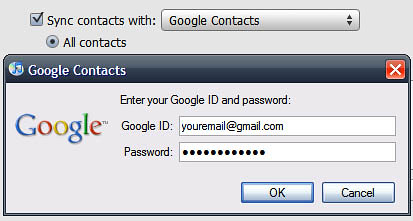
iTunes will connect with Google for a bit. When it’s done, click “Apply” in iTunes to sync your iPhone. You will be asked if you want to replace or merge the contacts that are on your iPhone with your Google contacts. Choose what you think is best for you. I chose to merge them.
4. Set Up Google Sync On Your iPhone
Now we’re going to set up Google Sync on your iPhone. Go to Settings > Mail, Contacts, Calendars > Add Account > Microsoft Exchange. In the Email field, enter your full Gmail address; leave the domain field blank; enter your full Gmail address again as your username; enter your password, and tap Next.
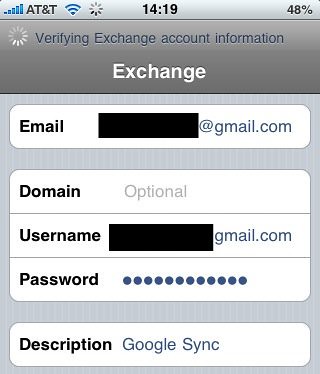
If you get the “Unable to verify access” error message, just tap “Accept”. A new field will appear to let you enter the server information. Enter m.google.com and tap Next.

5. Select the Services to Sync
Now you may select the Google services you would like to sync. At this time, it is impossible to sync email. Only calendars and contacts can sync with Google. As of today, it is now possible to use Google Sync to also get push Gmail emails to your iPhone. Until this morning, you were only able to sync contacts and calendars but now you can also sync your emails.
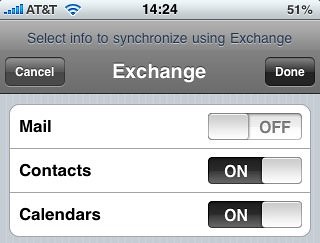
When you enable contacts and calendar syncs, you will get a message asking you what you’d like to do with existing contacts/calendars. You may keep them on your iPhone or delete them. I chose to delete them so it doesn’t create duplicate entries. Tap Done when to finish the set up.
Now go back to the Settings > Mail, Contacts, Calendars, and make sure that the “Fetch New Data” option is set to “Push”.
Getting Used to Google Sync
After setting up Google Sync, you may want to test it out. For example go to your Google Calendar account and create a new event. It should appear on your iPhone within seconds. Note that you sometimes need to close and launch the calendar app again to see the event show up on your iPhone. When you create an event online, it often takes a minute or so to sync with your iPhone.
If you create an event from your iPhone, make sure you create the event from the “Google Sync Calendar” we created or else, it will just show on your iPhone but it won’t sync with Google.
To try out the Gmail push service, send yourself an email from another email account and wait for the new email to arrive. I tested this a few times and it usually takes 5 to 10 seconds for me to get the new email notification.
The Bad Thing About Google Sync for iPhone
The obvious bad thing about Google Sync for iPhone is that you rely on Google once AGAIN.
My biggest issue is that I was used to the Gpush Gmail push app which would display a text notification for each incoming email. The text notification would show me the sender and the subject of the email which helped me figure out whether the email required immediate attention or not. Now every time a new email comes in, I have to open the mail.app to see what the email is about.
Battery life doesn’t seem to be affected much by this new set up but since I use a few push apps, my battery life sucks anyway…
So far, that’s about all the downside I could find about Google Sync for iPhone. Getting calendars, contacts, and emails pushed to my iPhone over the air for free is a much better alternative than MobileMe.


27 Comments


Thanks for the tip on the Push Gmail…finally!
Now I wish there were a way to set a Push schedule (I don’t want my iPhone alerting me of new email in the middle of the night).
Thanks for dropping by T-Will.
I hear your concern about the Push schedule. What I do is that I put my iPhone in silent mode at night (which also deactivates vibrations). This way, my iPhone never gets in the way of my sleep
Or you can also manually turn off push notifications before going to bed but that’s a little more cumbersome than just putting it in silent mode…
Sebastien
Good point with the silent mode and idea about turning off Push notifications. I think SBSettings has a Push toggle I could use, or silent mode will probably work fine for me.
-T
T-Will,
I don’t know for sure that it was the source of my issue, but since I’ve stopped using it I haven’t had the problem. Do not use SBSettings push toggle. I would turn off push via that every night and once a week lose push functionality altogether. I would turn push back on there, and in regular settings and all my push apps would tell me that i needed to connect to itunes to use push notifications. i’m on AT and T, not hactivated or anything. I haven’t had the problem since removing sbsettings push toggle. Everynight before bed I just hit settings quick and kill push. seeing as how i’m adjusting my alarms a little anyway, it doesn’t really hurt much.
And thank you for the clarification in your article Sebastien . I was losing my mind. i would get a vibrate, a badge number, but no text message on screen telling me the sender and subject. I think I might miss that enough to keep using the pushmail app I had been using. But opening mail and having the new messages there immediately is very very nice.
I did this without step 3. Not needed. And there is https://m.google.com/sync/settings/iconfig/device (on your iphone) for selecting which calendars to sync.
Good news. It would be nice to be able to setup more than one Exchange Account since I already have my work account setup in Exchange
I don’t know if this works with Google Apps domains yet, as I’ve yet to get a new mail notification for that account, yet.
@Carter Yes, it also works for Google Apps for domains
S
Did anyone feel his battery drains faster with the push mail on?
I think it does drain it faster on my iPhone.
From what I’m reading there’s a difference between Push Mail (what Gmail gives now) and Push Notifications (what GPush for example does). From what I understand each of those pushes uses around 20% of the battery, so it’s wiser to use one of them if possible.
Thoughts? Corrections?
Cheers!
Hi David,
I did notice that my battery is draining much faster now. I guess I didn’t pay much attention to that when I wrote the article. gPush was bad on the battery but I think this is even worse. I might have to rearrange my settings and manually fe5tch new data instead of relying on push.
Sebastien
Hey Sebastien,
It should also be noted that when you do set this up, the exchange changes the ENTIRE STRUCTURE of your contacts, to where there’s no longer an ‘iphone’ designation for numbers, and the choices you have are lame. You can only designate one number to ‘mobile’, so if you have a contact with multiple cell #’s, that shit’s not gonna happen. I had to undo it all, and go back to normal setup of Gmail, and bam, when I re-synced on Itunes, problem fixed.
Other than that, keep up the good work, good info, son.
Good call ILP. Thanks for your feedback. Greatly appreciated
I need to keep my personal MS outlook calendar and contacts syncronized with the i-phone. Any available free solutions? Tks
@Dr. DJ – just set your iPhone to sync with Outlook (in iTunes) and you’ll be good to go. That’s what I did before syncing with Google.
Hi. I’m not the most advanced user…. but until this morning I thought I could do all that without a special app. I was really happy that I finally got my ipod touch to work just right: I could input an event on the calendar, or a contact, and it would upload them to my gmail account with no trouble. I got it to work just by enabling push from the settings page. and now, today, all my contacts are gone! and i can’t push info from my ipod into gmail! I dont know what I did, I dont know how to fix it… I do know that I recently tried out SBS settings, didn’t like it, and removed it…. any ideas for me?
@ILP
This sounds like the issue I’ve had – I still have 2 sets of contacts on my iPhone, 1 has only a single mobile number and I can’t work out how to re-sync through iTunes as you say – any chance you could explain in a bit more details for me?!
@David / Sebastien …
I’m now confused about the effect of Push Gmail (or e-mail) on battery life …
I read the disadvantage here, but on Cnet I read:
Push e-mail is often preferred over “pulled” e-mail for its real-time updates and its lower toll on battery life.
[http://reviews.cnet.com/8301-19512_7-10358618-233.html?tag=mncol;mlt_related]
Any reason for the contradiction that anyone can explain?!
Thanks,
Paul
thanks for the article!
a quick question though. I’m only syncing my calendars to Google Calendar, and I’m wondering if there is data involved when the iCal program is not running on the iPhone? is there any exchange of data when neither iCal or Google Calendar is running? got to ask coz I’m on a very restricted data pack, and I may potentially get raped with insane excess charges if there is data that is sent in the background, without my control and/or acknowledgement.
Terrence,
In the settings, make sure the “Fetch new data” option is set to “manually”. Go to “advanced” and make sure everything is set to “manually” as well.
This will mean the data will update everytime you open the app vs. fetched hourly or so.
Hope that helps.
s
I keep getting prompted for a domain server… Does anyone know what the address needs to be?
Hello, can anyone tell me why the “configure” button in itunes – in the sync contacts section won’t work? In other words, nothing happens when I click on it. im obviously trying to sync my google contacts and although my contacts arrive in my iphone, none of my groups are included – only my complete contact list. Any ideas on how to get the “configure” function to work would be greatly appreciated.!! Thanks Dave
I tried the procedure and it erased my email account name and addresses in phone like it said it would. I didn’t know it would erase ALL my phone contacts too! Did I do something wrong?
Google won’t sync my groups in my contact list. I’ve tried to sync my group contacts through iTunes but nothing happens when I click “configure”. My entire contact link is synced but with no groups. Any idea on how to fix this? Thanks for your help
Hi !
Normally, when I save a new email adress, let’s say from a web page, it will be saved in “all contacts” which is not the contact folder wich synchronize automatically with gmail via exchange … Any idea on how to solve this issue ?
Thanks in advance you geeks ! (and sorry 4 my bad english)
Claudio
Hi – this works a treat. Onl;y thing I have found that any phone numbers which are listed under “other” do not sync onto the iphone. The contact and other numbers do sync, just nbot the number under the “other” field. Has anyone else had this problem.
Hey! Thanks for your manual, i now have mixed up the gMail settings (also available in mail settings) wit calender, mail and notes selected; and my contacts from exchange.
I did this because gMail lets me archive my mails, exchange won’t.
Bryan T,
If you get prompted for the domain server address it should be m.google.com.
I did this and now I have two copies of each contact. I don’t find a way to get rid of the copy except manually. ยง$%& Nor is there an easy way to delete all contacts at once and then resync to get the single contact back.