Tutorial: Jailbreak iPhone 3GS Using RedSn0w

by Sebastien on July 7th, 2009

This guide and tutorial will show you how to jailbreak your iPhone 3GS using RedSn0w. After jailbreaking your iPhone 3GS, you will be able to unlock it using UltraSn0w should you want to.

Note that this tutorial is for the iPhone 3GS but the steps are the same for the iPhone 2G, iPhone 3G and iPod Touch 2G. Read this for more information about the jailbreak that best fits your needs. This was done on a PC but I assume the steps are the same for Mac and Linux.

Jailbreak iPhone 3GS Guide:

1. First, make sure you have the latest version of iTunes installed on your computer. If you have to update iTunes, make sure you restart your computer after installing the latest iTunes.

2. On your desktop, create a folder called “jailbreak iPhone 3GS” or whatever you want to call it. In this folder, download firmware 3.0 for your iPhone 3GS and RedSn0w 0.8 from here. Unzip the RedSn0w folder.
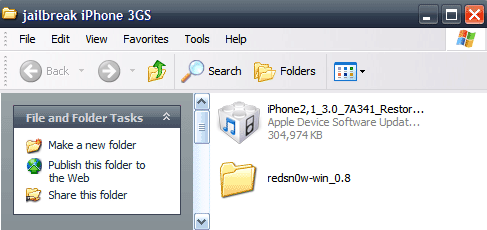
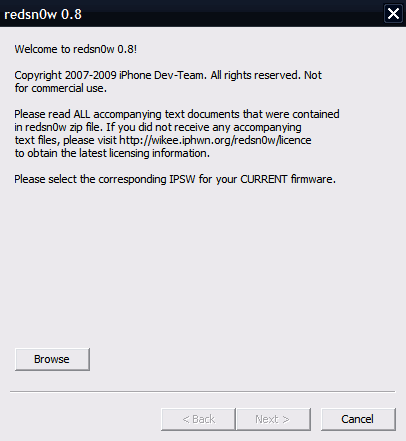
3. Launch RedSn0w and browse for the 3.0 firmware you downloaded in the previous step. RedSn0w should be processing the chosen firmware and tell you that the IPSW was “successfully identified”. Click Next.
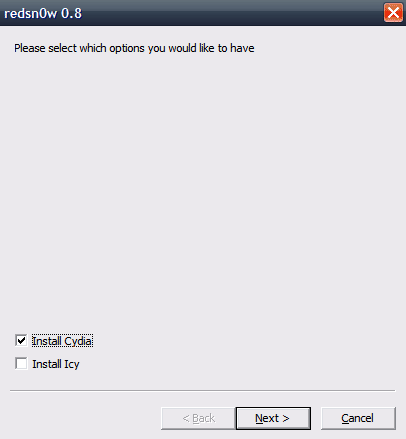
4. RedSn0w will start working for a few seconds and then will ask you what you would like to install. You can install Cydia and Icy. I highly suggest you only install Cydia. Choose Cydia and click Next.
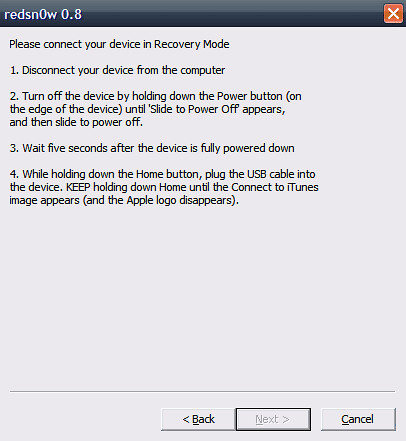
5. We’ll now have to connect the iPhone 3GS in recovery mode. To do so, unplug it from your computer, turn it off and wait a few seconds. Then hold the home button while plugin your iPhone to the USB cable. Keep holding the home button until the “Connect to iTunes” image appears.
6. Your iPhone will then go into recovery mode and that’s when the magic happens… RedSn0w will install the jailbreak, which may take a few minutes.
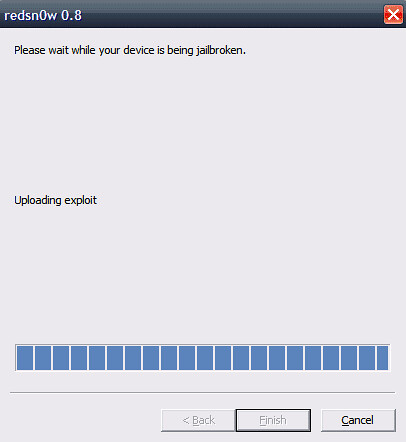
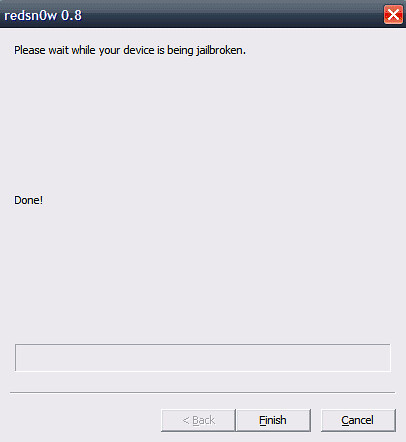
7. Your iPhone will restart and install a bunch of stuff. . Even though RedSn0w says “Done!”, wait until the very end to click “Finish”.

8. After a few minutes, your iPhone will restart. Then click “Finish”.
9. Go to your iPhone springboard and you should see the Cydia icon. Note that the icon may be on the second or third page on your springboard.
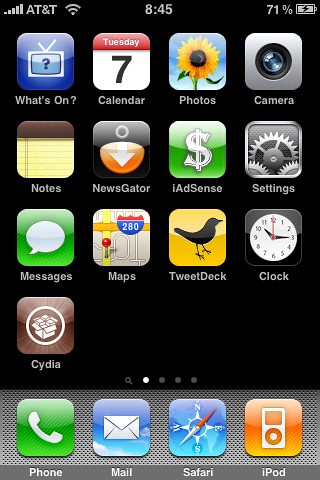
10. Done!

It took me about 10 minutes to jailbreak my iPhone 3GS, including time to take screenshots and write this tutorial. It was from far the quickest and most painless jailbreak.


291 Responses

  1. Oh nice but I don’t know if it’s necessery now I’ve the geohot jailbreak… :/

     
  2. @Pierrick It is kinda necessary because PurpleRa1n is not a very stable jailbreak. WinterBoard for example doesn’t work with PurpleRa1n. Everything works fine after jailbreaking using RedSn0w.

     
  3. Pierrick says: July 7, 2009 at 8:45 am

    Ok, thank you Sebastien. I’ll do the RedSn0w jailbreak. ;)

     
  4. can i do this right over my purplera1n jailbreak and be fine?

    Thanks

     
  5. when I download the firmware 3.0 it doesnt work from this link?

     
  6. Sebastien says: July 7, 2009 at 10:56 am

    @salar I downloaded from this link and didn’t have any problem. Did you choose the right firmware for your iPhone? Make sure

    @Jeff yes you can try butyou should restore your iPhone first

     
    • Sebastien,
      I have done the jailbreak, so if i want to install any IPA game, can i do so now or i need to install anything else? how should i go about it, should i go to add source in cydia to add ultrasn0w from repo666.ultrasn0w.com? after that what should i do? i have tried that but not able to install new IPA game.

      Can you help me, pls………. Thanks.

      A8095

       
  7. can we follow these same instructions if 3.1 is installed?

     
  8. Sebastien says: July 7, 2009 at 11:10 am

    @Greg the instructions should be the same but you will have to wait for redsn0w to be updated for 3.1

     
  9. so if I restore my phone to 3.0 first, the baseband wont revert back?

     
  10. yeah I think I am doing something wrong I dont know what. I downloaded it for 3GS and it download it as a zip file and when I unzip it it opens as a folder not an iTunes ispw file…! I am confuse

     
  11. About to give this a shot, hope it works….

     
  12. I got it nvm, it was a problem how safari downloads the file. I did it with firefox and it worked and now I am in the process of jailbreaking hope it works :)
    Thanks Sebastien

     
  13. anyone tried from 3.1?

     
  14. unsuccessful from 3.1

     
  15. iPhoneMan says: July 8, 2009 at 3:19 am

    Great tut! nice work man!

    @Greg, 3.1 is still in beta and there is no unlock or jailbreak for it. this is for 3.0 on 3GS only! don’t jump so soon!! :)

     
  16. Hi can you tell me after you have jailbreak it with redsnow ,to unlock it do you install purplera1n or go straight to ultrasnow?

     
  17. Will all of the installed apps remain on my iphone after I jailbrake it? Or will I need to reload them?

     
  18. @Freak yes, they will stay on the phone and you won’t have to download them again

     
  19. Thanks…

    Just read this… makes me a little gun-shy. So credit card, bank info could be hacked into easier if stored on my jailbroken iphone?

    http://www.macworld.com/article/141506/2009/07/jailbreak_security.html

     
  20. ok so after i jailbreak my phone i try to launch cydia but as soon as i do i get a message saying that i need to install an essential uprgrade so i try to do that however i get these multiple error messages saying “POSIX: operation timed out”. what do i do? i cant do anything with cydia please help

     
    • This happened to me also. Restore your phone, and re-jailbreak it, but only install Cydia this time if you installed Icy last time also. That’s what messed mine up I think.

       
  21. hi well done on a good guide and super app redsnow is but how can i get items on my iphone 3gs that itunes refuses to put on ? ive used cydia seems good but can we put on paid for apps`and games of the apps store thats been downloaded and i dont know who broght them so can use there login or anythink , any help me smart thanks p.s why you say dont install ice and what does it do it for mistakenly ;) instaled it THANKS long live hacked stuff

     
  22. iPhoNerd says: July 8, 2009 at 5:17 pm

    I have tried JB iPhone 3GS with redsn0w. Everything was perfect for a while, lately it start crashing apps like fring, facebook etc. Later it start crashing appstore and it wont start certain applications at all. Right now I am restoring 3GS to factory condition via itune. :( ((((

     
  23. aldebaran says: July 9, 2009 at 6:22 am

    trop bien cela prend a peine 10min de tout faire et ca marche nikel!!
    je vais pouvoir enfin reinstaller intelliscreen et tt!!

    quelqu’un sait comment on peut telecharger des application depuis apple store en 3G mais a plus de 10mo car la ou je sui jai pas le wifi… sinon ya installous mais bon les appli que jutilise souvent je prefere les acheter..

     
  24. Do we still need to capture the ibec and ibss files before we jailbreak iPhone?

    Thanks a lot!

     
  25. @Gachedo you may want to capture ibec and ibss for future jailbreaks

     
  26. I have a few newb questions (my first iPhone is a 3GS…):

    1. Will AT&T Visual Voicemail still work after the jailbreak?

    2. Is it possible to completely undo the jailbreak in case of problems and go back to the original state?

    3. What will happen when Apple releases OS 3.1 via iTunes? Will the iPhone upgrade to 3.1 and go back to being jailed until it gets jailbroken again?

     
  27. @fnordo

    1. Yes, everything will work exactly the same

    2. Yes, plug your iPhone to iTunes and click “restore”. It will restore the iPhone to factory settings.

    3. YOU are the one who choose to update to 3.1 or not. In case your order to 3.1, you will lose your jailbreak. If you don’t want to lose your jailbreak, you will have to wait for a new 3.1 jailbreak method while still running 3.0.

    Hope that helps

    Sebastien

     
  28. @Sebastien, thank you, this is very helpful.

     
  29. hi im jailbreak the iphone 3gs using redsnow but wen it running the last part of saying DONE the iphoen screen appear black and with word running then say waitting for NAND to appear wat does that mean and it jst say error, i keep jailbreak few times but still the same happen, please help i really need tihs in quick time ty so much

     
  30. i have been trying to jb my 3gs since redsn0w 0.8 was released. everything is fine until redsn0w says waiting for reboot. the reboot never happens. i live in australia and only have 3.0. purplerain worked until i tried to dl cydia. it just never happened. any suggestions to get me on my way.

    thanks

     
  31. Hi, when i download the file for the firmware for my iphone 3gs i unzip it and get a heap of files but none of the ones needed for redsnow, any hints

     
    • karl houghton says: August 22, 2009 at 9:17 am

      you shouldnt have to unzip any files. maybe try using a different browser like IE OR MOZILLA .

      SAFARI WILL NOT ALLOW YOU TO DO SO.

       
  32. Worked for me :) Just got my 3GS… and it just rebooted :)

     
  33. koichishio says: July 16, 2009 at 9:11 am

    Hi, im jailebraking 3GS now! So nice redsn0w 0.8!

    Thanks

    From JAPAN

     
  34. Presti013 says: July 17, 2009 at 3:09 am

    Hi,

    I’ve performed a purplera1n jailbreak (with the second released by geohot because the first one didn’t let me do ssh things).
    I’ve a 3GS 16mb working perfectly, I mean every 3.0 functions worked before and after the jailbreak.
    With Cydia installed, SBSettings, Winterboard, AppSync (so I may use iTunes to install .ipa), the only thing that doesn’t work is the saving of the iPhone content when I synchronise with iTunes (I’ve to clic on the cross to skip that step so it can update contacts, mp3, movies, apps …)

    My question is : what is the benefit to start all over using redsn0w ???

     
  35. joe chaaya says: July 17, 2009 at 3:13 am

    anyone tried this jailbreak?
    i need to know if the jailbreak using redsnow erases the voice control application or video recording or anything else ….

     
  36. I did the redsn0w jailbreak, tried to download something from cydia and now my iphone wont come on at all…I need help

     
  37. Im restoring 3.0 on my phone…that whole thing I just went thru with my phone scared the crap out of me…good luck out there all with this whole jailbreak stuff…Im not messing with it.

     
  38. Angie: if you read my previous comment – same thing happened with me, everything was working for a while, then one by one applications (including app store) collapsed and I had to restore to original settings via iTunes.

    I am staying away from jailbreaks until they figure out a stable solution. Gud luck jailbreakers. However, I appreciate and thank the Dev, team for their efforts and time. :)

     
  39. I can’t seem to get Redsnow 0.7.2 or 0.8 to work on Vista. I’ve tried varying combinations of ‘Run as Administrator’ and ‘Run as Windows XP SP3′ on a 32-bit machine and 64-bit machine. Symptoms: Redsnow opens and verifies the 3.0 firmware for my Touch. When I click ‘Next’, the progress bar pops up really quick and then it crashes. No error or anything.

    I was able to Jailbreak my Touch using an XP machine without admin rights. I’m currently deployed to Afghanistan so most tutorials out there (like any that talk about using Cydia to download Installeous do not apply to me since I don’t have Wifi access or even my own internet. Once, (and if) I can make something work with Vista, I’m going to release my own tutorial designed for those deployed to Afghanistan and Iraq that may not have the necessary internet access everyone else does. Worst case scenario, I may have to use a portable version of XP which I’m sure most sites won’t let me talk about so I’d really like to know how to jailbreak using Redsnow on Vista…

    Thanks,
    Derek

     
    • Update: It looks like the first thing Redsnow does is get on the internet. I have access to a Windows 7 machine in Texas and just out of curiosity, I ran Redsnow with no problems (at least up until the part where it starts looking for the iPhone/iPod Touch. So Redsnow must be on a computer with internet access since the Windows XP and 7 machines were both on the Net but the Vista machines were not. Are there any options to get around this…?

      Derek


      • So, does your iphone work in AFG? I’m getting ready to go out there and am having difficulty getting a straight answer…

         
  40. hey first thanks for sharing im gona try jailbreak my 3gs with this steps…but i need to know if …
    this yailbreak doese have or no side efects to the phone,doese itunes chatch whether is illegaly jailbreaken the phone and doese this jailbreak make the sim card work in any country not with at&t and stuff
    please inform me for this !
    regards and thanks again for sharing with us all!!!!!!!!!

     
  41. Worked like a charm… However how do I know that it has been Jailbreaked !!

    Need some application to check… I guess

     
  42. iphone 3g with redsn0w jailbreak… after a 3.1 jailbreak comes out will i be able to jailbreak over my current redsn0w? or will i have to restore and do the jailbreak from scratch like the first time. also, will i loose all the stuff ive downloaded from cydia and from installous? thanks!

     
  43. Download AppSync from Cydia then sync your apps with iTunes

     
  44. will i be able to JB with redsn0w and unlock with purplesn0w?

     
  45. I’m using an iPhone 3G with 3.0 Firmware. When I try Redsn0w’ing it, it can’t seem to find the ipsw file, so I can’t get past step 3 of the process.

    Help?

     
  46. I just did the jailbreak on my 3GS using RedSn0w 0.8. Everything works fine, except for that I cannot use my phone anymore. I get ‘No service’ in the upper left corner. Tried to resolve it with AT&T, but no success. I only used the jailbreak, without unlocking the phone. Any ideas?
    I read somewhere that I have to ‘uncheck activate’ in Pwnage expert mode. Was this for an earlier version? And if this is the correct answer. How exactly do I do this, step by step?
    Any help is appreciated! Thanks!

     
  47. Presti013 says: July 23, 2009 at 2:47 pm

    I removed all the applications I’ve had installed manualy (ssh) ans replaced with iTunes and now everything’s fine even saving operation when synchronising with iTunes ;)
    But I still don’t know if I should start all over again with the redsnow method ??? I got no problem with purplerain jailbreak

     
  48. I have tried to upgrade my 2G-4GB to OS3 on windows XP and everything went smooth till jailbreak and booting but at the final stage I get a msg “device attached to the computer has malfunctioned”
    I tried it on Windows Vista on another machine and upgraded. I got an upgraded phone in less than 15 minutes…

     
  49. Hi…I’m doing the jailbreak, and it’s stuck at Uploading ramdisk. Do I abort and start over?

     
    • Abort, and hold down the power button until the phone powers down.

      If you’re running VIsta/Win7 make sure redsn0w has the ‘run as administrator’ and compatibility mode XP SP3 options set.

      That should do it!

       
  50. Need help when i go to choose the iphone 3gs firmware it says it is unrecognizable but when i choose the firmware for iphone 3g 3.0 it works until its time to reboot then nothing it also says i need to put phone into DFU mode not restore mode any help would be appreciated email – blackwell3@optusnet.com.au

     
  51. Thanks for the tutorial, Sebastien!

    It worked for my 3Gs on Windows Vista with Internet Connection like a charm!

    No loss of any functionality!

     
    • UPDATED: Like iPhoNerd and Angie, all my apps started failing (flash a start and then the app shuts down) after I got something off the Cydia:
      1) Mame (which supposedly lodged a secret code on the device when I donated),
      2) MadLibs and
      3) OTTY (original transport tycoon)…

      It was working fine before that…

      Restoring to restore unfortunately. Damn, I really loved it.

      Thanks to the developers for their efforts.

       
  52. hey dev team, I have seriously been considering jailbreaking my iphone 3G on 3.0 firmware, but i have always been scared that it will brick or something will go wrong with prime functions such as service on the iphone. I was wondering if anyone who is experienced could fill me in and help me understand the process better and what to do if for example my iphone bricked.
    I would very much appreciate it, if anyone is willing to help just ask me for my contact info such as email or phone number but if you want to contact me without sharing to much info about each other just leave info to my youtube name- quackian thanks!

     
  53. thanks dev!

     
  54. i was wondering if the 3.0.1 update unlock works for iphone 3g. my iphone works for tmobile so is their a tutorial on how to jailbreak/unlock for tmobile on the 3.0.1 software… i have the 3g iphone.

     
  55. @Jerome Yes, it still works the same. Jailbreak your iPhone following the instructions on this page and install UltraSn0w from Cydia and it will unlock your iPhone again.

     
  56. i have a macbook so the version is different would anything change? following these steps my phone will on get jailbroken right? how would i unlock it?

     
  57. just kidding i was just wondering about the 3gs redsn0w it will still work on the 3g right?

     
  58. I followed this to jailbreak my iphone 3gs (3.0.1) and the jailbreak worked fine, but then i opened Cydia and updated and tried to install winterboard. It prompted me to restart to complete the winterboard install and my iphone froze and wouldn’t reboot, just kept getting the little apple on the screen, so had to restore the factory settings.

    Anyone have any idea why winterboard caused an iFail? Should I use a different jailbreak from RedSn0w or would winterboard still crash it?

     
  59. hi, i have a 2G fw 1.1.4 t-mobil sim card I updated to fw 3.01 now the phone is locked i can’t use it. itunes shows the iphone icon but the itunes window displays the SIM CARD inserted on thi iphone is not supported.
    now i don’t have access to my iphone in itunes or on the actual iphone.
    don’t know what to do seems like i mess up bad. i down loaded ziphone, redsnow and tryed them but did not work or i just don’t know what im doing actually i don’t know what i’m doing.
    please someone help.
    thanks.

     
  60. @Gus – follow these instructions to unlock an iPhone 2G.

     
    • i have down loaded fw 3.0 along with the necessary files the fw 3.0 is in the form of a zipfile i extracted the file and when i run redsnow and click browse the fw 3.0 folder appears to be empty no files to open i’m stuck on this step. i notice on other tutorials that the down load of the fw 3.0 on the desk top is in the form of a icom like a box and not a zip folder.
      what i do now.
      help

       
  61. @Gus remove the “.zip” extension and try again.

     
    • thanks Sebasien i will do that i will let you know the outcome.
      i really appreciate all the help and all that you guys do for people like me that don’t know much about this new technology.
      great job!


      • Gus, What Sebastien fails to mention is that if your file is unzipping you are most likely attempting the download in Safari. Safari auto unzips. Download the files using Firefox. Your IPSW should make it to your desktop looking like a Leggo Block and not a folder full of files.

         
  62. i replace the 3.0 software with the 3.0.1 right? sorry for asking many questions just wanna make sure i can use my tmobile account

     
  63. i used redsn0w the .8 version of redsn0w with the 3.0.1 software as the file and it didnt work any help?

     
  64. Jerome, Just use 3.0 as the file. Nothing in 3.0.1 affects the jailbrealk

     
  65. so just update to 3.0.1 and use redsn0w to jailbreak and i can install ultrasn0w to unlock it right?

     
    • @jerome: exactly. of course sync your iphone first, update to 3.0.1, then jailbreak with redsn0w pointed at the 3.0 firmware, then unlock with ultrasn0w.

       
  66. hi can i jailbreak my i phone 3g s in 3.0.1 i found a video that says i can do it with red snow http://www.youtube.com/watch?v=mW61wFTqtRA is it true? and if i do it it will be ok? is it a stable jailbreak or not?

    thanx.

     
  67. hi can i jailbreak my i phone 3g s in 3.0.1 i found a video that says i can do it with red snow http://www.youtube.com/watch?v=mW61wFTqtRA is it true? and if i do it it will be ok? is it a stable jailbreak or not?can somebody tell me please?

    thanx.

     
  68. Thnx.

     
  69. Amazing how you bloggers get it the first time and NEVER run into the myriad of hang-ups us regular folks do. I’m beginning to think this whole ‘jailbreak” is nothing more than a friggin’ mirage! Pownage Tool sucked! Failed miserably at DSU… and Redsn0w hangs at the very last step “waiting to reboot”… what a gaff!

     
    • I have the same issue. It will not reboot! You have any luck?


      • Yes finally!!! Seems this is the most skirted issue among all the genius bloggers and hackers so I figured it out myself. Firstly to all in the same boat…. I feel your frustration. Now it gets worse… (if you don’t have access to an earlier Mac that is). I tried for hours running RedSn0w on a brand new Mac Mini Intel Core Duo and finally gave up as it would not get past the “Waiting To Reboot screen. So…. I transferred RedSn0w and the IPSW o part is RedSn0w gave completely different instructions before it instantly jailbroke my 3GS. Instead of the whole countdown method screen to put the phone in DSU it simply asked to hold the home button on my phone as I plugged it into the USB and wait for the apple to disappear and the upload screen to appear. When I took my finger off the home button it jailbroke in seconds. Bottom Line. Try an older Mac. I think Apple may have worked their blockage magic on newer machines and or the USB.

        PS, BEWARE!!!! DO NOT WASTE YOUR MONEY on the AUTOMATIC IPHONE UNLOCK businesses advertised on this site. They are sending Pwnage Tool and the wrong IPSW. Their customer service is non existent and you’ll find yourself searching for all the right stuff on the internet that you can get for FREE! I got a PayPal Dispute with these dopes right now.


      • Just became aware that it was NOT the older Mac that resolved the issue it was the OLDER version of iTunes… 8.2 that did it. Google the older version…. download it and work with that version of iTunes and Voila….. yer jailbroken in seconds!


      • Tried googling to revert itunes on a mac to no avail. Loaded windows in vmware, installed itunes 8.2, then went back to 8.1 (message about needing to upgrade itunes in order to work with the iphone with newer firmware for version 8.1), stuck at rebooting both times. Will see if I can find a mac or native windows machine with older itunes to see if it will work.

         
  70. will pwnage work for the 3.0.1 update?

     
  71. i keep getting stuck at the waiting to reboot part how long am i suppose to wait? i wait like 10 mins and still the same thing… i have the .8 version of redsn0w for the 3gs . my phone is the 3g one

     
  72. Worked great the second time around. I had to format my phone to original settings, upgrade to 3.0.1, jailbreak with redsnow then point to a 3.0 ipsw but works perfect now. Some reason before I got it working it kept hangin after the initial download in the recovery mode, kept showing a usb cable and itunes.

     
  73. i got it to work

     
  74. Hello happy, confused, and frustrated ppl!

    I am about ready to jailbreak my 3Gs with firmware 3.0.1 using redsnow 8. I have a copy of the firmware for 3.0 and and installer for Installer. I would like to know that someone has done this successfully before I try it because we just got these phones and my mother will kill me if I ruin mine. I am not planning on unlocking it, I just need to jailbreak it. I tried to find a copy of Cydia but couldn’t so I got Installer, I hope that works. Someone who did this successfully with a 3Gs who reverted to 3.0 from 3.0.1 please email me and klear6@hotmail.com so I can be in direct contact with a knowledgeable person should I run into trouble. I will pay you back for your help somehow if that is an issue. I just need someone who has been dealing with this stuff for awhile because I am relatively new to iPhone and don’t want to have to keep checking the forums and seeing that nobody read my question or that they just called me stupid because I am inexperienced with this. I have tried to get all the parts ready to go so I am ready whenever you are – we can chat over IM, I am klear6 on just about everything (aim, yahoo, msn) my ICQ number is 65606000, I don’t have another phone number and seeing as we would be tampering withthe only one I have I don’t think that would be a good way to contact me I have a jabber account but I’ve never used it before so that’s probably not the best way to contact me…same with gmail. Anyways, althought it is against my nature I am trying to be patient and make sure I do this EXACTLY how I am supposed to because (quite honestly) I am very poor and this was one of the best gifts I have gotten in a long time and my hacking days were back in high school. I’m sure at least one of you is considerate enough to share your knowledge assuming anyone got it to work right on the Gs in the first place. So please get in touch with me, I will be waiting and am usually awake from about 11 AM (pacific time) until dawn or so (I am a writer so I have an odd schedule). If that doesn’t work for you I will be happy to set my alarm clock for whatever time would be best. Thanks so much ahead of time, and I wish all the rest of you guys luck also. When I get it done I will help as many other people as I can. =)
    Frosty
    PS I am pretty sure someone will help me out, everyone is a noob at some point and I will pay it forward. Been having a pretty bad year but this will really cheer me up if it works!

     
    • It works. Use redsn0w-mac_0.8 and iPhone2,1_3.0_7A341_Restore.ipsw. I finally got it to jailbreak after many “Waiting to Reboot” hang-ups. If you get those don’t panic. Cancel the process and hold the power button and the home button on your phone until the Apple appears. Your phone will be just as you left it. If you’re attempting this on a newer Mac… Good luck. I got it to finally jailbreak (in seconds) after I ran it on an older Aluminum Powerbook. You should not have to stare at that “Waiting to Reboot” for any longer than a blink of the eye.

      PS, BEWARE!!!! DO NOT WASTE YOUR MONEY on the AUTOMATIC IPHONE UNLOCK businesses advertised on this site. They are sending Pwnage Tool and the wrong IPSW. Their customer service is non existent and you’ll find yourself searching for all the right stuff on the internet that you can get for FREE! I got a PayPal Dispute with these dopes right now.


      • Just became aware that it was NOT the older Mac that resolved the issue it was the OLDER version of iTunes… 8.2 that did it. Google the older version…. download it and work with that version of iTunes and Voila….. yer jailbroken in seconds!

         
  75. I dont know why my face looks so mad in that pic, I didnt mean for it to

     
  76. Almost forgot. I am klear6 on twitter and Frawsty Fyre on facebook and myspace messengers as well.

     
  77. does it work for iphone 3G?
    my stuck at “waiting for reboot”

     
  78. Why isnt anyone responding to the 7 posts stating that it gets stuck when it says “waiting for reboot”?
    I have tried on multiple machines and have a 3g and a 3gs……same thing on all my pc’s! Im going crazy!

     
    • Seems this is the most skirted issue among all the genius bloggers and hackers so I figured it out myself. Firstly to all in the same boat…. I feel your frustration. Now it gets worse… (if you don’t have access to an earlier Mac that is). I tried for hours running RedSn0w on a brand new Mac Mini Intel Core Duo and finally gave up as it would not get past the “Waiting To Reboot screen. So…. I transferred RedSn0w and the IPSW o part is RedSn0w gave completely different instructions before it instantly jailbroke my 3GS. Instead of the whole countdown method screen to put the phone in DSU it simply asked to hold the home button on my phone as I plugged it into the USB and wait for the apple to disappear and the upload screen to appear. When I took my finger off the home button it jailbroke in seconds. Bottom Line. Try an older Mac. I think Apple may have worked their blockage magic on newer machines and or the USB.

      PS, BEWARE!!!! DO NOT WASTE YOUR MONEY on the AUTOMATIC IPHONE UNLOCK businesses advertised on this site. They are sending Pwnage Tool and the wrong IPSW. Their customer service is non existent and you’ll find yourself searching for all the right stuff on the internet that you can get for FREE! I got a PayPal Dispute with these dopes right now.

       
  79. Also having this “waiting for reboot” problem with a 3G phone, 3.01 on the phone and pointing redsn0w to 3.0.

     
  80. @raphas13 and JF you guys have to make sure wen entering DFU mode or whatever you cant let go of the home button until everything loads and the refresh icon appears. takes like 5-10 mins for everything to finish

     
  81. hey,
    i have 3.0.1 on my phone…as i unzipped everything i browsed for the downloaded “iPhone2,1_3.0.1_7A400_Restore” and it says “Unable to recognize specified IPSW”
    I downloaded everything from here….what shall I do ?

     
    • Download using Firefox and not Safari.


      • I have the same issue, downloaded with firefox.
        it just says unable to recognize specified ipsw,
        i downloades both files from here, redsn0w 0.8 and iPhone1,2_3.0.1_7A400_Restore for my iphone 3g


      • OK, this may sound stupid but make absolutely sure you’re using the right firmware for your phone type. I noticed on three downloads that I received the wrong package. (2G = 1,1; 3G = 1,2; 3GS = 2,1). Also. I didn’t use “3.0.1″…… I downloaded “iPhone2,1_3.0_7A341_Restore.ipsw” for my 3GS even though my phone had the newer 3.0.1 upgrade. I pointed it to the new download.
        Believe me I know it’s frustrating. I wasted an entire day before I figured it all out with no help from this forum. Read previous posts from me trying to get ANYBODY to respond to this final hang-up phase of the process. (that’s why I returned). Hopefully you guys will stick with it and learn from my experience. Once jailbroken you’ll find it was all worth the hassle. It’s a whole new and improved iPhone!


      • PS. The IPSW should look like a Leggo block when it hits your desktop and not an unzipped package of folders. Unzipped renders the package useless.


      • Has anyone resolved this? I am having the same problem. D/l using FF version iPhone2,1_3.0_7A341_Restore.ipsw for 3GS. Same error: “Unable to recognize specified IPSW”

        Any ideas?

         
    • dont unzip the file just right click and rename the file extension to .ipsw thats all you need to do.
      I had the same problem and it took me a few hours to figure this one out.
      good luck,and happy hacking!

       
  82. @Jerome thanks for the tip. I tried it to no avail. I even tried using version 0.7.2 as it turns out I am actually using a 2g phone (unless I’m really confused: silver back, model A1203). I have firmware iPhone1,1_3.0_7A341_Restore.ipswm, am working in OS X Leopard, there is something I am missing as I have searched many many blogs and can’t seem to get this right. I have also tried the unplugging the cord and waiting three seconds to try and trigger the reboot.

     
  83. hi im jailbreak the iphone 3gs using redsnow but wen it running the last part of saying DONE the iphoen screen appear black and with word running then say waitting for NAND to appear wat does that mean and it jst say error, i keep jailbreak few times but still the same happen, please help me.

     
  84. hey guys,
    so i installed the latest firmware, and followed these instructions. I’m opening redsn0w with 3.0 even though i have installed 3.0.1 through itunes. During the jailbreak, it says “waiting for reboot” and freezes there. any ideas or suggestions?

     
  85. Okay, for my dumb question…

    I go to download RedSn0w 0.8GS for Windows … I get a 2kb file that I tired to unzip… not happening. What do I need?

     
  86. ran into an interesting problem
    any time i try to upgrade the apps via CYDIA, and there is a program that relies on PYTHON-it locks my 3G phone (which is running 3.0 and on ATT)
    I narrowed down the problem by trying to download PYTHON only, and that is definitely the problem
    Issue is, I REALLY need python to be able to run my other apps
    I have tried various suggestions from jailbraking via the latest Pwnage Tool and redsn0w
    I have backed up, restored, i have even selected new iphone
    My last attempt was to upgrade to 3.01 and use redsn0w 0.8 and hope that would change something
    NOPE!
    any suggestions would be appreciated

    thanks

     
  87. @Aldo Maybe it’s time to do a restore…

     
  88. Yo, smart guy with all the answers – email me! I want to talk to someone one on one not thru a forum if thats cool. Preciate it, thanks! I took alot of time getting everything ready

     
  89. is there a way to change my avatar so i dont look like such a biatch

     
  90. Go to gravatar.com and create a quick account. You’ll be able to display a picture on most blogs when you leave a comment.

     
  91. Danke dude

     
  92. Has anyone resolved this? I am having the same problem. D/l using FF version iPhone2,1_3.0_7A341_Restore.ipsw for 3GS. Same error: “Unable to recognize specified IPSW”

    Any ideas?

    Thanks!!

     
  93. Sorry, mistake on my post, version is iPhone2,1_3.0.1_7A400_Restore.ipsw

     
  94. I have tried JB’ing my 3GS two times. It was successfull both times with redsn0w 8 with OS 3.0 and 3.0.1. However, after installing some themes and other programs through cydia, phone started crashing on almost all the time. So again I am back to my original OS. NO MORE JB FOR ME! I need a stable phone!!!! lol gud luck again guys!

     
  95. What do you mean by ” it doesn’t work”?
    Have you solved the problem?
    You may need to change the file extension for it to work.

     
  96. DON’T UNZIP THE FILE ! just change the file extinsion to .ipsw then you should be good to go.

     
  97. I have a 2G iPhone and downloaded the downloaded and unzipped the firmware, but there is no .ipsw file to be found that redsn0w is looking for… Any suggestions? Thank you.

     
  98. I read N8′s comments, renamed the firmware zip file to .ipsw and redsn0w said it was unable to recognize it. I then searched my computer for the existing .ipsw file, found it and had the same problem. I’m using the 2G 3.0.1 firmware.

     
    • did you unzip the file?
      try downloading with a different browser


      • I re-read all the posts and thank you N8 and @sinceOS7!

        First I was using Internet Explorer to download the firmware file, I used firefox and that solved the IPSW extension problem.

        I still had a problem with redsn0w unable to recognize the 3.0.1 firmware (iPhone1,1_3.0.1_7A400_Restore.ipsw), but thanks to @sinceOS7 I used the 3.0 firmware (iPhone1,1_3.0_7A341_Restore.ipsw) even though I have 3.0.1 and now have the jailbreak working.

        Wonder what the deal is with 3.0.1 firmware? I have a 2G phone and am running XP. Anyone having similar trouble, make sure you:
        - try 3.0 firmware instead
        - use firefox to download it


      • Glad I could help JF.

        Nice ‘NEW’ Phone you got there eh?

        Bottom line for all…..
        - try 3.0 firmware instead
        - use firefox to download it

         
  99. I am right now in the middle of the Jailbrake process, and my computer is seeming to hang on the “Please Wait While Your Device Is Being Jailbroken” window. its stuck on “Uploading Second Stage” and the blue bar is only filled up by four of those little blocks.
    Something went wrong?

     
    • Each time i try the process, how far it seems to go before it just halts differs on how long i hold down the home button by itself for the second time. Is the method described above not working for some or most, and is there some other method i should try?

       
  100. I had to restore my phone so it upgraded to 3.0.1. I jailbroke it using redsn0w 0.8 and is working fine except that I cannot access any of my apps. I have tried downloading a new app since the upgrade and the icon is on my phone but I cant access that either. When I press an app icon it flashes onto the app momentarily then goes back to the home screen again. What can I do to fix this. BTW it is a 2g iphone.

     
    • hmmm, hopefully you had installed AptBackup from BigBoss at Cydia and created a list of Cyia apps on iTunes BEFORE you upgraded. if so….

      After updating your iPhone to the latest iPhone firmware, jailbreak it and reinstall AptBackup again via Cydia.

      Launch AptBackup and click “Restore” to reinstall the Cydia installed applications based on the list that was backed up using iTunes.

      If you hadn’t installed AptBackup before upgrading I would suggest you do so once you figure out how to regain your jailbroken phone…

       
  101. when i run redsnow i have no problems untill i disconnect, then reconnect in recovery mode.
    the “new hardware found wizard” pops up and asks to install hardware. redsnow does nothing
    at this point. I am using windows XP ,iphone 3gS, 3.0 firmware.
    PLEASE HELP!!

     
  102. Completed required action everything fine,except the phone does not work any suggestions?

     
  103. wow.! that was easy … thanx so much for this tutorial.!

     
  104. If you undo jailbreak, does all the iPhone get reset to factory condition, losing pics, calendar and contact info?

     
  105. Hi Sebastien,

    After reading your articles about jailbreak and unlock the IPhone, I am of great interest to do so on my shiny IPhone 3GS. But there is one step I don’t understand which is Step 5.

    5. We’ll now have to connect the iPhone 3GS in recovery mode. To do so, unplug it from your computer, turn it off and wait a few seconds. Then hold the home button while plugin your iPhone to the USB cable. Keep holding the home button until the “Connect to iTunes” image appears.

    Why I should upplug the IPhone from the computer if it is not connected to the computer at all? Does that mean Steps 1 to 4 need the IPhone connected?

    Hope you can clarify this. Thanks.

    Chris

     
  106. I was wondering the same thing at first. If you watch the video tutorial it shows the iPhone connected at the begining of the jailbreak process i.e. Steps 1 – 5 . So to answer your question. U believe the answer is yes. Connect then reconnect in recovery mode.

     
  107. Desperately trying to unblock my 2G phone. Have done all the leg work – all the downloads, restoring etc., but iPhone1,2_3.0_7A341_Restore.zip downloads as an iTunes Music Player file, not the lego box I successfully jailbroke and unlocked my version 2.2.1 with before I upgraded to the 3.0.1 version. I have the 3.0.1 version in the lego block, but am simply too lost to get this download right!

    Very Frustrated, please help …

     
  108. hi sebastiian,

    i tried to install sygic for australia and new zealand.. and it won’t install. what am i doing wrong? are there any other application i need to install before i install sygic?

     
  109. WTF! that was too fast! unlike 3g and before.

    Thanks for the tutorial!!!!

     
  110. hi i am trying to jailbreak my iphone 3gs with red snow and i am unable to understand wat is this AT&T on the top of the snapshots of the i phone would u please help me to do so

     
  111. I keep getting “Unable to recognize specified IPSW” Whats the solution?

     
  112. For a process that is supposed to enhance an iphone(expensive item) you have not put enough detail here. There should be a clear indication how long each process should take. Additionally the link for jailbreaking the Iphone 3G takes you to a webpage indicating the 3GS process. I am sorry but thats really lazy ass poor documentation. For people that are not techically orientated its a major concern. You might see it as straight forward and easy, but you obviously cannot put yourself in others positions and visualize the situation and make sure your documentation is accurate. Once again I reiterate, I paid alot of money for my phone, your documentation should be absolutely 1000% accurate. If you attempt to use the 3.01 ipsw file it crashes, this crash is not related to circumstance of the person, it just is like that and you have failed to put a comment on your page indicating this.

     
    • “If you attempt to use the 3.01 ipsw file it crashes, this crash is not related to circumstance of the person, it just is like that and you have failed to put a comment on your page indicating this.”

      Relax Gavin. Take a deep breath and read again…..(see 2.)
      Jailbreak iPhone 3GS Guide:

      1. First, make sure you have the latest version of iTunes installed on your computer. If you have to update iTunes, make sure you restart your computer after installing the latest iTunes.

      2. On your desktop, create a folder called “jailbreak iPhone 3GS” or whatever you want to call it. In this folder, download firmware 3.0 for your iPhone 3GS and RedSn0w 0.8 from here. Unzip the RedSn0w folder.

      “You might see it as straight forward and easy, but you obviously cannot put yourself in others positions and visualize the situation and make sure your documentation is accurate.”

      If there’s not enough ‘hand holding’ via the tutorial or the 150+ Comments section for ya, perhaps you should get a 12 year old kid to handle the jailbreak on yer “expensive” device? Or perhaps it is you who is too “lazy ass” to read the myriad of helpful advice if yer stuck on something!


      • hi, can u help me, im new to iphone. i have jail break my iphone 3G as stated, latest update of itune 8.2.1.6 and the iphone is 3.0.1. i followed the steps & have RedSn0w 0.8 and 3.0 firmware, so cydia is now installed. I have also followed the steps of adding the source Ultras0w and installed Ultrasn0w. But i cannot install to my iphone with the IPA i download to work. Can you tel me how I can make it work, or if i have done or missed some steps.

        Thank you

        ak8095

         
  113. my cydia wont show any packages . =( did i do somethinq wrong ?

     
  114. Okay, i got it to work.
    But there are things in cydia that dont seem to work with the new update because it says i need to find more sources. SwirlyMMS for instance. it worked fine with just the plain 3.0 update but the 3.0.1 update seems to screw up a lot of of the cydia programs. I really don;t know how to find more sources. And looking elsewhere on the internet doesn;t hepl either, does anyone think that downgrading to 3.0 would be best?

     
  115. I just bought a iPhone 3GS with 3.0.1 firmware installed on it today, I did a little research using google and came across this method. It literally took me 5 minutes to complete the jailbreak, everything went really smooth. I suggest using RedSn0w if you have a new iPhone 3GS, it’s known to be way more stable to purplera1n.

    Thanks Again Dev-Team!

     
  116. Hey, i’m stuck on the “waiting to reboot” screen.

    Windows Vista 64 bit, ran “as administrator”.

    I tried the “unplug” trick, but it still didn’t work.

    Is this jailbreak an epic fail for some iPhones for reasons unknown?

     
  117. I used this method to jailbreak my iPhone 3GS with 3.0.1 firmware on it, the jailbreak had no problems what so ever. I open cydia and it ask me to update so I do complete update, I restart cydia and go to install MobileSubstrate & it starts to install… …I keep waiting, I start to relize after about 5 minutes or so that the install froze. I goto iTunes and click restore to restore to orignal, iTunes downloads Firmware 3.0.1 and begins to attempt to restore, all of a sudden I get a error message from iTunes telling me “The iPhone “iPhone” could not be restored. An unknown error occurred (3004)

    When I unplug usb & plug back in I get the message “iTunes has detected an iPhone in recovery mode. You must restore this iPhone before it can be used with iTunes.”

    I’m stuck in recovery!!!! PLEASE HELP!

     
  118. Looks like Apply may have finally gotten the upper hand on the jailbreaking scene….

     
  119. Looks like Apple may have finally gotten the upper hand on the jailbreaking scene….

     
  120. If you experienced the problem that I had you need to do this:

    Uninstall iTunes & Restart computer.
    Get iTunes 2.2 from http://www.mydigitallife.info/2009/06/28/apple-itunes-8-2-and-quicktime-7-6-2-direct-download-links/
    Turn your phone off (if necessary, hold the Power and Home buttons simultaneously till it goes off).
    Leave the USB cable connected to your computer but remove the other end from your phone.
    When the phone is off, hold the Home button *while* you reconnect the cable to your phone.
    iTunes will tell you it’s detected a phone in recovery mode.
    Proceed with the Shift+Restore.
    After restoration process is complete, set up as new phone and not from backup.
    Jailbreak with Redsn0w 0.8.
    Unlock with Ultrasn0w.

     
  121. HI!

    I have, updatet med Iphone 3g to 3.0, and used redsn0w, when it startet to jailbraik it crashes, its just shuts down, everytime, anyone can help?

     
  122. I have a 2G iphone, have upgraded to 3.0.1 on itunes 8.2

    I have also jailbreaked it using redsn0w but everytime i have tried to install winterborad, i press the reboot to finish the installation and my phone goes off, it displays the circular timer for around 2-3mintues then flashes and does it all over again.

    I cant get the reboot to work once its jailbreaked, so all the reboot apps in cydia make my iphone crash, any help?

    Iphone 2G
    Firmware loaded 3.0.1
    Firmware used for jailbreak 3.0
    Redsn0w
    windows XP

    Again i can jailbreak the phone but cant reboot when trying to install from Cydia

    Any help would be greatly appreciated!!

     
    • Cracked it myself! just dont install MIPATCH 2.2.1 from the cydia app unless it freezes on rebooting, so im afraid i cant sync cracked apps! never mind, still get them free!

       
  123. Trying to jailbreak 3Gs. Once I download redsnow from this site my iBook G4 asks me to
    select an application to open the file with. What do I use?

     
  124. i need help!!!! i downloaded redsn0w and the 3.0 firmware when i put the phone in recovory mode the redsnow does not do anything iot dosnt recognize my phone and it stays in recovory mode what do i do ?????????????????

     
    • Follow the instructions exactly. Also, make sure you are using the 3.0 software and using the Redsn0w that is specific to the 3GS.

       
  125. i also tryed to do it on a mac and when i browes for the firmware i cant open it i wacht videos and i did the same thing but when they did it they could open the firmware please help

     
  126. I downloaded redsnow for mac, and the 3.01 firmware. To open the redsnow file, I downloaded tomato torrent 1.5b1. When I try to open redsnow with it, it just keeps searching. Am I doing something wrong, or should I use another program? Thanks!

     
  127. I am trying to jailbreak my 3G 3.0.1 I downloaded Redsn0w from the link you provided above. On step 5 on the program it gives me the direction for unlocking the 2g (ie Leave phone plugged in and and off) When it should say to unplug and hold home button etc. It says Redsn0w 0.8 too. I still did it ignoring directon and following the ones here and it says I have put the phone in Recovery Mode instead of DFU mode. Did I do something wrong or is it Redsn0w?

     
    • Downloaded 3G 3.0 firmware by the way!


      • im having the same problem. i don’t think it can be done with 3gs using 3.0.1 yet. someone please help


      • Do not use the 3.0.1 firmware download for the jailbreak. I believe it is there only to do the shift+restore in iTunes. Use the Redsn0w specific to the 3GS and the 3.0 software for the 3GS as well. (Follow the instructions exactly and you should have a problem)

         
  128. I went through the whole process as written and everything worked properly except that when I open cydia it crashes immediately. I have the 3.1 update installed on the iphone 3gs but used 3.0 for the process so that it would work. I already used the clear list cache program without any success. Now I just have the cydia icon on the iphone but cannot open it without the program crashing. The iphone works fine except the cydia icon. Thanks.

     
  129. Got an iPhone 3GS (32gb) 3.0.1 firmware in it, that im trying to jailbreak.
    But redsn0w program is not even able to recognize specified IPSW, when I choose the file “iPhone2,1_3.0.1_7A400_Restore.ipsw” isn’t this the right file?

     
    • Do not use the 3.0.1 firmware, use the 3.0 (even if your iPhone is on the 3.0.1).
      The Dev-Blog states that 3.0.1 and 3.0 are exactly the same when it comes to jailbreaking an iPhone. :)

       
  130. Currently on my Iphone 3g i have firmware 3.0.1and when i downloaded it with firefox…redsn0w didnt reconize…. have any advice??

     
    • When you locate the ipsw with redsn0w, point it towards 3.0 rather than 3.0.1 as this only crashes if you do. The mobile substrates are the same so it’ll still work.

       
  131. all you do is get the 3.0 firm ware

    and 0.8 redsn0w

    you can be on 3.0.1 firmware

    start up red sn0w

    when it asks for firmware select 3.0
    the app will look at it and then go do the work
    it is not installing 3.0 just looking …

    this thing works – have tested it 10 times already worked every time
    without fail on 3gs

     
  132. hey,

    i’ve had the same problem with 3.0.1 not saying that it cannot process the ipsw file.

    i’ve just realised that i downloaded the 0.8 version of redsn0w which is actually for the 3GS – the 3G iphone needs the version just below which is redsn0w 3.0!

    silly mistake but maybe one that a few others have been making…

     
    • * just tried this version with the ipsw 3.0.1 and it is still not recognised – will try with 3.0 and report back *


      • IT WORKED!!!!

        iphone 3G 3.0.1 with the “iPhone1,2_3.0.1_7A400_Restore.ipsw” firmware and “redsn0w-win_0.8on” the o2 network!

        AWESOME!!!

         
  133. Question i jail broke my iphone 3g can i still sync it with itunes or will it turn the phone into a “brick”

     
    • I did my 3GS and was scared the first time I synched, but it worked like a charm.


      • You literally cannot “Brick” your iPhone unless you are effing with it when you are messing around with the Bios (which I’m pretty sure you don’t know how to do, especially if you are asking that question). So… NO WORRIES! :)


      • haha thanks. the very fact that i was capable of jailbreaking it in the first place baffles me lol i normally dont mess with stuff like this but it looked so cool lol

         
  134. This was the most comprehensive jailbreak for the 3GS with Redsn0w I have seen yet and I’ve been searching for hours to find one. It worked bloody perfect! Thanks alot guys! Keep up the good work!

     
  135. i got the 3gs n i updated my iphone to 3.0.1 would this jailbreak still work if i tried it…cause i tried the purplera1n n it didnt work i was halfway ….pls help to jailbreak my iphone thanks

     
  136. I Read the whole thing… but it isn’t clear to me if i can use the 3.0.1 file on my 3G phone, most people is talking about 3GS phone, but that guy AI said it worked for his 3G using iPhone1,2_3.0.1_7A400_Restore.ipsw, anyone can tell me if i should use the 3.0 or the 3.0.1 on my 3G phone?

     
    • Nevermind i used 3.0 works like a charm!! for installing ipa i reccomend doing the following …

      on cydia go to Manage and add this source…

      http://cydia.hackulo.us

      Then go to search and download AppSync and install it

      Reboot phone..

      install any free app from itunes.. then voila! youre ready to install any cracked game.. its so much easier than the process described in this site!!

      good luck!

       
  137. Every time i try step 3 it says “UNable to recognize specified IPSW.” I am using redsnow .72 and iphone firmware 3.0

     
  138. can u guys like do it step step by with pictures make it more easier for me i download the redsnow n every time i open it it go straight to limewire………. y is dat? n how come its not a folder

     
  139. redsnow doesn’t recognize the firmware downloads, so I get stuck pretty early.

     
  140. Mine keeps getting stuck on “Waiting for reboot.” I’m in OS X. Brand new 3GS. Advice?

     
  141. hi,

    i did this and jailbreaked my iphone 3gs on 3.0.1 and also unlocked it using ultrasn0w to unlock it and when i am using my t-mobile sim, i am having a problem… i am not receiving calls from all numbers, i receive call from some and i dont from others.. but when they call they hear it ringing and it goes to my voicemail… also my battery is depleting very fast… any fixes for this…

    Thanks in advance
    regards
    senthil

     
  142. iPhones are just the best, love the touch screen technology.
    Thanks for the informative post.

     
  143. Hey Team

    I have the iPhone 3G and what to jailberak it. However, every time i run redsn0w it crashs at the waiting to reboot screen.

    what do i do?

    Thanks

     
  144. Hi I downloaded the 3.0 firmware but iTunes will not let me install it, since there is a newest version 3.0.1. What can I do to install the 3.0?

     
  145. dirty_harry15 says: September 4, 2009 at 7:51 pm

    I’ve tried several times to JB my 3G iPhone (3.0.1 OS) using redsn0w 0.8 but each time during the last step when it goes to reboot, my phone never recovers. I either have to cycle power or just power it back on. I’m running Windows vista. Any help would be appreciated.

     
  146. I do have the same problem just like dirty_harry15.
    I’ve tried to JB my 2G iPhone (3.0.1 OS) using redsn0w 0.8 but during the last step when it goes to reboot, my phone never recovers. I’m running Mac. Please help!

     
  147. Can some1 please give me a good link to download the redsn0w 0.8? Every link I click on my computer tells me that it cannot find the link or I have a connection problem. I’m using Internet Expolorer 8.0 trying to jail break my iPhone 3.0.1. Any help would be appreciated, thank you!!

     
  148. First, thank you for this tutorial, it’s great.

    Second, if I jailbreak, will I lose all my applications that are already installed to my iPhone?

    Please Advise

     
  149. No , you will not loose your apps. If you are afraid you will loose them then just back them up on iTunes . Then no mater what happens, you can always go back and reload them onto your phone :-p

     
  150. Nevermind, I figured it out. Had to rename the .zip to .ipsw.

    Yup, I’m a noob.

     
  151. Ok….when I download the firmware it never shows up as a leggo block nor in .ispw format. How do I get it in that format to use it? It only shows in .zip format.

    Thanks

     
  152. thanks..its really helpfull me out

     
  153. I have previously jailbreak my iPhone, but after I upgraded to the latest firmware 3.1 from iTune, Cydia, and all other subsequent downloaded applications are gone….. Do I need to jailbreak again? Will it work with firmware 3.1?

     
  154. NO, you can not jailbreak firmware 3.1.If you upgrade to 3.1 it will erease your jailbreak. At this time it is absolutly impossible to jailbreak or unlock an iPhone running the 3.1 firmware.
    REPEAT, IF YOU WANT TO JAILBREAK YOUR IPHONE OR KEEP YOUR CURRENT JAILBREAK DO NOT UPGRADE TO THE NEW 3.1 FIRMWARE!!!!!!!!

     
  155. Unfortunately I have already upgraded the firmware and jailbreak stuffs are all erased… Is there any way to downgrade the firmware back to 3.0.1? Or do I have to wait until there is a jailbreak available for 3.1?

     
  156. Sorry Winnie, but you are out of luck here. Acording to Saurik, Apple has also made it impossible to down grade after the 3.1 update. . If you have not captured your ssid before the 3.1 update then it is very possible you will never be able to jailbreak your phone again. 3.1 is a nasty update for jailbreakers.

     
  157. Sorry Winnie, but you are out of luck here. Acording to Saurik, Apple has also made it impossible to down grade after the 3.1 update. . If you have not captured your ssid before the 3.1 update then it is very possible you will never be able to jailbreak your phone again. 3.1 is a nasty update for jailbreakers.

     
  158. I have had my Iphone 3gs jailbroken for some time now but for some reason the MMS function would not work.. so i restored the phone with iTunes and it installed the firmware iPhone2,1_3.1_7C144_Restore.ipsw then when i tryed to jailbreak it again using redsn0w and firmware iPhone2,1_3.0_7A341_Restore.ipsw..it went though all the steps on the computer but the screen on the iphone just stayed black. The logo didnt appear and once redsnow said it was done on the PC the screen remained black. Would only come right after a hard reboot and then there was no cydia.. is there anything i can do??

     
  159. NOPE, I’ll say it again. If you have upgraded to, or installed the 3.1 firmware update then you have made it impossible to JB your iPhone 3gS.
    Even if it seems like the redsnow jailbreak worked IT DIDN’T. Sorry to rain on your parade people. I’m sure the Dev team is hard at work on this one. But from what I understand, if you have not logged your ipsw and ssid in order to get your unique signature you are screwed. And apple has made it impossible to downgrade the 3gs back to 3.0 firmware. So if something goes wrong and you need to restore , you will loose your jailbreak for good. :-(
    thanks for ruining our fun apple.

     
  160. agh gay! thanks dude. hopefully the dev team can sort something out asap :)

     
  161. After downloading redsn0w and the 3.0 IPSW file, I attempt the first step of opening redsn0w and locate the IPSW file. I’m unable to locate or see this file, I have downloaded and saved everything to my desktop.

     
  162. daniel Urban says: September 13, 2009 at 7:30 pm

    When i downloaded the firmware for redsn0w to run on, i accidently changed the program that the firmware opens with, and i don’t know how to change it back. Any help?

     
  163. Uninstall and re download!!

     
  164. i did that, and it doesn’t change anything. -.-

     
  165. I was having the “waiting for reboot” problem as well — it drove me a little crazy. I was able to get it to work by unplugging and then plugging in the USB cable when it stalled out. Good luck everybody.

     
  166. Dosent Matter says: September 17, 2009 at 8:49 pm

    I upgraded firmware to 3.1 on accident when i just got 3gs. I am following the instructions to a tee but at the end the screen just stays lit up black. What should I do? please Help

     
  167. If you try to jailbreak the 3gs 3.01 with redsn0w 0.8 in vista and it’s stuck in uploading try the following:

    Rightclick on redsn0w.exe and choose properties.
    Then go to compatibility and run it in Winxp sp2 mode.

    And then just follow the guide, worked like a charm with me after 3 tries…

     
  168. HOw about installing ipa applications on 3.1 firmware? Is there a possible workaround? link somewhere? Much obliged,
    Sam

     
  169. hi, i have iphone 3GS with 3.1 firmware, will this jailbreak work for me ?

    i really need someone to answer me on this :D

     
  170. ok so i havent read through this whole long list of comments and i appologize is this is already asked but… at this moment there is no jailbreak for 3.0.1? you HAVE to revert back to 3.0 to do this? and if so am i really loosing out on anything from 3.0.1? i dont remember reading the update notes about a month ago

     
  171. Jesus 3.0.1 is fine to jailbreak, it 3.1 that you don`t want to go to!

    Just follow the instructions and make sure you get firmware 3.0 even though you have a 3.0.1 phone!

    For example for a 3gs 3.01 get the iPhone 3G S Firmware 3.0

    in vista run the program as administrator! (right click run as)

    I have done a few and all are working fine! (UK O2)

     
  172. Hey what if I already have a iphone with 3.0 installed. Do I have to download and install the 3.0 version located within the link you provided.

     
  173. Hey man i stumbled on this site today..This site is heaven and dam amazing…Just wanted to ask here…Some plz help me…Ystdy suddenyl itunes donest setect my iphone dont knw y…is it coz i updated to itunes 9 or wht…now i am back on itunes 8…Also my Iphone 8Gb is already jailbroken and unloacked on firmware 2.1.Can i use the above procedure to goto 3.0.1 on an already jaibroken and unlocked phone (using QuickPwn)?????Also Itunes doesnt detect my iphone now..But iphone Pc Suite, Ifunbox etc does…So will this be a problem while Upgrading ??Thanks a tonn in advance…You guys make it look so easy to Jailbreak…God Bless ya…Njoy…Some one plz help me with my Problem!

     
  174. Hey man i stumbled on this site today..This site is heaven and dam amazing…Just wanted to ask here…Some plz help me…Ystdy suddenyl itunes donest setect my iphone dont knw y…is it coz i updated to itunes 9 or wht…now i am back on itunes 8…Also my Iphone 8Gb is already jailbroken and unloacked on firmware 2.1.Can i use the above procedure to goto 3.0.1 on an already jaibroken and unlocked phone (using QuickPwn)?????Also Itunes doesnt detect my iphone now..But iphone Pc Suite, Ifunbox etc does…So will this be a problem while Upgrading ??Thanks a tonn in advance…You guys make it look so easy to Jailbreak…God Bless ya…Njoy…Some one plz help me with my Problem!

     
  175. I just goy my Iphone 3GS and it has 3.1 on it. Can I downgrade to 3.0 and do this jailbreak? Anything for the IPhone 3GS 3.1 yet?

     
  176. Same for me as for Tony. My phone came with 3.1.

     
  177. Tony said:

    I just goy my Iphone 3GS and it has 3.1 on it. Can I downgrade to 3.0 and do this jailbreak? Anything for the IPhone 3GS 3.1 yet?

    Telly said:

    Same for me as for Tony. My phone came with 3.1
    ______________________________________________________________________________

    Afraid for now you cannot downgrade/jailbreak but it is being worked on so just keep checking !
    ______________________________________________________________________________

     
  178. i was using 3.0 firmware on iphone 3gs and it gets stuck at the rebote step.. i did this server times idk what to do..

     
  179. I saw a post that stated I could downgrade my O/S from 3.1 to 3.0, but the modem firmware could not be downgraded to unlock. The unlock will just get me away from AT&T correct? I don’t care about that, just the jailbreak is all I after. Is that possible or just someone posting that?

     
  180. I have a 3G with 3.0.1 but there is a problem with processing 3.0 firmware. Redsn0w tells me that “unable to recognize specified IPSW”..
    Can someone please help?

     
  181. hi, i have Iphone 3GS with 3.1. is there any jailbreak that can jailbreak my iphone ??

     
  182. allready Jailbroken?
    check out appulo . us

    xD

    Cheers!

     
  183. Just upgraded my 2g. I used iTunes to upgrade to 3.0.1 first (shift + click on restore and selected the 3.0.1 ipsw file. Then launched RedSn0w and it didn't work at first because I was selecting the 3.0.1 firmware. Turns out you actually have to select 3.0 even if you have upgraded to 3.0.1. I'm on Tmobile, so I used wap.voicestream.com as my apn and everything works great. Thanks, Seb!

     
  184. I went through redsnow about 4 times and everytime I can;t find cydia. I turned off restrictions and still can't find it. Any help?

     
  185. still can't find cydia. did it 4 times and no cydia. I even turned off restrictions and nothing. any help

     
  186. I have unlocked my iphone 3gs originally on os 3.0.1. I need to jailbreak it, any ideas of how to do this and how to do it right?

     
  187. hello

    i have iphone 3gs its now but befor jailbreak the 3.0 im update 3.0.1 now its possiable to jailbreak this version ot nor?

    thanks

     
  188. I tried using this method with a already jailbroken iPod 2G, I got to the step 6 & it was saying “waiting to restart” and my iPod never restarted. I canceled and unplugged it, tried to turn it back on and it will not come back on! Can someone please help!!!!

     
  189. Can I use this to jailbreak a 3GS with 3.1 OOTB? I don’t care about unlocking it for another provider.

     
  190. Any updates on when jailbreaking a 3GS with 3.1 will be available?

     
  191. I’m so confused. Sabastian would you please email me? I am a new iphone user and love it and would like to jailbreak it. It says in itunes that I have version 3.1
    Can I or can I not jailbreak it?
    I am being prompted to update the iphone to version 3.1.2 and don’t know if I should.

     
  192. @Wen,

    Has you phone been jailbroken before? It is a 3gs 3.1 correct? I’m in the same boat, nothig out for the 3.1 OOTB yet. I wouldn’t upgrade to the new 3.1.2 until 3.1 is up and running. Hold tight. That’s how I screw up was by upgrading mine from 3.0.1 to 3.1 the 2nd day I had it and when I got Itunes download for the first time. Itune ask me to update to 3.1 and I did needless to say I screwed myself. Hope this helps you.

     
  193. Good news for all on 3.1 blackra1n has been released! go grab it at http://www.blackra1n.com/

    and enjoy jailbreak happy time :-)

     
  194. @ madlad

    Hi there :)

    No my phone is new out of the box and never jailbroken. My brother has an iphone and said I just have to jailbreak it so I read all about it here and decided that yes I do! :) His wasn’t version 3.1 though. He had the previous.

    It came out of the box with version 3.1 and yes 3Gs

    So is your phone working now or did you just sent it back to factory settings?

    This is all new to me :)

    I’m relatively new to mac as well. I got a macbook last christmas

     
  195. @ madlad

    Hi again…

    so this
    http://www.iphonedownloadblog.com/
    is to jailbreak 3.1.2 on a PC only correct? (blackrain)
    I am so illiterate it isn’t funny
    Wait till it comes time for me to actually jailbreak it. I’ll be so nervous haha

    On another note, I got the mophie juice pack air….fabulous!!!

     
  196. My ? is y shudnt u install Icy & if I jbreak my 3g 3.0.1. Will it freeze-up on me again. I had tht prob w/ my last 3g. I sent it bak 2 Apple & thy sent me a brand nw 1. I did more research on tht vry same prob 2 cum & find out tht it ws an easy fix. Wut r ur thoughts’ on ths?

     
  197. I m sorry but when they say waiting for reboot my iphone 3GS doesnt reboot what can i doo ? Please Help me

     
  198. Currently im using iphone 3GS 3.1.2, i need to jailbreak and i already installed iPhone2,1_3.1.2_7D11_Restore AND redsn0w-win_0.8 and follow step by step
    but after click redsn0w-win_0.8 and browse for iPhone2,1_3.1.2_7D11_Restore
    THERE IS AN ERROR “Unable to recogonize specified IPSW.
    PLEASE HELP, thanks!!!

     
  199. Simon, you cannot jailbreak your iPhone running 3.1.2 using redsnOw. Here are the steps to jailbreak:

    Step 1:
    ———
    Connect your iPhone to computer, iTune will prompt you to upgrade to 3.1.2. DO NOT upgrade yet, click Cancel. Let your phone sync so you will have a backup of your data. Leave your phone connected to computer after backup.

    Step 2:
    ———-
    Download blackra1n to your desktop
    - http://blackra1n.com/
    - click on the Windows icon on the bottom of the page, see video instruction: http://www.youtube.com/user/Dinozambas

    Step 3:
    ———-
    Open up iTunes, click Restore & Update to the NEW 3.1.2 Firmware. Wait until the phone has done the upgrade, verify that it is running 3.1.2. Leave your iPhone connected to computer, close iTunes.

    Step 4:
    ———
    Double click blackra1n.exe to run it, a window will pop up, then click on Make it Rain.

    Step 5:
    ———-
    - once you have completed Step 4, you will see blackra1n icon, click it, select to install Cydia.
    - In Cydia, follow instructions to install, ensure you backup the ECID by clicking on button “Make my life easier”. This will save your device’s ECID SHSH on file for future jailbreak.

    Step 6:
    ———
    How to Install/Sync Jailbroken Apps to your iPhone
    # Go to Cydia
    # Tap on Manage tab
    # Tap on sources
    # Tap on “Edit” and then on “Add” , type in http://cydia.hackulo.us
    # Tap on Add Source
    # After the source is added, go into Hackulo.us, click AppSync for OS 3.1 to install. Once done, within Hackulo.us you will need to install Installous.
    - Installous allows you to download free apps from iPhone and sync from iTune.
    - If you opt to download apps from computer (faster option), then go to http://appulo.us/appdb/
    – select the app you want, download -> save file -> double click the .ipa file, it will automatically open up in iTune, click Sync and it will be installed to your iPhone

    Step 6a:
    ——— In Cydia there is a package called WinterBoard, this will enable you to personalise your iPhone background/icons (no more black/dull background!!)

    Step 7:
    ———
    Enjoy your iPhone!!

     
  200. my iphone 3gs 3.1.2 doens’t work when i jailbreak it using blackra1n…why is it?

     
  201. It didnt work so y dont u help me

     
  202. hello is there a baseband 5.11 & bootloader 5.9 downgrader for windows now ? please help i miss using my phone

     
  203. If you guys can’t follow instructions, then you simply should not even try to jailbreak your iphones, because all you have to do is follow the instructions, and it works 100%. This is only my 2nd time jailbreaking and it’s quite simply the easiest thing to do, you just FOLLOW THE INSTRUCTIONS.

    Make sure you have all the firmware correctly corresponding to your version (Settings>General>About), download the right firmware (this is for FIRMWARE 3.0.1, MAKE SURE YOU HAVE BOTH THE 3.0 and 3.0.1 FIRMWARE AND FOLLOW THE INSTRUCTIONS.)

     
  204. i need help! i followed all the instructions and it worked just fine but after i can’t find the cydia icon anywhere on my phone :( what do i do?

     
  205. I did everything exactly as explaiend in the tutorial – however, my RedSn0w application gets stuck after i’ve plugged in the iphone and it says “waiting for reboot”?

    Any advise?

     
  206. As a paying ATT account, what are the benefits here? I was told all apps. Are download free. Is this true?
    Thanks

     
  207. Hey i have 3.1.2 firmware running on my iphone tried to run the redsnow and it didn’t recognize the IPSW, what should i do??? please help i really need my phone

     
  208. Even if I own iphone 3gs with 3.0.1 on it, i still have to download firmware 3.0 in order to install it?

     
  209. Hi Sebastien,
    Iam Greek and i have a brand new iphone 3gs….
    off course i want to jailbreak it in order to take free advantage of all its capabilities
    i read all the comments of this topic and i want to see writen only one clear word from you
    i want you to tell me if my iphone after doing all this simple procedure will work as if it was not jailbroken (i mean to work normal)..

     
  210. I followed it to a T and it”s stuck on “downloading jailbreak data…”

    any advice?

     
  211. quick question if i i unlock an iphone 3gs with the red snow would it remain unlocked forever/..if i were to put my sim card in there would i be able to call text and use the internet>

     
  212. @Sebastion: I jailbroke my iPhone 3GS firmware 3.0.1 with Redsn0w, and I followed all the directions and it finished the way it was supposed to.

    I went into Cydia and downloaded Bite SMS, which required a reboot. When it rebooted, it turned off, and doesn’t turn back on. Whenever I try to turn it on, the apple logo appears, but it turns right back off.

    Why is this happening and what can I do to fix it??

     
  213. Can I use redsnow to jailbreak a 3gs running 3.1.2? I tried blackrain but it’s tether only.

     
  214. Hi,
    Let me first thank you for your effort.
    I am trying to ‘JailBreak’ (and later unlock) my IPhone and getting lost after step4.
    As described, “Connect to Itunes” does not show up at step 5, even though I am holding down the “Home” button of my PC, I do not see any thing getting installed/any thing happening…

    IPhone 3Gs
    Version 3.0(7A341)
    Model: MB717LL
    Modem firmware: 04.26.08

    Any ideas as to what am I missing here? Please advise.

     
  215. Please ignore my last post. That was so dumb.
    However. Redsnow 0.8 is crashing with my Vista Ultimate ofter step 5.
    Please advise.

     
  216. yo sebastien, all 3g and 3gs wont accept 3.0 firmware for some weird reason.. when is the redsnow for 3.1 coming out??

     
  217. Swollen Powell says: January 31, 2010 at 9:01 pm

    @SOFC:

    I just did this on 3Gs running 3.0.1 with no issues -

    First, I had the USB cable plugged into my laptop but NOT connected to the iPhone (which was already powered off). Then I began the process (BTW make sure you have iTunes fully updated, if for no other reason than to eliminate it as a possible cause of your worries).

    At step 4 I selected only Cydia, clicked next, and was brought to step 5. I pressed down the “Home” button (aka the bottom circle button on your iPhone) and, keeping it depressed with a death grip, I then attached the USB cable to the iPhone. It fired up, then went right into “Connecting to iTunes” (represented visually with a graphic of a USB connection). At that point I let go of the button and everything pretty much fell into place magically.

    Maybe this micro-breakdown will help you solve your problem, maybe not. No matter – good luck!

     
  218. Just did this on a 3GS running 3.0.1, used firmware 3.0 and redsn0w 0.8 on Windows 7 with iTunes 9.0.3 (not that the iTunes version seems to matter), all worked perfectly, thanks!

     
  219. i have iphone 2g a1203, i had accidently updated it to fw ver 3.1.3
    and now its is not working, only thing i can do wit my iphone is to make emergency call and recieve calls. screen shows itunes logo and usb connection, wit slide for emergency calls sign
    i’m hooked up mann. wat to do now
    i’v tried all possible ways starting from unlocking to restoring it back. downloaded 3 diff firmwares from various sites
    even tried Jailbreaking as u’v described but it isn’t working for me
    redsnow stops working after 6th step.
    why is it so.
    even tried quickpwn but that too fails

    wen connected to itune it says
    Thers a problem with ur iphone
    the iphone connected may b damaged or cannot b activated for service, we recommend u to visit ur nearest apple store

    plz help me out….

     
  220. Now I got my Iphone
    – 3gs
    – OS 3.1.3
    – (MC model)
    – without SHSH of cydia back up
    – itunes9(in my window7 laptop)

    I wan to get Back the previous version whice is 3.1.2
    Wat should I do now???

    HELP HELP HELP

     
  221. I saw a website that has a program that unlocks or jailbreaks any iPhone. It says that it’s free too. It’s over at http://softunlock.com

     
  222. Help!!!

    I purchased an unlocked iphone 3gs with 3.1.2 firmware. I am attempting to sync it into my itunes (am using vista) when the program asks if i want to upgrade to firmware 3.1.3. I mistakenly clicked yes and to make the long story short my iphone cannot be accessed now and can only handle emergency calls.

    Hope you can give me an instruction on how to bring back the program. Much appreciated!

     
  223. it doesn’t work I’ve tried it twice now and it wont work.

     
  224. Veery help full

     
  225. I have a 3GS on emergency calls after upgrade to 3.1.3
    Here are some data …
    baseband: 05:12:01
    bootloader: 6.4
    model: MC 131
    how can i hack it?
    If there is a guide prepared for it?
    I tried to follow the manual instructions but after step “7″
    the iphone Refus to restart , the screen stay with light on but nothing happens even after half an hour
    help me …

    Thanks to all helpers

     
  226. dalllllleeeeeeeee says: July 28, 2010 at 12:06 pm

    can i jailbreak my ipod touch 2g ios 4.0 btw it is a mc version

    i have itunes 9.2

     
  227. My friend download another form of jailbreak on my iphone which I dont like will it stuff up my phone if I download this one aswell?

     
  228. I did everything but the icon is not showing up did something go wrong?


Your Comments

Leave a Reply


Submit Comment