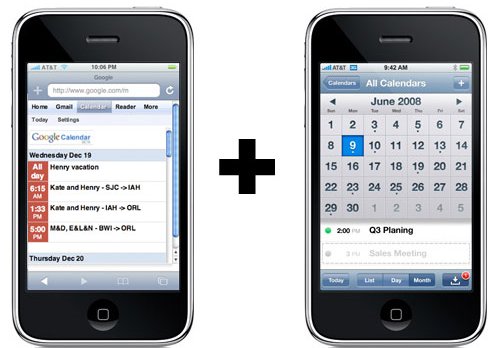
How to Sync Google Calendar With iPhone Calendar

by Sebastien on June 30th, 2009

My fiance Tina is a mental therapist and she regularly has appointments with clients. She usually uses her old Samsung phone as a calendar but needless to say it is not very practical. I recently “forced” her to get an iPod Touch and one of my sales argument was that she could use it as a calendar and that she would be able to sync it with Google calendar over the air. Note that these were just arguments I pulled out of my butt so she agrees to get an iTouch (yes, the iTouch is more for me than for her)…

We finally bought a 32GB iPod Touch and I started looking into ways to sync an iPhone calendar with Google calendar. I found many options but all involved some third party apps and that’s clearly not what I was looking for. I was very surprised that Apple hadn’t included this feature in the iPhone/iPod Touch until I actually found an article on JAIB saying that the new OS 3.0 supports CalDAV with SSL so your are technically able to sync Google calendar with your iPhone or iPod Touch, as long as you have internet access.

Here is how to set up your iPhone or iPod Touch to sync calendars with Google over the air:

1. On your iPhone, go to Settings > Mail, Contacts, Calendars > Add Account > Other > Add CalDAV Account

2. For the CalDAV settings, enter the following information. Note that your username should be the email address you use to access your Google calendar as well as the password.
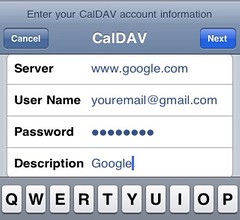
3. Then tap “Next” and it should verify your information.

4. If you can’t get your account verified, tap “Advanced settings” and make sure that “Use SSL” is On, that the port is 443, and that your Account URL includes the sign “@” in your email address.

That’s it!

Now every time you add an event to your iPhone calendar, it will also show up on your Google calendar, and vice versa. You obviously need to have internet access from your iPod or iPhone for the data to sync. Note that the sync is not immediate. It sometimes takes a few seconds but besides this, it works very well.

You might also find these posts interesting:


180 Responses

  1. Lucas Kunert says: June 30, 2009 at 10:02 am

    My bastard settings won’t retain the ‘@’ symbol in the account URL…

     
    • Didn’t work, got it to verify, but iPhone calendar and google calendar still not talking iPhone 3GS 16 gig upgraded to o’s 4


      • Any idea’s Why this won’t work fir me? We are talking syncing to the calendar that comes on the iPhone here right? I can sync it to my outlook easy with iTunes but not iPhone calendar to google cal. I did all the steps and got it to confirm etc

         
  2. i use microsoft exchange to sync google calendars with my iphone…
    i heard it syncs faster than with caldav… but you can only use one account, so if you already use exchange for work enviroment, you cant use it for google calendar…
    there’s a tutorial on how to do it in google.com/sync

     
  3. Thanks for this excellent tipp. Too bad I have to remind myself to choose the Google calendar each time I’m adding a new appointment. Is there any way to set the CalDAV calendar as default,
    Best,
    BJoe

     
  4. @Lucas – actually I just realized it doesn’t nee to “@”. Just leave it the way it’s automatically setup.

    @Bonanzajoe – Go to Settings > Mails, Contacts, Calendars > at the bottom, you can choose your default calendar ;)

     
  5. I use nuevasync.com! (It doesn’t sync just my calendar but also my contacts) I think this last one is better, don’t you?

     
  6. <<<< how can I change the picture that appears every single time I post a comment?

     
  7. @Rn3sto – Go to Gravatar.com and set up your account. It takes about 30 seconds and it will allow you to have your own avatar image for most blogs where you leave a comment.

     
  8. I’ve been using Google’s Exchange sync since it came out, and it’s worked great! I guess the CalDAV support is great for people who already sync to an Exchange account.

     
  9. nice one… thx!

     
  10. Will this transfer information already on both calendars or just sync new changes? I don’t want duplicate items.

     
  11. That’s a good question. I think it only syncs new items.

     
  12. Hey how’s everything? since I’ve done this my batery just finishes really fast, I donĀ“t know if there is any relation with it??, or is just the 3.0 firmware

     
  13. This did work great for me but i have 2 calendars on google and only one shows up on my iphone. Am I doing something wrong? Thanks for any help!!!

     
  14. This did work great for me but i have 2 calendars on google and only one shows up on my iphone. Am I doing something wrong? Thanks for any help!!!

     
  15. did anyone recon a change in battery lifetime?

     
  16. hpalexander says: July 4, 2009 at 2:59 am

    THANK YOU THANK YOU THANK YOU THANK YOU

     
  17. Lovely jubbly stuff guys – just what I’ve been looking for.

     
  18. nada.cascadia says: July 8, 2009 at 11:35 pm

    That is an awesome tip, thanks! I use the MS ActiveSync already for my work email, so I couldn’t use Google’s native sync. And none of the Apple Store apps allow Google Calendar sync with the iPhone’s built-in calendar. When I add events in Google Calendar, they show up on my iPhone calendar, but when I add events on my iPhone, they never show up on Google Calendar. I will check my settings to try to figure out why.

     
  19. Reiterating Mark’s question–is there any way to see more than one Google Calendar? I manage 4 or 5 in my Google account. Thanks!

     
  20. Just beautiful, the advice I got at this site. Thanks a lot and keep up the good work.

     
  21. Oh my, this works brilliantly only took me 1 minute literally to set it up.
    Many thanks for the instruction, super helpful!

     
  22. Wow that works like a treat thnkx saves havin to buy an app

     
  23. Thanks very much, searched the net for a simple solution as you said without needing to go through another app.It just works perfect.
    oh how i love my iPhone………..

     
  24. Thanks so much! I just set up my iTouch to sync and it works perfectly.

     
  25. Brilliant. Thanks!

     
  26. Bryan Schmiedeler says: August 2, 2009 at 6:32 pm

    I did this and it worked but I want to back out and unsubscribe from my google calendars. I went to google calendar and deleted the calendars, but they haven’t disappeared from my iPhone. Is there anything special I have to do to get them off of my iPhone?

    They are not on my MobileMe Calendar.

    Bryan

     
  27. Thank you, works great!
    Is there a way to have these events show up both in my iPhone Calendar and my Google Calendar? Sorry if it should be obvious, I just got my iPhone a few days ago.

     
    • That’s what it does. When you create an event on your iPhone, it adds it to Google, vice versa.


      • Oh, sorry :$ Then is there a slight delay, maybe? I checked my Google Calendar and the events I put in using the iPhone’s Calendar haven’t appeared yet.

         
  28. This works great. One thing Apple lacks about iPhone is information on full potential and features of the product since ver. 3.0 has so many.

     
  29. What a awesome tip. Why did I not search for this before! Nice

     
  30. Aleksey Kabrdin says: August 6, 2009 at 1:45 pm

    Thanks A LoTTTTT!!!!!1

     
  31. Fantastic! I’ve looked many places for this… So simple really.

     
  32. Johan Eltes says: August 15, 2009 at 1:43 am

    The only way I’ve found to synch with multiple google calendars over the internet is a combination of SpanningSynch (excellent third-party mac pref.pane app for synching Mac iCal with Google Calendars) and MobileMe. SpanningSync syncronizes the the local Calendars on the Mac (managed by iCal) with calenders on Google Calendar. Then the local Calendar on the Mac also syncs with MobileMe which handles the over-the-air sync with the iphone calendars. This works for me but has a set of drawbacks:

    - I need to by SpanningSync, which is a drawback compared to “free”, but it is few bucks and an absolutely fantastic produc (including the support). It is a one-off fee.
    - I need MobileMe. This is expensive and yearly cost. And the I think it sucks for many reasons that is OT for this post.
    - The sync between the iPhone and Google Calender requires that your Mac hosting your Mac Ical calendars is online, since the transitive sync between Google Calendar an iPhone requires SpanningSync to kick-in locally on your computer. Since I mainly view Google Calendar as the data store rather than using the web application, I can survive this one. If you often use googles web client to manage your calender from different computers, this is probably not a solution for you.

     
  33. OMG this actually worked!!! I’ve tried everything, even downloading apps. Who knew this could be so easy?? THANK YOU SO MUCH!

     
  34. My iPhone doesn’t sync at all with google, I setup a few times and I don’t see anything on my calendar, I’m using the exchange for my email from work so I’m stuck….

     
  35. this might be a dumb question, but if i’ve synced my google calendar and my outlook calendar, will all items disappear from my google calendar once my outlook account expires (two weeks from now)?

    thanks!

     
  36. Thank you! It works perfectly!

     
  37. Thank you! This is exactly what I was trying to accomplish. Had it all worked out on my old blackberry using Google Sync but now that I have an iPhone I was lost. Hooray!

     
  38. Hi,

    I works great for getting things from the google calendar onto the iPhone, but things I write in the calendar on the phone don’t seem to appear on my google calendar, when I open it up on the computer. Any suggestions fixing this? I dont think it’s a timing issue, because I’ve already waited several hours.

    Thanks

     
  39. Thanks so much!
    This is the perfect tool that I was looking for, and you made it so simple to set up!
    Kudos! Great Job!

     
  40. For those of you who are trying to figure out how to sync multiple calendars (in your google account) with your iphone calendar.

    Go to
    m.google.com/sync

    Select your device, enter your google account password…and you can select all the calendars you’d like link.

     
  41. thanks steve jobs!

     
  42. I used your sync tip through CALDEV and it seemed to sync fine, but now I realized that all events I entered on my iphone calendar don’t appear in my Google Calendar in my notebook. Why is that? am I doing something wrong?

    Please let me know! Thanks!

     
  43. Ok i just realized i needed to set Google cal as default
    thanks

     
  44. You are an ANGEL!!!!! I have been using google calendar on my iphone for sometime. I had some system glitches and ended up deleting my google account and my iphone and reinstalling it, and then the contacts and calendars wouldn’t sync. I tried Google sync, nothing. The only thing I found was something saying that if you delete your email account on your phone and then reinstall, google calendar will no longer sync. A lot of help that was! I wish I would have found your post a few days ago – would have saved me lots of frustration.

    THANK YOU!!!

    Now… how to sync with me.com?

     
  45. You can sync multipe google calendars without 3rd party app.

    look at this article for how.

    http://www.ideaexcursion.com/2009/06/17/howto-sync-google-calendar-on-iphone-os-3-0/

     
  46. Chck Hasins says: October 1, 2009 at 3:40 pm

    Can I sync two iPhones with one google calendar? My wife and I both have iPhones and want to sync to a family calendar.

     
  47. @Chck Hasins

    Yes, I assume it’s possible. Simply follow the same steps for both iPhones

    s

     
  48. Kapil Gupta says: October 1, 2009 at 5:55 pm

    Thanks!! This is exactly what I needed.. Now I can keep my exchange account and Google Calendar separately :)

     
  49. Just got iPhone after Treo, so new to this gig. Have the free trial of Mobile Me on and really don’t like the calendar (can’t even print the darn thing!) etc… I haven’t had the success that other folks have had in getting this sync process to work. Could it be that I have to remove Moblie Me first?

     
  50. Thank you so much for this GREAT tip!

    I just did it and as a SAHM, it sure makes my life easier! I have LOTS of calendars to keep up with and need to keep them all synced.

    You’re a blessing!
    Sunny

     
  51. Great help. Thanks!

    Todd

     
  52. Many thanks! Was looking for a solution and you provided it.

     
  53. I honestly had no idea that setting was there. Thanks so much for pointing that out. Just some FYI for readers, it syncs both ways. If I delete an appointment, or in my case work day, on Google calendars, it deletes them from my iPod Touch as soon as I access the calendar application.

     
  54. Thanks buddy.. i was searching for this info.

     
  55. Thank you! Life is easier now :)

     
  56. Ahhhhh thank you thank you thank you!

     
  57. Thank you so much for the very clear instructions. Worked perfectly! :-) . Much better than the Google help pages :-)

     
  58. Thank you so so much!
    I have been search the solution for days,
    and your article is the only one that helps.

     
  59. Nice! Worked like a charm! Thank you!

     
  60. That is a great tip – Worked and man it is great!

     
  61. How do I transfer the events from “All on my iphone” to google calendar ??

     
  62. great thanks man…

     
  63. Excellent!

    It’s works.

     
  64. Thanks for the help!

     
  65. Easy to follow instructions…what a pleasure….and it works great. Thank you!

     
  66. Oh my god, this is the only page I could find on the web that tells you the easy, simple way to sync GCal and iPhone. Every place else has you downloading applications and synching to Outlook. You rule!

     
  67. once synced, the timing for the appointments automatically change.
    Is there a way around this and why does it happen?

     
  68. I’d managed to get everything set up apart from being able to add events on my iPhone, and them appearing on my Google Calendar. This solves is brilliantly. Thanks!

     
  69. I’ve managed to sort out the color situation.

    Incase anyone else hasn’t commented yet. I used this thread a while back but just now figured out how to customize (sort of) the colors of multiple calendars subscribed on your iphone.

    I had the problem where many calendars were the same color when either subscribing or on CalDAV. what you can do is subscribe multiple times and each time will bring up another color – purple, red, orange. Then go back and delete the first ones to achieve your desired color. This is the only way I’ve found to edit colors.

     
  70. Here is how you get ALL of your Google calendars to sync up with your iPhone built in calendar.

    Honestly, this makes the iPhone calendar finally worth while.

    Ok, this will set up the service.
    http://www.google.com/support/mobile/bin/answer.py?answer=138740&topic=14252

    This will set up the multiple accounts.
    http://www.google.com/support/mobile/bin/answer.py?answer=139206

     
  71. freshgirl604 says: January 4, 2010 at 9:28 pm

    thanks so much for providing these steps! i have been looking for something simple to sync with my personal calender, and this is perfect!
    thanks!

     
  72. You totally rock the Casbah. This little feature is going to dramatically improve my life. THANK YOU!!!

     
  73. This is amazing – it now means I can keep a personal diary a work dairy and my other halfs diary. All together or separate on my iphone. You are a legend of the highest order. Thankyou

     
  74. Thank you so much! Great tip, and allows me to clean up the many apps I’ve accumulated. :-)

     
  75. Scott Davis says: January 13, 2010 at 2:48 pm

    I followed every step given above and nothing happens trying to sync the iphone calendar with my google calendar. I can update my calendar on iphone all day and nothing gets transmitted to google and vice versa. Any suggestions?

     
  76. You are my HERO!!!! Thank you sooo much. I too already have an exchange account and I didn’t want to bother sending it all to gmail and then to my phone. Wow you have no idea how much this helps. Well maybe you do but you’re super anyways.

     
  77. Awesome…
    Finding you was like winning a Lottery…
    OK not the MEGA..but still a WINNER….

    Very Easy however, my Ipod Appts not showing up in Google…
    Just 1 way from Google to IPOD…

    Is there something I missed…??
    Many Thx
    Carrie

     
  78. Briliant.. worked perfectly for me!! :)

     
  79. If you are not seeing your events in the google calendar, make sure when entering the event that you set the calendar option (below invitees, alert etc) to google. I have 2 calendars and by default it was going to the other one.

     
  80. Bingo..!!! Found it..!!
    There are 3 Calendars…”Ipod”…”Google” and “All Calendars”
    Tested it..and if I enter info into “Alll Calendar” & “Google” it works.
    Merci…Merci…a thousand times…Merci..

     
  81. YOU ARE MY SUPER HEROEEEEEE!!!! THANK YOU, THANK YOU SUPER THANK YOU!!!
    GRACIAS UN MILLON….IT WORKS
    PERFECT!!!!

     
  82. This is great, thank you! I am having the same problem as some others who aren’t seeing their iPhone events on the google calendar (but can see google calendar on the iPhone). Stefg- I used your suggestion for the calendar and it worked for a new event I just put in (thanks!) but does anyone know if there is a way to show already scheduled events in the google calendar without deleting each one and re-entering them with the google calendar selected on the “calendar” option?

    Thanks for any help!!

     
  83. Using this method, events on my iphone disappear after 30 days. Is there any way to alter this either on my phone or at google calendar, or somewhere else? thanks.

     
  84. Thanks a lot! Piece of cake!
    Cheers
    Bill

     
  85. Elena and Rick,

    Try adjusting the “Sync” time for the Calendar..
    Go to: “Settings” >>>>> “Mail, Contacts Calendars” >>>>
    go to the Bottom, Under “Calendars” >>>>”Sync”
    This gives u choice of syncing 2wks/1mth/3mths/6 mth or ALL Events.
    I chose “ALL” and all past events are on my Calendar.

    Rick, maybe this will keep your events longer than a month.

    When I go into my Calendar and Select “Calendars” (the Top Left of the Screen)
    I have 3 Calendars…:All Calendars”/ My Ipod/ All Google..
    I select “All Calendars” and that’s where both Calendar events appear.
    Hope it helps.

     
  86. Carrie!!!!!

    Thanks alot. That was it. I thought it might be something simple and you nailed it. I wonder why the Iphones rep. couldn’t tell me that? Anyway, thank you very much. It synced immediately – and voila – all is right with the world.

    Hope I can return the favor sometime :)

    Rick

     
  87. Thank you so much! I love you!

     
  88. Using your wonderful help…..my iphone and google cal are wireless sync. However, when I enter a repeating event on my google cal it only puts the first day on my phone. What am I doing wrong?
    Tamara

     
  89. Hi Tamara,
    Just tried it and it works ok…

    Try retracing your steps…
    Don’t mean to be patronising, but Double check and make sure u SET up the Event to Repeat… and WHEN you want the Repeat to EXPIRE.

    Depending on if u have set it up to repeat at a “Specific Time” or “All Day”..
    and you are looking at the Event on your Iphone…
    On the Bottom of the Screen(Iphone/Ipod) try changing the Selection of how you view the Calendar to “LIST”…maybe it will show up there.

    I have found that if I have a Lot of events scheduled “All Day”, PLUS other Scheduled Events on the same day…When I am in “Today” View they don’t all show up..

    Hope this helps…Good Luck
    Carrie

     
  90. Thanks for the step-by-step instructions…this worked great!!!

     
  91. Hi thanks for this. It works a treat for my Google Calendar, but when I “see” Google Calendar on the internet, I see lots of other calendars, like my wife’s work calendar, and the kid’s sports calendar. These are owned by others, but I can access and change them. Is there anyway I can “see” these calendars in my iphone calendar too?

    Thanks again.

     
  92. Set up and workin like a champ Thanks.
    one?
    Can I sync all the dates I already have set on my iphone calander over to the google calander? Dosent seem to have done it. Anyone? Please!!

     
  93. Yesterday I spent 3 hours scouring the web looking for just for this functionality. None of the guides that I found were as simple as yours. To top that, none of them but yours worked either.

    Great job. Thanks for sharing!

     
  94. How do I do if I want my 3gs iphone calendar in my google calendar? Please help me…

     
  95. All the different programs I try just sync from google to iphone not the other way…

     
  96. Echo nicks comment about copying appointments already on iPhone to google cal. Also when I add a new appointment in iPhone, when it syncs with google cal it adds two alerts at 10ims before the appointment. How can I turn this off??

    Thanks for the help. An hour in apple store on regents street didn’t get me this far!!

     
  97. I have both my iPhone and my mom’s iPhone set up to sync with my google calendar. I have found that if I add or delete an appointment – no problem; she sees it fine or it deletes fine from both phones. BUT, if she adds an appointment or deletes one it does not seem to sync with my phone or the google calendar. Any suggestions?

    Great post by the way! Your instructions are very easy to understand, thanks!

    Cherie

     
  98. Perfect! Works great! Thanks for the tip.

     
  99. Perfect, thanks!!

     
  100. Thanks, that was perfect. Amazing that it’s so hard to find a straight answer to this question online. Bravo!

     
  101. This is an excellent piece of info, Sebestian. Thanks for sharing….

     
  102. I have the same question as rob up above. How do I sync secondary calanders that have been created and show up on my gmail.com account

     
  103. Thanks so much!! I have been trying to do this forever!

     
  104. OK, this doesn’t work for me; in fact, it is a step backwards. As a test, I did an event on google, and a separate event on my iphone on the same day. When you google this issue, you get two sets of directions. One (from google) says use Exchange, others say use caldev.

    I used Exchange, and was able to do a one-way update of my google account to my iphone. But I could not update my google with my iphone events. OK, so I used the instructions above (without disabling the Exchange). It deleted the orignal event on my iphone while adding the computer calendar event!!!

    Obviously, I’m screwing up. What am I doing wrong? Obviously, there is some transfer going on, but not the two way transfer I’m looking for.

    BTW: Iphone 3GS, Version 3.1

    Thanks for your help. Best, N.

     
  105. Works great, Thank!

     
  106. Brilliant! Thanks.

     
  107. By default only your primary calendar will be synced to your device. You can sync additional calendars by visiting one of the following pages from any browser (via desktop or mobile device):

    For non-Google Apps users: https://www.google.com/calendar/iphoneselect
    For Google Apps users: https://www.google.com/calendar/hosted/YOUR DOMAIN NAME/iphoneselect

    Select the calendars you’d like to sync, and click Save. The selected calendars will display on your device at the time of the next sync.

     
  108. For people who wonder why IPHONE events do not show up on GOOGLE calendar, found this useful answer on google forums:

    In iCal, make sure you’re entering your events into your google calendar not the local iCal calendar. It took me a long time to notice there was a difference.

     
  109. Well done. Thanks much

     
  110. Just want to add my thanks to the crowd.
    Worked perfectly.

     
  111. Thanks a mill – worked perfectly

     
  112. Hi!
    Looks really promising, and I’ve tried the setup… only problem is that Ical on my Iphone 3G does’nt have the up-date icon on the right-hand side of the screen like on the photo in the guideline above… and I don’t get the syncronization of the two calendars even if I’ve done the set-up as instructed…

    Question: Does the sync-option only work with 3S???

    Thanks!
    Sincerely from Louise

     
  113. Can’t get CalDAV account to verify and if I save it, a screen keeps popping up asking for a password for that email address. What’s wrong. I have it working on another phone. Frustrating. Help please. Thanks in advance.

     
  114. Works like a charm. Thanx.

     
  115. Can’t get my outlook calendar, which is syncing nicely with iphone calendar through ms exchange, to now sync to google through CalDAV. If I enter something directly into my iphone calendar it shows up in google, but not the outlook appts.

     
  116. Thank you so very much!! I’ve been looking for something like this for ages!! Thank you, thank you, thank you!!!

     
  117. Hi Everyone –
    The events I have added to my Iphone calendar are not showing up on my Google calendar on my computer. Any tips? I’m a rookie at this..
    Thanks!!!

     
  118. Thanks for this awesome tutorial! So much easier than what I was doing!

    =)

     
  119. Como me conectar ao celendio do Google.

     
  120. Thank you for the help! I was so frustrated trying to follow gmail’s instructions!

     
  121. beautifully succinct post. thanks!

     
  122. Thank you for this tip. my wife and i are trying to set up a family calendar for all our kids events, now we can just enter it on the fly and we are both going to know about it.

    awesome, awesome info. thank you again!

     
  123. Thanks guys – such a simple solution to a problem I’ve had for a while!

     
  124. Thanks, worked a treat.

     
  125. Thanks for this. Worked like a charm! :)

     
  126. Thank you so much. I had already done a search for a tip to do this and hadn’t been given any help other than syncing on google sync. I just needed the calendar. I thought I’d search one more time just to see and BAM I found this tip. It worked just fine!!

     
  127. Hi. I’ve noticed a number of people who have raised the same issue I have: Pre-existing calendar items on the iPhone don’t seem to get transferred across.
    I get the bit about adding to the correct calendar, but I have 13 years of calendar records that I don’t want to lose (originally transferred across from a Palm, and no way to go back). I can no longer safely sync with Outlook, and my Outlook calendar got stuffed up after the last iPhone OS update (don’t ask me why, I have no idea. All repeating transactions from that past 13 years suddenly lost their end dates, and I had hundreds of appointments still current each day.)
    So now I am desperate for a way to back these up in an accessible form. Is there any way at all of getting pre-existing calendar items transferred from the iPhone to Google?????

     
  128. DANIELLE says: May 7, 2010 at 9:14 am

    Thank you! I just got my iPhone yesterday and this helped and worked perfectly!

     
  129. This is awesome! I badly needed this and finally found it.
    Simple and sweet!
    Thanks

     
  130. I have followed the steps and managed to add a new CalDAV account, which was duly verified and is showing in the Accounts setting. However there is no sign of a Google calendar within iCal on my phone – just my usual calendars. Even if I try to change the default setting with Mail, Contacts, Calendars there is no sign of Google… does anyone have a notion as to why this may be?

     
  131. It syncs as events are added. So if you already have stuff on your calendar nothing will happen until you add new stuff. This was no problem with my since my source is really a GroupWise calendar. So I wiped out my Google calendar and used CompanionLink (Free Trial) to add my Groupwise events back into Google. CalDAV saw these as new adds and synced them all with my phone. Worked perfectly!

     
  132. Fantastic. Thankyou so much. Initially couldn’t get iphone entries to show up in google – then read some more posts in this thead, did a bit more tweaking and it works beautifully. I am so very happy. : )

     
  133. great job — thanks!

     
  134. you kick arse

     
  135. Man is this the best reminder or what, Thanks

     
  136. Thanks a lot. I was banging my head for last one day and finally found your instruction. Worked like a charm. Thanks again.

     
  137. Anthony Hotchkins says: May 20, 2010 at 11:06 pm

    Many thanks man

     
  138. it’s works! thank u very much

     
  139. Like others, I cannot get events added using my iPhone to appear on my Google calendar, either on my PC or on the iPhone.

    I found this above: In iCal, make sure you’re entering your events into your google calendar not the local iCal calendar

    My iCal is set to All Calendars. Shouldn’t this setting update “all calendars”? I scanned the thread, but didn’t see this specific issue addressed. Apologies if I missed something.

    Thanks for any help anyone can offer.

     
  140. Excellent tip!!! Thank you!!!

     
  141. Thanks for the clear instructions, I can now see both calenders, set push notifications, see google calender on my iPhone calender. Having a problem getting the events already entered on my iPhone calender to appear in google calender- same as people above. I can only get new events to show up on google calender. Any clues?

     
  142. Hey

    Thanks a ton! Really helpful… i had my calendar synced between google and iphone.. i am from India, now i am in france to attend the annecy festival. Suddenly my calendar has stopped syncing. :(

    Cheers
    NISH

     
  143. Hi sorry but it does not synch my iphone calendar.. i have google app on my iphone which syncs my calendar but the iphone calendar is NOT SYNCING>> :( :( :(

    ANYONE HELP ME PLEASE!!!

     
  144. Thank you very much
    it worked perfetly in seconds

     
  145. Thanks a lot for the tip! Worked flawlessly !

     
  146. what info do we have to enter?

     
  147. Thanks

     
  148. that was the easiest! thank you!!!!!!!

     
  149. Thanks for this tip!

    However, when I add an even to my Google calendar, it syncs with my iPhone calendar, but the reverse will not work (when I add an event to my iPhone calendar, it will not sync with my Google calendar) Any suggestions for solving this riddle?
    Thanks.

     
  150. This is fine for just 1 calendar, but I have 5 calendars in my gmail and its only bringing in 1 of them. Can someone please help me? Even using Exchange it will only bring in 1 of my calendars. FUDGE!!!

     
  151. Hey Damien B # 155,
    I was Able to Sync ALL my Calendars following Google instructions which I have included here.

    Here’s the Link to Google for instructions on HOW to Sync your Google Calendar with your Apple device (including iPhone, iPad, and iPod touch) – CalDAV: CalDAV Calendar Sync:

    http://www.google.com/support/mobile/bin/answer.py?answer=151674

    PART A – Is what you have obviously done as per the Instructions on this Blog.
    PART B – Deals with Syncing More than I Calendar.

    ** NB **Requirements
    Syncing via CalDAV is only available for Apple devices running software version 3.0 or above. Learn more about checking the software version on your device.

    Part A:
    Getting Started
    To sync with your device, follow these steps:

    Open the Settings application on your device’s home screen.
    Open Mail, Contacts, Calendars.
    Select Add Account…
    Select Other.
    Select Add CalDAV Account.
    Enter your account information:

    In the Server field, enter [ google.com ]
    In the Username field, enter your full Google Account or Google Apps email address.
    In the Password field, enter your Google Account or Google Apps password.
    In the Description field, enter the name you’d like to appear on the account.
    Select Next at the top of your screen.
    After you’ve completed setup, open the Calendar app on your device and syncing will automatically begin.

    **PART B: **
    By default only your primary calendar will be synced to your device. You can sync additional calendars by visiting the following page from any web browser:

    https://www.google.com/calendar/iphoneselect
    Select the Calendars you’d like to sync, and click Save.
    The selected calendars will display on your device at the time of the next sync.
    (FYI – I have shared my Calendars with my other accounts..so ALL the Calendars I have shared show up..)

    Hope this works for you!
    All the Best
    C

     
  152. To Moderator,
    Hey Sebastien, can u Please advise why my comment #156 has been in “Moderation” for over 9 hrs.
    Many Thx
    C

     
  153. Perfect Guys! Thanks

     
  154. incredibly helpful ! thank you for posting this !

     
  155. Thanks for this info! It worked right away, and I had been using the Google App for a few weeks but that was so cumbersome!!

     
  156. Worked great! Just wish I’d found this before I synced my iphone the other day.

     
  157. Colbyzmom says: June 29, 2010 at 5:44 pm

    Thanks for the great help and great description of the set up. I’m not very savy at this yet. You directions were clear and looks like I am working!

     
  158. Thank you so much!!!!!!!!!!!!!!

     
  159. You rock! This was so helpful. Thanks so much!

    I used your tutorial to connect to my Google Apps calendar over CalDav. Now if only I could find some way to use Push Mail and Contacts between my Google Apps and iPhone.

     
  160. Thanks for the help. This was very useful. However, how can my tasks transfer to the iphone. I have set them up in the Google calendar, but can’t find them on my phone.

     
  161. David Faille says: July 10, 2010 at 3:59 pm

    THANKS!!!! Very Helpful!!!

     
  162. foolioami says: July 16, 2010 at 8:37 am

    I have an email address through a church domain which is ran through gmail – https://www.google.com/a/epiphanyfellowship.org

    What changes do i need to make in my calDAV settings to make this work?

    Thanks for the help!

     
  163. This page really helped me. It took me hours to realize that the only way for me to see my iPhone events on google were to change each and everyone of them from my iphone calendar to my default calendar. I went to each event and edited then changed the calendar to the new default account then saved. Maybe theres and easier way, but i was sick and had all the time in the world! I do see that I am not able to change the birthdays that are setup in contacts(the red dots) but i manually did them all. Either way this site really helped. Thank you!!

     
  164. icon is sad but i am very happy :)

     
  165. Waoh! This works like magic! Best tip on the internet!!!!

     
  166. Fantastic tip, very grateful, thanks.

     
  167. Thanks so much for posting!!! I’ve been looking for a way to do this.

     
  168. I have a 3Gs with the OS4 ops and this was easy, working like a champ!! Thanks so much!!!!!

     
  169. Thank You so much. I tried fifty different ways to sync my two cal. with no luck. googled your instructions and it worked like a charm. Thanks!

     
  170. Last year Steve Jobs posted a reply saying to go to m.google.com/sync to sync iphone calendar with Google calendar via itunes. I did what it said but when I got to “apply to sync your divice with itunes” a window popped up saying “info on (my) iphone is synced with another user account. Do you want to sync this iphone with information from the used account instead?” Then it gives option to either merge info of replace info. I have no idea what this other user account is. I’m a novice at this so I hope someone can help me.

     
  171. Thank you. No, really…THANK YOU.


Your Comments

Leave a Reply


Submit Comment