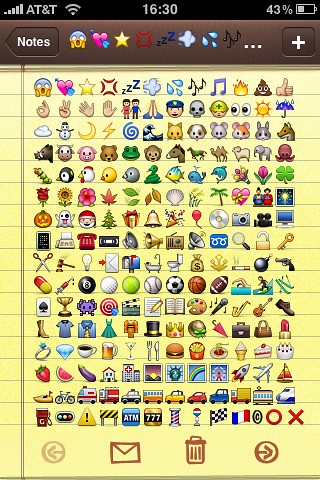
There is a simple trick to enable the emoji keyboard on your iPhone. This trick has been around for a few days but for some reason, I never wrote about it. Loyal reader David emailed me earlier today and reminded me of this.
1. Install Spell Number from the App Store (it’s a free app)
2. Launch the app and type 91929394.59
3. Press the home button
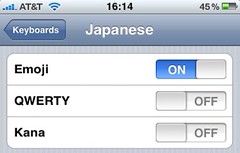
4. Go to Settings > General > Keyboards, and under “Japanese” select “Emoji”
You can now use these crazy little japanese icons. Note that you can delete the app if you don’t want to keep it. Your Emoji keyboard will still be activated.


23 Comments


Yay! I’m famous!
thanks for the Tip Sebastien ! Worked Great !
Wow, that’s awesome. Unfortunately, I just paid $0.99 for Emoji icon app.
Thanks a lot man, that’s awesome.
I found I had to press enter after typing in the number before pressing home and enabling the keyboard. Just thought I would add this in case anyone has trouble enabling this.
i have an iphone 3g and i tried txing my friend on his iphone 2g and it does not work. only on 3g.
tried on my iPhone 2G 3.0 and works like a charm, thanks!
It works in the fact that you do get the emoji icons, however on my iPhone 3GS running 3.0, the “delete” button and the return to normal keyboard button are both missing.
The bottom left and bottom right buttons do not show up properly and just look like gray squares. They do work when you tap them, they just don’t show up as the buttons.
Does anyone have a fix for this? Thanks.
@Rehan: I’ve read that it’s a problem with Winterboard.
Thanks for the response parry!
You’re right! I turned off Winterboard and it works fine again. Know of any fix to this while keeping WB running?
Thank you!
A friend informed me of the following fix, only downside to it is that for example if you have themed your SMS bubbles you will have to sacrifice them as the fix means only the Springboard can be themed.
Here is a link to the reply: http://twitter.com/Stezz/statuses/2657811576
lmao ! this is nicee !
I don’t know what i’m doing wrong… I can’t get it to work! Please somebody help?
What problem are you having?
Also having a strange problem, got the app installed and i’m seeing all emotes, but when I press one it won’t add too the text file.
Help plz….using jailbreaked 3gs with winterboard installed.
I love you.
If we sent 1 of these icons to a friend that does not have an iPhone, will she/he be able to see it or is this emoji icons just for iphone users?
Top Tip – should come on the first google page when searching for emoticons
@Cypher1 Your friend has to have Emoji enables on his phone for him to see the character. Or else he will just see a strange character that doesn’t mean anything.
Can I enable emoji on my pc? I tried to send wife email and all she saw was strange caracters w no meanings.
You don’t need the app to do this just go to the keyboad setting and add it. Also in the 4.0 SDK emoji is it’s own keyboad you don’t need to use the Japanese one.
This is CUTE! I love it! Thanks!
Its not workn for me??