[digg-me]Copy/Paste is without a doubt the most wanted feature on the iPhone and I still don’t understand why Apple hasn’t given it to us yet… Last month, I talked about PasteBud, which was kinda bringing copy/paste to the iPhone through a combination of javascript bookmarks and web services. PasteBud definitely had its share of restrictions and it wasn’t as great as I thought it would be so I gave up on it.
Now comes Clippy, a free application available in Cydia through the iSpazio repo. Let me tell you right away that, even though it’s still a beta version, Clippy is the best app for copy/pasting on your iPhone so far!
How does Clippy work? After installing the application, type any text you want and simply hit the “123” button on your keyboard to show the copy/paste buttons. Tap “copy” and start selecting the text you want to copy. Tap “copy” again to end the selection. Then tap “paste” to paste this text where you want it to be.
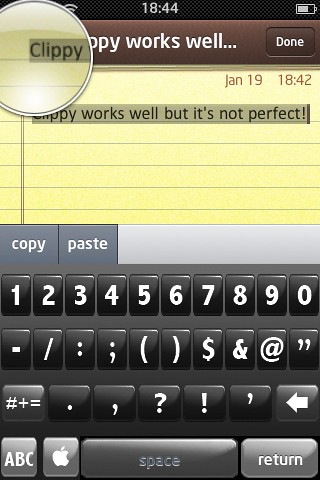
Pretty simple, huh? It does have a few limitations though…
First, Clippy only works across the Notes, Mail, and SMS apps and that is a big issue to me. Most of the text I want to copy comes from the web and Clippy won’t allow me (yet) to copy/paste snippets of text from Safari.
Second, Clippy will only let you copy one line at a time. For example, if you have a 5-line paragraph, you will only be able to copy one line from that paragraph. That is kind of an issue too because you most likely want to copy larger text areas.
Besides that, Clippy works great! Remember it is still in beta so it will most likely be improved and work for Safari and also let you copy several lines at a time.
UPDATE: Clippy got an update this morning and it now allows you to copy several lines at a time and use copy/paste anywhere you can use the keyboard (ie Maps, Twittfon, etc…). So most of my negative comments about Cippy are not valid anymore. Next step to make it the perfect copy/paste app is to allow it to copy text from Safari!