Downgrade iPhone Firmware 2.2 to 2.1

by Sebastien on November 22nd, 2008

Firmware update 2.2 surprised a few people who accidentally updated their iPhone. If that happened to you, you now have 2 choices: either stay and 2.2 and wait for the Dev Team to come up with a jailbreak method for 2.2, or you can try to downgrade from 2.2 to 2.1.

I personally don’t have this issue. I haven’t updated to 2.2 but I figured that some of you guys may have, so I started looking for a solution to post here. The problem is there doesn’t seem to be a solution that works for one main reason: 2.2 updates your baseband and once your baseband is updated, you can’t downgrade it to 2.1 (not as yet anyway).

From what I read, only 2-3 people were actually able to get their iPhone back to 2.1 without issues but it is very unclear what they did exactly… Now let’s have a look at these different methods that supposedly show you how to downgrade from iPhone firmware 2.2 to 2.1.

Note that I haven’t tried this and I do not approve it. If you choose to try any of these methods, understand that you’re doing it at your own risks. If I were you, I would just wait for a new jailbreak method by the Dev Team.

I found the first method on MegaLeecher.net and here is how it goes:

For downgrading iPhone Firmware 2.2 to an earlier version you will need to downgrade the baseband and firmware, for this following software are needed:

  1. ZiPhone patched by kIREmK (Pls. read this comment).
  2. QuickPwn v 2.1.
  3. Apple iTunes.
  4. Firmware IPSW file : 2.1 firmware 3G or 2.1 firmware 2G.

Once you have got all the above softwares, follow the process below:

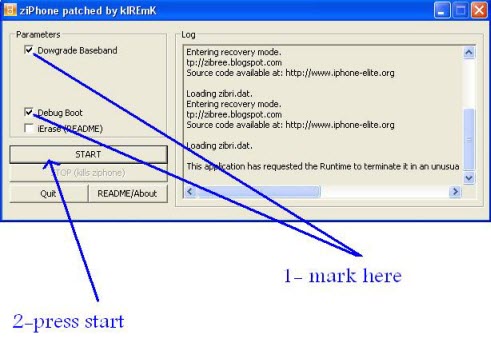
  1. Use Ziphone to downgrade the baseband using the settings as shown below.
  2. Downgrade iPhone Firmware
  3. Now restore the firmware to an earlier version using the IPSW file via iTunes, if you receive errors during this procedure simply ignore and proceed further.
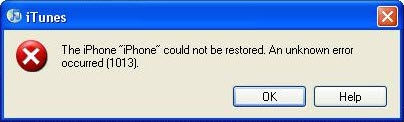
  4. iPhone Update Error 1013
  5. Now, use Quickpwn to unlock and jailbreak using the same firmware flash file used to restore in previous step.
  6. Your iPhone should be jailborken and unlocked now.
Please read the comments on MegaLeecher and you’ll see for yourself that it is not a really safe way to downgrade…

Now the second method that I found on iPhoneHacks.com.

First you need to download iPhone firmware 2.1 (for 1st iPhone, use this download link and for iPhone 3G, use this download link).

You can then follow these steps to downgrade from iPhone firmware 2.2 to firmware 2.1:

  • Connect your iPhone to your Mac or PC select your iPhone from the list of devices in iTunes. If things had gone horribly wrong while hacking your iPhone and iTunes does not detect your iPhone then you will need to put it in DFU (Device Firmware Upgrade) mode.
    • You can follow these steps to put your iPhone in DFU mode (this is required only if iTunes does not recognize your iPhone):
      • Connect your iPhone to your computer.
      • Turn iPhone off.
      • Hold power and home together for 10 seconds (exactly).
      • Release power but keep holding home until the computers beeps (observed on a PC) as a USB device is recognized.
      • A few seconds later iTunes should detect your iPhone.
  • In the Summary Tab, Hold down Option and press the “Restore” button. If you are using Windows hold down Shift and press the Restore button. (This is an important step as just pressing the “Restore” button will result in restoring your iPhone with the latest firmware which is firmware 2.2 currently, by holding down Option in case of Mac or Shift in case of Windows, allows you choose the firmware file that you want to downgrade to.)
  • Restore or Revirginize iPhone

  • You should be able to see all the older iPhone firmware files you had downloaded so far, select iPhone firmware 2.1 file (iPhone1,1_2.1_5F136_Restore.ipsw) to restore your iPhone or browse to the folder where you have downloaded it and select it.
  • You might get the any of the following errors: 1011, 1013, 1015, you can ignore them. However, if you get errors such as: 1601, 1602, 1600 or anything else then try putting the iPhone into DFU mode and try again.
  • Your iPhone should now be restored to iPhone firmware 2.1 (Settings -> General -> About). You can then jailbreak and unlock your 1st gen iPhone or jailbreak iPhone 3G.

Again, I highly suggest that you read the comments about this method…

If you have successfully downgraded your iPhone from 2.2 to 2.1, please let us know how you did that.


121 Responses

  1. it work !!!! dfu mode but after u put in dfu mode restar the whole divice by holdin home and power button for 15 secon realease home buton hold power button for 2 seconds wala wait untill reboot back on 2.1 “]

     
  2. Armando. Which metod did you use?

     
  3. any word on how to do this, or if it is at all possible, with a mac?

     
  4. i dont get how to ignore the error massages. It wont work when i restore to 2.1. it will almost finish and then i get the error (1013) and it stays in recovery mode.

     
  5. i had it very easy..i upgraded my jailbroken 2.1 to 2.2 knowing it would upgrade everything…. i didnt download anything else besides quickpwn 2.1 and it downgraded and jailbroke it by itself to 2.1… took about 5 mins and is legitimate

     
  6. I ALSO USED IT ON A MAC RUNNING LEOPARD!

     
  7. Just put your iPhone in dfu mode !!! And click ok on error 1013 after that hold power and home button for 15 after that release the home button remove from USB after error 1013 !!!

     
  8. i did all of the above armando but my iphone 3G could not be restored to 2.1 i have been using the gevey.3g sim but to do the restore i used the original usa sim since i bought the iphone in the usa.

     
  9. I have managed to down grade the FW to 2.1 on my iPhone 3G. I used the second method, installing the IPSW through the iTunes downloaded older version. I had to do the 15 second + 2 seconds reset a couple of times afterwards. My SIM jacket, still does not work though, does anyone know how to downgrade the Modem FW (baseband)? Step by step please.

     
  10. Downdrade was not a problem on the first time, but my i-smartphone sim unlock card still does not working.

     
  11. Pingback: iPhone 2.2 Firmware Jailbreak/Unlock

  12. roberto di cori says: November 23, 2008 at 12:28 pm

    thank you very very much for you advices , all went good but in the end there is no phone service .is there any way to resolve this problem ???

     
  13. recononect to itunes it should activate!! And no problem!!

     
  14. To LTD,

    How did you downgrade your iphone 3g? Step by step please. Just like Bill i get the 1013 error and when i click ok it stays in the recoverymode. and if i then try to put it in the recoverymode i stil get get the warning recover your iphone. So to LTD whendid you do the 15 second + 2 reset and how exactly? press home an power at the same time for 15 sec and then remove home and two sec later power? If i do that i still have to recover. So if you can help please write down the exact steps! Thanks!

     
  15. steps to downgrade!!!!!!!!!!!!!!!

    1.put iphone in dfu mode “hold power and home button for 7 seconds release power button keep holding home button untill itunes reconizes the iphone”
    2. after that press shift and click restore find the 2.1.ipws ”
    3.phone should star restoring…… after that you should get msg error 1013
    4.click ok disconnect iphone from usb
    5.restar your phone agian by holding power and home button for 15sec release home button but keeep holdin power button for 2 sec after that iphone will be starting up again wait untill it ask you to connect to itunes to activate ….

    phone should be back on 2.1

    hope it works !!!!!!!! it work for me !!!!!

    inxane* the one and only …..

     
  16. it’s best to include what iphone are you using before saying it works, etc. this one doesnt work with iPhone 3G, it will ONLY DOWNGRADE the software but not the baseband.

     
  17. I can confirm that I did the same as armando. I had to do the 15 sec + 2 a couple of times though. But it did work. BUT to confirm. This will only downgrade the FW to 2.1 and NOT THE BASEBAND. I still can not use my Any Network SIM card. So at the moment I dont know why people want to down grade the FW only. There is no point. Unless someone knows how to downgrade the Baseband also? If you know how please post a comment! :)

     
  18. Oh sorry and I’m on a 16Gb iPhone 3G locked to the O2 network in the UK!

     
  19. well, there is a free program – iBrickr (http://cre.ations.net/creation/ibrickr), which jailbreaks older firmware but totally crashes a new one. So, after running it, I just install 2.1, by clicking shift+the Restore button on iTunes so that i could choose the firmware version wanted. And that’s it :) Not that these methods here are not good, but i had trouble running the programs listed:)

     
  20. Pingback: iPhone 2.2 firmware update klachten - Mobiel Internet Blog iWap.be

  21. On 2G – very easy, you need to have the 2.1 firmware file on your computer.
    Enter iTunes and connect iPhone. Hold SHIFT down and click RESTORE. iTunes will ask from which file to restore, choose the 2.1 file.
    Thats it. Jialbraking and localization is then done by your program choice. I used QiuckPwn21-1 and it worked smoothly.

     
  22. i have 3g iphone with 2.1 fw that was downgraded from 2.2 fw .
    but the problem is with my baseband that remain in 2.2 fw
    so i get no service … every thing else is fine .

    is there any safe way to downgrade my baseband or a new way to use 2.2 fw
    on 3g phone jailbreaked and unlocked ..

     
  23. hi , its me from the post up here , i forgot to mention that i use a pc not mac.

     
  24. guys the ZiPhone ZIP file does not work????

     
  25. hello all how are you, i was like u all surprised by the new upgrade 2.2, and i always see “no service” cz am using turbo sim, what i did that after jailbreak with quickpwn :

    go to cydi, download bootneuter V2.1, even if ur sim not working, then open it , u will see that boot neuter cannot determine anything and ur iphone might restart , then after restart delete bootneuter ….. remove and insert ur sim many times u will see “ur service”

     
  26. also u will see in setting “carrier” try quickly to go there and choose Automatic, u will get some errors ignore .

     
  27. it worked for me then no signal but i think solution is in bootneuter

     
  28. Hi, i try all the steps, it works the downgrade!!! but i have a 3G 16GB locked to the Telcel network in the Mexico, and don’t connect to the network, the steps that i follow are:
    1.- with itunes shit+restore, locate the 2.1 firmware.
    2.- i got the error 1013, close the itunes and disconnect the iphone.
    3.- open the QuickPwn22-1 and connect the iphone.
    4.- follow the instructions.
    5.- i got the iphone with the firmeware 2.1, cydia and installer, but it can’t activate the celular network.

    please, if you have any sugestions…

     
  29. By the way, the reason for me to downgrade from 2.2 to 2.1 is that some apps don’t work with the new firmware, from example Mcleaner, iblacklist, pysl, etc.. of course all that got in cydia…

    best regards.

     
  30. guys i did something dont know what is it in bootneuter and i got the signal for 2 hours , but in reboot everything is back to “no service” any idea how we can woek ok bootneuter cz in it the solution i guess

     
  31. gustavo u can downgrade it to 2.1 but the modem firmware stays 2.2 check ur setting then about u will see 02.28.00 , cz by updating to 2.2 the baseband also updated and wont be downgraded…… firmware has no issue related to baseband…. we need solution for downgrading baseband , firmware easy to do it, and we will not get service unless we downgrade the baseband……

    But i will try workin gon bootneuter which is able to open the baseband and kill apple.comm dunno

     
  32. Iwas Abel to downgrade and I got servise

     
  33. hi armando,
    it seems you are the only one successful i need one last time a step by step help and i reach out to you.
    a/ my iphone is 3g with usa AT&T showing no service.
    b/ I use my local sim with Gevey-3G turbosim before the upgrade to 2.2 and it worked well.
    c/ I use Mac air notebook.

    Pls. advise in detail how i can downgrade FW 2.2 to 2.1 and Base band downgrade to use my Gevey-3G turbosim and continue service as usual.

     
  34. can u tell us Armando and how?

     
  35. just one q’s u guys have ur iPhones 3g unlock??? If yes so I can furder assist u !!!!!!!!

     
  36. YES , UNLOCKED

     
  37. WHAT IS HAPPENING WITH HEBDEV TEAM,
    THERE SITE IS NOT UPDATED 4 DAYS !!!!!!

     
  38. my iphone is jailbroaken with quickpwn , but baseband still the same as 2.2, i downgraded the firmware to 2.1 but still using baseband of 2.2 02.28.00

     
  39. Ok Armando, tell us the solution please.

     
  40. Ok guys I’m getting sick of this 2.2 and its baseband!! Did they reach a solution or not yet!! I guess we all downgraded the firmware to 2.1 but we want to downgrade the baseband as well!! I think the best way if we car create a file that will corrupte the new Baseband of the 2.2 firmware, then downgrade the firmware to 2.1, so it fixes the the corrupted baseband and istall the base band of 2.1 firmware!!!! What do you think guys…

     
  41. you said in chapter 30 .

    “30. Armando Says:

    November 25th, 2008 at 8:17 pm

    Iwas Abel to downgrade and I got servise

    so, how ?

     
  42. armando:
    which iphone do you use?2g,3g lock or 3g world?

    hashim:
    which file did you use to break baseband?

    Thanks

     
  43. there is no problem to unlock & jailbeak 2g in 2.2 fw .
    the problem is with 3 !!!!

     
  44. he guys
    the guy called armando is the only actual person in this whole discussion saying he did it.and every one is asking him about his iphone that is it 2g or 3g but he is not telling it.its clear that he is faking or don’t know what to do and just passing his time.
    we can downgrade iphone 3g 2.2 to 2.1 but the main problem is that we cant use proxy sim.it says no service.i tried my original sim which my iphone is locked to o2uk and it worked on both 2.1 and 2.2 but the problem is i don’t want to use the original sim.i want to use o2 Ireland and its saying no service.so now we have to find a way to break the barrier of the new base band and get our proxy sim to work for 2.2 to 2.1 on iphone 3g.

     
  45. i found that realsimcard.com has an option to use the sim card and run a 3g iphone 2.2 Firmware but with 2G functionality only, they seem to offer the best sim unlock option as their sim is upgradable to new firmwares and you do not need to buy again. i have spoken to their sales person and he says V 66 iphone realsim uncut version should work on 3G iphone but only offer 2G service at the moment.

    I have ordered a set for my self to try….someone in UK can do it faster as they are based out of there and upload findings.

     
  46. somebody konws about dev team , nothing is updating there !!!!

     
  47. Hi everybody,
    I have an iphone 2G… I was jailbreak and unlock in 2.1 with Orange French…
    But I go by mistake by 2.2 with itunes… and now I can’t restore a 2.1 or 2.2 firmware unlocked with PwnageTool 2.2.1 and Quickpwn 2.2 or 2.1 or 1.1 said “Firmware unsupported” ;-((
    Does anyone have an idea?

    Thanks

     
  48. Looks like that have cracked it again! Well done guys ;-)

     
  49. I downgraded from 2.2 to 2.1 and put my unlocked sim in my 3g, the t-mobile showed for about 30 second and gone. anyone know why?

     
  50. Have you even bothered to read the rest of the comments! The firmware is not the only thing to be updated. The modem baseband has also been updated. This can not be downgraded. The guys at any network have cracked the 2.2 visit their site.

     
  51. someone knows about any efforts that someone everywhere is doing do crack the 2.2 basband ??????????????????????????????

     
  52. Did any1 manage to downgrade the baseband after upgrading to 2.2 then downgrading to 2.1 ??? please help!!

     
  53. at a moment , the only way to get service on your phone is to buy a new turbosim { 45$ } that support 2.2 fw } ,

    dont you even try to resolve the problem in other ways , there aren’t !! belive me, i checked all the web for solution !!!!!!!!!!

    italked with the experts , yhe answer is , buy the sim or wait for the dev team.

    all i’m saying refer to 3g iphone , in the 2g there is no problem .

     
  54. Hey everyone,

    http://www.metacafe.com/watch/2084105/downgrade_iphone_firmware_2_2_to_2_1

    This is so simple but worked for me on the 3G

     
  55. what about downgrading the baseband in unlocked phones ????

    your video shows downgrading an unlocked or simfree phone .

    and its not the issue .

    but thanks anywhere

     
  56. Does anyone know how to downgrade the baseband? I have downgraded the firmware from 2.2 to 2.1. Now i need help downgrading the basband as well. the Ziphone program does not work!!!

     
  57. @kam, someone mentioned about bootneuter 2.1. should work, will b trying tonite, as i too accidentally did the upgrade

     
  58. Excellent, Well done.. it perfectly works. so let me tell the instructions again.
    1.Per the Blog instructions, click zip phone and enter recovery mode and then restore iphone to 2.1 and it will restore automatically to 2.1 but after your boots up automatically it will show you your service name but it will be in DFU mode. So all i did was, i went to quickpwn2.1 and jailbreaked it again selecting unlocking option,addcydia and installer and then also i selected baseband of 2.1 which you will get an option and i followed instructions as per the quickpwn app. Now my iphone works perfectly it was earlier.

    **this is for iphone 2G
    **After this whole process your phone will be back to new that means if you have backedup your when it was 2.2 then you cannot retrieve your contacts. Unfortunately i lost my notes but luckily i had made a bakup with 2.1 so i retrieved all my contacts.

    Hope this helps,
    mohdmatheen@gmail.com

     
  59. again !!! the problem is only !!!! with 3g iphones , there is no solution till now .

     
  60. hello again…
    well , One more problem luckily got solved because of this downgrade. i dont exactly know how it happened as i didnt do much research with my iphone. the problem was “this accessory is not made to work with this iphone” this thing was going crazy on my iphone and draining my battery almost 6hrs down… So after this downgrade it has been stopped popping back and also battery stands long..let me know if anyone finds how this happened..

     
  61. Does this downgrade the 2.2 baseband update back to the 2.1 baseband so i can use my turbo sim again?

     
  62. hello all,

    i have the iphone 2G version. i was using it unlocked and jailbroke with T-Mobile. i was using the 2.0.2 firmware and decided to upgrade to 2.2 to use some of the new apps coming out. turns out QuickPwn 2.2 dint work with my Vista system, so i used QuickPwn 2.1 and it worked great. After upgrading to 2.2, these were my steps to downgrade and re-unlock and jailbreak.

    1) connect iphone let itunes detect it, if not enter DFU mode like described above.

    2) once detected hold shift and click restore and it should open ur explorer to find the 2.1 firmware that u SHOULD have already downloaded. i put mine on my desktop. i filed it in a document folder after i completed using it.

    3) itunes will restore and ur phone should look like factory default on the home screen.

    4) after that disconnect ur phone then open quickpwn 2.1. once its opened it will ask you to connect it again, do so, and the blue arrow on the bottom right should become clickable. click it.

    5) i dont kno them by heart but just follow the directions and the process should finish and ur phone should be unlocked and jailbroken. note that u must have downloaded the 3.9/4.6 bootloaders and ur firmware (2.1) before using quickpwn because during the process it will ask u to select these files, so u need the ready, downloaded and on hand.

    6) quickpwn should say it appears to have completed successfully. then all u do is insert any sim, give it a minute to register and ur set. on the phone go to settings->mail, contact, calendar then scroll to the bottom. ull see an “import SIM contacts” button. push that to get all ur number onto the phone.

    7) fin :)

     
  63. good news !!!!!!

    hebdev israeli team will relese in 48 hours a jailbreak & unlock for 2.2 fw

    http://www.hebdev.com/

     
  64. and for you Dominique ,

    please try to folow the posts , you will see that there is no problem with 2.2 fw and 2g iphones !!!!! only 3g .

     
  65. geesh

    WILL SOME OF YOU FRIGGIN READ LOL.

    on the 2g iphone its is easy as friggin cleaning your a$$ lol. just shift + restore while the phone is on. after its done your phone will show itunes logo with the slide to unlock. next step go to jailbreak using quickpwn. finish the steps done deal. or you can also follow the method posted by some else.

    NO PLEASE STOP ASKING ABOUT 3G……………….. WHAT PART OF THE MODEM FIRMWARE DONT YOU UNDERSTAND.

    if its 2.28 you have a $500 ipod until dev team figures that one out. sorry to be so blunt, but its painful to read the same stuff over and over when it clearly tells you NO YOU CANT DOWNGRADE THE BASEBAND OF 2.28…….. watch someone is going ask again lol

     
  66. Pingback: old at&t blue mmode settings on iphone - Page 5

  67. roberto –
    are you from israel?
    even if the hebdev will publish a package for the 2.2
    you still cant use the phone options ( at least untill you buy new turbosim) or im wrong ?

     
  68. אהלן רונן ,

    לצערי הרב אתה צודק , ואני מחפש כזה טורבוסים .

     
  69. Hey guys, looks like everyone is having the same problem with this downgrade thing. I found a video that shows you how to downgrade from 2.2 to 2.1, but I’m not sure if resolves the problem with the baseband issue.
    Go to this link to see the video.
    http://www.metacafe.com/watch/208410/downgrade_iphone_firmware_2_2_to_2_1/
    If I find more stuff about how to fix the baseband issue I’ll come back and post here. Good luck to all of you. Marco Aurelio

     
  70. Here is the solution to understand the Hebrew website (hebdev.com). Follow the link:
    http://translate.google.com/translate?u=http%3A%2F%2Fwww.hebdev.com%2Fhowto.html&hl=en&ie=UTF-8&sl=iw&tl=en

    I hope this will help.
    Marco Aurelio

     
  71. Thank you sebastian

     
  72. Michael Knisley says: December 5, 2008 at 2:31 pm

    So far nothing is working, I finally order the turbo sime for $16.00 on ebay and this is working great. Thanks got I can use my Iphone again. Take my advice and pay $16.00 for your stupidity ( not searching before upgrading)

     
  73. My father and I we have two iPhone first generation, the 2 phones had iPhone 2.1 created with Pwng and wen we did the update to 2.2 iPhone we found out that the phone was still working with no issue, we are in Costa Rica, no ATT here. Now the two phones have the Apple logo at start up too.

     
  74. davidkingdc says: December 7, 2008 at 8:16 pm

    This works, Thank God ….. I dislike my iphone if I dont have it jailbreak!
    Thanks again, this worked great for me, I used the 2nd method.

     
  75. hey all. how many people got their iPhone 3 g baseband downgraded from 2.2 to 2.1? do either of these methods really work so that I will be able to use my old sim card once again?

     
  76. TO davidkingdc -

    WHAT METHOD DID YOU USED ?

    IS YOUR 3G IPHONE BASEBASE DOWNGRADED ?

    DO YOU GET SERVICE AFTER UPGRADING 2.2

    & DOWNGRADING TO 2.1 ?

     
  77. i was able to downgrade from iphone 2.2 to 2.1 but the modem firmware stays the same.

    any remarks

     
  78. iphone 3g ?????

     
  79. I have 3G 2.1 with “universal” or “turbo” sim , but I tried to use Ibrickr (i did not knew that it will not work with new firmware) and now my iPhone is in recovery mode!
    In iTunes I get:
    “iTunes has detected an iPhone in recovery mode.You must restore this iPhone before it can be used with iTunes.”
    But if I do that, it will be updated to 2.2 firmware and probably baseband will be upgraded too and it will be “no service”!
    I am new in all this, and I dont know what to do?
    Can anybody help me?
    P.S. Sorry if my english is bad!

     
  80. dragan .

    go to hebdev

    http://www.hebdev.com/howto.html

    download – HebPwn -

    and follow the insruction .

     
  81. I downgrade my 3G from 2.2 to 2.1 and now still have same modem firmware 02.28.00? is that normal ? I lost signal and network. I am using rebel simcard for unlocking

     
  82. Thank you Roberto!
    I dont understand the language, but I manage to fix my iPhone!

     
  83. What does hebdev.com do to the iphone? just install hebrew?

     
  84. to jon ,

    the app hebpwn was made for jb activate & hebrew installing you can use all but the hebrew .

     
  85. to marco ,

    you need to buy a new turbo sim that support 2.2 fw and that after you have uograded your fw 2.2 , when downgrading, the baseband {the modem } remain in the 2.2 fw .

     
  86. Anyone knows where to get the new turbo sim for firmware 2.2 for iphone 3G ? As so far, no solution for iphone 3g to get back signal after upgrade.

     
  87. hi joe , where do you live ?

     
  88. Turo sim for 3G i-phone 2.2. is here..

    Guyz i have programmed a turbo sim for firmware 2.2..
    I am using it in India on airtel n it’s working perfectly fine…
    If anyone wants tat contace me at +919212582064 or cmanaktala@yahoo.com

     
  89. Downgrading is impossible…
    DO NOT USE ziphone .. Mite destroy the bootloader for 3G i-phone…
    The best solution is to use 2.2 turbo sim..

     
  90. I have got IPHONE 3G and i upgraded it to 2.2 and pf course no service but then i bought this new V3 card from any network but it is still the same. No signal. Does anyone know what kind of sim should i buy to make it work?

     
  91. To Roberto

    I live in Malaysia

     
  92. i m also using iphone 3g with firm ware 2.2.and it said no service.so i bought rebel proxy sim card and its working fine with firmware 2.2.check their website http://rebelsimcard.com/virtu/
    they have explained everything their.check it

     
  93. I just downgrade my 2G iphone from 2.2 to 2.1. Thanks God every thing back to normal.
    On my PC I used Pwnage 2.1 and iphone 2.1 firmware and it works ;-)

    I had tried ziphone but not work for me.

     
  94. To Friend.

    How much u bought it ?
    tq

     
  95. Everything work fine with in 5 min. Thank you Sir

     
  96. Hi mamsong, can you tell us detail how to downgrade it?? Did you manage to update the baseband down to 2.1 as well?

     
  97. I can do for downgrade baseband from 2.28 in my 3G IPHONE?

    DO ANYONE KNOW?

     
  98. i cant read hebrew and thats the language its in can anyone help on the translation of the app itself was able to get the google translator to read the website but doesnt work on the app itself

     
  99. Hi to everyone, i live in croatia and have a problem like most of you. My problem is at the begining while I am trying to restore 2.1, i dont receive any errors because non-stop on my screen i have opened window “restoring i phone software”, and staying on that window almoust 4 hours???? any solutions what to do? Greetings

     
  100. I have iphone 3g 2.2 , to solve the no service problem I purchased rebel simcard from uk, I did updating for the simcard to v54i ,And I followed the instruction as shown in the video in rebel web site , but still giving me no service.

     
  101. Works like a charm. Downgraded from iPhone 3G v.2.2 – v.2.1 :)

     
  102. As i said restoration is possible but downgrading of baseband is 99% not possibe…
    1% possibility is thr…
    The solution is to use turbo sim for 2.2 ……
    as per i am selling it in India (New Delhi)..

     
  103. Ill make this some what easy for you guys. I think I’m the only one that knows this. Theres a problem with the turbo sims on resetting network key issue. For you guys running 2.28.00 firmware any turbo sim will work. The temporary problem solver for the no service issue is to take your tmobile sim (In my case) out of the iphoneand put it a regular tmobile phone and use it, you know make a couple calls to a friend and cust. service. RESTART IPHONE> Then take that same tmobile sim and put it back in the iphone, after boot you will see no sim installed. Then insert sim back into the iphone and wham you’ll have service. The only downfall is that you’ll have to do this every 3-5 days. But hey beats being stuck with a 500 dollar ipod or storing it on a shelf. Never use the turbo sim with nothing but the iphone. Only use the actual sim card when reactivating network keys. Good luck guys, and for some of those responding please read what the thread is about. TIM

     
  104. It work ! Thx. It’s verry sample. All you have to do is downloading the bootloaders, open the ziphone, make what they say, then open QuicPWN, and there are 5-6 steps.

     
  105. Pingback: Downgrade naar 2.1 (door WIFI probleem) - iPhone Forum - alles over de Apple iPhone en iPhone 3G

  106. My 2G iPod had not been jailbreaked, but needed a 2.1 device for testing purposes and had no issues. I merely opened up iTunes 7.7 on my Mac, did the Control + Restore and chose the 5F137 version. After update it said I needed to udpate to iTunes 8.0, but once I did that, it worked fine.

     
  107. Pingback: Downgrade mogelijkheden - iPhone Forum - alles over de Apple iPhone en iPhone 3G

  108. cambie la version pero no se cambia el basseband que es lo que me interesa y para cambiar la version no hace falta esta movida desde tunes se hace y ya estaaaaaaaaaaaaa

    un saludo.

     
  109. Hey guys I found a solution for the 1013 error problem while downgrading the 3G from 2.2 to 2.1. after getting the 1013 Error notice click ok and download Quickpwn2.2(windows):
    http://www.megaupload.com/?d=UUSVVZ7A
    run the software once the pop up appears unplug the phone and carry out the instructions. This will reboot your phone in 2.1 then u can screw it up again.

     
  110. hi. how can a 2.2.1 be unlocked???

     
  111. MANAGED to make WiFi work on 2.2.1! I know how strange it may sound, but I tried all the ways described in here and noone seemed to work. First, I tried to restore from iTunes (did not even know there are issues – thought it may have been my phone error). Issue was there. Started to read posts. OK. They told – downgrade to 2.2. Did that. Easy way – Shift + Restore in iTunes. Did not work. Downloaded 2.1 firmware. Downgraded easy way. Shift + Restore 2.1. Did not work. Then tried to downrade basebang with ziphone. Ran bat file. Phone went to restore mode and nothing happened. Well I was fed up and decided not to try anything else. Then simply went to iTunes. Upgraded iPhone to 2.2.1. And all seemed to work. Tried to restart – WiFi went on after reboot. Then tried reset with BossPrefs. Again WifiWent on. Tried to diable WiFi and enable in Settings (previously it did not work) – worked without any issues. I have no idea how it all just started to work, but perhaps it was something with the downgrade sequences that just worked by incident. have no idea. But Wifi is ON and running as before.

     
  112. Unfortunately after begin fully operational and working without any interruptions for more then half day it again stoped performing…. :( ah well… let’s wait for Dev’s help here…

     
  113. I used this method to downgrade to 2.2.1 from 3.0.I tried to get an upgrade but u have to pay $99 because it’s not released yet but after a day searching I found this web page and it worked perfectly:)

     
  114. the second method rock.i had downgraded my iphone from 3.0 to 2.1 without any problem……thanks:)

     
  115. hi
    i am iqbal form pak
    are you there man
    i am whiting for you

     
  116. In the Summary Tab, Hold down Option and press the “Restore” button. If you are using Windows hold down Shift and press the Restore button.

    WHERE CAN I FIND THE SUMMARY TAB!?
    CAN SOMEONE TELL ME :-(

     
  117. In the Summary Tab, Hold down Option and press the “Restore” button. If you are using Windows hold down Shift and press the Restore button.

    WHERE CAN I FIND THE SUMMARY TAB!?
    CAN SOMEONE TELL ME :-(

     
  118. Hello!

    Will this still work with bootloader 06.04?

    thanks


Your Comments

Leave a Reply


Submit Comment