Posted in Cracks & Hacks, How To & Tutorials and tagged with , , , , ,

Create an iTunes account without a credit card

Written on October 18, 2008 by Sebastien 334 Comments

So you have a spanking new iPhone or iPod Touch and you can’t wait to download all these applications from iTunes until you realize you need a Credit Card to have an iTunes account. Or, maybe you do have a Credit Card but the app you want is not available in your country? Don’t panic, there is an easy solution to this problem, and best of all, it’s totally legit and should take you about 2 minutes to set up.

This tutorial will teach you how to create an iTunes account in any country whether you have a credit card or not. All you need is 2 minutes, an Internet connection and have iTunes already running on your computer.

1. Select country
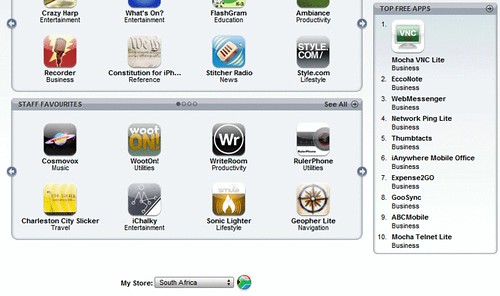
First things first. Go to iTunes homepage, and select your contry, at the very bottom of the page. For the purpose of this tutorial, I chose South Africa, although I live in the US.

2. Click on a free app

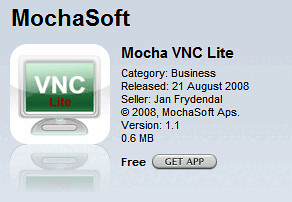
Once you have selected your country, you want to click on a free app in the “top free apps” section (see image above). For this tutorial, I clicked on Mocha VNC Lite. After clicking on the app, it will open the app description page. From there, click on “Get App”.
3. Create a new account

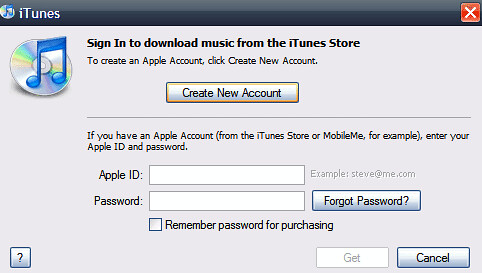
After clicking on “get app”, a window like the one below will pop up. Simply click on”Create New Account”.
4. iTunes welcome message

You will see this welcome message. Click “Continue”.

5. Terms Of Service

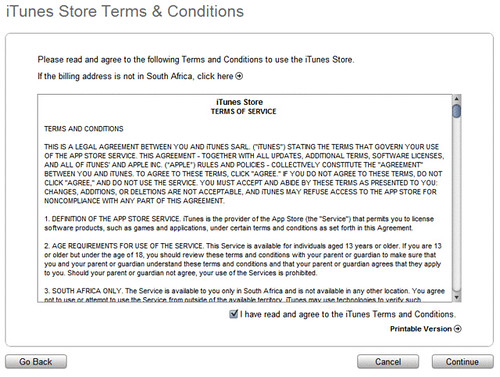
You will now see the usual Terms Of Service. Check the box saying that you agree and click “Continue”.
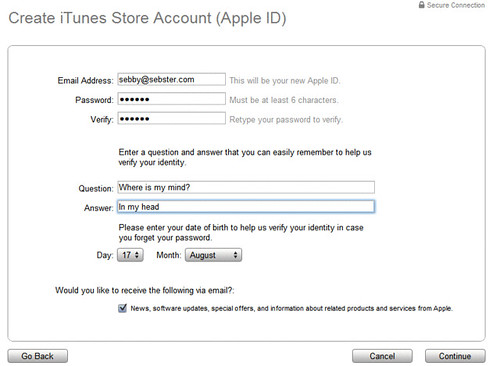
6. Create your iTunes account

Enter the information required to create your iTunes account. DO NOT lie about your email address as it would be pointless. You have to provide a real email address to activate your iTunes account. After creating your account info, click “Continue”.
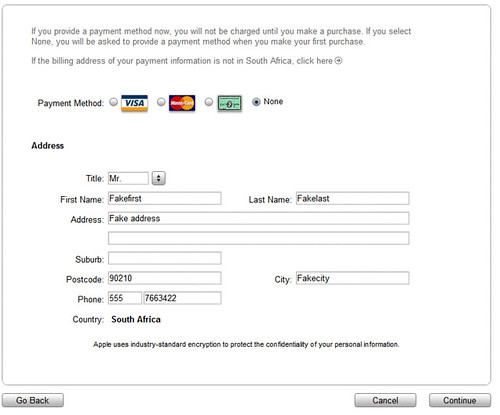
7. Payment method

Now, where you would normally be supposed to enter your credit card information, you have another option showing up: “Payment method: None”. Select “None”, enter your personal information and click “Continue”.
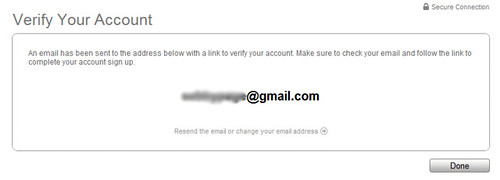
8. Verify your account

You now get a message saying that a confirmation email has been sent to the address you provided.
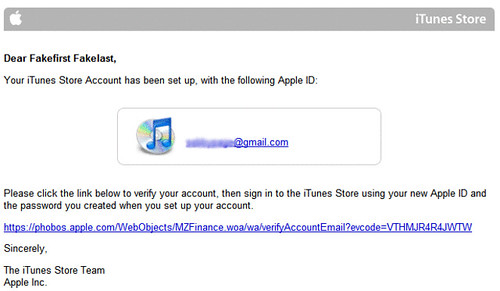
9. Check your emails to activate

Go check your emails. You should have received the email below from Apple. If it’s not here, make sure to check your spam folder. Click the link in the email to activate your new iTunes account.
10. Sign in your new iTunes account

Now you should be prompted to sign in. Enter your email and password.
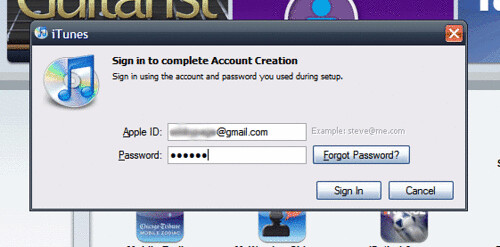
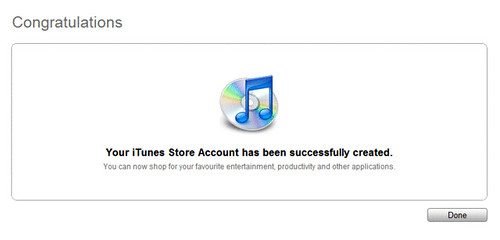
11. Congratulations

Done! You now have an iTunes account that you created without giving your credit card information.
You may wonder why you had to go through these steps instead of just creating an account straight from the login box when you try to purchase music on iTunes. I don’t know why but if you did this, you wouldn’t be able to see the “payment: none” option that we saw in step 7. So make sure to follow this step by step if you want it to work.

I hope this post will be helpful to some of you. If you liked it, please DIGG IT (button at the top of the post).

Keep updated: News via RSS Feed | Follow me on Twitter | Friend me on Facebook.


Related Entries

» The 15 Most Read iPhone Download Blog Articles Ever
» Apple Issues Weak Statement On App Store Hacking
» Cards
» anyone able to logon to itunes store?
» Get Your Tickets With Tiggits!

334 Comments »

  • deagleIphone said:

    thank you very very usefull actually i never saw the payment None maybe i need glasses

  • Goddess said:

    i didn’t realize you could do this either. good to know!

  • Freewill said:

    it’s still showed card number with exp date. I did switch with other country. Does Apple look from IP address now?

  • Sebastien said:

    Hello Freewill,

    No offense but you probably didn’t follow the steps religioulsy… I did this 3-4 times for this tutorial and for a video on YouTube and I didn’t have any problem. Try again and do EXACTLY what’s said in this tutorial.

    Thank you

    Sebastien

  • Andrew said:

    woot! Thank you heaps!

  • cristina said:

    I got this far, and there is no palce to click none for the credit card payment. : /

  • Hollerina said:

    This step by step guide is way beyond awesome! Thanks so much for sharing!

    By the way, if you happen to be using the ‘redeem iTunes coupon’ method and failed previously, iTunes somehow remembers the coupon number and instead of verifying your email account (shown in step 8) it will tell you that the coupon number is invalid. If you click ‘cancel’ you’ll get back to the apps page in step 2.

    Don’t panic.

    Attempt to download that free app again and use the userid and password that you registered earlier. iTunes will prompt you to verify your account. Follow the steps and registration will be complete.

    Cheers!

  • Hollerina said:

    Hmmm…I didn’t mean to have an emoticon….

    replace it with: the digit eight —- 8

  • Sebastien said:

    Hi Hollerina,

    Thank you for your kind words about my tutorial!

    Sebastien

  • panagiog said:

    Its not work for me, Greece….

  • Genie said:

    Oh my god! I love you!! I don’t have a credit card and my dad thinks if he lets me use his I’ll go crazy and buy lots of stuff. Thanks so much. =)

  • ROCKER said:

    DUDE your freakin awsome. At first i ran through the instructions you gave and it didnt work…got pretty mad cuz the responses said that it worked so i read your response. I took my time and read the instructions again carefully then guess what…..IT FREAKIN WORKED! thank you man very cool of you to post this

  • amit sheffer said:

    i don’t seems to have the “none” option.

    someone know why????

  • ROCKER said:

    AMIT you have to read the directions word by word and do exactly what he does…the thing is i did it and it worked to the point where it says “an email has been sent for your activation” after i go to my email and click on the link to activate it….the damn thing doesnt activate can someone please aid me on this.

  • amit sheffer said:

    i tried for the 10 time and I don’n have a “none” option, i did it step by step and nothing work’s

    why?????

  • ROCKER said:

    Im telling you it works just do what he does for example download latest iTunes then change your country to South Africa…..even do the step where he installs the free app. I bet it will work.

  • Melissa said:

    Lmao how come i never saw that option before. Thanks it worked and i got pac-man lol

  • Thomas Quigley said:

    Fantastic stuff. I saw something like this before on a website that didn’t work and the guy that wrote it up swore blind that it worked.
    I can see the line he missed. He forgot to tell people to try and get the free app.

    Anywoo, I followed exactly what you did only I put in Ireland as my country (what with my being irish and all) and I got the “None” Payment option.

    Cheers mate, Keep up the good work

  • amit sheffer said:

    it work for me with ireland too

    10X

  • ... said:

    this shit dosnt work they have updated the payment method step

  • 233324 said:

    card number? payment method? where is that on the tutorial?

  • Thomas Quigley said:

    Firstly “…” It does work I did it two days ago and “Amit Sheffer” did it yesterday. Secondly “233324″ This is all about not having a credit card as a payment method. :)

    Follow the tutorial exactly and it will work for you.

  • amit sheffer said:

    i did it not with “South Africa”, but with “ireland”

  • 233324 said:

    ok now i got it, thought it was another way.. thanks

  • Jeff said:

    Works for me with USA (Florida) Thanks

  • Nachiket said:

    Hello I am from India
    I can’t see the none payment option…. plz tell me why?

  • yiensia said:

    how come it doenst have the none option

  • yiensia said:

    omg finally i did it (i try many times)
    thanks alots

  • Nachiket said:

    My name is nachiket. I m from India. I have tried many times but it’s not showning ‘none’ option

  • Ninehh said:

    IT WORKEDD ITS SO EASYY!!!

  • Nachiket said:

    I have tried again but it’s not showing ‘none’ option.
    Plz send me other Ideas.

    Nachiket B.

  • mike said:

    thanks so much

  • Kukks said:

    hey thnx this is wonda ful….
    cheers

  • iPhone SA said:

    Sorry bud that was the worst thing you could have shown anyone. The trick is to get a US account, because of the availability of the software. You chose a country that does not have that many apps available and you can’t get much from that.

  • Sebastien said:

    Hello iPhone SA,

    Actually it was not the worst thing, like you sad…

    I took the example of South Africa but it works for any country…. Just choose US if you want.

    Sebastien

  • Cheky said:

    When i choose “none” and press continue it says “you did not complete the entire form. Please enter your credit card number. The credit card expiration date you entered has already passed. Please enter a vaild expiration date” what can i do?

  • Renato said:

    i can’t do it, its says “you did not complete the entire form. Please enter your credit card number. The credit card expiration date you entered has already passed. Please enter a vaild expiration date” what can i do?

  • glenn said:

    i got the none option but when i finish filling out the page and press continue it still says “you did not complete the entire form. Please enter your credit card number. The credit card expiration date you entered has already passed. Please enter a vaild expiration date”

  • xela said:

    Same as “glenn and renato”
    please we need a solution.

  • cassandra said:

    same here; it keeps askin for the payment method.

  • Ammar said:

    the same here i got the none option but when i finish filling out the page and press continue it says you did not complete the entire form.Please enter your credit card number. only!! we need a solution plz

  • Nachiket said:

    I get the none option on the screen. but i get some ” You did not complete the entire form. Please enter your payment card no. Please enter valid Expiration date. “

  • Kenny Kim said:

    SAME HERE! I’ve tried about ten times already and each time with a different country. Keeps saying “you did not complete the entire form. Please enter your credit card number. The credit card expiration date you entered has already passed. Please enter a vaild expiration date” F**kin HATE THIS. We need a solution here, or if someone could make me a fake account pls do so. PLS HELP!!

  • James said:

    i believe its the newer version of itunes try gettin the older versions should work

  • Yogi said:

    I am having the same problem as the last about, 8 or so people. It’s really bugging me, Sebastien help us please. :(

  • Sebastien said:

    Hi Yogi,

    I don’t think there is anything you can do as it seems this was patched with the latest iTunes update. I haven’t updated yet so I don’t have this problem but I suspect the new version of iTunes to have patched this hole.

    Sebastien

  • Yogi said:

    Thank you for replying so fast. :) But I’m afraid I won’t be enjoying any apps soon.

  • Tyler said:

    When I look at the payment methods, there is no ” None “, there’s just the three credit cards. I live in Canada but does it make a difference?

  • glenn said:

    to Sebastien
    this is not a hole. the reason it is not working is because there is something wong with there servers that are not letting accounts be crated with out a card. the reason why i know is because i emailed apple

  • dodly said:

    hi glenn
    I have this problem too, what did apple told you about this problem?

  • Lindaa said:

    guh even though i click none under it, it still comes up with gift cards/certificates so like what do i do?

  • SASA said:

    I still have the same problem asking for credit card number, so what should I do

  • jim said:

    yeah it still asks me 4 a payment method its pissin me offfffffff

  • Nachiket said:

    I have installed new ver. of iTunes but it’s not working. I hav also older versions like 7.6.1 and 7.7 but still it’s showing “you did not complete the entire form. Please enter your credit card number. The credit card expiration date you entered has already passed. Please enter a vaild expiration date”

    Now tell me Sebastien how I can create free account?

  • Sebastien said:

    @Nachiket – I don’t know. As I said before, it seems that Apple has patched the hole… I’m not sure there is another way. I will let you know if I find out.

  • Omfg! said:

    WHEN WILL THIS BE FIXED? I CANT GET CRACKED .IPA ON MY TOUCH!

  • joel said:

    i folo it step by step and press the none and wen i press continue it comes up with asking me for expiry date

  • KOVEH said:

    THIS IS NOT WORKING I HATE YOU SEBASTIEN

  • Sebastien said:

    @Koveh – if there is one thing I don’t like, it’s when someone talks crap about me on my own blog. I mean, it’s like someone coming to your house and telling you that you suck! This is so rude!

    I am maintaining this blog mostly to help people out so when you tell me that you hate me, the only thing I can say is that if you’re not happy, go to another website or something.

    If you had read the comments, you’d have noticed that this hack doesn’t work anymore. I said it twice. THIS HACK DOES NOT WORK ANYMORE and there is nothing I can do.

  • ramesh kumar said:

    sebastin please please pleas help ur tutariol is very helpful…just let us know how to get an itunes account without a credit card as on date we are not able to get one as per ur steps in the tutorial

    Thanks
    i trust u can come up with a solution to this.

    PS : or tell us some procedure to get the free apps from app share without downloading the one free app from app stor

    Thanks in advance!!!

  • ramesh kumar said:

    help please dude….

  • fredng1467 said:

    dude!!! i really hope u could find a solution to the new patch by Apple… all the best in ur search in cracking the problem!!! =)

  • ramesh kumar said:

    dude please help with a solution i am actually tired of searching cant live without applications on he iphone now…

  • tomer said:

    find a solution..
    plz

  • Ricky said:

    Don’t give Seb a hard time.. what he describes is actually the official apple way recommends to do any account without a credit card.

    Next version of iTunes are irrelevant as the pages are served from the web server.

    The fact it doesn’t work is a BUG by apple. Contact them to ask for this to be fixed (as they support it, look for it under apple support forums).

    I’ve done it many times for loads of people, it no longer works as the web server thinks it needs a CC number for the none option.

  • it did not work said:

    WOW no work :|

  • melz said:

    i live in barbados

  • aby said:

    i need help.. please i followed the instructions well but still i cannot create an account i found the none icon but after filling the info it still says you didnt complete the entire form. please enter payment card number.. i hope u guys can help me please.. im using 8.0.1

  • ramesh kumar said:

    sebastin please please please help ur tutorial is very helpful…just let us know how to get an itunes account without a credit card as on date we are not able to get one as per ur steps in the tutorial

    or tell us some procedure to get the free apps from app share without downloading the one free app from app stor

    Thanks in advance!!!

  • Nachiket said:

    Hi sebastin thanks. I got free account itunes reallly very very thanks………..
    Today i hav created the account. (08/Dec/2008) and it really works…..

    Good Job……..

  • Fersho said:

    only can get a account for ur really country beacuse itunes implement a system or something :(

    i want a account from USA, please someone create a account for me please, email: soyfersho@hotmail.com
    please please!!!!!!!!! i really want please!!

  • Borss said:

    Thx Man, It’s helped so much :)

  • salchich said:

    you are the best man!!! :D

    thank you

  • Andrew said:

    THANK YOU!!!

    I thought all was lost…..

    I tried to put in my credit card info for a Visa, but it would not accept my security number on the back of the card! It’s worked for a million other purchases, but would not work no matter how many times I tried.

    Well, at least with your way, I can succesfully get some new apps.

    But now what if I want to get some paid ones???

    I wish I could use my PayPal…I live in Canada by the way.

  • Uni said:

    This method does not work any more as Adobe has update the account creation procedure..

  • Robert said:

    Not working for me if someone could make me one? Skimboardfreak73@aim.com, and then someone email me pass please?!

  • Mike said:

    Thanks alot i have done it too am australian in saudi arabia and it did work.

    only if people read well…

    Thanks

  • varun said:

    cant find the option “none”

  • Aqeel said:

    Hey bro while making this account which verison of iTunes were you using ?

  • natalia said:

    I get to step 7, click None, and it still asks me for a redeem code and I don’t have one…what happened?

  • Angela said:

    Thanks! You were so much help… :)

  • Shantanu Rai said:

    Thanks a million dude
    Youre the greatest………..i was desperate to get an account but i didnt have a credit card
    Youre the saviour

  • Kishore, Kolkata, India said:

    @ Shantanu Rai, congrats!! for which store did it work? India? i ve been trying with almost every place…and with which version of iTunes?

    still not working …really pissing me off.

  • Kishore, Kolkata, India said:

    i dont see ‘none’ option… i f..n hate this

  • Johnny boy said:

    Thanks you very much, great!!

  • tiboy said:

    men i didnt receive any verified email adress?what will i do?

  • shail said:

    there’s no none option in the payment page!!!
    plz help!!!

  • ZDZ said:

    I did not recieved any email to! Help!

  • ZDZ said:

    I did everyting as well and it went OK but I did not recieved any email to! Help!

  • ME said:

    OMG! THANKS, THIS ACTUALLY WORKED!

  • ME said:

    i just havent recieved the confirmation email??

  • me too said:

    looks like their confirmation email sys is down, ive tried w 3 different emails to no avail

  • kyawzayya said:

    i get itune account free(without credit card)

  • kyawzayya said:

    i get itunes account free

  • kyawzayya said:

    Please
    How can i get itune account free..

  • luis said:

    wene i followd your steps in the paying method it dint say the button (none)
    what do i do

  • unknow said:

    Sebastien vaut mieux que 2 tu l’auras

  • Sebastien said:

    Haha, marrant ;)

  • sue loves jobros. said:

    i haven’t got a confirmation email yet. what should I do ?

    by the way Thanks Sebastien for helping us. what you do is awesome. seriously (:

  • AAA said:

    I checked this with different countries but there is no option called “None”

    please help? any other ideas?

  • Kaps' said:

    I did get the free account but cannot download anything

  • AAA said:

    Hey Guys

    I got the new account and the reason some of you can’t find “none” tab
    is you go directly to create a new account

    but solution is first search for a free application for example “Remote”, then click on Get It, so iTunes will ask you to enter your user name/password, here you should choose “Create a new account” click on that and fill every questions asked, then click on next and you will surely find “None” there to choose and then you can have an account easily without credit card or any payment

    with this account you can only purchase free applications or other things which are free, and not everything

    any one still has problem to get a free account?

  • RubyWilliams89 said:

    Just to say there is no option to click ‘none’ btw

    And have tried it with three diff. countries (UK, South Africa and USA)

  • RubyWilliams89 said:

    Sorry! I followed AAA’s instruction and it works

    (only with certian apps)

  • matt said:

    i cant verify it

  • mahan said:

    wich country has none option?

  • AAA said:

    Mahan follow this:

    I got the new account and the reason some of you can’t find “none” tab
    is you go directly to create a new account

    but solution is first search for a free application for example “Remote”, then click on Get It, so iTunes will ask you to enter your user name/password, here you should choose “Create a new account” click on that and fill every questions asked, then click on next and you will surely find “None” there to choose and then you can have an account easily without credit card or any payment

    with this account you can only purchase free applications or other things which are free, and not everything

    any one still has problem to get a free account?

  • Nadia♥ said:

    Wow that was easy! Thank You! It really worked!

  • Warned said:

    I can’t verify my email either.
    It’s taking forever.

    But don’t get me wrong!
    I can actually see that your tutorial works.
    I’ve gotten this far to just have to wait to verify it, that’s all.
    But all and all, this tutorial of yours seems helpful.
    Thanks … a lot!

  • itworkedforme said:

    Thank you soooooo much for this, it worked very well for me!! It was pretty easy to follow the steps, and I got the account on the first try.

  • kyawzayya said:

    I requed itune account

  • JC said:

    i have done it
    but after i have made the account and tried signing in, it says:
    Your account is only valid for purchases in the South African itunes store

  • HP said:

    Thanx, AAA, people with not getting ‘none’ tab , seriuosly just search Remote on the roght top corner and click the first free app on the bottom and it will ask you to Create a New Account…follow the tut from then on…….. :)

  • SB said:

    what countries still work? I have tried south africa and ireland while dowloading a free app and there is no “none” option.

  • Th3em said:

    I dont have the none selection (Australia)

  • JohnShan said:

    Thanks!! Worked like a charm

  • gladis said:

    I didn’t see the none option i flollowed the steps but didn’t work

  • Sabrina said:

    Thank you soooo much!

  • royalbabyboy said:

    i get free iTune account

  • kyawzayyamdy said:

    I get free iTune Account

  • Yasmin said:

    hiii but what if i dont have the “none” thing??

  • Abood said:

    When I look at the payment methods, there is no ” None “, there’s just the three credit cards.

  • Gerwurztraminer said:

    HOLY FUCKING SHIT THANK YOU SO FUCKING MUCH

    TO ANYONE WHOS FUCKING COMPLAINING THAT IT DOESNT WORK, IT DOES FUCKING WORK. LEARN TO FOLLOW INSTRUCTIONS.

    THANKS SO MUCH

  • Cool said:

    I have a problem with the link on my email. I clicked on the link but there’s no window pop up for completing account creation. A new window will pop up and the page cannot be displayed. Please advise what should I do?

  • Cj said:

    While you can have an iTunes without a credit card you can’t actually log onto iTunes itself with that account because it will ask you t o review your account which while doing that it ask you for your billing info. and there will be no “none” button selectable. which therefore defeats the purpose of an no credit card iTunes account if you can’t log onto iTunes with that account.

  • angel said:

    it dnt even work mn

  • staz said:

    u dont know how long ive been suffering with a new iphone and no apps!!! thank you so much!!! any chance i can post a link to ur site in all my pages?!?! thank you!!!!

  • staz said:

    u dont know how long ive been suffering with a new iphone and no apps!!! thank you so much!!! any chance i can post a link to ur site in all my pages?!?! thank you!!!!

  • mdyboy said:

    I get free iTunes account .

  • mdyboy said:

    I get iTunes accounts with without credit card

  • kisho said:

    this was very very useful esp coz i dnt hv credit card..tks alot!

  • mdyboy said:

    I get iTunes accounts without credit card

  • mdyboy said:

    I get iTunes account without credit card.

  • joephilips said:

    Great tutorial, thanks Sebastien… i got it working iTunes 8.0.2.20 – only thing is, like a few other people above, I still haven’t got the verification email yet. Any ideas, anybody? Is there any point in trying again with a different email address?

  • Rational said:

    it works with…..8.1 ver…….perfectacly u can download all free games and applications……

  • Darkiuz said:

    dont complain to sebastien ! he made this blog! thats all!! you should follow the STEPS!!!!! or leave this! it is really work….. i should ask something …. is their a purchase hack download on itunes???? ^^

  • Sebastien said:

    Hello Darkiuz,

    Thank you for your comment!

    I’m pretty sure there is NO way to hack iTunes to get free downloads. I think we would have heard of it.

    Sebastien

  • brandon said:

    k so when i try ot creat an account and i get to the payment part that says (none) what do i do about this??

  • Jennifer said:

    hi

  • Natalie said:

    I’ve tried it over and over and it seems
    the problem is simply, I have the newest itunes.
    I’m not sure what version to download now,
    what one should make this work??

  • Natalie said:

    Nevermind >w<
    I downloaded 8.1
    AND YOU’RE SO AMAZING!
    My heart was beating so fast! I can’t believe it actually worked!
    Thank you so-so-so-so-so-so-SO MUCH!

  • Ino said:

    I (Like many other users) just do not get option “NONE” . Anyway someone should realy sue apple for discriminating ppl like this

  • elle said:

    gee! thanks so much!!!!! it really worked!!! thanks!! you’re so great!!! :)

  • juni said:

    Fantastic tutorial mate…100%. quick query though. i am only permitted to use itunes of the south african store arent i? because i cannot seem to find the other apps in the UK and us store

  • Minyatur said:

    I don’t get the confirmation e-mail…. anyone know why?

  • pratik said:

    dude you dont rock you rule and thanks for the help

  • noyer said:

    please i want card visa valid please email mainpros@hotmail.fr

  • missygirl11 said:

    actually it really worked but the email confirmation is kinda slow tho -.-’

  • sexy shynayne said:

    Hi Seb,
    Nice to know there’s a step by step help to getting an account..it was really helpful esp as i needed to get some medical apps that were free..WOW!! it worked..i think everyone should learn to follow instructions and be patient while doing so..my itunes is d most recent one cos i had it downloaded on april 2009 and the tutorial still helped!!You totally rock Seb..keep it up smart guy..takia!

  • Marco Solis said:

    I follow all that steps and it shows a message that my account has not been verified, why? it stops in the step 11 I cant go forward this point, please assist me.
    Thanks

  • gggeo said:

    i never got a confirmation email from itunes….what happened? i typed in my email correctly. or maybe its lagging to send me an email? this is frustrating! lol

  • jeff said:

    yea its must be really slow i signed up for mine about an hour ago and still havent gotten my confirmation email

  • gurpreet said:

    hey jeff,gggeo……did u get the confirmation email?
    i mean should i wait for it or use another email ID??…..waiting for reply….

  • rose22 said:

    hey, i tried many times and followed the exact steps but i didn’t get the NONE botton.
    maybe i’m doing something wrong

    pls HELP!!

  • YoYoMo said:

    Yes – it still works. The NONE option is there.

    It might be country specific – don’t know. I’m in Canada and registered under CA and the NONE option was there for me.

    The confirmation e-mail didn’t come through – but spoke to Apple and they said that it can take up to 6-hours !!!! (AAAAAACK).

    Sigh.

    Will know in 6-hours if I really like the iPod Touch.

  • antonette said:

    i did it but there’s no mail from itunes to verify my account…

  • Shipieken said:

    Same here.

    I did everything. Got the ‘None’ option..
    But never received a confirmation mail..

  • Ameer said:

    They didnt send me an EMAIL message yet for the conformation, can you help me please?

  • Sami said:

    Thank you thank you thank you!!!!
    I havent gotten the confirmation email yet, but I have faith that it will come. Anyone else get theirs yet? I will let you know when I get mine.
    Thanks again Seb!!! you. are. awesome :D :D

  • Bryan said:

    Awesome Info!! Worked perfectly!!
    I used the United Kingdom and the email confirmation didn’t come immediately, but it did come within about 10 minutes.
    Thanks again bro!!

  • Sami said:

    Just wanted to let everyone know that I got the confirmation email which means… It worked!!! I went to bed instead of waiting for the email, so I don’t know how long it took to finally arrive, but nonetheless, it arrived :D thanks again Seb! Without you, I never would have been able to do this. And oh, btw, I just used the US as the country, and it didn’t give me any problems. Thank you!!!!

  • Gek said:

    I followed the steps but recieved no email. Could it b that my hotmail is blocking it? Someone tried to send me something from iTunes B4 and I didn’t recieve that either.

  • puguh said:

    i did not get it either

    i ilve in indonesia. i tried to create an account this morning, after more than 9 hours, i still didnot come.. huh..

    then i create another account using US as my country, and still, i did not get my verification!! T__T

  • Gek said:

    I just checked my email and it finally came. I am in Australia. Maybe try that. :)

  • Veeran said:

    HOW DID U DO IT!

  • Veeran said:

    I CANT FIND THE NONE BUTTON! >=(

  • Veeran said:

    I CANT FIND THE NONE BUTTON! >=(
    Veerank12@aol.com

  • Veeran said:

    Hello this is Veeran,
    I have a complaint i can not find the *None* Option if anyone has a way i can register my IPod Touch Get back to me ASAP here is my E-Mail :: Veerank12@aol.com ::
    Thanks,
    Veeran Kerai

  • Veeran said:

    HELP ME

  • apollo said:

    great tutorial thanks

  • june said:

    hey this is great and kind of you to share .. i did my account years ago and that point of time didnt need the cc yet but recent ones needed and this is a huge help for itunes and ipod lovers .. you are swell :)

  • doodi said:

    i dont have the none option either! what can i do

  • hahahaha said:

    ARE U FUCK SERIOUS

  • hahahaha said:

    this is all bullshit noone try this fucking website
    u can all suck penis

  • Veeran said:

    no fucking button

  • Peter said:

    Hey I got through it all and everything, and I have recieved the verification email but when I go to verify it it just stops on the screen that pops up right after you click the link in the email, the one that says it’s connecting to itunes. Please help?

  • tony said:

    same problem here!!
    itunes is not available in my country (oman) .. dunno if thats the problem

  • mark hoppus said:

    THIS METHOD DOESNT WORK ANYMORE
    apple sucks!! my ipod touch is totally boring without apps.
    thanks for trying anyway sebastian

  • Tithi said:

    Thank you! I love you!!!

  • rinkulove said:

    pls tell me bro india main kaise chalega without credit card acount registerd pls

  • Ja Ja said:

    Top bloke!Cheers mate worked first time.Now lets go shopping :)

  • heart vs love said:

    this methods you gave is not effective, i try it many times but it was still the same!!!i try to find where the NONE is but i can’t see it!!! it means if you don’t have a credit card you can’t create account your own account!!!huhuhu!!! now i can’t download music in our itunes!!!

  • heart vs love said:

    there are many new songs but i can’t download!!!! its so boring!!

  • heart vs love said:

    Ahhh!!! This methods makes me angry!!!!

    i really don’t want to follow that methods but i don’t have a choice!!!

    i hate it

  • Ingvild said:

    Hey, thanks for sharing this! But on my iTunes it doesn’t say “none” at the payment method thingy. Help!

  • junior said:

    thks this was so helpfull
    \thnks alot

  • ANUR said:

    WWWWWWWWWWWWWWOOOOOOOOOOOOOOOOOOOOOWWWWWWWWWWW……………i so glad i finally got an account,this is an amazing tutorial……….thanks brov

  • MOJAKS said:

    OMFG THANKS SO MUCHHHHHH!:D:D

  • Avery said:

    okay, so I got through all the steps and verified it to my email, but when I click on the link it brings me to the screen on apple to download iTunes eventhough I already have it.. Nothing pops up asking me to finish erifying it.. so I cant get the accoount..

  • kyle said:

    hey. is this whole thing done from itunes homepage, or itunes as an application on the p.c. im confused

  • khrizttine said:

    ~_^ thhhhaaannkkk yoouu so mch!! works great! ^_~

  • John Hart said:

    THANK YOU!!!!!

  • Paolo said:

    Thanks a lot.

    Extremely useful for people like me that have the credit card in one iTunes account linked to a country where not all the applications (even the free ones) are available.

    Ciao,

  • Chris said:

    Hi Y’all,
    I just managed to setup an itunes account without a credit card, am in Ghana and am using the latest version of Itunes (itunes9). And i got ma confirmation mail within seconds. Y’all just need to follow the instructions. Thanx Sebastien……………U ROCK!!

  • you know it said:

    It works for me . Oct 15,2009

  • AvalonTreman said:

    I can’t get it. I follow the verification link, but it sends me to the page where you download iTunes. I have the current version (needed it for my touch), so that’s not the issue. Any help is appeciated

    ~Avalon

  • Tanim said:

    MMMMMMMMMMAAAAAAAAAAAAAAANNNNNNNNNNNN thanks a lot!!!!! I wear glasses…but now i think i’ll nid new 1s!!!! nI wudve kissd u if u were a girls….thnx a lot

  • Siena Alex said:

    THANKS A MILLION, I did not think this would be possible to opne without a credit card, very generous of you. Thanks for your time, help and guidance…!! Best, Siena

  • frenszi said:

    thank you, great job

  • jorge said:

    thanks:D

  • Duderboy said:

    SEBASTIEN DUUUUUUUUUUUUUUUDE…. u are THE MAN!! thanks !

  • jake said:

    This didnt work for me i got the latest itunes and it wont come up with “none” as an option for the us and south africa so what do i dd help!!!!!!!!!

  • Selena said:

    There is no none button I tried by:Selena gomez

  • Selena Go said:

    Seb can you tell me by: Selena gomez

  • Itouch said:

    thanks for this! I was soooo frustrated before!!!

  • 32GB said:

    Awesome, it worked! Thanks, man!

  • Jess said:

    the selection for none ddnt come up for me :@

  • Leilaa said:

    What will I do with the State?

  • Mike said:

    I’m not getting a verify email

  • Rodrigo Sargo said:

    Thank you sooo much =DD

  • Deepan said:

    I am not getting the verification mail.

  • ahzle said:

    yeah i saw d “none option” but evrytime i tried to buy an application and click the “none option” nothing happened… what should i do?? pls help me

  • PunchBug said:

    Well I just did it,followed the steps as instructed and it worked….thank you very much for the info…..

  • Cygnus said:

    This was really helpful!
    Thank you so much!
    (:

    For those who couldn’t get the ‘none’ option, that means that you did step 2 wrong. Read again! I had the same problem.

  • Homesicknomad said:

    If the verification link doesn’t work try copy & pasting it into your browser.

    I had the same issue and when I pasted it in worked just fine.

  • stef said:

    THANKS, i thought i couldnt use apps, thankkkkk gooood, it was so much help

  • Shadir said:

    Thanks a lot… it’s very very useful trick… yah ti’s really tuck 2mins oh oh oh..
    good keep it up………….!!!!!!!!!!!!!!!!!!1

  • Sonic said:

    You can just create an account normally if you have an itunes card.

  • juan said:

    omg thank u berry much that help m alot u r really smart

  • April Nguyen said:

    I dont have a credit card & it doesnt have ‘NONE’ for me to choose. It doesnt allow me to finish if i dont have a credit card! :(

  • Gary said:

    I never received the verification email. I’ve checked the spam filter, double checked the entry of my email address for typos, and everthing seems o.k. But still no verification email received.

  • Amanda said:

    Thanks Sebastian, if you follow the steps it works. It does take some time for the confirmation email to send but once I got it I was able to download free apps. Great step by step here.

  • meee said:

    Where is the top apps ? I can’t find them

  • Gary said:

    Following up on my Jan. 10 comment, I tried again on Monday, Jan. 11, and was able to receive the confirmation email. Maybe the Apple system was just not working well (or at all) over last weekend? Any way, I’m now registered and able to receive apps. Thanks.

  • Carrie said:

    Great Articles..!
    Pls help..what happens if I hv an Acct,
    but would like free Apps only avail in USA.
    Hv several email accts, so OK to use other email..
    Have a couple Questions…???

    STEP 6 confuses me….What Name & Address do I use…???
    My real name or a Pseudo name ….?
    Use my Real Addr or use Address from ano Country..?.

    Now what happens when I Sync my IPOD with Itunes?…
    Do I lose all Existing Apps?…or will it recognize 2 Diff Accts..
    and Synce indiividually?

    How about when I’m downloading Apps on my IPOD?
    Currently it shows my Apple a/c name, so I just sign in..
    Will this be impacted?

    Thx a Lot ….hope I can do this…Sorry about being so long..
    Carrie

  • glydel said:

    pls help meee :( i did all of tht but i checked my mail and there was no verification email from apple or itunes or w/e :( and then i tried to do it again, to recreate my acount and stuf but then the “none” selection for the payment thign or which credit card i was gonna pay for dint show up tht time :( pls help!!!

  • JK said:

    i cant find “none”!!!
    help :(

  • Neofix said:

    You are the best….

    Thank you!!

  • The Janitor said:

    Yes! It is still working after all these years.

    There have been a few asthetic changes so the original screenshots in the tutorial are no longer acurate, but the method still works.

    A – Using a gmail account, the message came through straight away. Presumably the difference in delay for different people will depend on server loads and time zones.

    B – I got an initial “try again later” message at the last screen before creating an account. Pressing the “try again” button a few seconds later sent it through.

    C – I had a bit of difficulty verifying my account. The solution was to close the browser and iTunes program and re-start both. Presumably since I installed iTunes while the browser (Firefox) was running meant that the browser did not realise the iTunes program had already been installed. I kept getting the “download iTunes” screen instead of the “you are verified” screen.

    Thank you very much for writing out this tutorial! It was extrremely helpful as I had received some iTunes store gift vouchers but have no credit card. I thought that the funds would be lost, but now I am up and running.

    Thanks!

  • aisya said:

    hey there.. i tried the tutorial given above and face the same problem as others..
    there is no NONE button.
    luckily i found this tutorial by apple and want to share with you guys..

    http://support.apple.com/kb/HT2534

    i had follow the steps and it works :)

  • pinkyturtle said:

    can you help me Sebastien pls pls i can’t find the none button …why

  • pinkyturtle said:

    hey is anyone here …. i can’t find the”none button” if anyone know any way to find it this is my e-mail “xxpinkxcolaxx@gmail.com” pllllllllllllllllllllllz

  • Carrie said:

    Hey Pinkyturtle,
    The “NONE” Button is on the Page they Ask you to enter “Credit Card” Info. It’s to the Far Right. At the end of the Types of Credit Cards to Choose. This Video shows it. http://www.youtube.com/watch?v=F2AHrDXU5EY Copy & Paste if Link doesn’t work. Good Luck. Carrie

  • Marko$ said:

    Thank’s it’s really work!! :D

  • Carrie said:

    Dear Moderator,
    Can u pls advise why my message #232
    has been ” Awaiting Moderation” for the past 32 Hrs.
    If problem, why can I not Delete it or why Don’t you Delete it?
    Thanks

  • Sebastien (author) said:

    @Carrie Your comment was under moderation because it contained a link (this is a way to control comment spam). Since I’m traveling, I don’t have time every days to look at the comments. It is now approved and should show on the site.
    Sebastien

  • David Donacio said:

    I still don’t get it

  • lokis said:

    waoo ur a fucking lier i never saw tat payment none

  • Rio said:

    i had an itunes account ,with none payment method. i tried to authorize my comp, and it always works..
    now i cant use my account to authorize my comp, cause i only have a five chances to do it. the only way yo do it, i should create a new account. but when i tried to create new account, i didn’t see none payment method.. none payment method is dissappear. . .please tell me a new way, to create a new account.. sorry for my english

  • R. said:

    This is sooo simply amazing! Thank you! Helped me a lot! Now I can youse genius ^-.-^ !

  • Jan said:

    it doesn’t have that anymore

  • Champ189 said:

    Well this exploit was pointed out about a year and a half ago. So of course they fixed it by now

  • Carrie said:

    Hi Champ #189.
    I just set up a Free account 3 weeks ago…….It still works….

    Check out Posts #230 and #233 above….
    # 230 Has a Limk to ITunes Support…explaining how to do this…
    # 233 Has a Link to a YouTube Video that shows you step by step how to do ir…

    Hope it helps.
    Take Care

    Carrie.

  • Carrie said:

    Hi Loki # 238…

    Sounds like you’re a bit frustrated but there is absolutely
    no need for Rudeness. Your remarks were very RUDE…
    .
    Sebastian does this to HELP us…..for Free….

    If you are frustrated fair enough…but.. maybe if you explained where you were
    having Problems setting up the Free Account…someone might be able to hellp you.
    So PLEASE..Let’s all help each other..
    Take Care
    Carrie

  • CeeJay said:

    what version of itunes allows you to select none in the available option coz i can’t find it here

  • Ilaria said:

    Hi, try using yahoo mail when creating itunes account. It works

  • reezy said:

    i cant download any games…

  • reezy said:

    it works but cant download games

  • Dione said:

    plzzz help me how 2 make a itunes acount

  • CeeJay said:

    It works, just follow the instructions and you will see for yur self…..

    1. GET A FREE APP
    2. MAKE SURE YU USE UNITED STATES AS YUR COUNTRY
    3. FILL OUT THE FIRST STEP RIGHT WITH YUR OWN INFORMATIONS
    4. ON THE NEXT PAGE YU WILL C NONE OPTION
    5. SELECT THAT AND CONTINUE THE REST

    IT WORKED FOR ME, I NEVER BELIEVED IT BUT FOR REAL GUYS IT ROCKS…..

  • whoever said:

    do i have to input a real canadian adress? or can i just make something up??

  • whoever said:

    never mind problem resolved :D thankyou SOO~~~~ much for doing this for us XD

  • Teks said:

    Thanks so much for this tutorial. I have now my iTunes Account without a Credit Card. :)

  • Teks said:

    Hi! Choose other countries that shows option ‘NONE’. If you chose countries like US or Europe, you will not see ‘NONE’ option. I tried also South Africa even though I’m not from that country and it success. :)

  • CeeJay said:

    I aint from US but i used it and I got the none option.. It’s easy just log on to your app store and search for any free application and it will surely revile a none option..

  • Teks said:

    Tried it again and chose US. I have now 2 iTunes Accounts. One is South Africa & the other one is US. Thanks again. :)

  • hasam said:

    can someone please make me an account also. i tried but it doesn’t give me the “none” option for payment. please someone make me an account. email is hasamsarajzai@yahoo.com i live in the U.S. Thanks a lot guys.

  • shweta said:

    Hey …i followed all the steps mentioned but unfortunately i didnt get any mail in my account yet….what to do now?

  • shweta said:

    i confirm that its not even in my spam….

  • hasam aka Mysteryman said:

    This thing is old and doesn’t work anymore, FOLLOW MY STEPS IF YOU WANT AN ACCOUNT WITHOUT CREDIT CARD INFO.(you’ll eventually decide to give your info [in the future, not now] because you have to buy something in order for your iphone to recognize your account, then you can go back to ur account info and change the option to none after purchasing one app. that’s what i did) anywayz, i created an account and it was easy, hard at first when i didn’t know the SECRET.

    1. Download itunes, click on ‘itunes store’ on the left then ‘app store’ on top.
    2. to the right of the page click on a free app, from under the title ‘Top Free apps’
    3. it’ll take u to a new page n to the left you will see the app and under the app picture, it will say “Free App”
    4. click that and it will ask you to create and account. click “Create an Account”
    5. follow the steps and you will definitely have the “none” option where the credit card info is.

    these instructions are done step by step after creating another account for myself. so it must work for everyone…….

    email me if you have a question or u wana thank me lol…u_da_man_hasam@yahoo.com

  • hasam aka Mysteryman said:

    duhh!!! that’s what this page says. sorry i actually used this page to get my info and create mya cccount lol sorry guys…. but these steps helped me….

  • HD said:

    how come it doesnt appear “none” when im marking for credit card ?

  • Michael said:

    cool, quick & easy trick. thanks, Sebastien.

  • Nicholas Fournier said:

    It doesn’t work on my iPod but it does for my other friends my iPod is second generation with 3 generation update

  • CeeJay said:

    If you don’t have an itunes account and want me to create one for you, feel free to email your details like address, country, email address, name and phone number…… I’ll help you out and send your new itunes account to your email address

  • kirtika said:

    hey

    there’s no option as ‘none’ for the credit card

  • CeeJay said:

    if you want an itunes account, send me your details so i can offer my help…. that’s only if you want me to help and if you don’t, just try and get an application that’s free and try to download it

  • kaylee said:

    wow i tried that like 20 times and its still being stupid. It doesnt send anything to my email!!

  • Halieeee said:

    Ok first I wanna say thanks SO SO SO SO SO MUCHHHH!!!! u r amazingggg ok some of u guys have a problem with finding the none button ok ya kno how they show a bunch of cedit cards? Well it’s at the end n it says none(: ok another thing Is depending on ur country it will or will not have a button if it doesn’t thn I’m sorry mayb there is another way to do it(:
    Another problem is the verifacation email….well I have done this for a bunch of my friends (about 10 of them) and it took about 6hours-2days for them to send it because the servers are slow well I hope I helped u and if ilu want me to to of for u thn ask meeee(:
    My email is banana.pop@live.com an I will help u and do it thn send u the stuff (:
    GOOD LUCKKKK(:

  • ditzz said:

    thank you !
    worrked like a charm
    now i have an itunes account

  • James Ball said:

    Woohoo it works! Thanks a heap for this. My wife’s account has just been hacked and over $750 spent by some b@5t@rd in China :( We’ve had to cancel her credit card and spend ages changing all the auto payments we’d got setup on the old card.

    Worst of all was how poorly we’ve been treated by Apple! They basically don’t want to know and blame it on CC fraud, but if that was the case and someone had gotten our cc deatils we’d have been getting bills from all over the internet.

    Seeing that all the fraudulent purchases have only been made on iTunes I say Apple is wrong, it’s their iTunes store account that had been hacked! Apple just keeps fobbing us off though. The account country has been changed to China but when we try to change it back to New Zealand we’re asked to enter our CC details again. Bugger off! Having our details with Apple is what caused all this hassle in the first place, they didn’t keep them safe!

    This free account is all I’ll be using with Apple from now on, they are not to be trusted with payment details. Just google ‘hacked iTunes account’ as see how many others have gone through this with NO help from Apple at all.

  • Kobe Chen said:

    What version do i need the iTunes

  • Mohit said:

    Wat a idea bro ‘keep it up’

  • moe said:

    u lier

  • Dinank said:

    nothing happening now in 2010
    it might be that it was there in 2008
    please help!

  • Harlie said:

    the itunes store looks different! i cant find any of what your talking about!

  • zaizai said:

    OHH THX YAA~

  • fazzal said:

    it worked for me. change your country to Ireland or USA and try again you should see the payment option none. choose none and you are good to go

  • TedDY said:

    why do people criticize unnecessarily

  • helloparaamin said:

    THANKS THIS HELPS A LOT

  • hardy said:

    Dude!! It worked !!!!
    A M A Z I N G ….

    You rock…man!!

    Thank you so much so much so much!!!

    \m/

  • Theodore said:

    Thanks it worked like a charm!

  • Rasha said:

    Guys please your help. I created the account but it keep telling me that the email was sent to you for activation but i never got this email i did the process many times but never got the email for activation!

  • grace said:

    that was great! thank you so much!

  • Seng Kuan said:

    Dear Freewill

    i think i facing the same problem with Rasha….pls urgently need help…iphone tat cant dl any app is make my life sucks…

  • Robert said:

    The None Option does not longer exists, or at least it does not apperas to me, what should I do? Is there an updated version of how to create an account from another country?

  • Hack said:

    Could I access on ITunes if ever I do the steps in lower version on iTunes?

  • Eman said:

    Nheheh

  • Toxic said:

    Blabla bla blabla

  • Didier said:

    It’s not working for me. I have followed the instructions no none shows an the credit card section

  • jenilyn said:

    ceejay could you help me create an account in itunes?i tried a lot,but they doesn’t sent me a verification in my email..pls help….here’s my email: http://www.jenilynhernandez15@yahoo.com, jenilyn hernandez is my full name,i’m from sorosoro ilaya batangas city, philippines….0908-132-1453

  • Arkiel said:

    thank you! this guide is simply amazing! =P

    After you followed this guide and you find yourself getting an error message saying something like “.. your payment method is invalid”, try restarting the itunes application. If still not working, clear your internet cache and saved information. if still not working, restart your computer.

    this worked for me!

  • WilliamSmith and confused ? said:

    Omg … it doesnt say none on mine wtf wtf wtf … helpp pppppleaseeeeee ?

  • donna said:

    i followed all the steps but there’s no NONE options on my itunes. sad face

  • donna said:

    ok. i got the none button and was able to create my account and download free apps but my itunes still does not have an applications tab/button, so i can’t sync my free apps to my ipod touch. please help! im really bad at this techie stuff.

  • Rehman said:

    After searching it for weeks i found the solution…Go to AppStore in your iTune software, go in Free Apps section, then purchase a Free App by clicking on ‘Free’…then it will ask you to login,,just creat acount from that step following the steps mention above…i got my account after a month ..hope it will help

  • Cely said:

    What if they don’t give you the none option

  • Guy said:

    Hi, I don’t know if someone can help me, but this is my problem: I had an account i the US store, changed to the brazilian store so I could buy an app and everything worked ok… but when I tried to change it back to US the “none” option is not there! Now I have updates that I can’t download because my account is in brazil!!!! Even my purchased history shows that I downloaded them, but it simply won’t let me do it! please help!

  • meggie poo said:

    i cant find the none button. I had it before but now that i restored my ipod i have to enter all the information again and i cant find it :(

  • robin said:

    So it works for india too :) thx mate

  • Jcassio said:

    Like , i live in Angola and iTunes dont have Angola avaiable, i can only create free account but if a want An. App. Or you recomend me to purchase app without Angola , for example i use US or another country? Please give me a comment

  • Carrie said:

    Hi Jcasio, if I understand you correctly, you are unable to “purchase” applications from Itunes in Angola & you were wondering if you can purchase an application using another country like USA. My understanding is that if u want to purchase an application using a credit card, the Billing address must be the same as your account address(country) eg if have USA free account..to purchase using this account..the Billing address of credit card must be USA…so unless there is an application u really want to buy..stick with Free Applications.
    Maybe u can purchase from another Country if u have a Gift Certificate.. This I don’t know. Maybe u can check or someone can help with info re Gift cards & if u can use in Angola.
    Good luck..
    C

  • rajat said:

    grtttttttttt

  • Carrie said:

    Jcasio #301 in Angola-
    See my 1st reply #302 -

    Someone sent me this info – (Please Note..I am sending you instructions they sent to me – I have not checked it out)

    “How to buy music from iTunes in South Africa

    STEP 1:
    Setup a FREE U.S. based iTunes account.

    STEP 2:
    Once you have your U.S. iTunes account setup, you are going to need to buy iTunes gift cards that you can load into your account to spend.
    There are 2 websites that come recommended: iTunes Express & Media WoB

    STEP 3:
    Once you have purchased the gift card, you’ll receive an email from them with a code.
    Click on the Redeem link under the Quick Links section (top right of iTunes Store),
    enter the Gift Card code and off you go

    You should now see your email address next to the value of your gift card loaded in the status bar. You can now buy music and apps from the iTunes store!”

    There was a DISCLAIMER:
    Disclaimer: This does violate the terms of conditions of the iTunes store, but the music industry in SA need to catch a wake up. There is no decent place to buy music online in South Africa. At least this way, you aren’t pirating music (the artist is getting paid), the only people suffering are the record labels in SA who won’t get their commission.

    All the Best
    C

  • Soffonias said:

    WOW!!!! U r so amazing, life saver……… Tnx sooo muchhh., i was tryin so many things to get for an account without the credit card but u did it,.,
    Thanks Again

  • dian said:

    I want new account in itunes

  • yooyoyo said:

    when i got to the payment there was no “none”..please help

  • Dinu said:

    This is simply an amazing link….thanks for sharing…it really works to create an iTunes account without giving any credit card details!

  • Ashley said:

    On my iPod touch my credit card ran out and when I try to edit the info and put “none” in the credit card spot, the word ” none” isn’t in the box. How do I put none in the spot sinse its not there?

  • Milkkky said:

    This worked great!! But do they send a receipt to your house??? Or just an email???

  • Milkkky said:

    This worked great!! But do they send a receipt to your house??? Or just an email??? Plz help!! I m desperate

  • Carrie said:

    Hey Mikkky, so glad it worked!
    They ONLY send email… no snail mail.
    Email usually sent to the email u entered when
    signing up. As u will note from some of the other COMMENTS, sometimes it takes a while to get confirmation. I used gmail to sign up & received my confirmation immediately..also
    check it didn’t go to Your SPAM folder.
    Take Care
    C

  • Milkkky said:

    Thank youu Carrie!!! I’m taking your word for it!!!!

  • Dean said:

    Nice One Man, It works. Fun fun fun.

  • lisa said:

    i am happy i am almost done

  • kiran said:

    can someone help me to create pls? mail : Kirankiranzxc@gmail.com

  • katya said:

    i tyed it but it didnt work 1 bit
    this HORRIBLE!!!!!!!!

  • carlos said:

    it only works with free apps it ask you for cc when you try to buy an app

  • jazz said:

    i don’t have the ‘none’ option on the payment section and it wont let me create an account without it, i don’t know what to do?

  • anana said:

    thanks loads …. that helped alot :)

  • Brenda said:

    Idk wat is this I’m really cunfused all I want is to buy games n stuff on the app store I don’t understand

  • help me please said:

    help me i dont have the none option can someone please make me a free account and send it to me at joncarr52@yahoo.com.

  • Luvapplehateatt said:

    Ok. I wanna know what’s the benefit of opening iTunes account with no credit card. Can I buy things with NO Money? Can I download apps and NOT pay for them? This is what I want and need..free stuff. Can I do this if j open iTunes without a credit card????

  • Krysta said:

    Thank you so much for this!
    I have a 11 year old and didn’t want my credit card on his ipod!!

    Luvapplehateatt said:
    “Ok. I wanna know what’s the benefit of opening iTunes account with no credit card. Can I buy things with NO Money? Can I download apps and NOT pay for them? This is what I want and need..free stuff. Can I do this if j open iTunes without a credit card????”

    To answer your question…some people don’t want there CC number out there for thier kids to add music and apps or games whenever they want to….If he wants an App he’ll have to ask me first!

  • Bela said:

    OK I just got an iphone, I have terrible credit so I dont have a credit card. I tried doing this but nothhing is happening for me. ICan someone email me what to do and help me out please

  • Bela said:

    Or at least tell me what to do

  • MAtthew alay said:

    this dose not work or i tunes is just messed

  • amber said:

    didn’t work. thats because i cant connect to the itunes store. ever since i downloaded a newer version, itunes says it only works with safari 4.something. and everytime i try to download that, it says, contact manufacturer or whatever! pisses me off! any help with that???

  • Khalilah said:

    Ok, I followed the steps the same way. I get the none option, but when I enter my info and hit continue, it tells me my cc was declined…..wtf. Can someone that is able to do it please create an account for me and email me the password….khalilahhall@gmail.com. Thanks in advance

  • eurton baker said:

    thank youu so muchh for your helpp

  • frostt said:

    IT WORKED !!!!!!!!!!!!!!!!!!!!!!!!!!!!

    omg, dude! you are officially my hero.

    This is AMAZING…who wants help? let me know ( email please )

    I am freakin out ..THANK YOU !!!!!!!!!!!!!!!!!!!!!!!!!!!!

  • frost said:

    I am the guy left the above comment.

    I am making a video how to do it and putting it on Youtube in 30 minutes. Find me and watch the video.
    You can find me under ‘frostgothic’ on Youtube.

  • dothedew said:

    Fuck this bullshit because you can ONLY do it in South Africa. I tried to switch to US and it prompted me again about the CC number. Fuck iTunes and fuck all of its bullshit.

  • anand said:

    thanks lot man thats really work….
    for others who dont get it just switch country to south africa it wil sure work

What Do You Think?

Leave a comment below or discuss this topic in the forum.