I wrote in the past about iPhoneBrowser, this neat little piece of software that allows you to browse and manipulate your iPhone files without jailbreaking it. After updating to 2.0, iPhoneBrowser didn’t work anymore so I kinda forgot about it until today.
I checked the Google Code page of iPhoneBrowser and realized it was recently updated so I decided to download it again. Boy, it’s as good as ever! I like iPhoneBrowser for one good reason: it’s much faster than SSH. When using SSH, you have to turn on SSH on your iPhone and open WinSCP on your PC whereas you just need to open iPhoneBrowser and plug in your iPhone to access your files when using iPhoneBrowser. Furthermore, downloading a large file from the iPhone to your computer is much faster using iPhoneBrowser too as it transfers the file through the USB port of your computer. One thing SSH does that iPhoneBrowser doesn’t is let you change the file properties. For example, if you want to set different properties for a file, you will have to use SSH. Not a big deal as I personally don’t touch file properties very often.
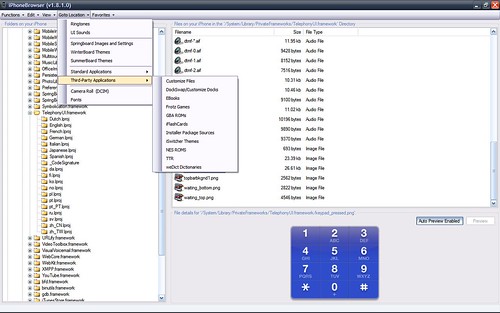
So what can you do with iPhoneBrowser?
- drag and drop uploading to our phone
- automatic and manual backups of files on your phone
- previews of text and picture files and very cool icons
- create “favorite” path to your most used locations
From the iPhoneBrowser page:
Usage
To use, plug in your iPhone and run iPhoneBrowser. The screen should show up with a listing of your folders on the left. Once a folder is selected, the files show up on the upper right. Select a file to see the contents in the lower right. Right-click a file or group of files to see a menu describing your different options, Save As, Backup File, Restore File (not yet implemented), Replace File and Delete File. You can also drag and drop files or folders into the file window to upload them to that folder.
Make sure you have at least V7.3.1 of iTunes installed. If you still get errors, make sure you have the Manzana.dll and iTunesMobileDevice.dll in the same directory as iPhoneBrowser.exe.
Connecting your iPhone
You can use it with or without jailbreaking your phone, but if you don’t jailbreak, you won’t get very far! A locked iPhone basically has a small area of folders called a sandbox to work with.
Automatic Preview
If the file you selected is a text-based file, the text of the file will automatically be shown in the lower right preview area. Sometimes special characters are not shown properly, but it gives you an idea of what data is in the file. If you select a picture file, that preview is automatically loaded in the same area. Apple formatted PNG files do show in the preview. Selecting audio files will play audio. Files are only previewed if < 10MB.
Drag and Drop
You can drag and drop files into the file window to upload them to the selected folder in the tree on the left. You can drop multiple files or folders as well. If there is an existing file with the same name in the directory, it will be overwritten on your phone, but a backup copy is made automatically first.
Save As
This menu item will prompt you to save the file in a location of your choosing. The file is downloaded off of your phone and stored with whatever filename and location you choose. PNG files will optionally be converted from Apple format to standard PNG format.
Backup File
Backups are created with the same directory structure as on the phone, but in a folder named “BACKUPS..”. This allows you to save multiple version of the same file, and allows you to manually restore to a previous version of the file. Select Backup File to create a backup of the file(s) currently selected on your iPhone. Select View Backups to open a windows explorer window of the folder where backup folders are stored.
Replace File
This function allows you to replace a file on your iPhone with one you select from your computer, backing up the original before replacing. The program will automatically rename the file to overwrite the file on the phone. For example, you can replace an “icon.png” stored on your phone with “MyCalculatorIcon.png” from your computer. The system will automatically backup the icon.png from the phone, and then upload your MyCalculatorIcon.png as icon.jpg.
Delete File
Selecting this deletes the file off of your phone after confirmation. The system will automatically backup the file before deleting.
View Backups
Select View Backups to open a windows explorer window of the folder where backups are stored.
Go here to download iPhoneBrowser.